Pcie 4.0 Nvme M 2 Ssd 2tb

A PCIE 4.0 NVMe M.2 SSD 2TB delivers incredible storage speeds for gamers, creators, and professionals. These drives offer read speeds up to 7000 MB/s and write speeds around 5000 MB/s, making them a massive upgrade over older SATA drives. In this guide, we break down everything you need to know about choosing the best 2TB NVMe M.2 SSD for your system.
A PCIE 4.0 NVMe M.2 SSD 2TB is one of the best storage upgrades you can make for your computer today. Whether you are a gamer, a video editor, or just someone who wants a faster PC, this type of drive changes everything. The days of waiting minutes for files to copy or games to load are over.
In this guide, we will walk you through exactly what makes a 2TB NVMe M.2 SSD so special. You will learn how these drives work, why PCIE 4.0 matters, what to look for when buying one, and which options stand out in 2024. By the end, you will feel confident picking the right drive for your needs.
The NVMe protocol is a modern way storage devices communicate with your computer. Unlike older SATA drives, NVMe uses the PCIE lane directly. This means data travels much faster between your drive and your system. Add in the PCIE 4.0 interface, and you get speeds that were unthinkable just a few years ago.
Key Takeaways
- Blazing Speeds: PCIE 4.0 NVMe M.2 SSD 2TB drives offer read speeds up to 7000 MB/s, far faster than SATA SSDs.
- Perfect for Large Files: A 2TB capacity handles games, video projects, and massive data sets with ease.
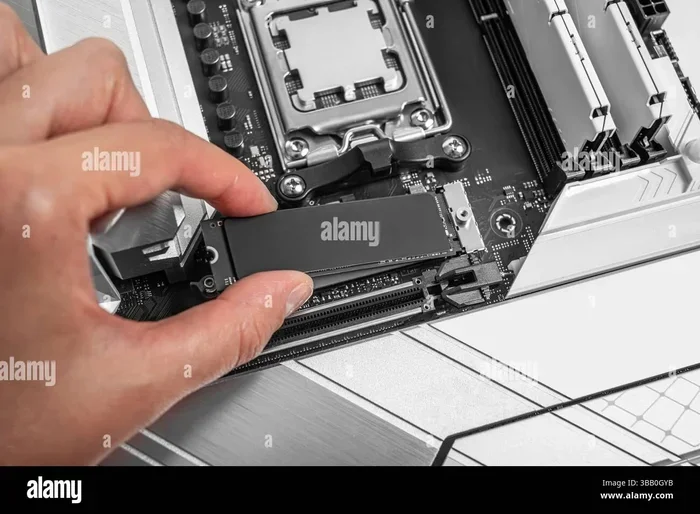
- Easy Installation: The M.2 form factor fits directly into your motherboard slot — no cables needed.
- Gen4 Technology: PCIE 4.0 doubles the bandwidth of PCIE 3.0, giving you a real performance boost.
- Cooling Matters: Many drives come with heatsinks to prevent thermal throttling during heavy workloads.
- Great Value Now: Prices for 2TB PCIE 4.0 NVMe SSDs have dropped significantly, making them affordable for most budgets.
📑 Table of Contents
What Is a PCIE 4.0 NVMe M.2 SSD 2TB?
Let us break this down piece by piece. PCIE 4.0 refers to the fourth generation of the Peripheral Component Interconnect Express standard. It offers double the bandwidth of PCIE 3.0. NVMe stands for Non-Volatile Memory Express, which is the communication protocol designed specifically for flash storage. M.2 is the physical form factor — a small, rectangular stick that plugs directly into your motherboard. And 2TB is the storage capacity, meaning two terabytes of space.
Together, these components create a storage drive that is incredibly fast and compact. A PCIE 4.0 NVMe M.2 SSD 2TB can read sequential data at speeds around 7000 MB/s and write at around 5000 MB/s. To put that in perspective, a typical SATA SSD tops out around 550 MB/s. That means a PCIE 4.0 drive is roughly 13 times faster at reading data.
How Does PCIE 4.0 Compare to PCIE 3.0?
The jump from PCIE 3.0 to PCIE 4.0 doubled the available bandwidth. PCIE 3.0 offers about 1 GB/s per lane, while PCIE 4.0 provides about 2 GB/s per lane. Since NVMe M.2 SSDs use four lanes, a PCIE 4.0 drive can reach up to 8 GB/s of total bandwidth.
In real-world use, this means faster game loading times, quicker file transfers, and smoother performance when working with large projects. If you currently use a PCIE 3.0 NVMe M.2 SSD, upgrading to a PCIE 4.0 drive will feel noticeably faster, especially during heavy tasks.
Why Choose a 2TB Capacity?
Storage capacity matters a lot when picking an SSD. A 1TB drive works well for most users, but a 2TB NVMe M.2 SSD gives you twice the room. This is especially important for gamers who install multiple AAA titles, each of which can take up 100GB or more.
Content creators also benefit from the extra space. Video editing projects, raw photo libraries, and audio files can eat up storage quickly. With 2TB, you have plenty of headroom without needing a second drive.
Here are some common use cases where a 2TB drive shines:
- Gaming: Store 10 to 15 large games without worrying about running out of space.
- Video Editing: Keep raw footage and project files on your boot drive for faster workflow.
- Data Storage: Archive photos, documents, and backups while keeping them fast to access.
- Professional Workstations: Run demanding applications like 3D rendering or CAD software with ease.
Top Features to Look For
Not all PCIE 4.0 NVMe M.2 SSDs are the same. When shopping, pay attention to these key features:
Sequential Read and Write Speeds
The advertised speeds on a 2TB NVMe M.2 SSD matter, but real-world performance can vary. Look for drives that consistently deliver at least 6500 MB/s read and 4500 MB/s write speeds. Some premium models push beyond 7000 MB/s in reads.
DRAM Cache
DRAM cache is a small amount of memory on the drive that stores mapping data. Drives with DRAM cache tend to perform better during sustained workloads. If you plan to move large files regularly, a DRAM-equipped PCIE 4.0 NVMe M.2 SSD is the better choice.
TBW Rating
TBW stands for Terabytes Written. It measures how much data you can write to the drive over its lifetime before it starts to wear out. Most quality 2TB NVMe SSDs carry a TBW rating of 1200 TB or higher. This is more than enough for typical daily use over many years.
Heatsink Design
Fast SSDs generate heat. Many 2TB NVMe M.2 SSD models come with a built-in heatsink or a sticker-style thermal pad. Without proper cooling, a drive may slow down during extended heavy use. If your motherboard has an M.2 heatsink, you might not need a separate one.
Top PCIE 4.0 NVMe M.2 SSD 2TB Options
The market offers several excellent options for a PCIE 4.0 NVMe M.2 SSD 2TB. Here are some popular choices that balance speed, reliability, and price.
Crucial T705
The Crucial T705 is one of the top-performing PCIE 4.0 drives available. It delivers read speeds up to 7400 MB/s and write speeds around 6800 MB/s. It does not have DRAM cache, but its performance is still excellent for most users. For those who want even more capacity, the Crucial T705 2TB PCIE Gen5 NVMe M.2 SSD represents the next generation if you are ready for cutting-edge tech.
Samsung 980 Pro
The Samsung 980 Pro has been a favorite for years. It offers reliable speeds, a DRAM cache, and strong endurance. It remains a solid pick for anyone looking for a dependable 2TB NVMe M.2 SSD.
WD Black SN850X
The WD Black SN850X is another great option. It features consistent performance, good thermal management, and a user-friendly software suite. It is a strong contender in the PCIE 4.0 NVMe M.2 SSD 2TB category.
Kingston NV2
For budget-conscious buyers, the Kingston NV2 offers solid PCIE 4.0 speeds at a lower price point. It is a great entry-level option if you want the benefits of NVMe without spending a premium. Check out the Kingston NV2 1TB M.2 review for more details on this popular line.
Installation and Setup Tips
Installing a PCIE 4.0 NVMe M.2 SSD 2TB is straightforward, but a few tips can make the process smoother.
- Check Compatibility: Make sure your motherboard has an M.2 slot that supports PCIE 4.0. Not all M.2 slots support the latest standard.
- Locate the Slot: Find the M.2 slot on your motherboard. It is usually near the CPU socket or along the bottom edge.
- Remove the Heatsink: If there is a stock heatsink on the slot, unscrew it carefully and set it aside.
- Insert the Drive: Insert the SSD at a 30-degree angle into the slot. Press it down gently and secure it with the mounting screw.
- Enable XMP/EXPO: In some cases, you may need to enable the PCIE 4.0 mode in your BIOS settings for the drive to run at full speed.
- Install a Heatsink: If your drive did not come with one, consider adding an NVMe M.2 heatsink to keep temperatures in check.
Quick Tips for Best Performance
- Always update your motherboard BIOS before installing a new NVMe SSD.
- Use the drive manufacturer’s software to update firmware after installation.
- Leave at least 10% of the drive free for optimal performance.
- If your PC case has poor airflow, add a fan near the M.2 slot area.
Common Mistakes to Avoid
Even experienced PC builders make mistakes when setting up a new 2TB NVMe M.2 SSD. Here are some pitfalls to watch out for:
- Buying the Wrong Form Factor: Make sure you get a 2280 M.2 SSD, which is the standard size for most desktop motherboards.
- Ignoring Thermal Throttling: Without proper cooling, your drive may slow down during heavy use. A heatsink is not optional for high-performance drives.
- Skipping BIOS Updates: Older motherboards may need a BIOS update to fully support PCIE 4.0 speeds.
- Assuming All Slots Are Equal: Some M.2 slots on motherboards run at PCIE 3.0 speeds, not PCIE 4.0. Check your motherboard manual.
- Not Backing Up Data: Always back up your existing data before installing a new drive and migrating your system.
Is a PCIE 4.0 NVMe M.2 SSD 2TB Worth It?
The short answer is yes. A PCIE 4.0 NVMe M.2 SSD 2TB is one of the best upgrades you can make for almost any modern PC. The speed difference compared to older drives is dramatic. Games load in seconds instead of minutes. Large files copy in moments. Video editing workflows become much smoother.
Prices for these drives have come down significantly over the past couple of years. What once cost a premium is now very affordable for most budgets. A 2TB PCIE 4.0 NVMe SSD typically costs between $120 and $180, depending on the brand and features.
If you are still on a SATA SSD or an HDD, the upgrade will feel like a completely new computer. If you already have a PCIE 3.0 NVMe drive, the jump to PCIE 4.0 is noticeable but not as dramatic. Still, it is well worth it if you need the extra speed for demanding tasks.
For those who want to future-proof their system, consider that PCIE 5.0 drives are already available. The Crucial T705 PCIE Gen5 NVMe M.2 SSD represents the newest generation, but PCIE 4.0 remains the sweet spot for value and performance today.
One thing to keep in mind: make sure your system supports PCIE 4.0. Most motherboards from 2020 and newer do. Older boards may only support PCIE 3.0 or even PCIE 2.0, which would limit your drive’s speed potential.
Final Thoughts
A PCIE 4.0 NVMe M.2 SSD 2TB is a fantastic storage solution for anyone who wants speed and capacity in one package. Whether you are building a new PC or upgrading an existing one, this type of drive delivers real-world performance that you will feel every single day.
Focus on the features that matter most to your use case. If you are a gamer, prioritize read speeds and capacity. If you are a creator, look for strong write performance and a high TBW rating. And always make sure your system is compatible before you buy.
With the right 2TB NVMe M.2 SSD, your computer will feel faster, more responsive, and ready for anything you throw at it. Do not wait — upgrade your storage today and experience the difference for yourself.
Frequently Asked Questions
What is the difference between PCIE 3.0 and PCIE 4.0 NVMe SSDs?
PCIE 4.0 offers double the bandwidth of PCIE 3.0, which means faster data transfer speeds. A PCIE 4.0 NVMe M.2 SSD can reach read speeds around 7000 MB/s, while PCIE 3.0 drives typically max out around 3500 MB/s. The real-world difference is most noticeable during large file transfers and heavy workloads.
Do I need a heatsink for my PCIE 4.0 NVMe M.2 SSD?
It depends on your use case and airflow. High-performance PCIE 4.0 drives can generate significant heat during sustained tasks. A heatsink helps maintain top speeds by preventing thermal throttling. Many drives come with a heatsink included, and some motherboards have built-in M.2 heatsinks.
Can I use a PCIE 4.0 NVMe SSD in a PCIE 3.0 slot?
Yes, you can. The drive will work but will operate at PCIE 3.0 speeds. It will still be much faster than a SATA SSD. However, you will not get the full benefit of PCIE 4.0 speeds unless your motherboard slot supports the fourth generation.
How much does a 2TB PCIE 4.0 NVMe M.2 SSD cost?
Prices vary by brand and model, but most 2TB PCIE 4.0 NVMe SSDs range from $120 to $180. Budget models may be slightly cheaper, while premium drives with advanced features can cost a bit more. Prices have dropped significantly compared to just a few years ago.
Is a 2TB NVMe M.2 SSD enough for gaming?
Absolutely. A 2TB drive can hold 15 to 20 large modern games comfortably. Most AAA titles take up between 50GB and 150GB of space. With 2TB, you will have plenty of room for your game library, operating system, and applications without needing a second drive.
What does NVMe stand for and why does it matter?
NVMe stands for Non-Volatile Memory Express. It is a communication protocol designed specifically for flash storage devices like SSDs. Unlike older AHCI protocol used by SATA drives, NVMe is built to take full advantage of the speed of modern flash memory. This is why NVMe M.2 SSDs are so much faster than traditional SATA drives.
=== CONCLUSION ===
A PCIE 4.0 NVMe M.2 SSD 2TB is a powerful and practical upgrade for any computer user. The combination of blazing speeds, generous capacity, and compact design makes it an ideal choice for gaming, creative work, and everyday computing. With prices now more accessible than ever, there has never been a better time to make the switch.
Remember to check your motherboard compatibility, consider cooling solutions, and choose a drive that fits your specific needs. Whether you pick the Crucial T705, Samsung 980 Pro, WD Black SN850X, or a budget-friendly Kingston NV2, you will enjoy a massive performance boost over older storage options.
Upgrade your 2TB NVMe M.2 SSD today and experience the speed difference for yourself. Your computer will thank you.