Samsung 970 Evo Plus Ssd 2tb Nvme M 2

The Samsung 970 Evo Plus SSD 2TB NVMe M 2 delivers incredible performance with PCIe Gen 3 x4 speeds, V-NAND TLC technology, and up to 3,500 MB/s read speeds. Whether you need a fast boot drive, a gaming storage solution, or a reliable workstation upgrade, this drive stands out. It offers excellent value, strong endurance, and broad compatibility in a compact M.2 form factor.
Key Takeaways
- Blazing Speeds: The Samsung 970 Evo Plus achieves up to 3,500 MB/s sequential read speeds, making it one of the fastest consumer SSDs available.
- V-NAND TLC Technology: Samsung’s 3-bit V-NAND flash delivers excellent endurance and reliability for everyday and intensive workloads.
- 2TB Capacity: Plenty of storage space for operating systems, games, creative projects, and large media libraries.
- Compact M.2 Form Factor: Fits easily into modern laptops and desktops without requiring extra cables or drive bays.
- Broad Compatibility: Works with most systems that support NVMe M.2 PCIe SSDs, including older and newer platforms.
- Great Value: Combines premium performance with a competitive price point for a 2TB NVMe drive.
📑 Table of Contents
- Why the Samsung 970 Evo Plus SSD 2TB NVMe M 2 Stands Out
- What Makes the Samsung 970 Evo Plus So Fast
- Real-World Performance and Use Cases
- Key Features and Specifications
- Compatibility and Installation
- How the Samsung 970 Evo Plus Compares to Other SSDs
- Pricing and Value Assessment
- Common Mistakes to Avoid
- Expert Insights
- Final Verdict
Why the Samsung 970 Evo Plus SSD 2TB NVMe M 2 Stands Out
If you are looking for a storage upgrade that transforms your PC experience, the Samsung 970 Evo Plus SSD 2TB NVMe M 2 deserves your attention. This drive combines raw speed, solid reliability, and generous capacity into a tiny package. It has been a favorite among PC builders and laptop upgraders for years, and for good reason.
Storage speed matters more than most people realize. A slow drive can bottleneck your entire system. Your operating system takes forever to boot. Games stutter during loading screens. Large files crawl across your screen. The Samsung 970 Evo Plus eliminates all of these frustrations. With its PCIe Gen 3 x4 interface and NVMe protocol, it leaves traditional hard drives and even SATA SSDs in the dust.
In this guide, we will cover everything you need to know about this drive. We will look at its performance benchmarks, key features, real-world use cases, compatibility, and how it compares to alternatives. By the end, you will know if this is the right 2TB NVMe M.2 SSD for your needs.
What Makes the Samsung 970 Evo Plus So Fast
The speed of any NVMe SSD comes down to its controller, NAND flash type, and interface. The Samsung 970 Evo Plus uses Samsung’s custom Phoenix controller paired with 3-bit V-NAND TLC flash memory. This combination delivers outstanding sequential and random read/write performance.
Sequential Read and Write Speeds
The manufacturer-rated sequential read speed reaches up to 3,500 MB/s. Sequential write speeds go up to 3,200 MB/s. These numbers are impressive for a PCIe Gen 3 drive. In real-world testing, you will see close to these figures when transferring large files, installing games, or copying video projects.
Random Read and Write Performance
Beyond sequential speeds, random read/write performance matters for everyday tasks. The Samsung 970 Evo Plus delivers up to 600,000 IOPS random read and 550,000 IOPS random write. This means your system feels snappy when opening multiple applications, switching between browser tabs, or running demanding software.
V-NAND TLC Technology Explained
Samsung’s V-NAND technology stacks memory cells vertically instead of laying them out flat. This allows higher density and better performance in a smaller footprint. The TLC (Triple-Level Cell) design stores three bits per cell, which balances speed, endurance, and cost effectively. You get fast performance without paying the premium price of a drive using QLC or single-level cell flash.
Real-World Performance and Use Cases
Theoretical numbers are great, but what matters most is how the drive performs in daily use. The Samsung 970 Evo Plus SSD 2TB NVMe M 2 excels across several common scenarios.
Boot Drive for Desktops and Laptops
Installing Windows or Linux on the Samsung 970 Evo Plus turns boot times into a near-instant experience. Most systems boot in under 10 seconds. Applications launch immediately. The drive handles multitasking with ease, so you can have dozens of apps open without slowdowns.
Gaming Storage
Modern games are huge. A 2TB capacity gives you room for dozens of titles without constantly deleting and reinstalling. The fast read speeds reduce game load times significantly. Games that stream assets from the drive during gameplay run smoother and with fewer hitches.
Creative and Professional Workloads
Video editors, photographers, and 3D artists benefit greatly from the Samsung 970 Evo Plus. Scrubbing through 4K video timelines becomes buttery smooth. Large Photoshop files open in seconds. Rendering workflows that involve reading and writing massive files see a noticeable boost in speed.
Content Creation and Media Storage
With 2TB of space, you can store an extensive media library of raw footage, project files, and finished exports. The fast write speeds mean you spend less time waiting and more time creating. It is also an excellent choice for a dedicated media scratch disk.
Key Features and Specifications
Here is a closer look at what the Samsung 970 Evo Plus brings to the table.
- Interface: PCIe Gen 3 x4 with NVMe 1.3 protocol
- Form Factor: M.2 2280 (single-sided)
- Capacity: 2TB
- Sequential Read: Up to 3,500 MB/s
- Sequential Write: Up to 3,200 MB/s
- Random Read: Up to 600,000 IOPS
- Random Write: Up to 550,000 IOPS
- NAND Type: V-NAND 3-bit TLC
- TBW Rating: 1,200 TBW (Terabytes Written)
- Warranty: 5 years limited warranty
- Dimensions: 80.15 x 22.15 x 2.38 mm
- Operating Temperature: 0 to 70 degrees Celsius
The 5-year limited warranty gives you peace of mind. Samsung backs this drive with strong customer support and a proven track record of reliability. The 1,200 TBW endurance rating means the drive can handle heavy write workloads over many years before showing signs of wear.
Compatibility and Installation
One of the best things about the Samsung 970 Evo Plus is how widely compatible it is. The M.2 2280 form factor fits into most modern motherboards and laptops that support NVMe M.2 slots.
Desktop Compatibility
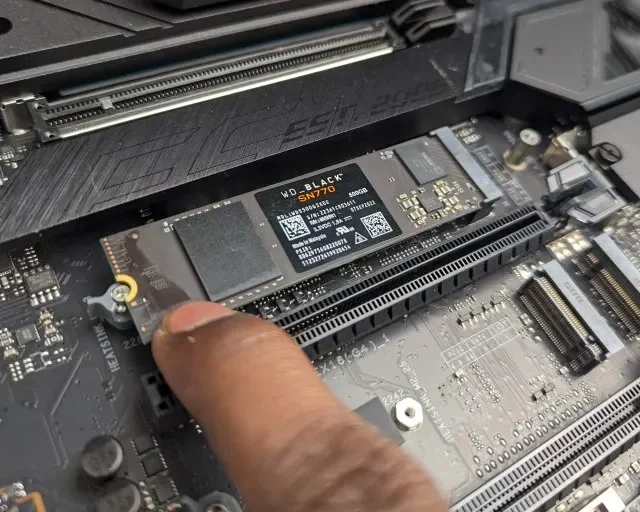
Most desktop motherboards released in the last several years include at least one M.2 slot. Whether you have an Intel or AMD system, chances are it supports NVMe PCIe SSDs. You simply insert the drive into the M.2 slot, secure it with a screw, and you are ready to go. No cables, no extra power connectors, no drive bays needed.
Laptop Compatibility
Many modern laptops come with an M.2 slot that supports NVMe SSDs. However, it is always wise to check your laptop’s specifications before purchasing. Some older or budget laptops only support SATA M.2 drives or 2242-length modules. The Samsung 970 Evo Plus uses the standard 2280 size, so verify that your laptop has an M.2 2280 slot.
Does It Need a Heatsink?
The Samsung 970 Evo Plus can generate noticeable heat during sustained workloads. For most desktop use, the motherboard’s stock M.2 heatsink is sufficient. If you plan on running intensive tasks for extended periods, consider adding an M.2 NVMe SSD heatsink or choosing a model that comes with one included. Keeping temperatures in check helps maintain consistent performance over time.
Software and Driver Support
Samsung provides the Samsung Magician software, which is an excellent tool for managing your SSD. It lets you update firmware, monitor drive health, run performance benchmarks, and optimize settings. The drive works with Windows and is compatible with most Linux distributions. It does not require any special drivers beyond what your operating system already includes for NVMe devices.
How the Samsung 970 Evo Plus Compares to Other SSDs
The storage market offers many options. Here is how the Samsung 970 Evo Plus stacks up against a few popular alternatives.
| Drive | Interface | Seq. Read | Seq. Write | Capacity Options | Warranty |
|---|---|---|---|---|---|
| Samsung 970 Evo Plus 2TB | PCIe Gen 3 x4 NVMe | 3,500 MB/s | 3,200 MB/s | 2TB | 5 years |
| Samsung 970 Evo Plus 1TB | PCIe Gen 3 x4 NVMe | 3,500 MB/s | 3,200 MB/s | 1TB | 5 years |
| Crucial T705 2TB | PCIe Gen 4 x4 NVMe | 7,400 MB/s | 6,800 MB/s | 2TB | 5 years |
| Corsair MP600 Core XT | PCIe Gen 4 x4 NVMe | 4,900 MB/s | 4,400 MB/s | 2TB | 5 years |
The Samsung 970 Evo Plus uses the PCIe Gen 3 interface, which means it is slightly slower than newer Gen 4 and Gen 5 drives like the Crucial T705 2TB PCIe Gen5 NVMe M.2 SSD or the Corsair MP600 Core XT M.2 NVMe SSD. However, for most users, the performance difference is barely noticeable in everyday tasks. The Gen 3 interface also means better compatibility with older systems that do not support Gen 4 or Gen 5.
If you need even more capacity, Samsung offers the Samsung NVMe SSD 8TB for users who require massive storage. And if you want a smaller capacity option, the Samsung 970 Evo Plus 1TB NVMe SSD provides the same great performance in a more budget-friendly size.
Pricing and Value Assessment
The Samsung 970 Evo Plus 2TB has historically been priced competitively for a high-performance NVMe SSD. While prices fluctuate, this drive often sits in a sweet spot between budget SATA SSDs and premium Gen 4 or Gen 5 options. You are paying for proven reliability, Samsung’s excellent build quality, and a generous endurance rating.
When you compare the price per gigabyte against alternatives, the Samsung 970 Evo Plus holds its ground well. The 5-year warranty adds long-term value that cheaper drives cannot match. If you are building a new PC or upgrading an existing one, this drive delivers excellent return on investment.
Common Mistakes to Avoid
- Buying without checking M.2 slot support: Always confirm your motherboard or laptop supports NVMe M.2 PCIe SSDs before purchasing.
- Ignoring thermal management: Without proper cooling, the drive may throttle speeds during sustained workloads. A heatsink can make a big difference.
- Skipping firmware updates: Samsung releases firmware updates that can improve performance and fix bugs. Use Samsung Magician to keep your drive up to date.
- Confusing M.2 SATA with M.2 NVMe: Not all M.2 slots support NVMe. Some only support SATA. Make sure your slot supports PCIe NVMe drives.
- Overlooking capacity needs: 2TB is generous, but if you store large media libraries or many games, consider whether you might need more space down the road.
Expert Insights
From a professional standpoint, the Samsung 970 Evo Plus remains one of the most well-rounded NVMe M.2 SSDs on the market. It is not the absolute fastest drive available today, but it offers an outstanding balance of speed, endurance, capacity, and price. For the average user, enthusiast, and even some professionals, it hits the mark perfectly.
Samsung’s V-NAND manufacturing expertise gives this drive a reliability edge. Many competitors use third-party NAND and controllers, which can lead to inconsistent performance. Samsung controls the entire production pipeline, which translates to tighter quality control and better long-term stability.
If you are upgrading from a traditional hard drive or a SATA SSD, the performance jump will feel dramatic. Your system will feel brand new. Applications will open instantly, file transfers will finish in seconds, and your overall computing experience will be smoother and more enjoyable.
Final Verdict
The Samsung 970 Evo Plus SSD 2TB NVMe M 2 is a fantastic choice for anyone looking to upgrade their storage. It delivers top-tier performance, excellent endurance, and Samsung’s trusted quality in a compact M.2 package. The 2TB capacity gives you plenty of room for your operating system, applications, games, and files.
Whether you are a casual user, a gamer, a content creator, or a professional who needs reliable and fast storage, this drive has something to offer. Its PCIe Gen 3 speeds are more than enough for the vast majority of use cases, and the 5-year warranty provides long-term peace of mind.
If you want the best 2TB NVMe M.2 SSD that combines proven performance with excellent value, the Samsung 970 Evo Plus should be at the top of your list. Check out the Samsung 970 Evo Plus NVMe M 2 SSD and the 2TB SSD M 2 NVMe options available on our site for more details and pricing.
Frequently Asked Questions
Is the Samsung 970 Evo Plus 2TB worth buying in 2024?
Absolutely. While newer Gen 4 and Gen 5 drives are available, the Samsung 970 Evo Plus still delivers outstanding performance for its price. Most users will not notice a difference in everyday tasks compared to faster drives. The 2TB capacity, 5-year warranty, and proven V-NAND TLC reliability make it a smart investment.
Can I use the Samsung 970 Evo Plus in a laptop?
Yes, the M.2 2280 form factor fits into most laptops with an NVMe-compatible M.2 slot. Just make sure your laptop supports PCIe NVMe M.2 SSDs and has the 2280 length slot available. Check your laptop’s manual or specifications before purchasing.
How does the Samsung 970 Evo Plus compare to the Crucial T705?
The Crucial T705 is a PCIe Gen 4 drive with significantly higher sequential speeds. However, the Samsung 970 Evo Plus offers excellent Gen 3 performance and broader compatibility with older systems. The T705 is faster, but the 970 Evo Plus is more versatile and often priced lower.
Does the Samsung 970 Evo Plus need a heatsink?
For light to moderate use, the stock heatsink on most motherboards is sufficient. During sustained heavy workloads like large file transfers or extended rendering sessions, temperatures can climb. Adding an M.2 heatsink helps maintain consistent speeds and prevents thermal throttling.
What is the endurance rating of the Samsung 970 Evo Plus 2TB?
The drive has a TBW (Terabytes Written) rating of 1,200 TBW. This means it can handle writing 1,200 terabytes of data over its lifetime under normal usage conditions. For most users, this translates to many years of reliable daily use without any concerns about wear.
Can I migrate my operating system to the Samsung 970 Evo Plus?
Yes, you can clone your existing operating system to the Samsung 970 Evo Plus using tools like Samsung Magician, Macrium Reflect, or other disk cloning software. Make sure to set the new drive as your primary boot drive in BIOS after installation for the best performance.