Should Usb C Hub Be Powered
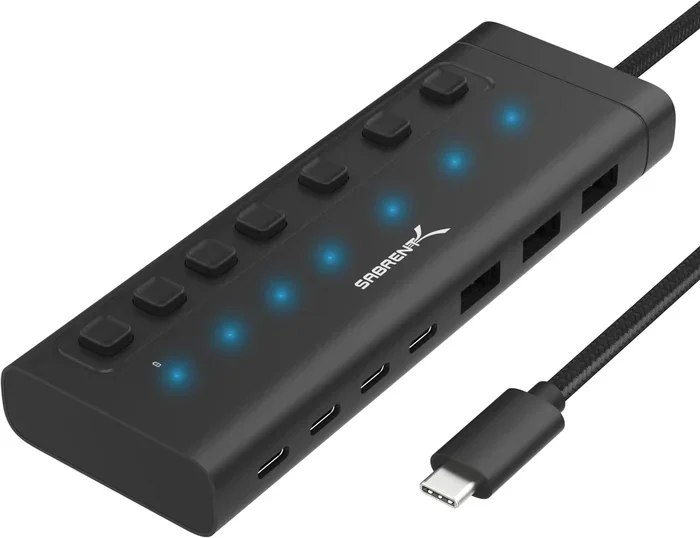
The answer depends on how many devices you connect and what you use them for. A USB C hub that is powered draws its own electricity, while an unpowered hub relies on your laptop or device. If you run multiple peripherals, external drives, or charge your laptop at the same time, a powered USB C hub is the better choice.
You bought a sleek USB C hub and plugged in your flash drive, mouse, and external drive. Then the screen flickers. The mouse disconnects. Your laptop slows to a crawl. Sound familiar? The culprit might be simple: your hub needs its own power source.
So, should USB C hub be powered? The short answer is: it depends on what you plug into it. But the full answer is much more interesting. In this guide, we will walk through everything you need to know about powered vs unpowered USB C hubs. You will learn when a powered USB C hub saves the day, when an unpowered one works fine, and how to pick the right one for your setup.
Whether you are a student, a remote worker, or a creative professional, this guide has you covered. Let us dive in.
Key Takeaways
- Know your power needs: A powered USB C hub is essential when connecting power-hungry devices like external hard drives.
- Unpowered hubs work for light use: If you only need a mouse, keyboard, or flash drive, an unpowered USB C hub may be enough.
- Check the power delivery specs: Look for USB C hub power delivery ratings before buying to avoid frustration.
- Overheating is a red flag: An unpowered hub that gets hot is a sign it is being pushed beyond its limits.
- Docking stations often need power: If your USB C hub doubles as a docking station, plan for a power adapter.
- Match the hub to your workflow: Your daily use determines whether you need a self-powered USB hub or a bus-powered one.
📑 Table of Contents
What Does It Mean When a USB C Hub Is Powered?
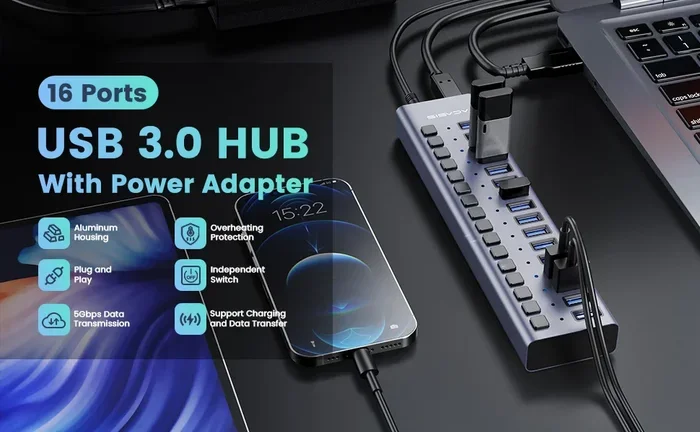
A powered USB C hub has its own power source. It uses an external adapter or draws power through USB C power delivery from your laptop. This extra power lets the hub run multiple devices without tapping into your laptop’s battery or power limits.
Think of it like a power strip for your desk. A regular extension cord works fine for a lamp and a phone charger. But if you run a space heater, a microwave, and a coffee maker at the same time, you need a heavier-duty circuit. A self-powered USB hub works the same way.
Powered vs Unpowered: The Key Difference
Here is the core difference in plain terms:
- Powered hub: Has its own power supply or uses USB C power delivery to run devices.
- Unpowered hub: Pulls all power from the host device, like your laptop.
An unpowered hub is also called a bus-powered USB hub. It shares the power budget of your laptop with everything else connected. A powered hub, on the other hand, brings its own electricity to the table.
This matters because USB C ports have a limited amount of power they can share. A standard USB C port on a laptop can deliver about 5 watts at 5 volts. A powered USB C hub can handle much more, often up to 100 watts with proper USB C power delivery support.
When Do You Need a Powered USB C Hub?
Not every situation requires a powered USB C hub. But certain setups absolutely demand one. Here are the most common scenarios where going powered is the smart move.
You Connect Multiple External Drives
If you use an M 2 NVMe to USB C SSD enclosure or an NVMe SSD to USB adapter, you already know these devices pull a lot of power. An external SSD can draw anywhere from 2 to 10 watts depending on the model and workload.
Plug one external drive into an unpowered hub and it might work fine. Plug two or three, and you will likely run into problems. The hub cannot supply enough power, and your drives may disconnect or fail to mount. A powered USB C hub solves this completely.
For example, if you use a M2 NVMe SSD in USB enclosures for video editing on the go, you need a hub that can keep up. A self-powered USB hub ensures your drives stay connected and your files stay safe.
You Use Power-Hungry Peripherals
Some devices simply need more juice than an unpowered hub can provide. Think about:
- External graphics cards
- Professional audio interfaces
- Large monitors with USB C connectivity
- USB-powered fans or lighting rigs
- Multi-bay storage enclosures
All of these devices push the limits of what a bus-powered hub can handle. If your USB C hub keeps dropping devices or your laptop gets sluggish, power starvation is often the cause.
You Want to Charge Your Laptop While Using the Hub
This is a big one for laptop users. Many people use a USB C hub as part of their desktop setup at home. They want to plug in a monitor, keyboard, mouse, external drive, and still charge the laptop at the same time.
An unpowered hub cannot do this reliably. The laptop has to share its charging power with all the connected devices. A powered USB C hub with USB C power delivery passthrough lets you charge your laptop at full speed while running all your peripherals.
When Is an Unpowered USB C Hub Enough?
Here is the good news. You do not always need a powered USB C hub. For many everyday tasks, an unpowered hub works perfectly well.
Light Peripherals Only
If you are plugging in a mouse, a keyboard, a webcam, and a couple of flash drives, an unpowered hub is fine. These devices use very little power, typically under 1 watt each. A standard bus-powered hub can handle this without breaking a sweat.
For example, if you work from home and just need extra ports for a USB headset for working from home, a simple unpowered USB C hub will do the job. No extra adapter, no extra cord, no extra clutter.
Travel and On-the-Go Use
One of the biggest advantages of an unpowered hub is portability. There is no power adapter to carry. No extra cable to pack. You plug it into your laptop, and it works.
For travel, an unpowered USB C hub is often the better choice. You do not want to juggle a power brick in your bag. Just make sure you are not connecting power-hungry devices on the road.
Budget-Friendly Setup
Powered hubs cost more because they include a power supply and better internal components. If you are on a tight budget and only need basic connectivity, an unpowered USB C hub saves you money.
Just be honest about your needs. If you start adding more devices later, you may find yourself upgrading to a powered model anyway.
How to Choose the Right USB C Hub
Buying a USB C hub does not have to be confusing. Here are the key things to look for so you make the right choice the first time.
Check the Power Delivery Rating
The USB C hub power delivery rating tells you how much power the hub can handle. Look for this number on the product listing or in the specs. Common ratings include:
- 5 watts: Basic unpowered hubs for light use
- 45 watts: Mid-range hubs that can charge laptops
- 60 to 100 watts: Premium hubs with full USB C power delivery support
If you plan to connect external drives, pick a hub rated for at least 45 watts. This gives you headroom for power-hungry devices.
Count Your Ports and Devices
Make a list of everything you plan to plug in. Include:
- External hard drives or SSDs
- Monitors
- Keyboards and mice
- Webcams
- Flash drives
- Charging cables
Now add up the power needs. If the total exceeds what an unpowered hub can provide, go with a powered USB C hub. It is better to have extra capacity than to deal with dropped connections.
You can also check out the best USB hub for PC guides to see what options match your needs.
Look for Quality Build and Thermals
A good powered USB C hub should stay cool under load. Look for models with metal housings or built-in fans. Cheap plastic hubs without any cooling can overheat quickly, especially when you push them with multiple devices.
Overheating is one of the most common reasons unpowered hubs fail. If your hub gets hot to the touch, that is a clear sign it needs more power than it is getting.
Consider Future Expansion
Think about where you will be in six months or a year. Will you add more devices? Will you upgrade to faster storage like an M 2 NVMe to USB C SSD enclosure? Planning ahead saves you from buying a second hub later.
A self-powered USB hub gives you room to grow. You can add devices without worrying about power limits. This is especially important for creative professionals who use external drives, audio interfaces, and multiple monitors.
Common Mistakes People Make with USB C Hubs
Avoid these simple mistakes that cause headaches and wasted money.
Assuming All USB C Hubs Are the Same
Not all hubs are created equal. A cheap unpowered hub and a premium powered hub can look identical on the outside. The difference is inside: the power circuitry, the chip set, and the build quality.
Always check whether the hub is bus-powered or self-powered before you buy. The product description should make this clear.
Ignoring Power Delivery Passthrough
If you want to charge your laptop while using the hub, make sure the hub supports USB C power delivery passthrough. Some hubs do not pass power through to the laptop port. You plug in the charger, but your laptop does not charge.
This is a common frustration. Check the specs carefully, and look for “PD passthrough” or “power delivery passthrough” in the product description.
Overloading an Unpowered Hub
This is the number one mistake. People plug in too many devices into an unpowered hub and wonder why things stop working. An unpowered hub has a strict power limit. Once you exceed it, devices disconnect or the hub shuts down.
If you find yourself doing this often, it is time to upgrade to a powered USB C hub. Your workflow will be much smoother.
Skipping the Manufacturer’s Power Adapter
Some powered hubs come with a power adapter. Others sell it separately. Do not skip buying the adapter. A powered USB C hub without its power supply is just an unpowered hub in a fancy shell.
Always check the box and make sure you have everything you need before you start using the hub.
Expert Insights: What the Pros Recommend
Tech professionals and IT specialists almost always recommend a powered USB C hub for anyone who uses external drives regularly. The M2 NVMe SSD in USB enclosures and NVMe SSD to USB adapters have become mainstream, and these devices need reliable power to perform at their best.
Here is what the experts say:
- External storage users: Always go powered. Your drives will thank you with faster speeds and fewer disconnects.
- Remote workers: A powered hub with PD passthrough is a game changer for a clean, clutter-free desk.
- Creative pros: Invest in a high-quality powered hub that supports USB C power delivery and high-bandwidth data transfer.
- Students: An unpowered hub is fine for light use, but consider a powered model if you use external drives for projects.
The bottom line is that a powered USB C hub gives you reliability, speed, and peace of mind. It is worth the extra investment for most users.
Key Takeaways
- Powered hubs bring their own electricity: They can run multiple devices without stressing your laptop.
- Unpowered hubs work for light tasks: Mice, keyboards, and flash drives are no problem.
- External drives need power: If you use an M 2 NVMe to USB C SSD enclosure or similar gear, a powered hub is a must.
- Charge while you work: A powered hub with USB C power delivery passthrough keeps your laptop charged.
- Check the specs before buying: Look for power delivery ratings, port count, and cooling features.
- Do not overload an unpowered hub: This is the fastest way to cause disconnects and frustration.
- Plan for growth: A self-powered USB hub gives you room to add devices over time.
Frequently Asked Questions
Can I use a powered USB C hub without plugging in the power adapter?
Yes, you can use it as an unpowered hub if you do not connect the power adapter. However, you will lose the benefit of extra power. The hub will rely on your laptop for power, just like a bus-powered hub. This works fine for light devices but may struggle with external drives or multiple peripherals.
Will a powered USB C hub slow down my laptop?
No, a powered hub should not slow down your laptop. In fact, it can help by taking the power load off your laptop’s USB port. Without enough power, an unpowered hub can cause your laptop to throttle or disconnect devices. A powered USB C hub keeps everything running smoothly.
How do I know if my USB C hub is powered or unpowered?
Check the product description or the box. A powered hub will mention an included power adapter, a power delivery rating, or the term “self-powered.” An unpowered hub will say “bus-powered” and will not include a power brick. If you are unsure, look at the hub itself. A powered hub has a power input port or a power adapter plugged into it.
Can I connect an external SSD to an unpowered USB C hub?
You can, but it may not work reliably. External SSDs, especially NVMe drives in M 2 NVMe to USB C SSD enclosures, can draw significant power. An unpowered hub may not supply enough, causing the drive to disconnect or perform poorly. For external SSDs, a powered USB C hub is strongly recommended.
What is USB C power delivery passthrough?
USB C power delivery passthrough means the hub passes electrical power from the charger through to your laptop while also powering the connected devices. This lets you charge your laptop and use the hub at the same time without any power loss. It is a key feature to look for in a powered USB C hub.
Are expensive powered USB C hubs worth it?
For most users, yes. A quality powered USB C hub offers better reliability, more ports, higher power delivery, and better cooling. If you use external drives, multiple monitors, or run a busy workflow, the extra cost is well worth the stability and performance you get.
Conclusion
The question of whether should USB C hub be powered comes down to one simple factor: what you connect to it. For light everyday use with a mouse, keyboard, and flash drive, an unpowered hub works fine. But if you use external drives, multiple peripherals, or want to charge your laptop while working, a powered USB C hub is the clear winner.
A self-powered USB hub gives you the freedom to connect everything without worrying about power limits. It keeps your devices running, your data safe, and your workflow smooth. Take a moment to assess your setup, count your devices, and pick the right hub. Your future self will thank you.