1 Tb to 2 Tb Ssd Nvme

A 1 TB to 2 TB NVMe SSD delivers blazing-fast storage for gaming, creative work, and everyday computing. These drives offer read speeds up to 7,000 MB/s and come in affordable M.2 form factors. Whether you need a boot drive or game library storage, this guide covers the best options and what to look for.
When it comes to upgrading your PC storage, few choices deliver the same impact as a 1 TB to 2 TB SSD NVMe drive. These compact, lightning-fast solid-state drives have become the go-to upgrade for gamers, creators, and everyday users who want their systems running at full speed. If you have been stuck wondering whether an NVMe drive is worth the investment, this guide breaks it all down.
We will walk you through what makes these drives special, how to choose the right one, and which models stand out in the current market. By the end, you will know exactly what to look for and feel confident making your next storage upgrade.
Key Takeaways
- Speed Matters: NVMe SSDs use the PCIe interface to deliver speeds far beyond traditional SATA drives.
- Capacity Sweet Spot: 1 TB to 2 TB strikes the perfect balance between storage space and value for most users.
- Gaming Advantage: Modern games benefit hugely from NVMe load times, reducing wait times dramatically.
- Price Range: You can find quality 1 TB to 2 TB NVMe SSDs between $60 and $150 depending on the brand and generation.
- Form Factor: M.2 2280 is the most common size and fits most modern desktops and laptops.
- Gen4 vs Gen5: PCIe Gen4 offers great value, while Gen5 provides cutting-edge speeds for enthusiasts.
- Thermal Management: High-speed NVMe drives can run hot, so heatsinks and proper airflow matter.
📑 Table of Contents
What Is a 1 TB to 2 TB NVMe SSD?
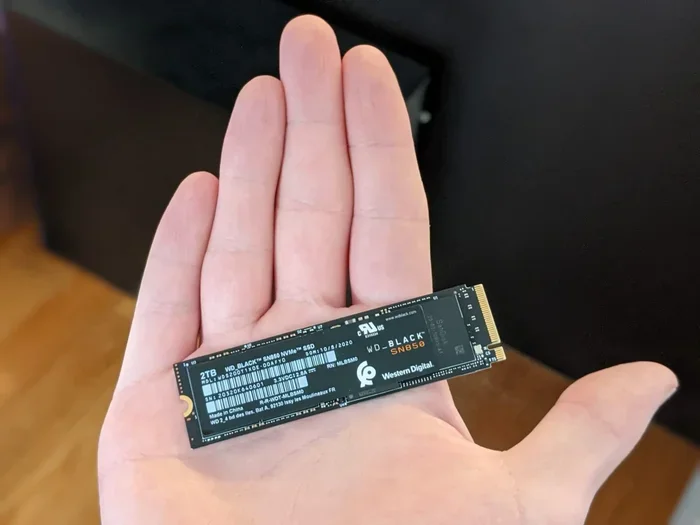
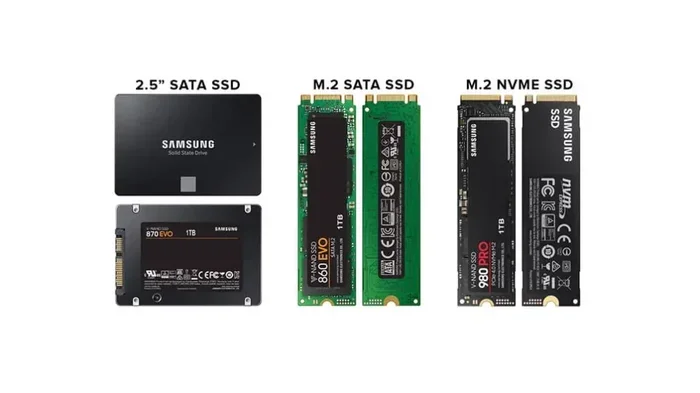
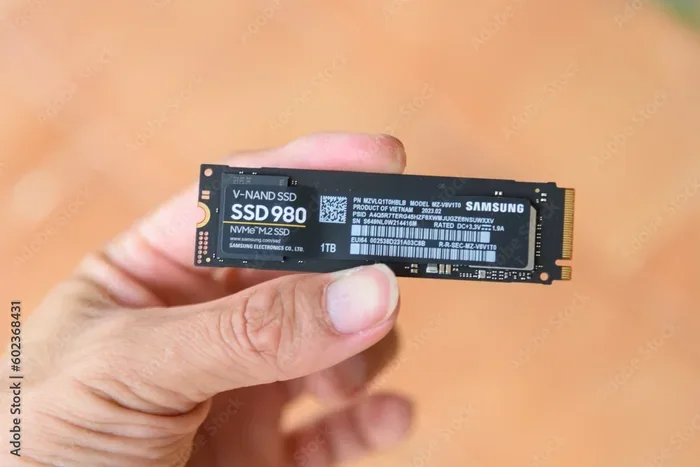
An NVMe SSD is a type of solid-state drive that uses the NVMe protocol over a PCIe connection. Unlike older SATA drives, NVMe drives communicate directly with the CPU through the PCIe bus. This means much faster read and write speeds and lower latency.
A 1 TB to 2 TB NVMe SSD gives you plenty of room for your operating system, favorite games, large media files, and creative projects. The M.2 2280 form factor is the most common shape, and it slots directly onto your motherboard without needing extra cables.
How NVMe Differs from SATA SSDs
The biggest difference comes down to the interface. SATA SSDs max out around 550 MB/s. NVMe drives, on the other hand, can reach speeds of 3,500 MB/s on Gen3 and over 7,000 MB/s on Gen4. This gap makes a real-world difference when booting your system, loading heavy applications, or transferring large files.
If you are still using a SATA drive as your main storage, switching to a 1 TB to 2 TB NVMe SSD will feel like a completely new computer. The improvement is that dramatic.
Why Choose 1 TB to 2 TB Capacity?
Storage capacity needs vary from person to person, but the 1 TB to 2 TB range hits a sweet spot for most users. Here is why this capacity range works so well.
Perfect for Gaming
Modern PC games are getting larger every year. Titles like Call of Duty, Cyberpunk 2077, and Starfield can take up 100 GB to 150 GB each. A 1 TB drive gives you room for about 6 to 10 large games, while a 2 TB drive doubles that. You get fast load times and enough space to keep your library without constantly deleting and reinstalling games.
Great for Creative Work
Video editors, photo editors, and 3D modelers need fast storage that can keep up with large project files. A 2 TB NVMe drive handles video timelines and raw footage with ease. The sequential read and write speeds of NVMe drives make a noticeable difference when scrubbing through timelines or exporting projects.
Ideal as a Boot Drive
Using a 1 TB NVMe SSD as your boot drive means your Windows or Linux system starts in seconds. Programs launch instantly, and your overall system feels snappy and responsive. Pair it with a larger HDD or SATA SSD for mass storage, and you get the best of both worlds.
Top Picks for 1 TB to 2 TB NVMe SSDs
The market is full of great options, but some drives stand out for performance, reliability, and value. Here are a few models worth considering.
Samsung 970 Evo Plus
The Samsung 970 Evo Plus 1 TB NVMe SSD remains a popular choice for good reason. It delivers excellent sequential read speeds up to 3,500 MB/s and write speeds up to 3,200 MB/s. The drive uses a V-NAND controller that provides strong sustained performance even under heavy workloads. It also comes with a five-year warranty, giving you peace of mind.
Crucial T705
If you want cutting-edge performance, the Crucial T705 PCIe Gen5 NVMe M.2 SSD is a strong contender. It uses the latest PCIe Gen5 interface to push sequential read speeds well beyond 10,000 MB/s. This drive is perfect for enthusiasts who want the fastest NVMe storage available today. Keep in mind that Gen5 drives run warmer, so proper cooling is important.
Kingston NV2 1 TB
For budget-conscious buyers, the Kingston NV2 offers solid NVMe performance at an attractive price point. It uses PCIe Gen4 and delivers sequential read speeds up to 3,500 MB/s. The Kingston NV2 1 TB M.2 2280 NVMe Internal SSD is a great entry point into NVMe storage without breaking the bank.
2 TB Options for Heavy Users
If you need more space, a 2 TB NVMe M.2 SSD gives you plenty of headroom. The 2 TB capacity is ideal for users who store large game libraries, video projects, or multiple operating systems. Prices have come down significantly, making 2 TB drives increasingly affordable.
How to Choose the Right NVMe SSD
Not all NVMe drives are created equal. Before you buy, consider a few key factors that will help you make the right choice.
PCIe Generation
PCIe Gen3, Gen4, and Gen5 are the current generations used in NVMe SSDs. Gen4 offers the best value for most users, with speeds around 7,000 MB/s read. Gen5 is the newest and fastest, but it comes at a premium price. Gen3 drives are still perfectly capable for everyday use and budget builds.
DRAM Cache
Drives with a DRAM cache tend to maintain consistent performance during sustained read and write operations. Budget drives without DRAM may slow down when handling large file transfers. If you plan to do heavy workloads, look for a model with a DRAM buffer.
Endurance and Warranty
NVMe SSD endurance is measured in TBW (terabytes written). A higher TBW rating means the drive can handle more data over its lifetime. Most quality NVMe SSDs come with a three- to five-year warranty. Always check the TBW rating and warranty length before purchasing.
Heatsink and Thermal Design
High-speed NVMe drives generate heat, especially during long transfers or gaming sessions. Many modern motherboards have built-in M.2 heatsinks. If yours does not, you can buy an NVMe M.2 enclosure with a heatsink or add a standalone M.2 cooler. Keeping your drive cool helps maintain peak performance and extends its lifespan.
Installation and Setup Tips
Installing an NVMe SSD is one of the easiest upgrades you can do. Most modern PCs and laptops have an M.2 slot ready to go. Here is a quick overview of the process.
- Locate the M.2 slot on your motherboard. It looks like a small slot with a single screw.
- Remove the screw and carefully insert the NVMe drive at a 30-degree angle.
- Press the drive down flat and secure it with the screw.
- Boot into your BIOS or UEFI and make sure the drive is detected.
- Initialize and format the drive through Windows Disk Management or your operating system of choice.
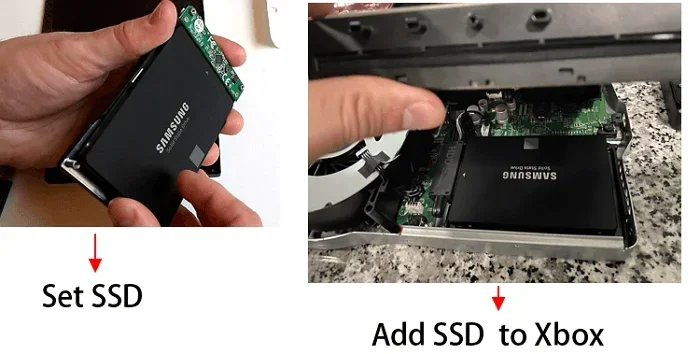
If you are using an older system without an M.2 slot, you can use an M.2 NVMe enclosure connected via USB. It is not as fast as a direct motherboard connection, but it still offers much better speeds than a traditional external hard drive.
Quick Tips for Best Performance
- Always update your motherboard BIOS before installing a new NVMe drive.
- Enable XMP or EXPO in BIOS for best overall system performance.
- Keep your drive firmware updated through the manufacturer’s software.
- Leave at least 10% of the drive free for optimal wear leveling and speed.
- Use the manufacturer’s SSD management tool to monitor health and TBW usage.
Common Mistakes to Avoid
Even experienced PC builders can make mistakes when installing or choosing an NVMe SSD. Here are a few to watch out for.
- Skipping the heatsink: Without proper cooling, your NVMe drive may throttle and lose speed during heavy workloads.
- Buying the wrong form factor: Make sure your motherboard supports M.2 2280 drives. Some older boards only support shorter lengths.
- Ignoring PCIe lane limitations: Some M.2 slots share bandwidth with other components. Check your motherboard manual to avoid bottlenecks.
- Not enabling NVMe in BIOS: If the drive is not showing up, make sure NVMe mode is enabled in your BIOS settings.
- Choosing capacity based on price alone: A larger drive is not always better if you do not need the space. Match the capacity to your actual needs.
NVMe SSD Price Guide: 1 TB vs 2 TB
Prices for NVMe SSDs have dropped significantly over the past few years. Here is a general idea of what to expect in the current market.
- 1 TB NVMe SSD: Typically ranges from $60 to $100 for mainstream models. Premium Gen4 and Gen5 drives can go up to $130.
- 2 TB NVMe SSD: Usually costs between $100 and $180. The price-per-gigabyte improves significantly at this capacity.
When comparing prices, look at the sequential read/write speeds, TBW rating, warranty length, and whether the drive includes a heatsink. A slightly more expensive drive with better endurance and performance often provides more value in the long run.
Final Thoughts on 1 TB to 2 TB NVMe SSDs
A 1 TB to 2 TB NVMe SSD is one of the best upgrades you can make to any modern PC. The combination of blazing speed, compact size, and reasonable pricing makes it a no-brainer for anyone looking to breathe new life into their system. Whether you are a gamer who wants instant load times, a creator who needs fast file handling, or simply someone who wants a responsive computer, these drives deliver.
Start by assessing your storage needs and budget. Then pick a drive from a reputable brand with solid reviews and a good warranty. With the right NVMe SSD, your PC will feel faster and more capable than ever before.
Frequently Asked Questions
Is a 1 TB NVMe SSD enough for gaming?
Yes, a 1 TB NVMe SSD is plenty for most gamers. You can comfortably store 6 to 10 modern games and still have room for your operating system and applications. If you have a large library, consider stepping up to 2 TB for extra breathing room.
Can I use a 1 TB to 2 TB NVMe SSD as my main drive?
Absolutely. Many people use a 1 TB or 2 TB NVMe SSD as their primary boot and application drive. It makes your system feel incredibly fast, with near-instant boot times and quick program launches.
Do I need a heatsink for my NVMe SSD?
It depends on your usage. For casual use and light gaming, most NVMe drives run cool enough without a heatsink. However, if you do heavy file transfers, video editing, or extended gaming sessions, a heatsink helps maintain consistent speeds and protects the drive.
What is the difference between PCIe Gen4 and Gen5 NVMe SSDs?
Pcie Gen4 NVMe SSDs offer speeds up to about 7,000 MB/s read. Gen5 drives push that to over 10,000 MB/s. Gen4 provides excellent value for most users, while Gen5 is best for enthusiasts who need the absolute fastest speeds available.
How long does a 1 TB to 2 TB NVMe SSD last?
Most quality NVMe SSDs last 5 to 7 years under normal use. The TBW rating tells you how much data you can write before the drive starts to wear out. For typical gaming and everyday use, a 1 TB to 2 TB drive will last well beyond its warranty period.
Are NVMe SSDs compatible with all PCs?
Most PCs built after 2018 support M.2 NVMe SSDs. Check your motherboard for an M.2 slot and confirm it supports NVMe protocol. Older systems may need an adapter or may not support NVMe at all.