22110 M 2 Nvme Ssd

The 22110 M 2 NVMe SSD is a longer form factor solid state drive that offers high storage capacity and fast speeds. This drive uses the NVMe protocol over PCIe for lightning quick data transfer. It is ideal for users who need more space and top tier performance in their systems.
If you are shopping for a high capacity NVMe SSD, you may have come across the 22110 M 2 NVMe SSD. This is a less common but very powerful form factor that deserves your attention. Unlike the standard 2280 drives most people know, the 22110 is longer and packs more storage into a single module.
In this guide, we will break down everything you need to know. From what makes the 22110 size special to how it compares to other M.2 drives, you will find all the details here. Whether you are building a new PC or upgrading an existing one, this article will help you make a smart choice.
Key Takeaways
- Longer Form Factor: The 22110 measures 22mm by 110mm, giving it more space for higher capacity NAND flash chips.
- Blazing Fast Speeds: NVMe protocol over PCIe delivers sequential read speeds that far outpace traditional SATA drives.
- Great for High Capacity Needs: This drive is a solid choice if you need 2TB or more of fast storage.
- Not Universal: The 22110 size requires a compatible M.2 slot on your motherboard or an enclosure like the M 2 NVMe Ssd Enclosure.
- Gen4 and Gen5 Options: Many 22110 drives support the latest PCIe generations for maximum throughput.
- Ideal for Gaming and Workloads: Large game libraries and video editing projects benefit greatly from this drive type.
📑 Table of Contents
- What Is a 22110 M 2 NVMe SSD?
- Benefits of Choosing a 22110 M 2 NVMe SSD
- 22110 vs 2280: How Do They Compare?
- What to Look for When Buying a 22110 NVMe SSD
- Use Cases for the 22110 M 2 NVMe SSD
- Installation and Setup Tips
- Common Mistakes to Avoid
- How Does the 22110 Compare to Other NVMe Drive Types?
- Final Thoughts on the 22110 M 2 NVMe SSD
What Is a 22110 M 2 NVMe SSD?
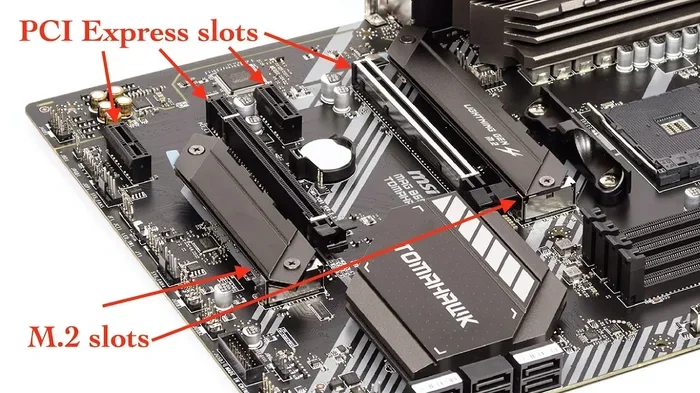
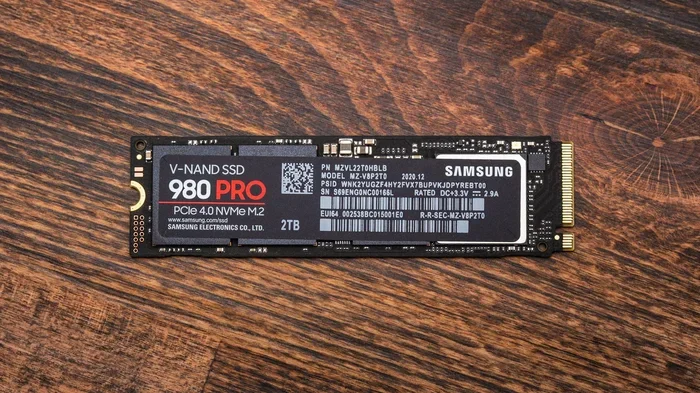
The name 22110 tells you the physical size of the drive. It measures 22mm wide and 110mm long. The M.2 connector on the bottom allows it to plug directly into a compatible slot on your motherboard. The NVMe part means it uses the NVMe protocol, which is much faster than the older AHCI protocol used by SATA drives.
Most M.2 SSDs you see in laptops and desktops are 2280, meaning 22mm by 80mm. The 22110 is 30mm longer. That extra space allows manufacturers to fit more NAND flash chips on the board. More chips means higher storage capacity without sacrificing speed.
How Does the 22110 Form Factor Work?
The 22110 size is not as widely supported as the 2280. Your motherboard or laptop needs to have an M.2 slot that can physically accept a 110mm long drive. Some boards only support up to 2280, so you need to check your specs carefully. If your system does not support the 22110 directly, you can use an M 2 Ssd Nvme Enclosure to connect it externally via USB.
The drive connects through the M.2 key M slot, which supports PCIe NVMe protocols. This gives you access to the full speed potential of the drive. You will see sequential read speeds that can reach several thousand megabytes per second, depending on the specific model and PCIe generation.
Benefits of Choosing a 22110 M 2 NVMe SSD
There are several reasons why someone would pick the 22110 over the more common 2280. Let us look at the biggest advantages.
Higher Storage Capacity
The extra length gives manufacturers more room to add NAND flash memory. This means you can find 22110 drives with 2TB or even 4TB of storage. If you need a lot of fast storage without buying multiple drives, this is a great option. For comparison, a standard 2TB NVMe M 2 SSD in the 2280 form factor is also available, but the 22110 can push even higher capacities in some cases.
Excellent Sequential Performance
Because the 22110 can house more flash memory chips, it often delivers outstanding sequential read and write speeds. These speeds are perfect for moving large files, editing 4K video, or loading massive game libraries. The PCIe NVMe connection ensures you are getting the fastest possible data transfer without bottlenecks.
Reliable Endurance
More NAND chips also mean better endurance over time. The TBW (terabytes written) rating tends to be higher on larger capacity 22110 drives. This is important if you do heavy write workloads like video rendering or running a server. A drive with higher endurance will last longer under stress.
22110 vs 2280: How Do They Compare?
The 2280 is the most popular M.2 size, so it is natural to compare the two. Here is a quick look at how they stack up.
| Feature | 22110 M 2 NVMe SSD | 2280 M 2 NVMe SSD |
|---|---|---|
| Length | 110mm | 80mm |
| Typical Max Capacity | Up to 4TB | Up to 2TB (common) |
| Speed | Very Fast (PCIe Gen4/Gen5) | Very Fast (PCIe Gen4/Gen5) |
| Motherboard Support | Less Common | Widely Supported |
| Price per GB | Slightly Higher | More Competitive |
| Best For | High Capacity Needs | General Use and Gaming |
As you can see, the main trade-off is compatibility. The 2280 fits almost any modern M.2 slot, but the 22110 requires a longer slot or an external enclosure. If you need the extra capacity and your system supports it, the 22110 is a strong choice.
What to Look for When Buying a 22110 NVMe SSD
Not all 22110 drives are created equal. Here are the key specs to check before you buy.
PCIe Generation
Look for PCIe Gen4 or Gen5 support. Gen4 offers speeds up to around 7000 MB/s read, while Gen5 can push past 10000 MB/s. The SSD NVMe PCIe M.2 standard continues to evolve, and newer generations offer noticeably better performance. Make sure your motherboard supports the same PCIe generation to get the full speed.
Sequential Read and Write Speeds
These numbers tell you how fast the drive can read and write large files. For the 22110 form factor, you should expect sequential read speeds above 5000 MB/s on Gen4 drives. Write speeds vary but should also be very strong. Check reviews and benchmarks to confirm real world performance.
TBW Rating
The Total Bytes Written rating tells you how much data you can write to the drive over its warranty period. A higher TBW means better long term reliability. For a 2TB 22110 drive, you should look for at least 1200 TBW or higher. This ensures the drive can handle heavy workloads without wearing out quickly.
Heatsink Compatibility
High performance NVMe drives can run hot. Some 22110 drives come with a built in heatsink, while others do not. If you plan to use the drive in a tight space or under heavy load, a heatsink is important. You can also add an M.2 heatsink to your motherboard if needed.
Use Cases for the 22110 M 2 NVMe SSD
This drive is not for everyone, but it shines in specific scenarios. Here is where the 22110 really stands out.
Gaming PCs with Large Libraries
Modern games are huge, often taking up 100GB or more per title. If you have a library of 20 or more games, you need plenty of fast storage. A 2TB or 4TB 22110 drive gives you room to install many games and load them quickly. The fast NVMe speeds mean shorter load times and smoother gameplay.
Video Editing and Content Creation
Working with 4K or even 8K video files requires fast read and write speeds. The 22110 form factor handles these large files with ease. You can edit footage directly from the drive without needing a separate scratch disk. For creators who need both capacity and speed, this is an ideal solution.
Workstations and Servers
In professional environments, the 22110 can serve as a high performance boot or working drive. Its endurance and capacity make it suitable for running databases, virtual machines, or other intensive applications. The PCIe NVMe M.2 SSD architecture ensures minimal latency and maximum throughput.
External Storage with an Enclosure
If your computer does not have a 22110 compatible slot, you are not out of luck. You can place the drive in an Ugreen M 2 NVMe SATA SSD Enclosure or a similar enclosure to use it externally. This gives you portable high capacity storage with fast transfer speeds over USB or Thunderbolt.
Installation and Setup Tips
Setting up a 22110 NVMe SSD is straightforward, but there are a few things to keep in mind.
First, make sure your motherboard has an M.2 slot that supports the 22110 length. Check your motherboard manual for the maximum supported M.2 length. Some boards list this clearly, while others may only support 2280 by default.
Second, install the drive at a slight angle and press it down gently. The M.2 screw holds the drive in place. Do not overtighten the screw, as this can damage the drive or the slot.
Third, enable NVMe mode in your BIOS if it is not already set. Most modern boards default to NVMe, but it is worth double checking. This ensures your system recognizes the drive at full speed.
Finally, update your NVMe driver after installation. For example, if you are using a WD Blue NVMe drive, you can download the latest driver from the manufacturer. Keeping drivers up to date helps maintain optimal performance and stability.
Common Mistakes to Avoid
Here are some mistakes people make when buying or using a 22110 M 2 NVMe SSD.
- Assuming All M.2 Slots Support 22110: Always verify your motherboard supports the full 110mm length before purchasing.
- Ignoring Thermals: These drives can get hot under load. Skip the heatsink at your own risk, especially in compact cases.
- Mixing PCIe Generations: Putting a Gen5 drive in a Gen4 slot will work, but you will only get Gen4 speeds.
- Forgetting the BIOS Setting: If the drive is not showing up, check that NVMe mode is enabled in your BIOS settings.
- Not Backing Up Data: Even reliable NVMe drives can fail. Always keep backups of important files on a separate drive.
How Does the 22110 Compare to Other NVMe Drive Types?
The NVMe SSD market offers several form factors and interfaces. The 22110 is just one option. Here is how it fits into the broader picture.
The standard SSD NVMe PCIe M 2 drive in the 2280 form factor is the most common choice for most users. It offers a great balance of speed, capacity, and compatibility. The 22110 steps up the capacity game but sacrifices some universal compatibility.
You may also encounter SATA M.2 drives, which use the same physical slot but the older SATA protocol. These are much slower than NVMe drives and are not ideal for performance focused builds. If you want the fastest possible speeds, always choose an NVMe drive over a SATA M.2.
For the absolute highest performance, PCIe Gen5 NVMe drives are the latest and greatest. The Crucial T705 PCIe Gen5 NVMe M 2 SSD is one example of a Gen5 drive that delivers incredible speeds. While the 22110 form factor is more about capacity than raw speed, you can find Gen4 and Gen5 options in this size as well.
Another consideration is price. The 22110 drives tend to cost a bit more per gigabyte than standard 2280 drives. This is because they are less common and use more NAND flash. However, the price gap is shrinking as demand grows and manufacturing improves.
Final Thoughts on the 22110 M 2 NVMe SSD
The 22110 M 2 NVMe SSD is a powerful and high capacity storage solution that fills a specific niche. It is perfect for users who need 2TB or more of fast NVMe storage in a single drive. The longer form factor allows for more NAND chips, which translates to higher capacity and better endurance.
Before you buy, make sure your system supports the 22110 length. If it does not, an external enclosure is a great workaround. Check the PCIe generation, TBW rating, and heatsink options to find the best drive for your needs.
Whether you are a gamer building a new rig, a content creator handling large video files, or a professional running demanding workloads, the 22110 NVMe SSD has a lot to offer. It combines speed, capacity, and reliability in one package. Just remember to do your homework on compatibility and you will be enjoying blazingly fast storage in no time.
Frequently Asked Questions
Is a 22110 M 2 NVMe SSD faster than a 2280 NVMe SSD?
The speed depends on the NAND chips and controller, not just the length. However, the 22110 can house more flash chips, which sometimes leads to better sequential performance. Both sizes use the same NVMe protocol and PCIe interface, so the real world speed difference is often small.
Can I use a 22110 NVMe SSD in any M.2 slot?
No, not all M.2 slots support the 22110 length. You need to check your motherboard or laptop manual to confirm it accepts 110mm long M.2 drives. If it does not, you can use an external enclosure to connect the drive.
What is the maximum capacity available for a 22110 NVMe SSD?
Some 22110 drives are available in capacities up to 4TB. The exact capacity depends on the manufacturer and model. Higher capacity options are becoming more common as NAND flash technology improves.
Do I need a special heatsink for a 22110 M 2 NVMe SSD?
It depends on the drive and your usage. High performance NVMe drives can generate significant heat. A heatsink helps maintain optimal temperatures, especially in compact cases or during heavy workloads. Some 22110 drives come with a built in heatsink.
How do I install a 22110 NVMe SSD?
Insert the drive at a slight angle into the M.2 slot, then press it down flat and secure it with the M.2 screw. Make sure your BIOS is set to NVMe mode and update the NVMe driver after installation for best performance.
Can I use a 22110 NVMe SSD as an external drive?
Yes, you can place the 22110 drive in an M.2 NVMe enclosure and connect it via USB or Thunderbolt. This is a great option if your computer does not have a compatible internal slot. It gives you portable high capacity storage with fast transfer speeds.