2tb Pcie Gen4 Nvme Ssd
A 2TB PCIe Gen4 NVMe SSD delivers blazing-fast speeds and massive storage for gamers, creators, and professionals. This guide covers speeds, compatibility, benefits, and top picks to help you choose the right drive.
A 2TB PCIe Gen4 NVMe SSD is one of the best upgrades you can make to your computer right now. If you have been waiting for the right time to boost your storage and speed, this is it. These drives offer incredible read and write speeds that change how you work, game, and create content.
In this guide, we break down everything you need to know. From understanding what PCIe Gen4 means to picking the right drive for your needs, we have you covered. Whether you are a gamer looking for faster load times or a creator who needs space for huge video files, a 2TB NVMe M.2 SSD has something to offer you.
Key Takeaways
- Blazing Speeds: PCIe Gen4 NVMe SSDs offer read speeds up to 7,000 MB/s, far faster than SATA drives.
- 2TB Capacity: Plenty of space for games, videos, and large files without running out of room.
- Easy Installation: M.2 2280 form factor fits most modern desktops and laptops.
- Price Drops: 2TB Gen4 SSDs are more affordable now than ever before.
- Backward Compatible: Works in PCIe Gen3 and Gen5 slots too, though you lose some speed.
- Great for Gaming: Reduces load times dramatically compared to HDDs and SATA SSDs.
📑 Table of Contents
- What Is a 2TB PCIe Gen4 NVMe SSD?
- Why Choose a 2TB PCIe Gen4 NVMe SSD?
- How to Choose the Right 2TB PCIe Gen4 NVMe SSD
- Top 2TB PCIe Gen4 NVMe SSDs to Consider
- Is a 2TB PCIe Gen4 NVMe SSD Right for You?
- Common Mistakes to Avoid When Buying a 2TB NVMe SSD
- Expert Tips for Getting the Most from Your 2TB NVMe SSD
- Final Thoughts
What Is a 2TB PCIe Gen4 NVMe SSD?
Let us start with the basics. NVMe stands for Non-Volatile Memory Express. It is a protocol designed specifically for flash storage. Unlike older SATA connections, NVMe uses the PCIe lane on your motherboard. This means much faster data transfer.
The “Gen4” part refers to the fourth generation of PCIe technology. Each new generation roughly doubles the bandwidth. Gen4 offers up to 16 GT/s per lane. With four lanes, that is a huge boost over Gen3.
The “2TB” part simply means the drive holds 2 terabytes of data. That is 2,000 gigabytes. You can store thousands of games, hours of 4K video, and massive project files without breaking a sweat.
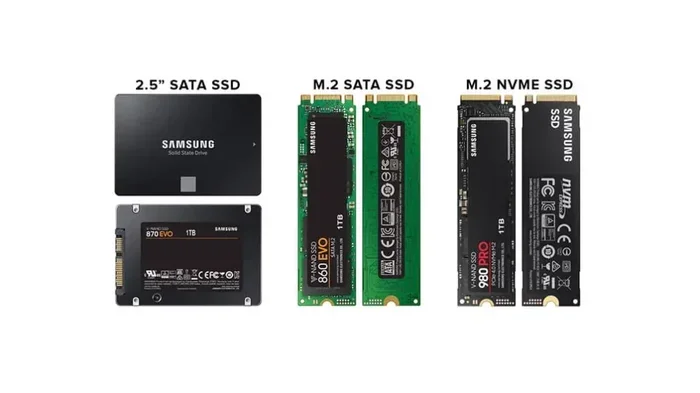
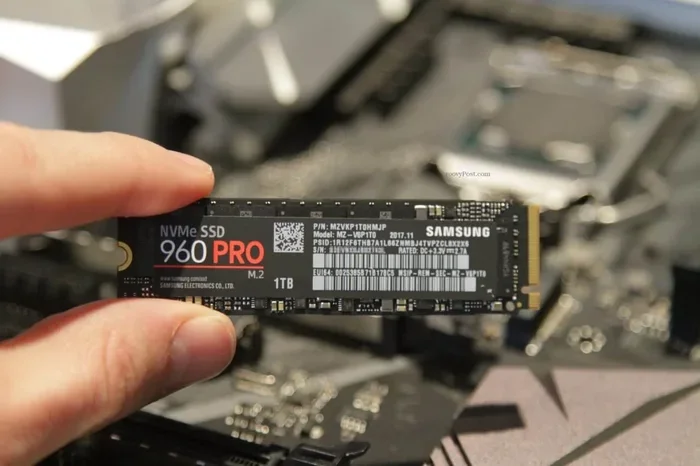
A 2TB PCIe Gen4 NVMe M.2 SSD fits into the M.2 2280 slot on your motherboard. This is a small, rectangular slot that has become standard in modern PCs and laptops. The form factor is compact, so you do not need extra cables or drive bays.
Why Choose a 2TB PCIe Gen4 NVMe SSD?
There are many reasons to choose a 2TB Gen4 NVMe SSD over other storage options. Let us look at the biggest benefits.
Blazing Fast Speeds
The most obvious advantage is speed. A typical PCIe Gen4 NVMe SSD can deliver read speeds of 6,500 to 7,000 MB/s. Write speeds often reach 5,000 MB/s or more. Compare that to a SATA SSD, which tops out around 550 MB/s. The difference is enormous.
Here is a quick comparison:
- PCIe Gen4 NVMe SSD: Up to 7,000 MB/s read
- PCIe Gen3 NVMe SSD: Up to 3,500 MB/s read
- SATA SSD: Up to 550 MB/s read
- HDD: Around 100-150 MB/s read
With a 2TB PCIe Gen4 NVMe SSD, your operating system boots in seconds. Games load almost instantly. Large files transfer in a fraction of the time.
Massive Storage Capacity
Two terabytes gives you a lot of breathing room. Modern AAA games can take up 100GB or more each. With 2TB, you can comfortably store 15 to 20 large games at once. For video editors and photographers, 2TB handles hours of raw footage.
Many users pair a smaller NVMe drive for their system drive with a 2TB SSD M.2 NVMe as a storage drive. This setup gives you both speed and capacity.
Compact and Easy to Install
The M.2 2280 form factor is tiny. It is about the size of a stick of gum. You simply insert it into the M.2 slot on your motherboard and secure it with a screw. No cables, no drive cages, no fuss.
Most motherboards made after 2018 support M.2 NVMe drives. You can also check your laptop for an M.2 slot. Many modern laptops have one or even two slots for expansion.
Energy Efficient
NVMe SSDs use less power than traditional hard drives. They also produce less heat and noise. This is great for laptops, where battery life matters. A 2TB PCIe Gen4 NVMe drive will not drain your battery faster than a SATA SSD.
How to Choose the Right 2TB PCIe Gen4 NVMe SSD
Not all Gen4 NVMe SSDs are the same. Here are the key factors to consider before buying.
Read and Write Speeds
Look for drives with read speeds above 6,000 MB/s. Write speeds above 4,000 MB/s are also good. Some drives push even higher, but those are usually more expensive. For most users, a 2TB NVMe Gen4 SSD with 7,000 MB/s read is more than enough.
NAND Flash Type
Most modern NVMe SSDs use TLC (Triple-Level Cell) NAND. TLC offers a great balance of speed, endurance, and price. Some budget drives use QLC (Quad-Level Cell), which is cheaper but slower over time. Stick with TLC for the best long-term performance.
DRAM Cache
Drives with a DRAM cache handle sustained workloads better. They keep a map of where data is stored, which speeds up access times. If you work with large files or run heavy applications, a DRAM-equipped drive is a smart choice.
Heatsink and Thermal Management
Gen4 NVMe SSDs can get warm under heavy load. Many drives come with a heatsink included. If your motherboard has a built-in M.2 heatsink, you may not need an extra one. But if you are pushing the drive hard with large file transfers or video editing, a NVMe M.2 heatsink is a good investment.
Warranty and Endurance
Check the warranty period and TBW (Terabytes Written) rating. A higher TBW means the drive can handle more data over its lifetime. Most quality Gen4 SSDs come with a 5-year warranty and a TBW rating of 600 or higher for a 2TB drive.
Top 2TB PCIe Gen4 NVMe SSDs to Consider
Here are some popular options in the 2TB PCIe Gen4 NVMe space. Each one brings something different to the table.
The Crucial P310 is a solid budget-friendly option. While the 1TB version is very popular, the 2TB model offers great value for users who need more capacity without breaking the bank. It delivers reliable Gen4 speeds and works well for everyday tasks and gaming.
If you want the latest and greatest, the Crucial T705 is a Gen5 drive that also works in Gen4 slots. It offers even faster speeds and is a great choice if you plan to upgrade your system in the future.
For users who need a lot of storage on a budget, a 2TB SSD M.2 NVMe drive from a reputable brand gives you plenty of space and solid performance. These drives are perfect for storing game libraries, media files, and backups.
Is a 2TB PCIe Gen4 NVMe SSD Right for You?
A 2TB PCIe Gen4 NVMe SSD is ideal for several types of users. Gamers will love the fast load times and plenty of space for their libraries. Content creators benefit from the speed when working with large video and photo files. Professionals who run virtual machines or handle big datasets will appreciate the performance boost.
If you are currently using an HDD or a SATA SSD, upgrading to a Gen4 NVMe drive is a night-and-day difference. Your system will feel snappier, files will move faster, and you will have more than enough room for everything.
For those on a tighter budget, a 1TB NVMe SSD can still offer excellent speed at a lower cost. You can always add more storage later. But if you need space and speed right now, 2TB is the sweet spot.
Keep in mind that you need a compatible motherboard with an M.2 slot that supports PCIe Gen4. Most modern boards do, but it is always worth checking before you buy. You can also use a Gen4 drive in a Gen3 slot, but you will get Gen3 speeds. Similarly, a Gen4 drive works in a Gen5 slot but will be limited to Gen4 speeds.
Common Mistakes to Avoid When Buying a 2TB NVMe SSD
Here are some pitfalls to watch out for when shopping for a 2TB PCIe Gen4 NVMe M.2 SSD.
- Buying without checking compatibility: Not all motherboards support Gen4. Check your motherboard manual before purchasing.
- Ignoring the heatsink: Some drives run hot. If your board does not have a built-in heatsink, consider buying one with a cooler included.
- Choosing QLC over TLC: QLC drives are cheaper but slower in the long run. TLC is the better choice for most users.
- Overlooking warranty terms: A good warranty shows the manufacturer stands behind their product. Look for at least a 5-year warranty.
- Confusing GB with TB: 2TB equals 2,000GB. Make sure you are getting the capacity you actually need.
Expert Tips for Getting the Most from Your 2TB NVMe SSD
Once you have your 2TB PCIe Gen4 NVMe SSD installed, here are a few tips to get the best performance.
- Enable NVMe mode in BIOS: Make sure your BIOS is set to AHCI or NVMe mode, not IDE or RAID. This ensures the drive runs at full speed.
- Keep firmware updated: Manufacturers release firmware updates that improve performance and fix bugs. Check the manufacturer’s website periodically.
- Use the right driver: Windows 10 and 11 include native NVMe drivers. But if you are on Linux or need specific features, install the manufacturer’s driver.
- Avoid filling the drive completely: SSDs perform best when they have some free space. Try to keep at least 10-15% of the drive empty.
- Monitor drive health: Use tools like CrystalDiskInfo to check the health and temperature of your NVMe drive regularly.
Following these simple steps will help your 2TB Gen4 NVMe SSD run smoothly for years to come. You will get the best speeds, the longest lifespan, and the most value from your investment.
Final Thoughts
A 2TB PCIe Gen4 NVMe SSD is a fantastic upgrade for anyone who wants more speed and more storage. The combination of massive capacity and lightning-fast read and write speeds makes these drives a standout choice for nearly any use case. Whether you are building a new PC or upgrading an existing one, this is one of the best investments you can make.
With prices dropping and more options available than ever, there has never been a better time to make the switch. Pick a drive that fits your needs, follow the installation tips, and enjoy the difference that a 2TB NVMe M.2 SSD makes in your daily computing experience.
For more guidance on choosing the right storage solution, check out our guides on SSD NVMe PCIe M.2 options and 2TB NVMe M.2 SSD comparisons to find the perfect match for your setup.
Frequently Asked Questions
What is the difference between PCIe Gen4 and Gen3 NVMe SSDs?
PCIe Gen4 offers roughly double the bandwidth of Gen3. This means Gen4 SSDs can read and write data much faster. A Gen4 drive can reach speeds around 7,000 MB/s, while a Gen3 drive typically maxes out at 3,500 MB/s. If your motherboard supports Gen4, you will see a big speed boost.
Can I use a 2TB PCIe Gen4 NVMe SSD in a Gen3 slot?
Yes, you can. The drive will work, but it will run at Gen3 speeds. You will still get much faster performance than a SATA SSD, but you will not get the full Gen4 speeds. Check your motherboard manual to see which PCIe generations your M.2 slots support.
Do I need a heatsink for a 2TB Gen4 NVMe SSD?
It depends on your workload. For everyday tasks and gaming, most drives stay cool without a heatsink. But if you are doing heavy video editing or large file transfers for long periods, a heatsink helps maintain peak performance. Many drives come with a heatsink included, and some motherboards have built-in M.2 coolers.
How long does a 2TB NVMe SSD last?
A quality 2TB PCIe Gen4 NVMe SSD can last many years. Most drives have a TBW (Terabytes Written) rating of 600 or higher, which means they can handle hundreds of terabytes of data over their lifetime. With normal use, you can expect 5 to 7 years or more of reliable service.
Is a 2TB NVMe SSD enough for gaming?
Absolutely. Two terabytes gives you plenty of room for a large game library. Modern AAA games can be 100GB or more, so you could store 15 to 20 games easily. You will also enjoy much faster load times compared to HDDs and SATA SSDs. Many gamers consider a Gen4 NVMe drive the best upgrade for their setup.
What is the average price of a 2TB PCIe Gen4 NVMe SSD?
Prices have dropped significantly in recent years. A quality 2TB Gen4 NVMe SSD typically costs between $120 and $200, depending on the brand and features. Budget options are available for less, while high-end models with extra features like heatsinks or higher endurance ratings may cost more. It is a great time to buy.