M 2 Nvme 2230 Ssd

An M 2 NVMe 2230 SSD is a compact solid state drive built for ultra-thin laptops and small devices. It delivers blazing fast NVMe speeds in a tiny form factor that is smaller than the common 2280 size. Whether you are upgrading a laptop or building a mini PC, this guide covers everything you need to know.
If you have been shopping for a M 2 NVMe 2230 SSD, you probably noticed it is one of the smallest storage drives on the market today. It is tiny, fast, and designed for devices where every millimeter counts. In this guide, we will walk you through everything you need to know about this little powerhouse.
Whether you want to upgrade a slim laptop, build a mini PC, or just learn more about NVMe storage, you are in the right place. We will cover sizes, speeds, compatibility, and practical tips to help you make the best choice.
Key Takeaways
- Small but mighty: The 2230 form factor packs NVMe performance into a space smaller than a stick of gum.
- Blazing speeds: PCIe Gen4 and Gen5 NVMe protocols offer read speeds well above 5000 MB/s.
- Perfect for slim devices: Many modern ultrabooks and tablets use the 2230 size because of its compact design.
- Easy to upgrade: Most M 2 slots on motherboards support the 2230 size with a simple screw-in install.
- Watch the heat: Small SSDs can run warm, so thermal management matters a lot.
- Enclosure options exist: You can use an NVMe M.2 enclosure to turn your 2230 SSD into a portable drive.
📑 Table of Contents
What Is an M 2 NVMe 2230 SSD?
The name M 2 NVMe 2230 tells you a lot about the drive. M 2 refers to the form factor, which is a small rectangular module that plugs directly into a motherboard slot. NVMe stands for Non-Volatile Memory Express, which is the protocol that makes these drives so fast. And 2230 refers to the physical dimensions: 22 millimeters wide and 30 millimeters long.
This is much shorter than the common 2280 size, which measures 22mm by 80mm. The 2230 is roughly one-third the length. That makes it ideal for devices where space is at a premium. Many modern ultrabooks, tablets, and handheld gaming devices rely on this compact size.
The NVMe protocol is the key reason these drives outperform older SATA SSDs. NVMe connects directly to the PCIe bus, which means much higher bandwidth and lower latency. You get speeds that simply are not possible with traditional hard drives or SATA-based flash storage.
How Does It Compare to Other M 2 Sizes?
There are several M 2 sizes available. The most common ones you will see are 2280, 2260, 2242, and 2230. Here is a quick breakdown:
- 2280: 22mm x 80mm. The most popular size for desktops and standard laptops.
- 2260: 22mm x 60mm. Used in some thin laptops and mini PCs.
- 2242: 22mm x 42mm. Common in tablets and small form factor devices.
- 2230: 22mm x 30mm. The smallest mainstream size, found in ultra-compact devices.
All of these sizes share the same 22mm width. The length is what changes. A shorter drive does not mean slower performance. The NVMe controller and flash memory chips inside determine the speed, not the physical length.
Why Choose a 2230 SSD?
The 2230 form factor has become increasingly popular in recent years. Here is why so many people are choosing it for their devices.
Space-Saving Design
Thin laptops and compact devices have very limited room inside. A standard 2280 drive might not fit at all. The 2230 size slides into tight spaces without blocking other components. This allows manufacturers to build thinner, lighter devices without sacrificing storage performance.
Fast Enough for Real-World Use
Some people assume a smaller drive means slower speeds. That is not true with modern NVMe flash memory. A 2230 SSD can deliver the same read and write speeds as a longer drive of the same generation. You get the full benefit of PCIe Gen4 or even Gen5 technology in a tiny package.
Great for Portable Devices
Handheld gaming PCs, portable monitors, and compact workstations all benefit from the 2230 size. These devices need fast storage but cannot fit a full-length M 2 module. The M 2 NVMe 2230 SSD fills that gap perfectly.
Speed and Performance Explained
One of the biggest reasons people choose a NVMe M.2 SSD over a traditional drive is speed. Let us break down what you can expect from a 2230 drive.
Sequential Read and Write Speeds
Sequential read speeds measure how fast the drive can pull large files in order. Sequential write speeds measure how fast it can save them. A modern PCIe Gen4 M 2 NVMe 2230 SSD typically offers read speeds between 5000 MB/s and 7000 MB/s. Write speeds often range from 4000 MB/s to 5000 MB/s.
Gen5 drives push those numbers even higher. The Crucial T705 PCIe Gen5 NVMe M.2 SSD is a great example of a Gen5 drive that delivers massive throughput.
Random Read and Write
While sequential speeds grab the headlines, random read and write speeds matter just as much for everyday use. These numbers affect how fast your system boots, how quickly apps launch, and how smoothly multitasking feels. NVMe drives excel here because of their low latency design.
Real-World Performance Gains
In practical terms, a 2230 NVMe SSD will make your device feel noticeably faster. Boot times drop to seconds. Large files copy in moments. Games and applications load almost instantly. Even compared to a good SATA SSD, the difference is clear and immediate.
Compatibility and Installation
Before buying a M 2 NVMe 2230 SSD, you need to make sure your device supports it. Here is what to check.
Check Your Motherboard or Device Manual
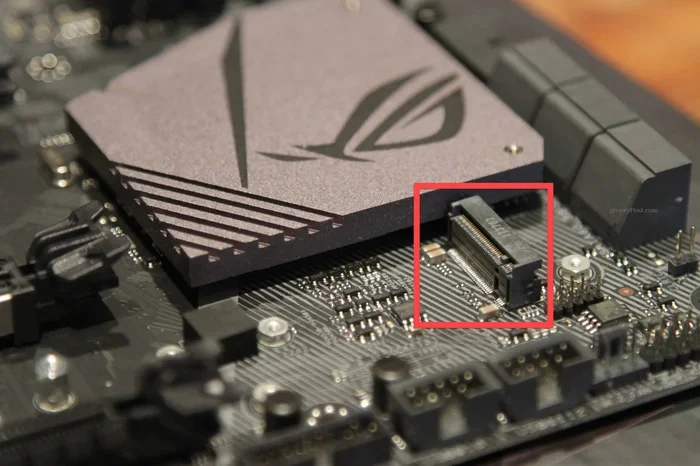
Not every M 2 slot supports every size. Some slots are designed only for 2280 drives. Others can fit 2230, 2242, and 2260 sizes with a simple spacer or mounting hole adjustment. Check your device specifications carefully before purchasing.
Keying and Connector Types
M 2 drives use a keying system to prevent incorrect insertion. The B key and M key are the most common. Most NVMe M.2 drives use the M key, which supports PCIe connections. Some slots support both B and M keys, giving you more flexibility.
Simple Installation Steps
Installing an M 2 SSD is straightforward. Here are the basic steps:
- Locate the M 2 slot on your motherboard or device.
- Insert the drive at a 30-degree angle into the slot.
- Press it down flat and secure it with the small mounting screw.
- Close the device and power it on.
That is it. No cables, no extra power connectors. The slot provides both data and power connections. This plug-and-play simplicity is one of the biggest advantages of the M 2 format.
Using an Enclosure for External Use
Want to use your 2230 SSD as an external drive? You can place it inside an M 2 NVMe enclosure. This turns your compact internal drive into a portable external storage solution. It is perfect for transferring large files between devices or creating a fast backup drive.
Choosing the Right Capacity
M 2 NVMe 2230 SSDs come in a range of storage capacities. The right choice depends on what you plan to store and how much space you need.
Common Capacity Options
- 256GB: Enough for an operating system and a few essential apps. Great as a boot drive.
- 512GB: A solid sweet spot for most users. You can store documents, photos, and several games.
- 1TB: Ideal for power users who need space for large media libraries or multiple applications.
- 2TB and above: Best for professionals working with video, design files, or massive datasets.
If you are looking for a compact 512GB option, check out the 512GB NVMe M.2 SSD category for reliable choices at a great price point.
Price vs. Performance
Larger capacity drives generally cost more per gigabyte at the lower end but offer better value overall. A 1TB drive will cost more than a 512GB drive, but the price per gigabyte is usually lower. Think about your needs carefully. If you only need a fast boot drive, 256GB or 512GB may be all you need.
Common Mistakes to Avoid
Even experienced users can run into issues when working with M 2 NVMe 2230 SSDs. Here are some common mistakes to watch out for.
- Buying the wrong size: Always double-check that your device supports the 2230 form factor. A 2280 drive will not fit in a 2230 slot.
- Forgetting the screw: The mounting screw is small and easy to lose. Keep it safe during installation.
- Ignoring thermal management: Small SSDs can heat up under heavy load. Consider adding a small heatsink if your device allows it.
- Skipping firmware updates: Manufacturers often release firmware updates that improve performance and fix bugs. Check for updates after installation.
- Using the wrong driver: Make sure your system has the correct NVMe driver installed. Without it, the drive may not reach its full speed potential.
Quick Tips for Getting the Most from Your 2230 SSD
- Enable NVMe mode in BIOS: Make sure your BIOS is set to use the NVMe mode for the M 2 slot, not AHCI or SATA mode.
- Keep your OS updated: Operating system updates often include optimizations for NVMe drives.
- Use TRIM commands: TRIM helps maintain long-term performance by clearing unused data blocks.
- Monitor drive health: Use free tools like CrystalDiskInfo to check the health and temperature of your M 2 NVMe 2230 SSD.
- Consider a heatsink: A small copper heatsink can prevent thermal throttling and keep speeds consistent.
The Future of Compact NVMe Storage
The M 2 NVMe 2230 SSD is still a relatively niche size compared to the 2280 standard. But as devices continue to shrink, demand for compact high-performance storage will only grow. Manufacturers are already producing faster Gen5 and Gen6 controllers that fit perfectly into the 2230 format.
We can expect to see even more ultra-thin laptops, AR glasses, and portable devices adopting this small but powerful form factor. The combination of tiny size and massive speed makes it a compelling choice for the next generation of computing devices.
If you are ready to upgrade, explore options for a M 2 NVMe 2230 SSD that fits your needs and budget. Whether you want a blazing fast boot drive or portable external storage, this compact drive delivers serious performance in a remarkably small package.
For more information on NVMe M.2 SSDs and how they compare to other storage options, check out our guide on PCIe NVMe M.2 SSDs to understand the full range of available options.
Also, if you are curious about what happens when connections are interrupted, our article on what happens if an NVMe SSD disconnects covers important safety and data considerations.
Conclusion
The M 2 NVMe 2230 SSD is a fantastic choice for anyone who needs fast, compact storage. It brings NVMe speeds to ultra-thin devices and small form factor builds without compromising on performance. With read speeds that can exceed 7000 MB/s on Gen5 drives, this tiny SSD punches well above its weight.
Just remember to check compatibility before buying, keep an eye on temperatures, and choose a capacity that fits your workflow. A 2230 NVMe SSD can transform a slow or outdated device into a fast and responsive machine. It is one of the best upgrades you can make for a slim laptop or compact system.
Take your time, pick the right drive, and enjoy the speed boost that comes with modern NVMe flash storage. Your device will thank you.
Frequently Asked Questions
Is an M 2 NVMe 2230 SSD the same as a 2280 SSD?
No, the main difference is the length. A 2230 drive is 30mm long, while a 2280 drive is 80mm long. Both share the same 22mm width and use the same NVMe protocol. Performance depends on the controller and flash chips, not the length of the drive.
Can I install a 2230 SSD in a slot designed for 2280?
It depends on your motherboard or device. Some slots support both sizes with a simple spacer. Others are fixed for one size only. Check your device manual or motherboard specifications to confirm compatibility before purchasing.
Do M 2 NVMe 2230 SSDs need a heatsink?
Small SSDs can generate noticeable heat under heavy workloads. A heatsink helps dissipate that heat and prevents thermal throttling. Many slim laptops already include a small heatsink over the M 2 slot. If you are building a custom mini PC, adding one is a smart move.
What is the average lifespan of a 2230 NVMe SSD?
Most modern NVMe SSDs are rated for hundreds of terabytes written (TBW). Under normal use, a 2230 SSD can last 5 to 10 years or more. Heavy write workloads may shorten that lifespan slightly, but these drives are built for durability and long-term reliability.
Can I use a 2230 SSD as an external drive?
Yes. You can place the drive inside an M 2 NVMe enclosure and connect it via USB. This gives you a fast portable drive for backups, file transfers, or extra storage on the go. Look for an enclosure that supports the 2230 size specifically.
What speeds can I expect from a Gen4 M 2 NVMe 2230 SSD?
A Gen4 M 2 NVMe 2230 SSD typically delivers sequential read speeds of 5000 MB/s to 7000 MB/s and write speeds of 4000 MB/s to 5000 MB/s. Real-world speeds vary based on the controller, NAND type, and workload. For most users, these speeds are more than fast enough for everyday tasks and demanding applications alike.