Over 2 Tb Nvme Ssd
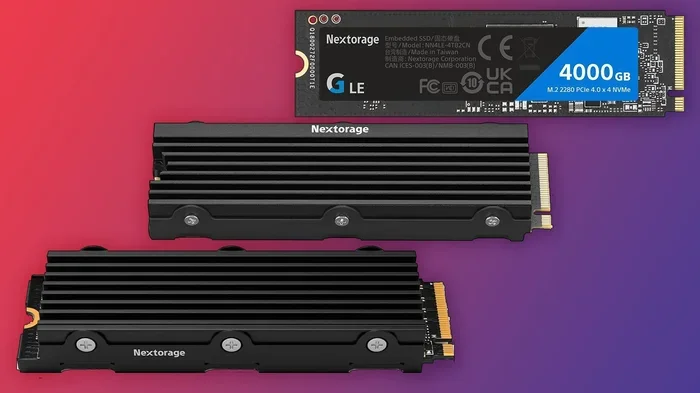
An over 2 TB NVMe SSD delivers blazing-fast speeds and massive storage for gamers, creators, and professionals. These drives use the PCIe interface and NVMe protocol to outperform older SATA SSDs by a wide margin. In this guide, you will learn about top picks, key features, and how to choose the right drive for your setup.
Storage needs are growing fast. Games, video files, and creative projects demand more space than ever. An over 2 TB NVMe SSD solves this problem with huge capacity and incredible speed.
If you are tired of waiting for files to load or running out of space, a large NVMe drive is the answer. These drives use the PCIe interface and NVMe protocol, which means they are far faster than traditional hard drives and even older SATA SSDs.
In this guide, we break down everything you need to know. We cover the best options, key features to look for, and how to pick the right 2 TB or larger NVMe M.2 SSD for your needs. Let us dive in.
Key Takeaways
- Massive Storage: Over 2 TB NVMe SSDs offer 2 TB to 8 TB of space for games, videos, and files.
- Blazing Speeds: PCIe Gen4 and Gen5 drives deliver read speeds up to 14,000 MB/s.
- Easy Upgrade: Most NVMe SSDs use the M.2 2280 form factor and fit standard desktop and laptop slots.
- Great for Gaming: Load times drop significantly with large-capacity NVMe drives.
- Price Trends: Costs have dropped, making 2 TB+ NVMe SSDs more affordable than ever.
- Check Compatibility: Always verify your motherboard supports NVMe M.2 slots before buying.
📑 Table of Contents
What Is an Over 2 TB NVMe SSD?
An over 2 TB NVMe SSD is a solid state drive that stores more than 2 terabytes of data. It uses the NVMe (Non-Volatile Memory Express) protocol over a PCIe connection. This combination delivers much faster speeds than SATA-based drives.
Most of these drives come in the M.2 2280 form factor. That means they are a small rectangular stick that plugs directly into your motherboard. No cables needed. No bulky drive bays. Just a simple, clean install.
The capacity range for these drives is huge. You can find 2 TB, 4 TB, 6 TB, and even 8 TB NVMe SSDs on the market today. The 4 TB NVMe M.2 SSD has become especially popular among content creators and serious gamers.
How NVMe Technology Works
NVMe was designed specifically for flash storage. It uses the PCIe lane on your motherboard to transfer data. Traditional SSDs use SATA III, which maxes out around 550 MB/s. A large NVMe M.2 SSD can reach speeds of 7,000 MB/s or more on PCIe Gen4, and up to 14,000 MB/s on PCIe Gen5.
The secret lies in the way NVMe communicates with your system. It uses a streamlined command queue that reduces latency. This means your system responds faster, files transfer quicker, and games load almost instantly.
Benefits of Choosing a 2 TB or Larger NVMe Drive
There are many reasons to go with a 2 TB or larger NVMe SSD. Here is why it makes sense for most users.
Speed You Can Feel: Boot times drop to seconds. Applications launch instantly. Large file transfers finish in minutes instead of hours. This is the biggest advantage of NVMe PCIe M.2 SSD technology.
Massive Capacity: Modern games can take up 100 GB or more each. A 2 TB drive holds 20+ AAA titles. A 4 TB NVMe SSD holds even more, plus your video projects and media libraries.
Future-Proofing: As game sizes and video resolutions grow, you need more space. Buying a larger drive now saves you from upgrading again in a year or two.
Reliability: NVMe SSDs have no moving parts. They are less prone to physical damage than hard drives. Many 2 TB NVMe M.2 SSD models come with 5-year warranties.
Who Needs Over 2 TB of Storage?
Not everyone needs this much space, but certain users benefit greatly. Here are the groups that see the most value:
- Gamers: Modern game libraries easily exceed 2 TB. A large NVMe drive keeps all your favorites installed and ready to play.
- Video Editors: 4K and 8K video files are enormous. A fast, high-capacity SSD makes editing smoother.
- 3D Designers and Architects: Large project files and render caches need fast, spacious storage.
- Data Scientists: Working with massive datasets demands both speed and capacity.
- Content Creators: Photographers and videographers store thousands of high-resolution files on these drives.
Top Over 2 TB NVMe SSD Options
The market for over 2 TB NVMe SSDs has exploded in recent years. Here are some of the most popular and well-reviewed options.
Samsung 970 EVO Plus NVMe M.2 SSD
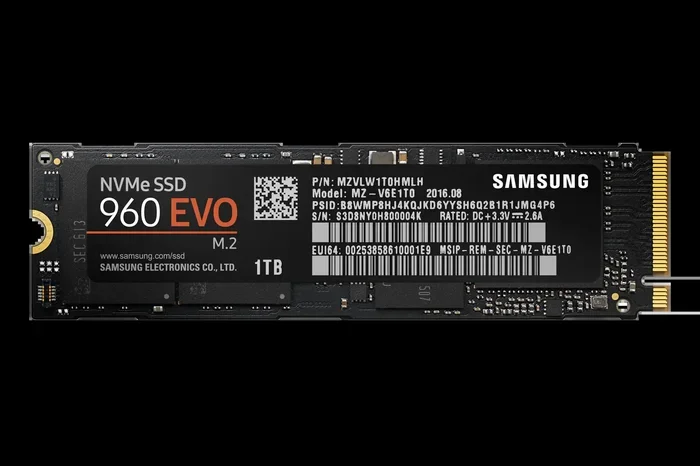
The Samsung 970 EVO Plus remains a top choice for many users. It offers reliable performance and strong endurance ratings. The 2 TB version delivers excellent read and write speeds, making it a solid pick for everyday use and gaming.
Crucial T705 PCIe Gen5 NVMe M.2 SSD
The Crucial T705 PCIe Gen5 NVMe M.2 SSD is one of the fastest consumer drives available. It uses the latest PCIe Gen5 technology and offers read speeds up to 12,400 MB/s. The 2 TB and 4 TB versions are great for users who want maximum performance.
4 TB NVMe M.2 SSD Options
If you need even more space, a 4 TB NVMe M.2 SSD is a fantastic choice. These drives are perfect for professional workloads and large game libraries. Prices have come down significantly, making 4 TB more accessible than it was just a year ago.
What to Look for When Buying
Not all large NVMe SSDs are the same. Here are the key factors to consider:
- PCIe Generation: Gen4 offers great value. Gen5 is the fastest but comes at a premium.
- DRAM Cache: Drives with DRAM handle sustained workloads better.
- TBW Rating: Terabytes written tells you how much data the drive can handle over its lifetime.
- Form Factor: Make sure your system supports M.2 2280 drives.
- Warranty: Look for at least a 5-year warranty from reputable brands.
Speed Comparison: NVMe vs SATA SSDs
One of the biggest reasons to upgrade to an over 2 TB NVMe SSD is speed. Here is a quick comparison of how NVMe drives stack up against traditional SATA SSDs.
SATA SSDs use the AHCI protocol, which was designed for spinning hard drives. NVMe uses a modern protocol built specifically for flash memory. The difference is dramatic.
A typical SATA III SSD reads at about 550 MB/s. A 2 TB NVMe M.2 SSD reads at 3,500 to 7,000 MB/s on PCIe Gen4. The latest Gen5 drives push past 10,000 MB/s. That is up to 20 times faster than SATA.
For real-world use, this means game loads that take 30 seconds on a SATA SSD take just 5 seconds on a fast NVMe drive. Video exports finish much faster. Large file copies barely make you wait.
If your motherboard supports PCIe Gen4 or Gen5, there is no reason to buy a SATA SSD for your main drive. The SSD NVMe PCIe M.2 format is the clear winner for performance.
Installation and Setup Tips
Installing an over 2 TB NVMe SSD is straightforward, but a few tips can make the process smoother.
Step-by-Step Installation
- Turn off your PC and unplug it from the wall.
- Open the case and locate the M.2 slot on your motherboard.
- Remove the heatsink or retention bracket if needed.
- Insert the NVMe SSD at a 30-degree angle into the slot.
- Press it down flat and secure it with the screw.
- Replace the heatsink if your motherboard has one.
- Close the case and boot up your PC.
Quick Tips for Setup
- Check your motherboard manual for the correct M.2 slot to use. Some slots share bandwidth with SATA ports.
- Update your motherboard BIOS before installing a new NVMe drive. This ensures full compatibility.
- Use the drive manufacturer’s software to initialize and format the SSD after installation.
- If you are using a laptop, make sure it has an M.2 slot that supports NVMe. Not all laptop slots do.
Common Mistakes to Avoid
- Forgetting to check if your CPU and motherboard support the PCIe generation of your drive.
- Installing the SSD in a slot that shares bandwidth with another device, which limits speeds.
- Skipping the BIOS update, which can cause compatibility issues with newer drives.
- Not enabling XMP or EXPO in BIOS after installing a new drive in some systems.
Pricing and Value Guide
Prices for over 2 TB NVMe SSDs have dropped a lot in the last couple of years. A 2 TB NVMe drive now costs less than a 1 TB model did just a few years ago.
Here is a rough price range you can expect:
- 2 TB NVMe SSD: Around $100 to $150
- 4 TB NVMe SSD: Around $250 to $350
- 8 TB NVMe SSD: Around $600 to $900
Prices vary by brand and model. Drives with PCIe Gen5 technology cost more but offer the fastest speeds. For most users, a PCIe Gen4 2 TB NVMe SSD offers the best balance of speed and price.
Keep an eye out for sales and deals. Major shopping events often bring significant discounts on large-capacity SSDs. The Samsung 970 EVO Plus NVMe M.2 SSD and the Crucial T705 PCIe Gen5 NVMe M.2 SSD are both excellent choices at various price points.
Final Thoughts
An over 2 TB NVMe SSD is one of the best upgrades you can make to any PC. Whether you are a gamer who wants instant load times, a creator who needs fast storage for large files, or a professional who demands reliability, these drives deliver.
The technology is mature, prices are reasonable, and the performance gains are real. With read speeds that dwarf older drives and capacities that hold entire libraries, a large NVMe M.2 SSD transforms your computing experience.
Take a moment to check your system compatibility. Pick the right capacity for your needs. And enjoy the speed that comes with modern NVMe M.2 SSD technology.
Frequently Asked Questions
What is the best over 2 TB NVMe SSD for gaming?
The Samsung 970 EVO Plus and the Crucial T705 are both excellent choices for gaming. They offer fast load times, large capacities, and reliable performance. A 2 TB or 4 TB model gives you plenty of room for your game library.
Can I use an over 2 TB NVMe SSD in a laptop?
Yes, but only if your laptop has an M.2 slot that supports NVMe drives. Check your laptop’s specifications before purchasing. Many modern laptops support M.2 NVMe SSDs, but some budget models use only SATA M.2 drives.
How fast is a 2 TB NVMe M.2 SSD compared to a regular SSD?
A 2 TB NVMe M.2 SSD is significantly faster than a SATA SSD. Read speeds can be 5 to 20 times higher depending on the PCIe generation. This means faster boot times, quicker game loads, and speedier file transfers.
Is a 4 TB NVMe SSD worth the price?
For users who work with large files or have extensive game libraries, a 4 TB NVMe SSD is absolutely worth it. Prices have dropped enough that the cost per terabyte is very competitive. It also saves you from needing multiple drives.
Do I need a heatsink for my over 2 TB NVMe SSD?
It depends on your workload and motherboard. High-performance drives like the Crucial T705 can run warm under heavy use. Many motherboards come with M.2 heatsinks built in. For most casual users, the default cooling is sufficient.
What does TBW mean on an NVMe SSD?
TBW stands for Terabytes Written. It measures how much data you can write to the drive over its warranty period. A higher TBW rating means the drive is more durable and built to handle heavy workloads over time.
=== INTERNAL LINKS ===
For more details on large-capacity storage, check out our guide on the 4TB NVMe M.2 SSD options available.
Looking for the fastest speeds? Our review of the Crucial T705 PCIe Gen5 NVMe M.2 SSD covers everything you need to know.
Want to compare with other Samsung options? Read our Samsung 970 EVO Plus NVMe M.2 SSD review.
Not sure which form factor you need? Learn more about SSD NVMe PCIe M.2 drives and how they work.