Are All Usb Power Bricks the Same
No, are all USB power bricks the same? The answer is no. USB power bricks differ in wattage, port types, and charging speeds, which directly affects how fast and safely your devices charge. This guide covers everything you need to know to pick the right USB charger for your devices.
Are all USB power bricks the same? The short answer is no. Many people assume that every USB charger works identically, but that is far from the truth. USB power bricks come in different sizes, wattages, and designs that affect how fast and safely your devices charge. In this article, we will break down the key differences between USB chargers so you can make an informed choice. You will learn about wattage, port types, fast charging standards, and how to pick the right power brick for your needs.
If you have ever grabbed a random USB charger from a drawer and wondered why your phone takes forever to charge, you are not alone. The truth is that not every power brick delivers the same performance. Some charge your devices quickly while others barely keep up. With so many options on the market, it can feel overwhelming to pick the right one. This guide will walk you through everything you need to know about USB power bricks, from basic specs to advanced features. By the end, you will know exactly what to look for when shopping for a new wall adapter.
Key Takeaways
- Not all USB power bricks are the same: They vary in wattage, port types, and charging speeds.
- Wattage matters most: Match your charger’s wattage to your device’s power requirements for optimal charging speed.
- USB-C is the future: Newer devices use USB-C for faster charging and better charger compatibility.
- Safety certifications are essential: Always look for UL, CE, or FCC certifications on your wall adapter.
- Cable quality affects charging speed: A cheap charging cable can limit the performance of even the best USB power brick.
- Multi-port chargers share power: Check how power is distributed across ports before buying a multi-port power brick.
- GaN chargers are more compact: Consider GaN technology for a smaller, more efficient USB charger.
📑 Table of Contents
What Is a USB Power Brick?
A USB power brick is the small rectangular block that plugs into a wall outlet and converts AC power to DC power for your devices. You probably have several of them at home right now. They come in many shapes and sizes, from tiny cube chargers to larger blocks with multiple ports.
The main job of a power brick is to deliver the right amount of electricity to your device safely. Every device has specific power requirements, and using the wrong charger can lead to slow charging or even damage. Understanding what goes into a USB charger helps you make better choices.
How USB Power Bricks Work
Inside every USB wall charger, there is a small circuit board that converts electricity. The wall outlet provides alternating current (AC), but your devices need direct current (DC). The power brick handles this conversion and regulates the voltage and amperage to match what your device needs.
Modern USB power bricks also include smart chips that communicate with your device. These chips negotiate the right amount of power to deliver. This is why a USB-C charger can charge some devices faster than older USB-A chargers. The technology inside has come a long way in just a few years.
Why Not All USB Power Bricks Are the Same
Not all USB power bricks are created equal. There are several key factors that make them different from one another. Understanding these differences is the first step toward choosing the right charger.
Wattage and Power Output
Wattage is the most important spec to look at on a power brick. It tells you how much power the charger can deliver. A higher wattage means faster charging, but only if your device can handle it.
For example, a basic USB charger might deliver 5 watts, while a fast USB-C charger can deliver 65 watts or more. If you plug a device that needs 18 watts into a 5-watt charger, it will charge very slowly. This is why knowing your device’s power needs matters. You can also check how much power your laptop draws when plugged in to better understand your overall power supply needs.
Port Types and Compatibility
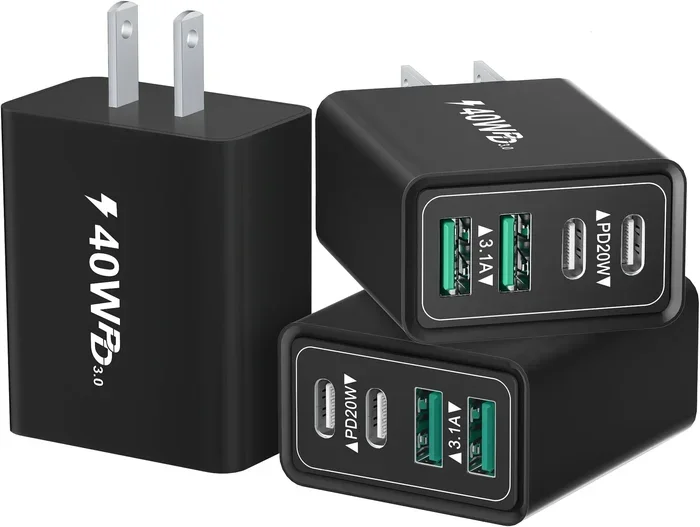
USB power bricks come with different port types. The most common are USB-A and USB-C. Older devices typically use USB-A ports, while newer phones, tablets, and laptops often use USB-C.
Some wall adapters come with multiple ports so you can charge several devices at once. However, sharing power between ports can reduce the speed for each device. If you want to learn more about how power usage varies across devices, you can explore our guide on how much power does a laptop use when plugged in.
Fast Charging Standards
Different USB chargers support different fast charging standards. Qualcomm Quick Charge, USB Power Delivery, and VOOC are some of the most common ones. Each standard has its own way of delivering power quickly and safely.
Not every power brick supports every fast charging standard. If your device supports USB Power Delivery, you need a charger that also supports it. Using mismatched standards can result in slower charging speed. Always check that your charger and device use compatible charging protocols for the best device charging experience.
USB-C vs USB-A: What Is the Difference?
The difference between USB-C and USB-A is one of the biggest factors in charging speed and compatibility. USB-A is the older, rectangular port you have likely seen for years. USB-C is the newer, smaller, reversible port that is becoming the standard.
USB-C chargers generally offer faster charging and more power delivery. They also support the latest fast charging standards like USB Power Delivery. If you buy a new USB power brick, look for USB-C ports to future-proof your setup.
However, USB-A chargers are still useful for older devices. Many top best laptop brands still ship with USB-A chargers or include USB-A to USB-C cables. The key is to match your charger ports to your devices. You can also use adapters to connect USB-C devices to USB-A chargers, but this may limit charging speed.
Which Port Type Should You Choose?
If you are buying a new wall adapter, go with USB-C whenever possible. It is the future of charging. Most new phones, tablets, and laptops use USB-C. If you have older devices, consider a power brick with both USB-A and USB-C ports for maximum flexibility.
Also, think about the devices you use most. If you travel often, a single USB charger with multiple USB-C ports can replace several bulky adapters. This saves space in your bag and keeps your charging setup simple and organized.
How to Choose the Right USB Power Brick
Choosing the right USB power brick does not have to be complicated. A few simple steps can help you find the perfect charger for your needs.
Check Your Device’s Power Requirements
Start by checking what your device needs. Look at the original charger or your device’s manual for the wattage and voltage requirements. Most smartphones need around 5 to 12 watts, while laptops can need 30 to 100 watts or more.
Matching the wattage is crucial. A power brick that delivers too little power will charge your device slowly. One that delivers too much power is usually fine because devices only draw what they need. But always make sure the voltage matches your device’s requirements for safe device charging.
Consider the Number of Ports
If you charge multiple devices at once, look for a USB charger with several ports. A multi-port wall adapter can charge your phone, tablet, and earbuds all at the same time.
Keep in mind that total power is shared across ports. A 65-watt USB power brick with three ports might not deliver 65 watts to each port. Check the power distribution details before buying. This is especially important if you use power-hungry devices like top best laptop brands alongside phones and tablets.
Look for Safety Certifications
Not all USB chargers are made equally when it comes to safety. Cheap, uncertified power bricks can overheat, damage your devices, or even pose fire risks. Always look for certifications like UL, CE, or FCC on the wall adapter.
Brand-name USB power bricks generally undergo more rigorous testing. They include safety features like over-current protection, over-voltage protection, and temperature control. These features protect both your devices and your home. Never buy a charger from an unknown brand at a suspiciously low price.
Think About Portability
If you travel frequently, the size and weight of your power brick matter a lot. A compact USB charger that fits in your pocket is a game changer. GaN (Gallium Nitride) chargers are a great option because they are smaller and more efficient than traditional silicon-based power bricks.
Portable wall adapters are also great for daily commutes or business trips. You want something light that still delivers enough power. A good USB-C charger in the 30 to 65-watt range strikes a nice balance between size and performance.
Common Mistakes People Make with USB Chargers
Even with the best intentions, many people make mistakes when choosing or using USB power bricks. Here are some common pitfalls to avoid.
Using the Wrong Wattage
One of the biggest mistakes is using a charger with too low wattage. This leads to slow charging and frustration. If your device needs 18 watts, do not settle for a 5-watt power brick. Always check the wattage before you buy.
On the flip side, using a charger with too high wattage is generally safe. Your device will only draw the power it needs. But if the USB charger is poorly made, higher wattage can increase the risk of overheating. Stick with reputable brands for reliable power supply and peace of mind.
Ignoring Cable Quality
People often focus only on the power brick and forget about the charging cable. A cheap or damaged cable can limit your charging speed no matter how good your USB charger is. High-quality cables with proper gauge wiring make a real difference in USB power output.
If you pair your USB power brick with premium accessories like best noise cancelling headphones that support fast charging, make sure your cable can handle the power load. A good cable is just as important as a good charger for optimal charger compatibility.
Leaving Chargers Plugged In All the Time
Some people leave their wall adapter plugged into the outlet even when not in use. While modern USB power bricks have standby power modes, they still draw a small amount of electricity. Over time, this adds up and can also pose a minor fire risk.
It is a good habit to unplug your USB charger when you are not using it. This also protects the charger from power surges. A simple habit can extend the life of your power brick and keep your home safer.
Quick Tips for Getting the Most Out of Your USB Power Brick
Here are some practical tips to help you get the best performance from your USB chargers:
- Check compatibility: Make sure your USB power brick supports the fast charging standard your device uses.
- Use the right cable: A high-quality USB-C cable can make a big difference in charging speed.
- Avoid extreme temperatures: Do not charge your devices in very hot or cold environments. Heat can reduce battery health over time.
- Unplug when full: Once your device reaches 100%, unplug it to avoid overcharging and battery degradation.
- Inspect cables regularly: Frayed or damaged cables can cause slow charging or safety issues. Replace them promptly.
- Invest in GaN technology: A GaN charger offers better efficiency and a more compact USB adapter design.
- Match the USB power delivery standard: Ensure your charger and device use the same quick charge protocol for the fastest device charging.
Conclusion
Are all USB power bricks the same? As you now know, they are definitely not. USB power bricks vary widely in wattage, port types, fast charging standards, and safety features. Choosing the right power brick can make a huge difference in how fast and safely your devices charge.
Take the time to understand your device’s power needs. Look for USB-C ports, check for safety certifications, and invest in quality cables. A good USB charger is a small investment that pays off every day. Whether you are charging a phone, a tablet, or a laptop, the right wall adapter makes all the difference.
Now that you know what to look for, you can shop with confidence. Pick a USB power brick that matches your devices, fits your lifestyle, and keeps everything powered up and ready to go. The right power supply keeps your charging setup efficient and your devices running at their best.
Frequently Asked Questions
Can I use any USB power brick with my phone?
Most USB power bricks will work with your phone, but the charging speed may vary. Check that the power brick provides the right voltage and supports your phone’s fast charging standard. Using a basic 5-watt charger will work but will charge your phone much more slowly than a compatible fast charger.
Is it safe to use a higher wattage USB charger?
Yes, it is generally safe. Your device will only draw the amount of power it needs. The USB charger cannot force excess power into your device. However, always make sure the charger is from a reputable brand with proper safety certifications to avoid any risks.
What is USB Power Delivery?
USB Power Delivery (USB PD) is a fast charging standard that allows devices to negotiate higher power levels through USB-C. It can deliver up to 100 watts or more. Many modern phones, tablets, and laptops support USB PD, making it one of the most versatile charging protocols available today.
Do I need a special charger for my laptop?
Most laptops require a power brick with higher wattage than phones. Check your laptop’s manual for the recommended wattage and voltage. Using an underpowered USB charger may charge your laptop very slowly or not charge it at all while you are using it.
Can I charge multiple devices with one USB power brick?
Yes, many wall adapters come with multiple ports for charging several devices at once. However, the total power is shared among the ports. If you are charging power-hungry devices simultaneously, look for a USB power brick with enough total wattage to support all connected devices.
Are GaN chargers better than regular USB chargers?
GaN (Gallium Nitride) chargers are more efficient and run cooler than traditional silicon-based power bricks. They are also significantly smaller and lighter. If you want a compact USB charger that delivers high wattage, a GaN charger is an excellent choice for both travel and daily use.