Is Blue Yeti Usb Only
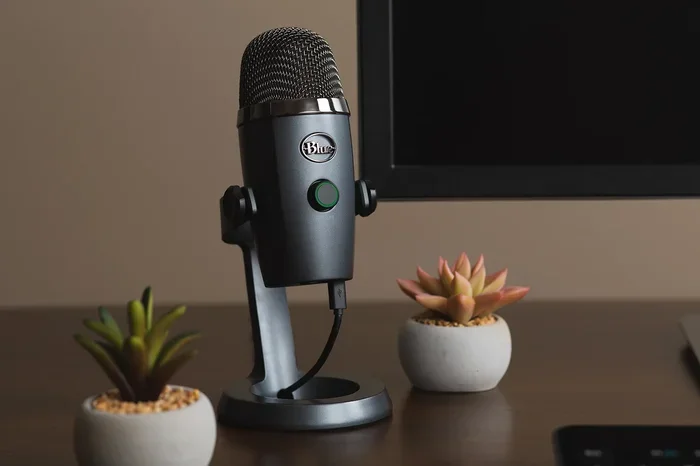
The Blue Yeti is a popular USB microphone, but is Blue Yeti Usb Only? The short answer is yes — the Blue Yeti connects exclusively through USB, making it a simple plug-and-play device for recording, streaming, and podcasting. You do not need extra audio gear to get started, which is a big reason it remains a favorite among beginners and pros alike.
Key Takeaways
- USB Only Connection: The Blue Yeti uses a USB connection and does not support XLR or other analog inputs without additional adapters.
- Plug and Play Setup: You can connect the Blue Yeti directly to any computer with a USB port — no extra audio interface needed.
- Multiple Pickup Patterns: Despite being USB only, the Blue Yeti offers four pickup patterns for versatile recording.
- Great for Beginners: The simple USB connection makes it one of the easiest microphones to set up for podcasting and streaming.
- Limited Professional Use: Advanced users may want an XLR microphone for more control and higher audio quality.
- System Compatibility Matters: Your computer needs decent specs to handle the Blue Yeti, especially for recording and streaming.
📑 Table of Contents
What Is the Blue Yeti Microphone?
The Blue Yeti is one of the most popular USB microphones on the market today. Made by Blue Microphones, this condenser microphone has become a staple for podcasters, streamers, and home studio enthusiasts. It has been around for years and continues to be a top seller in the USB microphone category. People love it because it delivers professional-quality sound without the complicated setup that most studio microphones require.
What makes the Blue Yeti stand out is its combination of quality and simplicity. Most professional microphones require complex setups with multiple pieces of equipment. The Blue Yeti flips that model on its head. You plug it into your computer with a simple USB connection, and you are ready to go. This plug and play approach is a huge part of its appeal. You do not need to buy an audio interface, learn routing software, or fiddle with phantom power.
The microphone also offers four different pickup patterns. You can switch between cardioid, omnidirectional, bidirectional, and stereo modes. This gives you a lot of flexibility for different recording situations. Whether you are recording a solo voiceover, interviewing a guest, or capturing ambient sound, the Blue Yeti adapts to your needs. It is one of the most versatile desktop microphones available at its price point.
It also features a built-in headphone jack for zero-latency monitoring. You can listen to your audio in real time without any delay. This is incredibly useful for podcasters and streamers who need to hear themselves as they speak. The microphone also has a mute button and volume control right on the unit, so you do not need to dig into software settings every time you want to adjust your levels.
Who Makes the Blue Yeti?
Blue Microphones is the company behind the Yeti. Blue is a well-known brand in the audio industry, especially for USB microphones. They have been making audio products for over a decade and have built a strong reputation for quality and innovation. The Blue Yeti is their flagship product and remains their most popular microphone. The company focuses on making audio accessible to everyday users, and the Yeti is a perfect example of that mission.
Is Blue Yeti Usb Only?
The answer to the question Is Blue Yeti Usb Only is straightforward: yes, the Blue Yeti is a USB-only microphone. It connects to your computer exclusively through a USB cable. There is no XLR input, no 3.5mm analog input, and no other connection option on the device itself. This design choice shapes everything about how the microphone works and who it is best suited for.
This means the Blue Yeti processes audio digitally inside the microphone body. It converts your voice into a digital signal and sends it to your computer through the USB cable. There is no need for an external audio interface or mixer to make it work. This is a major advantage for beginners and casual users who want a simple setup. You unbox it, plug it in, and you are recording within minutes.
However, the USB-only design does come with some limitations. You cannot connect the Blue Yeti directly to professional audio equipment like mixing boards or external recorders. If you are a musician or audio engineer who needs to route audio through multiple devices, this could be a problem. The microphone is designed for direct computer connection and works best in that context. It is not meant to be part of a larger professional audio chain.
What Does USB Only Mean for Users?
Being USB only means the Blue Yeti is limited to computer-based recording. You cannot use it as a standalone recorder or connect it to a smartphone without additional adapters. The microphone relies on your computer’s USB port for both power and data transfer. This is fine for most users, but it is important to understand this limitation before buying. If you need a microphone that works independently of a computer, the Blue Yeti is not the right choice.
For the average content creator, this is not an issue at all. Most people record directly into a computer using software like Audacity, OBS, or GarageBand. The Blue Yeti works perfectly with all of these applications. The USB connection handles everything you need for high-quality audio capture. You get clean digital audio without worrying about signal degradation from analog cables or interference from external sources.
Can You Use an Adapter with the Blue Yeti?
Technically, you could use a USB-to-XLR adapter to try and route the Blue Yeti’s output to other equipment. However, this is not a standard or recommended use case. The Blue Yeti is designed as a USB microphone, not an XLR microphone with a USB output. Using adapters may cause compatibility issues and can degrade audio quality. The internal digital processing of the Blue Yeti is optimized for USB output, not for analog conversion through adapters.
If you need a microphone that works with both USB and XLR, you should look at hybrid microphones from brands like Audio-Technica or Rode. These mics give you the flexibility of both connection types in one device. The Blue Yeti is not designed for this kind of versatility, and trying to force it into that role will likely lead to frustration.
Quick Tips for Blue Yeti Users
- Always use the USB cable included in the box or a high-quality USB 2.0 cable for best results.
- Place the microphone on a stable surface to avoid vibrations and handling noise.
- Use the cardioid pickup pattern for solo recording to minimize background noise.
- Keep the microphone about six inches from your mouth for the clearest audio.
- Update the Blue Sherpa software regularly for the latest features and drivers.
Common Mistakes to Avoid
- Plugging the Blue Yeti into a USB hub instead of a direct computer port, which can cause power issues.
- Using the omnidirectional pattern in a noisy room, which picks up everything around you.
- Ignoring the headphone monitoring feature, which helps you catch audio problems in real time.
- Placing the microphone too close to your mouth, which causes plosive sounds and distortion.
- Assuming the Blue Yeti works without any software — while basic recording works, you need Blue Sherpa for full control.
Blue Yeti Connectivity Options Explained
Even though the Blue Yeti is USB only, it still offers several useful connectivity features. Let us look at what the microphone provides and how it connects to your setup.
The Blue Yeti uses a standard USB Type-B connector. This is the same type of connector you find on most printers. You get a USB cable included in the box that connects the microphone to your computer. The cable is about six feet long, which gives you plenty of room to position the microphone on your desk. You can also use a longer USB cable if your setup requires more distance.
On the back of the microphone, you will find a headphone output. This 3.5mm jack lets you monitor your audio in real time. You can plug in any standard headphones or earbuds and listen to yourself as you record. This is essential for podcasting and streaming because it lets you catch mistakes or background noise immediately. The monitoring feature works independently of your computer speakers, so you can record without any echo or feedback.
The microphone also has a pattern selector on the top. This switch lets you choose between four pickup patterns with the flip of a switch. Each pattern is designed for a different recording scenario:
- Cardioid: Captures sound from the front of the microphone. Best for solo recording and podcasting.
- Omnidirectional: Captures sound from all directions. Great for group discussions and room recordings.
- Bidirectional: Captures sound from the front and back. Ideal for interviews with two people sitting across from each other.
- Stereo: Captures sound in left and right channels. Perfect for music recording and ambient soundscapes.
These patterns are selected mechanically, not digitally. This means you can switch between them without opening any software. It is a quick and easy way to adapt the microphone to different recording situations. You do not need to stop your workflow to change settings in an application.
Do You Need Extra Equipment?
No, the Blue Yeti does not require any extra equipment to function. The USB cable provides both power and data transfer. You plug it in, and it works. This is a huge advantage over XLR microphones that need phantom power from an audio interface. The Blue Yeti is a self-contained unit that handles everything internally.
That said, some accessories can improve your experience. A boom arm can help you position the microphone more precisely and save desk space. A pop filter can reduce harsh plosive sounds like “p” and “b” words. A shock mount can isolate the microphone from desk vibrations and accidental bumps. These are all optional, but they can make a noticeable difference in audio quality. If you are serious about your recordings, investing in a few basic accessories is worth it.
Expert Insight: Getting the Most from Your Blue Yeti
Audio professionals often recommend treating the Blue Yeti like a studio microphone, even though it is a USB model. This means recording in a quiet room with soft surfaces that absorb echo. Hard walls and bare desks can create unwanted reflections that degrade your audio quality. Even a simple blanket behind the microphone can make a big difference. The Blue Yeti is capable of studio-quality sound — it just needs the right environment to shine.
Blue Yeti vs XLR Microphones
To truly understand the Blue Yeti, it helps to compare it to traditional XLR microphones. These are the microphones you typically see in professional studios. They use a three-pin XLR connector and require an audio interface or mixer to work with a computer. The Blue Yeti takes a completely different approach. Instead of requiring multiple pieces of equipment, it bundles everything into one simple device. This makes it much more accessible for beginners and more convenient for everyday use.
Here is a side-by-side look at the key differences between USB and XLR microphones:
- Setup Complexity: The Blue Yeti is plug and play. XLR microphones need an audio interface, cables, and often phantom power. Setup time with the Blue Yeti is minutes, while XLR setups can take hours to configure properly.
- Cost: The Blue Yeti is affordable on its own. An XLR setup requires a microphone, an audio interface, cables, and possibly a mixer. The total cost adds up quickly compared to the all-in-one Blue Yeti.
- Audio Quality: High-end XLR microphones generally deliver superior sound quality and more customization options. The Blue Yeti sounds very good for its price range, but it cannot match a $500 studio microphone.
- Flexibility: XLR systems can grow with you. You can swap microphones or upgrade your interface without replacing everything. The Blue Yeti is a fixed setup that works as-is.
- Portability: The Blue Yeti is highly portable. You only need a USB cable. XLR setups require multiple pieces of gear and are harder to transport.
If you are just getting started with recording or streaming, the Blue Yeti is an excellent choice. It gives you professional-quality audio without the complexity or expense of an XLR setup. But if you are serious about audio production and want maximum control, an XLR microphone system is the way to go. Many professionals start with a USB mic like the Blue Yeti and eventually upgrade to XLR as their skills and needs grow.
When Should You Choose XLR Over USB?
Choose XLR if you plan to record in a professional studio, work with multiple audio sources, or need the highest possible audio quality. XLR microphones also offer better long-term value because you can upgrade individual components over time. If you are building a serious recording setup, XLR is the way forward. The ability to swap microphones and interfaces separately gives you more control over your sound.
Choose USB if you want simplicity, affordability, and quick setup. The Blue Yeti is perfect for home recording, podcasting, and streaming where convenience matters most. For most content creators, USB is more than enough. The sound quality of the Blue Yeti is more than adequate for the vast majority of use cases, from YouTube videos to professional podcasts.
Who Should Use the Blue Yeti?
The Blue Yeti is a versatile microphone that suits many different users. Let us look at who benefits most from this USB-only design and why it works so well for each group.
Podcasters are one of the biggest user groups for the Blue Yeti. It captures clear, detailed audio for spoken word content. The cardioid pickup pattern isolates your voice from background noise. The USB connection means zero hassle with cables and adapters. If you are starting a podcast, the Blue Yeti is one of the best microphones you can buy for the price. You can find it at Best Buy Blue Microphones Yeti Usb Microphone guides and reviews online, which can help you compare prices and models.
Streamers and content creators also love the Blue Yeti. It delivers clean, broadcast-quality audio for live streams and video recordings. Many popular streamers use this mic because it is reliable and sounds great. The real-time headphone monitoring lets you hear yourself as you speak, which is essential for live content. The multiple pickup patterns also work well for panel discussions with multiple guests. The Blue Yeti handles both solo streams and group sessions with ease.
Remote workers and video call users will appreciate the Blue Yeti as well. It provides much better audio quality than built-in laptop microphones. Your colleagues and clients will hear you clearly without any echo or background noise. The USB connection makes it easy to use with Zoom, Microsoft Teams, or any other video conferencing tool. For people who work from home, the Blue Yeti transforms the quality of every online meeting and presentation.
Students and beginners who are just getting into content creation will find the Blue Yeti very approachable. There is no learning curve. Plug it in, open your recording software, and start talking. The simplicity of the USB connection removes all the technical barriers that might otherwise discourage new creators. You do not need to understand audio interfaces or signal routing to get great sound from the Blue Yeti.
What About System Requirements?
While the Blue Yeti is simple to set up, your computer does need to meet some basic requirements. Most modern laptops and desktops work perfectly with the Blue Yeti. However, if you are running demanding recording or streaming software, your system needs to be capable of handling the workload.
For smooth recording and streaming, make sure your computer has enough processing power and memory. Having at least 8GB of RAM is recommended for most audio and video tasks. If your laptop has less than that, you might experience audio dropouts or performance issues during recording sessions. Check your system specs to make sure everything runs smoothly before you invest in a microphone.
You should also check the Blue Iris System Requirements if you plan to use the Blue Yeti for surveillance or security recording. The software has specific hardware requirements that your computer needs to meet. Similarly, if you are streaming, make sure your computer can handle the encoding workload alongside your recording software. A weak processor can cause lag and audio sync issues that ruin your content quality.
For general podcasting and voice recording, most computers from the last five years will work fine. The Blue Yeti is not demanding on system resources. It is designed to be accessible to users with a wide range of hardware configurations. Even older laptops can handle the Blue Yeti for basic recording tasks without any problems.
Common Mistakes with System Setup
- Using a USB 3.0 port when the microphone works best on USB 2.0 — try different ports if you experience issues.
- Running too many background applications that consume CPU power while recording or streaming.
- Not checking if your operating system is up to date, which can cause driver conflicts.
- Ignoring the need for a dedicated USB port — sharing a port with other devices can cause power fluctuations.
Final Verdict on the Blue Yeti
So, is Blue Yeti Usb Only? Yes, it is. The Blue Yeti is a USB-only microphone that offers excellent sound quality and ease of use. It is a fantastic choice for podcasters, streamers, and anyone who wants a simple, reliable recording setup without the hassle of extra equipment.
The USB-only design is both the Blue Yeti’s greatest strength and its main limitation. On the positive side, it makes setup effortless and keeps costs low. You do not need to buy an audio interface or learn complex routing. Just plug it in and start recording. On the other side, it means you are locked into computer-based workflows and cannot use the microphone with professional audio gear directly. For most users, this trade-off is absolutely worth it.
If you are a beginner or intermediate creator, the Blue Yeti will serve you well for years. It is one of the best investments you can make for your content creation setup. The microphone delivers professional-quality audio in the simplest possible package. You get great sound without the learning curve that comes with more complex equipment.
Before you buy, think about what you plan to do with the microphone. If you need a straightforward recording solution, the Blue Yeti is hard to beat. If you need professional-grade flexibility with multiple connection options, you should explore XLR alternatives. But for the vast majority of users, the Blue Yeti hits the sweet spot between quality and simplicity perfectly.
Make sure your computer is up to the task as well. Having enough RAM and a decent processor will ensure your recordings sound their best. With the right setup, the Blue Yeti can help you produce content that sounds polished and professional. The microphone is a proven tool that has helped countless creators launch their channels and build their audiences.
Frequently Asked Questions
Can the Blue Yeti Connect to a Phone or Tablet?
The Blue Yeti uses a standard USB connection, so it can work with some tablets and Android phones that support USB OTG. However, it does not work directly with iPhones or iPads that use Lightning or USB-C without an adapter. Always check your device compatibility before trying to connect the microphone to a mobile device.
Do You Need Drivers for the Blue Yeti?
Most modern operating systems recognize the Blue Yeti automatically. Windows and macOS both support it as a plug-and-play device. You may need to install Blue Sherpa software for advanced features like gain control and pattern selection, but basic recording works without any extra software. The microphone is truly plug and play for most users.
Is the Blue Yeti Good for Music Recording?
The Blue Yeti can record music, but it is primarily designed for spoken word content. Its condenser design captures detail well, but it may not match dedicated studio microphones for music production. For podcasts, vocals, and voiceover work, it performs excellently. If you are recording instruments or full bands, you may want to consider a different microphone.
How Far Can the Blue Yeti Pick Up Sound?
The Blue Yeti’s effective range depends on the pickup pattern you select. In cardioid mode, it captures sound best from about six to eight inches away. In omnidirectional mode, it picks up sound from a wider area. For best results, position yourself about six inches from the microphone and speak at a consistent volume.
Can You Use the Blue Yeti for Live Streaming?
Yes, the Blue Yeti is one of the most popular microphones for live streaming. Its USB connection makes it easy to set up with streaming software like OBS or XSplit. The multiple pickup patterns also let you adjust for solo streams or panel discussions with multiple guests. The real-time monitoring feature helps you catch audio issues before they reach your audience.
What Accessories Do You Need for the Blue Yeti?
The Blue Yeti comes with everything you need to get started, including a USB cable and a desktop stand. Many users also buy a boom arm for better positioning, a pop filter to reduce plosive sounds, and a shock mount to minimize vibrations. These accessories are optional but can improve your recording quality significantly. A basic setup with just the included stand works perfectly for most users.
=== CONCLUSION ===
The Blue Yeti remains one of the best USB microphones available today. Its USB-only design makes it incredibly easy to use, and its sound quality holds up well for a wide range of applications. Whether you are a beginner podcaster or a seasoned streamer, the Blue Yeti delivers reliable performance every time.
The key takeaway is that Is Blue Yeti Usb Only has a simple answer: yes. This microphone connects exclusively through USB and does not need extra gear to work. For most users, that simplicity is exactly what makes it so appealing. You get professional-quality audio without the complexity of traditional recording setups.
If you want a microphone that works right out of the box without any complicated setup, the Blue Yeti is a top choice. It is affordable, versatile, and sounds great. Whether you are recording podcasts, streaming gameplay, or taking video calls, the Blue Yeti gives you the audio quality you need in the simplest possible package. Invest in one today and experience how easy great audio can be.