Does a Usb Headset Have a Microphone
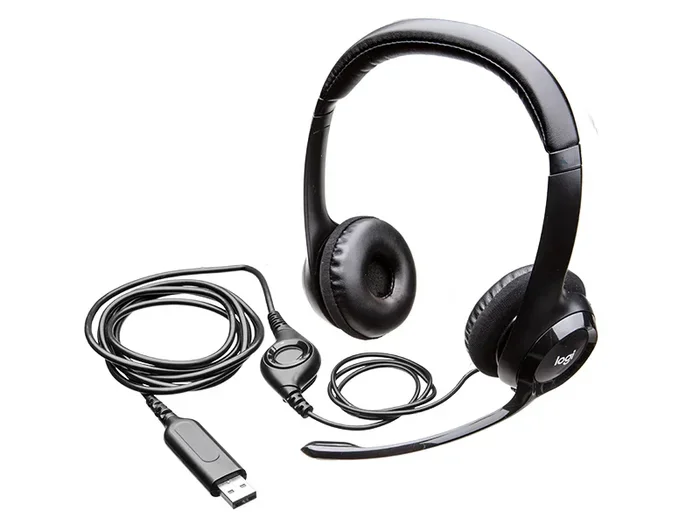
A USB headset typically includes a built-in microphone, making it a convenient all-in-one audio solution for calls, gaming, and streaming. These headsets connect directly to computers through a simple USB plug, offering plug and play ease without extra hardware. Whether you need clear voice chat or reliable audio for remote work, a USB headset with microphone delivers both in one device.
If you have ever picked up a USB headset, you may have wondered whether it actually has a microphone built in. The short answer is yes, most USB headsets do come with a microphone. But not all of them do, and understanding the differences can save you time and money. In this guide, we will walk you through everything you need to know about USB headsets and microphones. You will learn how they work, what to look for, and why they are such a popular choice for gaming, remote work, and everyday calls.
A USB headset with a microphone is one of the simplest audio solutions you can use today. Instead of dealing with multiple cables and separate components, everything connects through a single USB plug. This makes setup quick and easy, which is why so many people prefer them over traditional headsets that rely on audio jacks. Whether you are a gamer looking for clear voice chat or a professional who needs reliable audio for video meetings, a USB headset can do it all.
But here is the thing not every USB headset is the same. Some come packed with features like noise cancellation and adjustable mic arms. Others are basic and meant only for listening to audio. Knowing what you are buying matters, and that is exactly what this article will help you figure out.
Key Takeaways
- Most USB headsets come with a built-in microphone: The majority of USB headsets on the market include a microphone as a standard feature.
- USB headsets are plug and play: You do not need extra drivers or sound cards to get started with most USB headsets.
- Audio quality is often superior: USB headsets bypass your computer’s built-in sound card, which can improve audio clarity.
- They work with multiple devices: USB headsets can connect to PCs, laptops, and even some gaming consoles.
- Not all USB headsets have microphones: Some models are audio-only, so always check the product details before buying.
- Noise cancellation is a key feature: Many modern USB headsets offer noise-canceling microphones for clearer voice capture.
📑 Table of Contents
- What Is a USB Headset?
- Does Every USB Headset Include a Microphone?
- How Does the Microphone in a USB Headset Work?
- Benefits of USB Headsets With Microphones
- Common Uses for USB Headsets With Microphones
- How to Choose the Right USB Headset With a Microphone
- Common Mistakes People Make With USB Headsets
- Conclusion
What Is a USB Headset?
A USB headset is a pair of headphones or earphones that connects to your device using a USB cable instead of a traditional audio jack. The USB connection handles both the audio output and, in most cases, the microphone input. This means you get a complete audio solution in one simple device.
Unlike headsets that use a 3.5mm audio jack, USB headsets have a small built-in sound card. This built-in sound card processes the audio signals directly, which can lead to better sound quality. You do not have to rely on your computer or phone to handle the audio processing. That is a big advantage for people who want clean and clear sound without extra equipment.
How Does a USB Headset Connect?
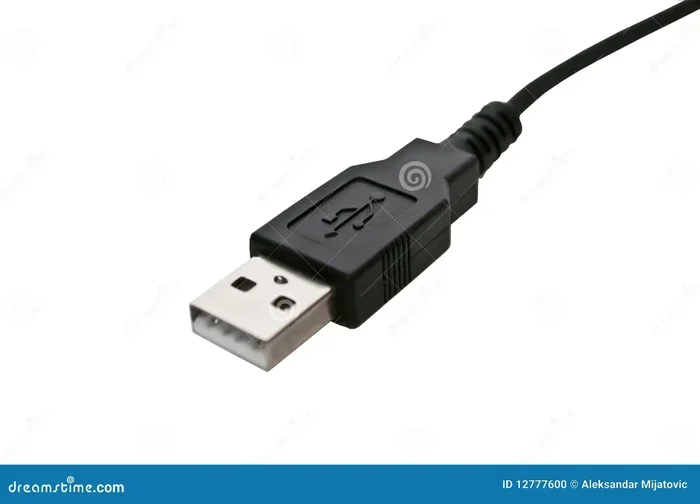
Connecting a USB headset is straightforward. You simply plug the USB connector into an available port on your computer or laptop. Most modern devices recognize the headset immediately. This plug and play functionality is one of the biggest reasons people love USB headsets. There is no need to install extra software or configure audio settings manually.
Some USB headsets use USB Type-A connectors, while others use USB Type-C. The type of connector you need depends on your device. If your laptop or desktop has USB-C ports, you might want to look for a headset that supports that connection type. USB technology is versatile and used in many devices, from storage solutions like the M2 NVMe SSD in USB Enclosures to audio equipment like headsets, making it one of the most universal connection standards today.
Does Every USB Headset Include a Microphone?
This is a question many people ask, and the answer is not as simple as yes or no. While most USB headsets do include a microphone, some models are designed for audio output only. These audio-only headsets are often marketed as USB headphones rather than USB headsets. The distinction matters when you are shopping and want to make sure you get what you need.
When shopping for a headset with microphone, always check the product description carefully. Look for terms like “with mic” or “headset” rather than just “headphones.” Retailers sometimes list USB headphones and USB headsets in the same category, which can cause confusion. Reading the product specifications before you buy will save you from an unpleasant surprise when the package arrives.
Headsets With Built-In Microphones
The vast majority of USB headsets sold today come with a built-in microphone. These microphones are usually retractable or removable, which gives you the option to use the headset for audio only when you do not need the mic. The microphone is typically positioned near the mouth area on the earcup or on a flexible boom arm.
These headsets are perfect for everyday use. Whether you are on a work call, playing a multiplayer game, or recording a voice message, the built-in microphone handles the job well. Many models also include a mute button on the cable or earcup for quick and easy mic control. Some even have volume wheels built into the cable for adjusting audio on the fly.
Headsets Without Microphones
Some USB headsets are designed purely for listening to audio. These are often called USB headphones or USB audio devices. They are popular among people who already have a separate microphone setup, such as a USB microphone like the Best Buy Blue Microphones Yeti USB Microphone or the Oneodio FM1 USB Condenser Desktop Microphone Review product line.
If you already have a quality standalone mic, buying a USB headset without a built-in mic can be a smart choice. It keeps your setup clean and lets you focus on audio quality without the bulk of a microphone arm. This approach is common among streamers and podcasters who want dedicated equipment for each function.
How Does the Microphone in a USB Headset Work?
The microphone in a USB headset works by converting your voice into digital audio signals that travel through the USB connection. Unlike traditional microphones that connect through an audio jack, the USB mic has its own digital-to-analog converter built right into the headset cable or earcup. This digital conversion is a key advantage because the microphone signal does not have to compete with other audio signals for bandwidth on an analog connection.
The result is often cleaner voice capture and less background noise. When you speak into the microphone, your voice creates vibrations in a thin membrane inside the mic. These vibrations are converted into electrical signals, which are then digitized and sent to your computer through the USB connection. The process happens almost instantly, so there is very little lag between your voice and what the other person hears.
Microphone Technology Explained
Most USB headset microphones use one of two technologies: condenser or electret. Condenser microphones are known for their sensitivity and clarity. They pick up detail well, which makes them great for voice calls and streaming. Electret microphones are a type of condenser mic that uses a permanent charge, making them more affordable and energy efficient.
Both types do a solid job for everyday use. If you are choosing between headsets, look for condenser microphone options if clarity is your top priority. For casual use or budget-friendly options, electret microphones still deliver reliable performance. The audio input quality of your headset mic will depend on the microphone type and the overall build quality of the headset.
Noise Cancellation Features
Many modern USB headsets come with noise cancellation features. These help reduce background sounds like typing, fan noise, or ambient chatter. Some headsets use software-based noise cancellation, while others rely on physical design elements like sealed ear cups and directional microphones.
Noise cancellation is especially important for remote workers and gamers. If you are in a busy household or a loud environment, a headset with good noise cancellation can make a big difference in call quality. Look for headsets that advertise noise-canceling microphones or directional mic technology. These features help your voice stand out and make conversations much more pleasant for everyone on the call.
Benefits of USB Headsets With Microphones
There are many reasons to choose a USB headset with a microphone over other audio options. Let us look at the main benefits that make these devices so popular.
Easy Setup and Compatibility
One of the biggest advantages of a USB headset is how easy it is to set up. You plug it in, and it works. There is no need to fiddle with audio settings or install drivers in most cases. This makes USB headsets a great choice for people who are not tech-savvy or who need a quick solution for a meeting or gaming session.
USB headsets are also highly compatible. They work with Windows PCs, Macs, and even some Linux machines. Many gaming consoles like the Nintendo Switch also support USB audio devices. This wide compatibility means you can use the same headset across multiple devices without any hassle. Your headset compatibility with different platforms is one of the strongest selling points of USB models.
Better Audio Quality
Because USB headsets have their own built-in sound processing, they often deliver better audio quality than headsets that rely on a computer’s internal audio hardware. The digital connection reduces interference and signal loss, which can result in clearer sound and more accurate microphone pickup.
For gamers, this means hearing footsteps and in-game audio with more precision. For professionals, it means your voice comes through clear and crisp on every call. The digital audio quality of USB headsets is hard to beat at this price point. Even budget USB headsets tend to sound better than basic wired alternatives because of the dedicated digital processing.
All-in-One Convenience
Having both headphones and a microphone in one device is incredibly convenient. You do not need to buy a separate mic, set it up, or worry about compatibility. Everything works together out of the box. This all-in-one design also means less clutter on your desk, which is always a win for people who value a clean workspace.
The headset cable management is also simpler with USB headsets. Instead of juggling an audio jack and a separate mic cable, you have one USB cable to worry about. This makes it easier to move between setups or take your headset on the go.
Common Uses for USB Headsets With Microphones
USB headsets with microphones are used in a wide variety of situations. Here are some of the most common use cases where they really shine.
Gaming and Voice Chat
Gaming is one of the most popular uses for USB headsets. Clear communication with teammates can make the difference between winning and losing a match. A gaming headset with a good microphone lets you coordinate strategies, call out enemy positions, and chat with friends without any hassle.
Most gaming USB headsets also feature surround sound, which helps you pinpoint where sounds are coming from in the game. Combined with a responsive microphone, this creates a complete immersive experience. Many gamers also appreciate the headset features like adjustable volume controls and mute buttons that are built right into the cable.
Remote Work and Video Calls
With more people working from home than ever, USB headsets have become essential office tools. They provide clear audio for video calls on platforms like Zoom, Microsoft Teams, and Google Meet. The built-in microphone ensures your colleagues can hear you without you needing to set up a separate mic.
Many remote workers prefer USB headsets because they are comfortable for long periods and easy to use. You can put on the headset, join a meeting, and focus on your work without any technical setup. The voice chat quality is smooth and natural, which helps make online meetings feel more like face-to-face conversations.
Online Learning and Streaming
Students and content creators also benefit from USB headsets with microphones. For online classes, a headset mic ensures you can participate in discussions clearly. For streamers, a USB headset provides both audio output for gameplay and a mic for talking to their audience.
If you are just getting started with streaming, a USB headset is an affordable way to get good audio quality without investing in expensive equipment. It is a practical first step for anyone looking to build a basic streaming or content creation setup.
How to Choose the Right USB Headset With a Microphone
Not all USB headsets are created equal. Here are some factors to consider when making your choice.
Key Features to Look For
When shopping for a USB headset with mic, keep these features in mind:
- Microphone quality: Look for headsets with noise-canceling microphones and adjustable mic arms. A flexible boom mic gives you the ability to position the microphone close to your mouth for the best pickup.
- Comfort: If you plan to use the headset for long sessions, comfort matters a lot. Look for padded ear cushions and adjustable headbands. Lightweight designs reduce fatigue during extended use.
- Audio quality: Check for headsets with good frequency response ranges. Wider frequency response means better sound reproduction across bass and treble. This matters for both music listening and clear voice capture.
- Build quality: Durable materials and a sturdy headband ensure your headset lasts longer. Look for reinforced cables and strong joints that can handle daily use.
- Compatibility: Make sure the headset works with your devices. Check if it supports plug and play on your operating system and whether it needs any additional software.
Quick Tips for Getting the Most Out of Your USB Headset
Here are some practical tips to help you get the best experience from your USB headset:
- Keep your USB headset cable away from power cables to reduce interference and static.
- Clean the microphone mesh regularly to prevent dust buildup that can muffle your voice.
- Adjust the mic position so it is about two finger-widths from the corner of your mouth.
- Use the mute button during calls when you are not speaking to avoid background noise.
- Store your headset in a case when not in use to prevent cable tangling and damage.
Common Mistakes People Make With USB Headsets
Even though USB headsets are simple to use, there are a few common mistakes people make. Avoiding these can help you get better performance and a longer lifespan from your headset.
One mistake is buying an audio-only USB headset when you actually need a microphone. Always double-check the product listing to confirm it includes a mic. Another mistake is ignoring fit and comfort. A headset that does not fit well can cause discomfort during long use and may not capture your voice clearly. The sound card inside the headset also needs to be compatible with your device, so check the system requirements if you run into any issues.
Some people also forget to check the USB port version on their device. A USB 2.0 port works fine for most headsets, but if your device supports USB 3.0 or USB-C, you may get better performance and faster data transfer. Keeping your headset firmware and drivers updated is also important for the best experience. These small steps can make a big difference in how your headset performs day to day.
Conclusion
So, does a USB headset have a microphone? In most cases, yes. A USB headset is designed to be a complete audio solution with both headphones and a microphone built in. They are easy to set up, offer great audio quality, and work with a wide range of devices. Whether you are gaming, working from home, or taking online classes, a USB headset with a microphone is a practical and reliable choice.
Remember to check the product details before you buy, and look for features that match your needs. With the right USB headset, you will enjoy clear sound and crisp voice communication every time you put it on. Investing in a good headset with microphone is one of the easiest ways to upgrade your daily audio experience.
Frequently Asked Questions
Do all USB headsets come with a microphone?
No, not all USB headsets include a microphone. Many models are audio-only and are marketed as USB headphones. Always check the product description to confirm whether the headset has a built-in microphone before purchasing.
Can I use a USB headset with a microphone on a gaming console?
Yes, many USB headsets work with gaming consoles like the Nintendo Switch. However, compatibility varies by console and headset model. Check the headset specifications to confirm it supports your specific gaming platform.
Do USB headsets need drivers to work?
Most USB headsets are plug and play and do not require drivers. They work immediately when you connect them to a USB port. Some advanced models may include software for customizing audio settings, but basic functionality works without any installation.
Is a USB headset microphone better than a separate microphone?
A USB headset microphone is convenient and works well for most everyday tasks like calls and gaming. However, a dedicated standalone microphone like a USB condenser mic may offer better audio quality for professional recording or streaming. It depends on your needs and budget.
How do I mute the microphone on a USB headset?
Most USB headsets have a mute button on the cable or earcup. Some models use a flip-up microphone design that physically mutes when the mic is lifted. Check your headset manual for the specific mute method.
Can I use a USB headset with a laptop that only has USB-C ports?
Yes, as long as the headset supports USB-C or you use a USB-C to USB-A adapter. Many modern USB headsets now come with USB-C connectors for direct compatibility with newer laptops and devices.
=== CONCLUSION ===
A USB headset with a microphone is a practical, convenient, and reliable audio solution for a wide range of uses. From gaming and streaming to remote work and online learning, these headsets deliver both quality sound and clear voice communication in one simple package. The plug and play design means you can start using your headset right away without any complicated setup. Whether you are upgrading your current setup or buying your first USB headset, knowing what to look for will help you make the best choice for your needs.