Does Apple Use Usb C to Usb C

Yes, Apple uses USB C to USB C on most of its modern devices. The iPhone 15, iPad, MacBook, and other Apple products now rely on the USB-C connector for charging, data transfer, and accessories. This shift from Lightning to USB-C brings faster speeds, universal compatibility, and a simpler charging experience.
Apple made a big move a few years ago when it started swapping out its trusty Lightning connector for something new. That something is USB-C. If you have been wondering does Apple use USB C to USB C, the short answer is yes. But the full story is a lot more interesting than a simple yes or no.
Today, almost every Apple device you buy comes with a USB-C port. From the latest iPhones to iPads, MacBooks, and even the Apple Watch charger, USB-C has taken over. This shift happened because of new regulations and Apple’s own desire to make life simpler for its users. In this guide, we will walk through everything you need to know about Apple’s USB-C journey.
Key Takeaways
- Apple adopted USB-C across most devices: iPhone 15, iPad, MacBook, and more now use the USB-C connector.
- USB-C to USB-C enables fast charging: USB Power Delivery can charge Apple devices much faster than Lightning.
- Data transfer speeds improved: USB 3.0 and Thunderbolt USB-C connections offer significantly faster file transfers.
- One cable fits many devices: USB-C is a universal connector that works across Apple and non-Apple products.
- Not all Apple devices use USB-C yet: Some older models still use Lightning or other ports.
- Choosing the right cable matters: Not all USB-C to USB-C cables are equal in speed and power delivery.
- The future is USB-C at Apple: Apple is fully committed to USB-C going forward.
📑 Table of Contents
The USB-C Revolution at Apple
Apple was one of the last major tech companies to hold onto its proprietary Lightning connector. For years, Lightning cables were everywhere in the Apple ecosystem. But things started to change in 2018 when Apple introduced the first iPad Pro with a USB-C port. That was a big signal.
Then came the real game-changer. In 2022, the European Union passed a law requiring all smartphones to use USB-C by 2024. Apple did not wait for the deadline. The company switched the entire iPhone lineup to USB-C starting with the iPhone 15 in 2023. This meant the iPhone 15, iPhone 16, and all future iPhones now use the same USB-C connector.
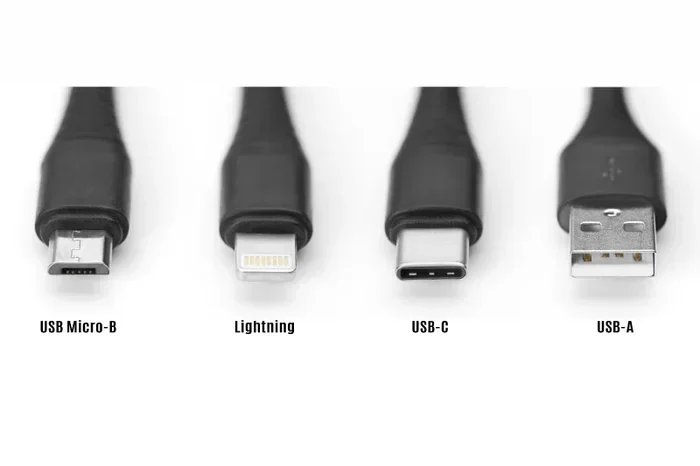
The shift was not just about following rules. Apple saw real benefits in USB-C. It is a reversible connector, which means you can plug it in either way. It supports faster data transfer and higher power delivery. And it works with thousands of accessories already on the market. Apple finally embraced the universal standard that the rest of the tech world had been using for years.
Why Apple Dropped Lightning
There were several reasons Apple moved away from Lightning. First, Lightning was an older technology. It could not keep up with the speed demands of modern devices. Second, Lightning was proprietary. That meant Apple controlled everything about it. Third, customers got frustrated carrying different cables for different devices. USB-C solved all three problems at once.
With USB-C, Apple can offer one cable that works for charging, data syncing, and video output. You can plug your iPhone into your MacBook and transfer photos in seconds. You can charge your iPad with the same cable you use for your laptop. This kind of simplicity was impossible with Lightning.
Which Apple Devices Use USB-C to USB C
Apple has rolled out USB-C across a wide range of products. Let us break down which devices use the USB-C to USB-C connection and what you can expect from each one.
iPhone 15 and Newer Models
The iPhone 15 and iPhone 16 both feature a USB-C port. This was the first time Apple switched the iPhone away from Lightning. The USB-C port on these phones supports USB 3.0 speeds for fast data transfer. It also supports USB Power Delivery, which means you can charge your iPhone much faster than before.
You can use any USB-C to USB-C cable to charge these iPhones. You can also connect them to external drives, cameras, and displays. The versatility is a huge upgrade from Lightning.
iPad Lineup
Most modern iPads now use USB-C. The iPad Air, iPad Pro, and standard iPad models all feature USB-C ports. These ports support fast charging and high-speed data transfer. The iPad Pro models especially benefit from USB-C because they can connect to external displays and storage devices.
If you want to expand your iPad storage, you can connect an external drive using a USB adapter. This lets you access large files, edit videos on the go, and back up your iPad without needing a computer.
MacBook and MacBook Pro
Apple has been using USB-C on its MacBook lineup since 2015. Every MacBook, MacBook Air, and MacBook Pro uses USB-C or Thunderbolt ports. These ports support incredibly fast data transfer, video output, and charging through a single cable.
The latest MacBooks use Thunderbolt 3 and Thunderbolt 4 over USB-C. This means you can connect external storage, monitors, and docks with ease. For creative professionals, this connectivity is essential.
AirPods and Accessories
Even some AirPods accessories now use USB-C. The AirPods Pro charging case and the latest MagSafe accessories feature USB-C connectors. This keeps the ecosystem consistent and makes charging simpler.
USB-C to USB-C: What Can You Do With It
Now that you know Apple uses USB-C, let us talk about what you can actually do with a USB-C to USB-C connection. The possibilities go far beyond just charging your phone.
Fast Charging
USB-C supports USB Power Delivery, which allows for much faster charging than older standards. With the right cable and power adapter, you can charge your iPhone or iPad in a fraction of the time it took with Lightning. This is especially useful for the iPad Pro and MacBook, which have larger batteries.
Here are some quick tips for fast charging with USB-C:
- Use a USB-C cable that supports USB Power Delivery.
- Pair your cable with a high-wattage USB-C power adapter.
- Avoid cheap cables that do not support the full power specs.
- Keep your device cool while charging for best results.
Data Transfer
Data transfer is one of the biggest advantages of USB-C. With USB 3.0 or Thunderbolt connections, you can move large files between devices in seconds. Need to transfer a video from your iPhone to your MacBook? Just connect them with a USB-C to USB-C cable and the transfer happens almost instantly.
For professionals who work with large files, this speed is a game-changer. Photographers, videographers, and designers can move terabytes of data quickly and easily.
Connecting External Storage
USB-C makes it easy to connect external storage to your Apple devices. You can plug in an external SSD, hard drive, or M.2 NVMe SSD enclosure directly to your MacBook or iPad. This is perfect for anyone who needs extra storage on the go.
For example, you can connect a SanDisk Extreme Portable SSD to your MacBook and edit 4K video directly from the drive. The speeds are incredible and the setup takes seconds.
Video Output and Displays
Thunderbolt USB-C ports on MacBooks can output video to external monitors. You can connect your MacBook to a TV, projector, or external display with a single USB-C cable. This eliminates the need for dongles and adapters in many cases.
Choosing the Right USB-C Cable for Apple Devices
Not all USB-C cables are created equal. This is something many people learn the hard way. When you are shopping for a USB-C to USB-C cable, there are a few things you need to know.
Cable Speed Ratings
USB-C cables come in different speed categories. USB 2.0 cables are the slowest and are fine for charging only. USB 3.0 cables support data transfer speeds up to 5 Gbps. USB 3.1 and USB 3.2 cables go even faster. And Thunderbolt cables offer the best speeds at up to 40 Gbps.
For Apple devices, you want at least a USB 3.0 cable if you plan to transfer data. If you want the fastest possible speeds, go with a Thunderbolt 3 or Thunderbolt 4 cable.
Power Delivery Ratings
USB-C cables also have different power delivery ratings. Some cables only handle 60 watts, while others can handle 100 watts or more. If you are charging a MacBook Pro, you need a cable that supports higher wattage. For iPhones and iPads, a standard 60-watt USB-C cable works great.
Brands to Trust
When buying USB-C cables, stick with reputable brands. Look for cables that are USB-IF certified. This ensures they meet safety and performance standards. Avoid cheap no-name cables, especially for expensive devices like MacBooks.
Common Myths About Apple USB-C
There are a lot of misconceptions floating around about Apple and USB-C. Let us clear up some of the most common ones.
Myth: All USB-C Cables Work the Same
This is probably the biggest myth. As we discussed above, USB-C cables vary widely in speed and power delivery. A USB 2.0 cable will charge your device and transfer data, but it will not give you the speeds of a Thunderbolt cable.
Myth: USB-C Means Thunderbolt
USB-C is just a connector shape. Thunderbolt is a technology that runs over USB-C cables. Not every USB-C port supports Thunderbolt. Check your device specs to see what your ports actually support.
Myth: Apple USB-C Cables Are Expensive for No Reason
Apple cables do cost more than many alternatives. But they are well-built, safe, and reliable. That said, you do not have to buy Apple cables. Many third-party options offer great quality at lower prices.
The Future of USB-C at Apple
Apple is fully committed to USB-C going forward. Every new iPhone, iPad, and MacBook uses USB-C. The company has no plans to go back to Lightning or any other proprietary connector. This means USB-C will only get better and more important in the Apple ecosystem.
Looking ahead, we can expect even faster USB standards. USB4 is already making its way into devices, and it builds on the USB-C connector. This means even faster data transfer, better video output, and more power delivery in the future.
For consumers, this is great news. One cable to rule them all is finally becoming a reality. You can charge your phone, tablet, and laptop with the same type of cable. You can connect the same accessories to all your devices. The universal connector dream is here.
What This Means for Accessories
The shift to USB-C has opened up a huge market for accessories. USB-C hubs, docks, adapters, and cables are now available everywhere. You can find M.2 NVMe SSD USB enclosures and adapters that work seamlessly with Apple devices. The accessory ecosystem around USB-C is stronger than ever.
Whether you need a simple charging cable or a complex docking station, there is a USB-C solution for you. The days of carrying multiple cables and adapters are slowly fading away.
Final Thoughts
The answer to does Apple use USB C to USB C is a clear and definitive yes. Apple has fully embraced the USB-C standard across its product lineup. From the iPhone 15 to the latest MacBook Pro, USB-C is the connector of choice. This shift brings faster speeds, better compatibility, and a simpler charging experience for millions of users.
If you are still using older Apple devices with Lightning, now is a great time to make the switch. Invest in a few good USB-C to USB-C cables, explore the world of USB-C accessories, and enjoy the convenience of a universal connector. Apple made the right call with USB-C, and the benefits are clear for everyone.
The transition to USB-C is not just a technical change. It is a shift toward a simpler, more connected tech experience. Embrace it, and you will wonder how you ever lived without it.
Frequently Asked Questions
Do all Apple iPhones use USB-C now?
Yes, all iPhones starting from the iPhone 15 use USB-C. Apple switched from Lightning to USB-C with the iPhone 15 lineup in 2023. This includes the iPhone 15, iPhone 15 Plus, iPhone 15 Pro, and iPhone 15 Pro Max. Future iPhone models will continue to use USB-C.
Can I use any USB-C to USB-C cable with my Apple device?
You can use any USB-C cable for basic charging. However, for fast data transfer and fast charging, you need a cable that supports USB 3.0 or higher. Thunderbolt cables offer the best performance for MacBook and iPad Pro users.
Is USB-C faster than Lightning for data transfer?
Yes, USB-C is significantly faster than Lightning. USB 3.0 USB-C connections can transfer data at up to 5 Gbps. Lightning maxes out at much slower speeds. For large files like videos, the difference is very noticeable.
Can I charge my MacBook with a USB-C iPhone charger?
Yes, you can charge a MacBook with a USB-C charger. However, for best results, use a charger with sufficient wattage. A 60-watt USB-C charger works for most MacBooks, but MacBook Pro models may benefit from higher-wattage adapters.
Will Apple ever go back to Lightning?
It is very unlikely. Apple has fully committed to USB-C across all its product lines. EU regulations and the benefits of USB-C make it clear that this is the long-term connector standard for Apple devices.
What is the difference between USB-C and Thunderbolt?
USB-C is a connector shape. Thunderbolt is a technology that uses the USB-C connector. Thunderbolt cables offer faster speeds and more features than standard USB-C cables. Not all USB-C ports support Thunderbolt, so check your device specifications.