Which Hp Laptops Charge with Usb C
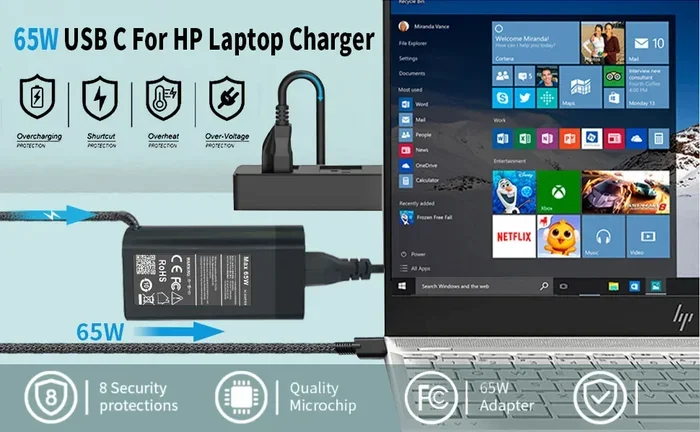
Many modern HP laptops now support USB-C charging, making it easier to use one cable for power and data. Models like the HP Envy, HP Spectre, HP EliteBook, and HP Omen series offer USB-C power delivery. Knowing which HP laptop USB-C charging options work for you saves time, money, and hassle.
Have you ever grabbed your HP laptop charger and realized it is not at home? It happens to all of us. That is exactly why USB-C charging has become such a big deal. If you own an HP laptop or are thinking about buying one, you want to know which HP laptops charge with USB C. The good news is that many modern HP laptops now support this convenient charging method. You can use a single cable for power, data, and even video output.
In this guide, we will walk through everything you need to know about HP laptop USB-C charging. We will cover which HP models support it, how fast it charges, what gear you need, and how to avoid common mistakes. Whether you own an HP Envy, HP Spectre, or an older HP Pavilion, this article has you covered.
Key Takeaways
- USB-C charging is now standard on many newer HP laptop models, replacing older barrel chargers.
- HP Envy, Spectre, EliteBook, and Omen lines are among the most popular HP laptops with USB-C charging support.
- USB Power Delivery (PD) standards determine how fast your HP laptop charges through a USB-C port.
- Not all USB-C cables are equal. Using the right cable and charger matters for safe and fast charging.
- Check your HP laptop model before buying a USB-C charger to ensure full compatibility.
- Common charging issues like slow speeds or non-recognition can often be fixed with simple troubleshooting steps.
📑 Table of Contents
- Understanding USB-C Charging on HP Laptops
- HP Laptop Models That Support USB-C Charging
- How to Know if Your HP Laptop Supports USB-C Charging
- USB-C Charging Speeds and Power Delivery Standards
- Best USB-C Chargers for HP Laptops
- Common USB-C Charging Issues and How to Fix Them
- The Future of USB-C Charging on HP Laptops
Understanding USB-C Charging on HP Laptops
USB-C is a small, reversible connector that has taken the tech world by storm. Unlike the old barrel plugs, USB-C plugs in either way. You do not have to flip it around three times trying to get it right. More importantly, USB-C supports USB Power Delivery, also known as USB PD. This standard allows laptops to draw power through the USB-C cable.
HP was one of the early adopters of USB-C charging on laptops. Many HP laptop models released after 2019 now feature at least one USB-C port that can handle charging. This is a huge convenience. You can carry just one cable and one charger for your laptop, phone, and tablet.
What Makes USB-C Different from Other Ports
USB-C is not just about charging. It is a full-featured connector. Here is what makes it special:
- Reversible design – no more guessing which way to plug it in.
- High power delivery – USB PD can push up to 100 watts or more, enough to charge most laptops.
- Fast data transfer – USB 3.1 and USB 4 offer speeds up to 40 Gbps.
- Video output – many USB-C ports support DisplayPort or Thunderbolt for external monitors.
- Universal compatibility – one cable can charge many devices, from laptops to phones to earbuds.
For HP laptop users, the biggest benefit is the charging capability. You can ditch the bulky proprietary charger and switch to a compact USB-C power adapter. This also means you can charge your HP laptop using a portable battery pack, a car charger, or even a USB-C docking station.
HP Laptop Models That Support USB-C Charging
Not every HP laptop supports USB-C charging. In fact, some budget models still use the traditional barrel plug. Here is a breakdown of the HP laptop lines that do support USB-C power delivery for charging.
HP Envy Series
The HP Envy lineup is one of the most popular consumer laptop families from HP. Most Envy models released since 2020 come with USB-C charging. This includes the HP Envy x360, HP Envy 13, HP Envy 15, and HP Envy 17. These laptops typically use USB-C with USB PD 3.0 or higher, which delivers up to 65 to 100 watts of power.
If you own an HP Envy, check the port on the side of your laptop. If you see a USB-C port with the lightning bolt or power symbol next to it, that port can charge your laptop. This is one of the easiest ways to confirm USB-C charging compatibility on your HP Envy.
HP Spectre Series
The HP Spectre series is HP’s premium line of laptops. These machines are known for their sleek design and powerful performance. Nearly all HP Spectre models from the last few years support USB-C charging. The HP Spectre x360, HP Spectre 13, and HP Spectre 14 all use USB-C as their primary charging method.
One nice thing about the Spectre series is that it often supports fast charging through USB-C. You can get a significant battery boost in just 30 minutes of charging. This makes the Spectre a great choice for people who are always on the go.
HP EliteBook Series
The HP EliteBook line is designed for business professionals. These laptops are built to be durable, secure, and powerful. Many EliteBook models, including the EliteBook 840, EliteBook 860, and EliteBook x360, support USB-C charging. In fact, USB-C has become the standard charging method across most modern business laptops.
HP EliteBook users also benefit from USB-C docking stations. You can connect your laptop to a dock with a single USB-C cable, and it handles charging, display output, and peripheral connections all at once. This is a game-changer for the modern workplace.
HP Omen Series
HP Omen laptops are built for gaming. You might not expect a gaming laptop to charge through USB-C, but many Omen models do. The HP Omen 15 and HP Omen 16 often include USB-C ports that support charging. However, gaming laptops tend to use more power, so you may need a higher-wattage USB-C charger to charge while gaming.
Keep in mind that some Omen models still use a traditional power barrel plug for the primary charging port. Always double-check the specs of your specific Omen model before relying on USB-C charging alone.
How to Know if Your HP Laptop Supports USB-C Charging
Not sure if your HP laptop can charge through USB-C? It is easy to find out. Here are a few simple ways to check.
Check the Port Symbols
Look at the USB-C ports on your HP laptop. Next to the port, you should see a small symbol. A lightning bolt or a battery icon means that port supports charging. A standard USB-C symbol without any extra icons means it is data-only. This is one of the simplest ways to confirm USB-C charging capability.
Check the HP Support Website
You can also visit the HP Support website and enter your laptop model number. The specifications page will list all the ports and their capabilities. Look for USB-C with Power Delivery or USB-C with charging support. This method works for all HP laptop models, including older ones.
Check Your Original Charger
Look at your original HP laptop charger. If it has a USB-C connector, then your laptop definitely supports USB-C charging. If it has a barrel plug, your laptop might still have a USB-C port for data, but it may not support charging through USB-C.
Some HP laptops have both a barrel plug port and a USB-C port. In those cases, the barrel plug is the primary charging method, and the USB-C port is for data and charging accessories only. Always verify which port is the main charging port for your specific model.
USB-C Charging Speeds and Power Delivery Standards
Speed matters when it comes to charging your laptop. You do not want to wait hours for your battery to fill up. USB-C charging speed depends on the Power Delivery standard your laptop and charger support.
USB PD 2.0 vs USB PD 3.0
USB Power Delivery 2.0 can deliver up to 100 watts of power. USB PD 3.0 introduced smarter power management and can adjust the power draw based on what the laptop needs. Most HP laptops released in the last few years support USB PD 3.0 or higher.
For faster charging, look for a USB-C charger that supports HP Smart Charge or the latest USB PD 3.1 standard. USB PD 3.1 can deliver up to 240 watts, which is more than enough for even the most power-hungry HP gaming laptops.
How Fast Does USB-C Charge an HP Laptop?
Charging speeds vary based on the charger wattage and the laptop model. Here is a general idea:
- 45W USB-C charger – good for HP Envy and HP Spectre models with smaller batteries. Full charge in about 2 to 3 hours.
- 65W USB-C charger – works well for most HP laptops with standard batteries. Full charge in about 1.5 to 2.5 hours.
- 100W USB-C charger – ideal for HP Omen gaming laptops and larger Envy models. Full charge in about 1 to 2 hours.
- 130W+ USB-C charger – best for high-performance HP laptops that need more power. Fastest charging times.
Using a lower-wattage charger will still charge your laptop, but it will take longer. And if you are gaming or running heavy apps while charging, the laptop might not charge at all if the charger wattage is too low.
Best USB-C Chargers for HP Laptops
Not all USB-C chargers are created equal. To get the best performance and safety, you need the right charger for your HP laptop. Here are some tips for choosing the best one.
What to Look for in a USB-C Charger
- Wattage match – choose a charger that matches or exceeds your HP laptop’s charging requirements.
- USB PD support – make sure the charger supports USB Power Delivery, not just basic USB-C.
- Quality certification – look for chargers with UL, CE, or MFi certification for safety.
- Cable quality – a good USB-C cable rated for high wattage is just as important as the charger itself.
- Portability – compact GaN (Gallium Nitride) chargers are small, lightweight, and powerful.
Many users also ask about using third-party chargers with their HP laptops. The short answer is yes, as long as the charger supports USB PD and matches the right wattage. HP laptops are designed to work with standard USB-C power delivery chargers from any brand.
Can You Use a Phone Charger to Charge an HP Laptop?
Some people wonder if they can use their phone’s USB-C charger for their HP laptop. The answer depends on the wattage. Most phone chargers deliver 18W to 30W. HP laptops typically need 45W to 130W. A phone charger will charge an HP laptop very slowly, and it might not charge at all under heavy use.
If you are in a pinch, a phone charger can give you a small top-up. But for regular use, always use a charger with the proper wattage for your HP laptop model.
When shopping for USB-C accessories, you might also come across USB-C hubs and adapters. These are great for expanding your connectivity. If you also use external storage, you can find options like an M 2 Nvme To Usb C Ssd Enclosure that connects through USB-C and doubles as a charging hub for your devices.
Common USB-C Charging Issues and How to Fix Them
USB-C charging is convenient, but it is not perfect. Sometimes things go wrong. Here are the most common issues HP laptop users face and how to fix them.
Laptop Does Not Recognize the USB-C Charger
This is a common problem. Usually, it happens because of a faulty cable or an incompatible charger. Try using a different USB-C cable first. If that does not work, try a different charger. Make sure the charger supports USB PD and the correct wattage for your HP laptop.
Charging Is Very Slow
If your HP laptop charges slowly through USB-C, the charger wattage might be too low. Check the wattage rating on your charger and compare it to your laptop’s requirements. Also, make sure your USB-C cable supports high wattage. Some cheap cables are limited to data transfer only and cannot handle power delivery.
Laptop Only Charges When Plugged in a Certain Way
Some HP laptops have a specific USB-C port for charging. If you plug the charger into a different USB-C port, it might not charge. Check your laptop manual or the HP support page to find out which port is the charging port. On some models, only the port on the left side supports charging.
Charging Intermittently or Stopping
If your HP laptop keeps stopping and starting while charging, the USB-C cable or port might be loose. Try a different cable. If the problem persists, check the USB-C port on your laptop for dust or debris. A loose port can sometimes be fixed with a small piece of tape or by adjusting the cable angle.
For users who also connect external devices through USB-C, keep in mind that some USB-C hubs and adapters can interfere with charging. If you notice charging issues when using a hub, try disconnecting it and charging directly from the laptop’s USB-C port.
Another helpful tip is to keep your HP laptop firmware updated. HP regularly releases BIOS updates that can improve USB-C charging compatibility and fix known issues. You can check for updates on the HP Support website by entering your laptop model number.
The Future of USB-C Charging on HP Laptops
The trend is clear. USB-C is becoming the universal charging standard for laptops, and HP is leading the way. More and more HP laptop models are dropping the barrel plug entirely in favor of USB-C charging. This shift makes life easier for everyone. You carry fewer cables, you use fewer adapters, and you can charge your laptop from more sources.
Looking ahead, we can expect even faster USB-C charging speeds with the adoption of USB PD 3.1 and USB4 standards. HP laptops will likely support higher wattages through USB-C, making it possible to charge even the most powerful gaming and workstation laptops with a single USB-C cable.
If you are in the market for a new HP laptop, USB-C charging should be high on your list of must-have features. It is convenient, versatile, and future-proof. And if you already own an HP laptop with USB-C charging, you are already ahead of the curve.
For users who want to get the most out of their USB-C setup, consider pairing your HP laptop with quality USB-C accessories. A good USB-C charger, a reliable cable, and a versatile hub can transform how you work and charge on the go. If you are interested in expanding your USB-C ecosystem, you might explore options like M 2 Nvme To Usb C Ssd Enclosure solutions that let you connect external storage and charge your devices through a single USB-C connection.
In short, USB-C charging on HP laptops is a practical, modern solution that saves time and reduces cable clutter. Whether you have an HP Envy, HP Spectre, HP EliteBook, or HP Omen, USB-C charging is likely already supported or coming soon. Embrace the change, invest in the right gear, and enjoy the simplicity of one cable for everything.
Frequently Asked Questions
Can all HP laptops charge with USB-C?
No, not all HP laptops support USB-C charging. Most HP laptops released after 2020 do, but some budget models and older laptops still use traditional barrel plug chargers. Check your specific HP model to confirm USB-C charging support.
What wattage USB-C charger do I need for my HP laptop?
It depends on your HP laptop model. Most HP Envy and Spectre laptops need 45W to 65W. HP Omen gaming laptops usually require 65W to 130W. Check your laptop’s manual or the HP support website for the exact wattage requirement.
Can I use any USB-C cable to charge my HP laptop?
Not all USB-C cables are the same. You need a cable that supports USB Power Delivery and the correct wattage for your HP laptop. Using a low-quality or low-wattage cable may result in slow charging or no charging at all.
Is it safe to use a third-party USB-C charger with my HP laptop?
Yes, it is safe as long as the third-party charger supports USB Power Delivery and matches the correct wattage for your HP laptop. HP laptops are designed to work with any USB PD-compliant charger, regardless of the brand.
Why is my HP laptop not charging through USB-C?
There are several possible reasons. The cable might not support power delivery, the charger wattage might be too low, or the USB-C port on your laptop might be data-only. Try a different cable or charger first, and check your laptop specifications to confirm USB-C charging support.
Will USB-C charging replace the barrel plug on all HP laptops?
It is very likely. USB-C is becoming the universal standard for laptop charging. Most new HP laptop models now use USB-C as the primary or only charging method. Over time, you can expect even HP budget and business laptops to adopt USB-C charging fully.
=== CONCLUSION ===
So, which HP laptops charge with USB C? The answer is that many modern HP laptops do, including models from the HP Envy, HP Spectre, HP EliteBook, and HP Omen lines. USB-C charging offers convenience, speed, and versatility that traditional barrel plug chargers simply cannot match.
To get the best results, make sure you use a USB-C charger that supports USB Power Delivery and matches your laptop’s wattage requirements. Invest in a quality cable, and always check your laptop’s specifications to confirm which USB-C port handles charging.
With the right setup, you can charge your HP laptop from almost anywhere using a single USB-C cable. It is simple, fast, and future-proof. Make the switch to USB-C charging today and enjoy the freedom of one cable for all your power needs.