Does Headphone Jack to Usb Work
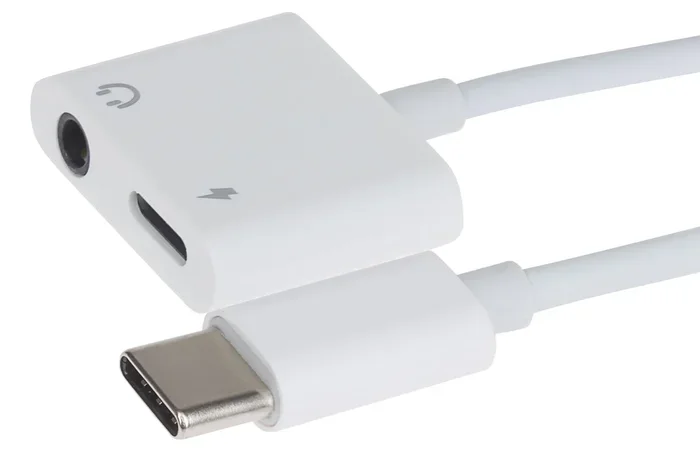
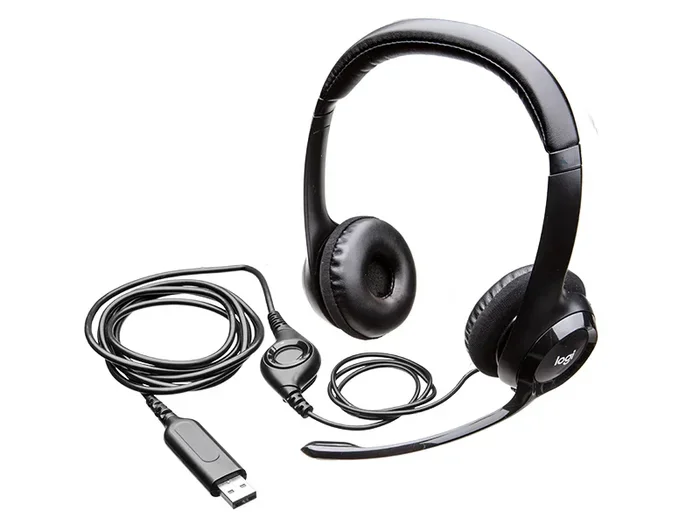
Yes, a headphone jack to USB adapter works by converting analog audio signals into digital data your computer can process. These small USB audio adapters let you plug in standard headphones when your device lacks a traditional audio port. Whether you use a 3.5mm to USB converter or a USB-C headphone adapter, the technology is simple, affordable, and widely compatible.
Have you ever plugged your favorite headphones into your laptop and found there is no headphone jack? You are not alone. Many modern laptops, tablets, and phones have dropped the traditional 3.5mm audio port. This leaves people searching for a simple solution. The answer often comes in the form of a headphone jack to USB adapter. But does it really work?
The short answer is yes. A headphone jack to USB adapter works in most situations. It takes the analog signal from your headphones and converts it into a digital signal your device understands. This tiny gadget bridges the gap between old-school audio gear and modern devices. In this guide, we will walk through exactly how these adapters work, what to look for, and when they might not be the best choice.
Key Takeaways
- Headphone jack to USB adapters work reliably for most everyday listening, gaming, and video tasks.
- Analog-to-digital conversion is the core process that makes these adapters function.
- USB-C and USB-A adapters serve different devices, so check your port type before buying.
- Sound quality can vary depending on the adapter’s build quality and DAC chip.
- Plug-and-play setup means no drivers or software are needed for most models.
- Bluetooth speakers offer a wireless alternative if you prefer not to use a wired adapter.
📑 Table of Contents
- How Does a Headphone Jack to USB Adapter Work?
- When Do You Need a Headphone Jack to USB Adapter?
- Do Headphone Jack to USB Adapters Affect Sound Quality?
- Common Problems and How to Fix Them
- Alternatives to Headphone Jack to USB Adapters
- How to Choose the Right Headphone Jack to USB Adapter
- Expert Insight: The Future of Audio Connectivity
- Conclusion
How Does a Headphone Jack to USB Adapter Work?
Understanding how a headphone jack to USB adapter works is simpler than you might think. The adapter contains a small chip called a DAC, which stands for digital-to-analog converter. Wait, that sounds backward, right? Let us break it down.
Your computer or phone stores audio as digital data. When you play a song, that digital file needs to become an analog electrical signal. That signal travels to your headphones and turns into sound. The DAC inside the adapter handles this conversion. It takes the digital audio from your device and outputs it as an analog signal through the 3.5mm headphone jack.
So when you plug a 3.5mm to USB adapter into your laptop, here is what happens:
- The device recognizes the adapter as a USB audio device.
- Digital audio data travels from the device to the adapter.
- The DAC chip inside the adapter converts the data to analog.
- The analog signal flows through the 3.5mm jack to your headphones.
- You hear sound.
This process happens in milliseconds. You do not need to press any buttons or wait for anything. It is instant and seamless for most users.
USB-A vs USB-C Adapters
Not all USB adapters are the same. The two main types are USB-A and USB-C. USB-A is the older, rectangular port found on desktops and older laptops. USB-C is the smaller, oval-shaped port found on newer laptops, phones, and tablets.
Make sure you buy the right type for your device. A USB-A adapter will not fit into a USB-C port without an additional cable. Some adapters come with both connector types, which is a great option if you use multiple devices.
For users who also work with storage devices, the M 2 NVMe to USB C SSD enclosure shows how USB-C has become a universal connector for many accessories. The same port philosophy applies to audio adapters.
When Do You Need a Headphone Jack to USB Adapter?
You might need a headphone jack to USB adapter more often than you think. Here are the most common situations where these adapters save the day.
Laptops Without a Headphone Jack
Many newer ultrabooks and thin laptops have removed the 3.5mm audio jack entirely. If your laptop only has USB ports, a USB audio adapter is your best friend. You simply plug it in and start listening. No cables, no fuss, no need to buy special wireless headphones.
Desktop Computers
Some desktop computers also lack front or rear audio jacks. This is common with compact PCs and all-in-one desktops. A USB sound card solves this problem quickly. It also gives you a backup audio option if your built-in sound card stops working.
Gaming Setups
Gamers often use headsets with a single combined audio jack. A USB adapter lets you plug in these headsets to PCs or consoles that only have USB ports. Some gaming adapters even include a microphone input, so you can chat with teammates while listening to game audio.
Travel and Portability
Travelers love these adapters because they are small and lightweight. You do not need to carry separate headphones for your phone and your laptop. One adapter works across multiple devices. It fits in your pocket or laptop bag easily.
Do Headphone Jack to USB Adapters Affect Sound Quality?
This is one of the most common questions people ask. The honest answer is: it depends. A cheap, no-name adapter might introduce some noise or reduce audio clarity. A well-built adapter with a good DAC chip will sound just as good as your device’s built-in audio jack.
Here are some factors that affect sound quality:
- DAC Chip Quality: Better chips produce cleaner, richer sound.
- Build Quality: Metal adapters reduce interference better than plastic ones.
- Driver Support: Some adapters need drivers for optimal performance.
- Impedance Matching: High-impedance headphones need more power than cheap adapters can provide.
For casual listening, most adapters sound great. You will notice a difference mainly if you use high-end audiophile headphones. In that case, investing in a dedicated external DAC might be worth it.
Quick Tip: Test Your Adapter
Plug your adapter in and play a song with deep bass and clear vocals. If you hear any crackling, static, or distortion, the adapter might be low quality. Try a different port or a different adapter to compare. This simple test takes seconds and saves you from buying a dud.
Common Problems and How to Fix Them
Headphone jack to USB adapters work well most of the time. But sometimes, things go wrong. Here are the most common issues and easy fixes.
No Sound at All
If you plug in your adapter and hear nothing, check a few things first. Make sure the adapter is fully inserted into the USB port. Try a different USB port. Check your device’s sound settings and make sure the USB adapter is selected as the output device.
On Windows, right-click the speaker icon in your taskbar and choose the playback device. On Mac, go to System Settings and select Sound. Pick the USB adapter as your output.
Distorted or Crackling Sound
Distorted audio often means the adapter is underpowered or low quality. Try a powered USB hub if you are using a laptop. Also, check if your headphones work with another device. This helps you figure out if the problem is the adapter or the headphones.
Adapter Not Recognized
Some devices need drivers to recognize a USB audio adapter. Visit the manufacturer’s website and download the latest driver. On most modern systems, the adapter should install automatically. If it does not, try unplugging and replugging it into a different port.
Alternatives to Headphone Jack to USB Adapters
Adapters are not the only way to listen to audio on devices without a headphone jack. Here are some alternatives worth considering.
Bluetooth Headphones
Bluetooth headphones connect wirelessly to your device. They eliminate the need for any adapter or cable. The how Bluetooth speakers work article explains the same wireless technology that powers these headphones. Bluetooth is convenient, but it introduces slight audio delay and depends on battery life.
USB DAC and Amplifier Combos
For serious audio lovers, a dedicated USB DAC offers superior sound quality. These devices contain high-end DAC chips and amplifiers. They cost more than basic adapters but deliver noticeably better audio. Audiophiles and music producers often prefer this route.
Wireless Charging and Audio Solutions
Some newer devices support wireless audio through standards like AirPlay or Chromecast. You can stream audio to wireless speakers or compatible headphones without any cables or adapters. This is a clean solution, but it requires a strong Wi-Fi connection.
How to Choose the Right Headphone Jack to USB Adapter
Not all adapters are created equal. Here is what to look for when shopping for one.
- Compatibility: Match the USB type to your device (USB-A or USB-C).
- DAC Quality: Look for adapters with dedicated DAC chips for better sound.
- Build Material: Metal housings reduce interference and feel more durable.
- Extra Features: Some adapters include mic inputs, volume controls, or multiple jacks.
- Price: Good adapters cost between $10 and $30. Anything cheaper might sound worse.
- Brand Reputation: Stick with trusted brands known for audio equipment.
For users exploring USB connectivity options more broadly, the NVMe SSD to USB adapter guide covers how USB adapters work across different device types. The same principles of compatibility and connection apply to audio adapters.
Also keep in mind that some adapters work better with specific operating systems. Windows, Mac, and Chrome OS all handle USB audio devices slightly differently. Check the adapter’s specifications to confirm it works with your system.
Expert Insight: The Future of Audio Connectivity
The trend in device design keeps moving toward fewer ports. USB-C is becoming the standard for charging, data transfer, and audio output all in one. This means the 3.5mm headphone jack may continue to disappear from more devices. USB audio adapters will become even more important as a result.
Some manufacturers now produce USB-C headphones that plug directly into modern laptops. These bypass the need for an adapter entirely. But for people who already own standard headphones with a 3.5mm plug, adapters remain the most practical solution. They are affordable, easy to use, and work with almost any device.
Conclusion
So, does headphone jack to USB work? Absolutely. A headphone jack to USB adapter is a simple, effective way to use your wired headphones with modern devices that lack a traditional audio port. The technology relies on a DAC chip that converts digital audio to analog sound in milliseconds. Most adapters are plug-and-play and require no setup whatsoever.
Whether you need a 3.5mm to USB adapter for your laptop, a USB-C headphone adapter for your new phone, or a backup audio solution for your desktop, these small devices deliver reliable performance. Just choose a quality adapter, match it to your device’s port type, and enjoy your music, podcasts, and calls without any hassle.
The next time someone asks you if these adapters really work, you can confidently say yes. They are one of the most useful and affordable accessories you can own in a world that keeps removing the headphone jack.
Frequently Asked Questions
Can I use a headphone jack to USB adapter with any device?
Most devices with a USB port will work with a headphone jack to USB adapter. This includes laptops, desktops, tablets, and even some smart TVs. Just make sure the adapter matches your port type, whether USB-A or USB-C.
Do I need to install drivers for a USB audio adapter?
Most modern adapters are plug-and-play and do not need drivers. Windows, Mac, and Chrome OS usually recognize them automatically. If your device does not recognize the adapter, check the manufacturer’s website for drivers.
Will a USB headphone adapter reduce sound quality?
A good quality adapter will not reduce sound quality. Cheap adapters with low-grade DAC chips may introduce noise or distortion. Stick with reputable brands and you should get clear, reliable audio.
Can I use a headphone jack to USB adapter for gaming?
Yes, you can. Many gamers use USB audio adapters to connect headsets to PCs and laptops. Some adapters even include a microphone input for in-game chat. Look for adapters labeled as gaming audio adapters for the best experience.
Are USB-C to 3.5mm adapters the same as headphone jack to USB adapters?
They work the same way but in reverse. A USB-C to 3.5mm adapter takes digital audio from a USB-C port and outputs it through a 3.5mm headphone jack. A headphone jack to USB adapter does the opposite. Both solve the same problem of missing audio ports.
What is the difference between a USB sound card and a headphone jack to USB adapter?
A USB sound card is essentially the same thing as a headphone jack to USB adapter. The terms are used interchangeably. Sound cards may offer more features like multiple audio inputs, surround sound support, or higher-quality DAC chips.