Are Usb C Chargers All the Same
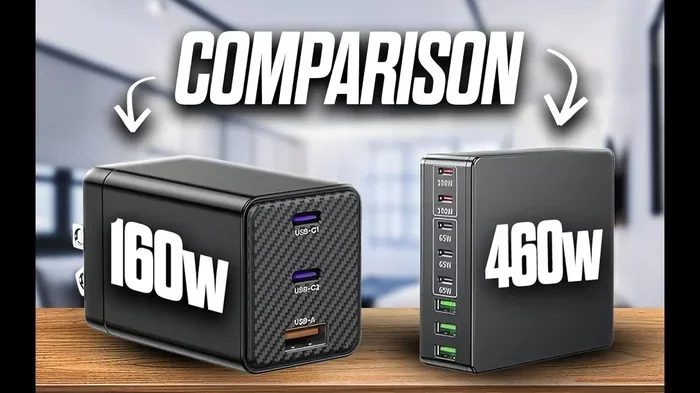
No, USB C chargers are not all the same. They differ in power delivery, wattage, and charging speed. Choosing the right USB-C charger depends on your device’s needs and the charger’s capabilities. This guide breaks down everything you need to know.
Have you ever grabbed a USB-C charger and plugged it in, only to wonder why your phone or laptop charges so slowly? You are not alone. USB-C chargers look the same on the outside, but they are far from identical on the inside. Some deliver 10 watts. Others push 100 watts or more. The difference matters more than most people realize.
Are USB-C chargers all the same? The short answer is no. They come in different shapes, sizes, and power levels. Each charger has its own charging protocol, wattage rating, and compatibility profile. Picking the wrong one can mean slow charging, wasted time, or even a damaged device. In this guide, we will walk through everything you need to know about USB-C charging, so you can make the right choice every time.
The USB-C connector has become the go-to standard for phones, laptops, tablets, and even some external hard drives and accessories. But the connector is just the plug. What is inside the charger determines how much power flows to your device. Understanding this difference is the first step toward better charging.
Key Takeaways
- USB-C chargers vary widely in wattage, speed, and compatibility.
- USB Power Delivery (PD) is the standard that determines how fast your device charges.
- Not all USB-C cables are equal — cable quality affects charging speed.
- GaN chargers are smaller, cooler, and more efficient than traditional chargers.
- Using the wrong charger can slow down charging or even damage your device.
- Check your device’s charging requirements before buying a USB-C charger.
📑 Table of Contents
What Makes USB-C Chargers Different?
At first glance, every USB-C charger looks the same. The small oval-shaped connector is universal. But peel back the surface and you will find big differences in how each charger works. These differences come down to a few key factors that affect your daily charging experience.
Wattage and Power Output
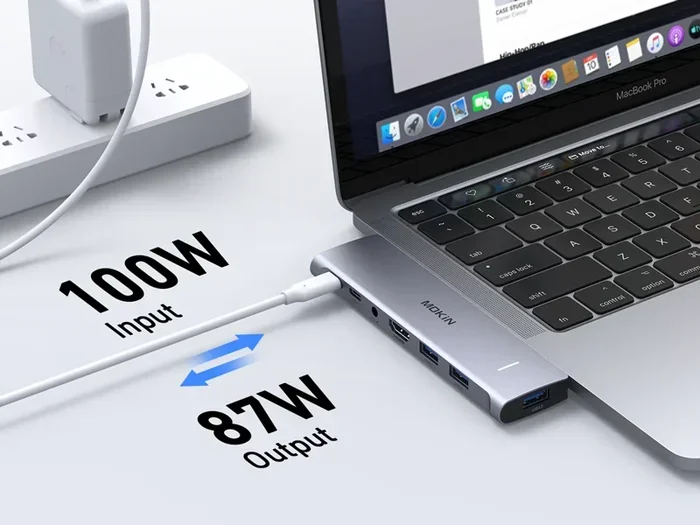
Wattage is the most important number on any charger. It tells you how much power the charger can deliver. A low-wattage charger might only push 5 watts, which is fine for a small Bluetooth speaker but painfully slow for a laptop. A high-wattage charger can deliver 65, 100, or even 240 watts.
Here is a simple breakdown of common wattage levels and what they are best for:
- 5-15 watts: Basic phones, earbuds, and small accessories.
- 20-30 watts: Most smartphones and tablets.
- 45-65 watts: Lightweight laptops and ultrabooks.
- 100+ watts: Gaming laptops, monitors, and power-hungry devices.
If you use a 15-watt charger with a laptop that needs 65 watts, your device will charge very slowly. It may even lose battery while you use it. Matching the charger wattage to your device is essential for good performance.
USB Power Delivery (PD) Standards
USB Power Delivery, also called USB PD, is the protocol that controls how power moves from the charger to your device. It is not just one fixed rule. USB PD has evolved over the years, and different versions support different power levels.
Here are the main USB PD versions and what they bring:
- USB PD 2.0: Supports up to 100 watts. This is still common in many chargers.
- USB PD 3.0: Adds smarter power management and better efficiency.
- USB PD 3.1: The latest standard, supporting up to 240 watts for demanding devices.
When shopping for a USB-C charger, look for the USB PD logo or check the product specs. Not every charger supports every PD version. A charger with older PD standards may not work well with newer devices that need higher wattage.
Charger Chipsets and Smart Charging
Modern USB-C chargers are smarter than they used to be. Inside every good charger is a small chip that talks to your device. This chip negotiates the right voltage and current for your specific gadget. This process is called smart charging.
Smart charging does two important things. First, it prevents overcharging, which can shorten battery life. Second, it ensures your device gets the fastest safe charge possible. Cheap chargers often skip this smart chip, which means they deliver a fixed power level whether your device needs it or not.
USB-C Cables: The Overlooked Hero
People focus so much on the charger that they forget the cable. But USB-C cables matter just as much. A great charger paired with a bad cable will still charge slowly. The cable is the bridge between power and your device, and not all bridges are built the same.
Cable Quality and Thickness
The thickness of a USB-C cable, measured by its wire gauge, directly affects how much power it can carry. Thicker cables have lower resistance and can handle more current. Thin, flimsy cables are often limited to 60 watts or less, even if your charger can push more.
Here are some quick tips for choosing the right cable:
- Look for 56k-ohm resistors in the cable, which is the USB-C spec for full power delivery.
- Avoid ultra-thin cables unless you only need basic charging.
- Buy cables from reputable brands or ones certified by USB-IF.
- Check the cable’s rated wattage before assuming it can handle your charger’s output.
USB-C Cable Length and Performance
Longer cables tend to lose more power along the way. A 2-foot cable will almost always charge faster than a 6-foot cable of the same quality. If speed matters to you, keep your cables short and high-quality. This is especially true for fast charging devices like laptops and tablets.
Some people use a USB-C hub or adapter with their cable, which can also affect charging speed. Extra connections mean more resistance, so try to keep the path between charger and device as direct as possible.
GaN Chargers: The New Standard in USB-C Charging
If you have been shopping for chargers recently, you have probably seen the term GaN everywhere. GaN stands for gallium nitride, a material that replaces the traditional silicon inside chargers. The result is a smaller, cooler, and more efficient charger.
Why GaN Chargers Are Better
GaN chargers offer several advantages over traditional silicon-based chargers:
- Smaller size: GaN chargers can be up to 50% smaller than comparable silicon chargers.
- Less heat: They run cooler, which means better long-term performance.
- Higher efficiency: More of the power from the wall reaches your device.
- Faster charging: Many GaN chargers support multi-device charging with smart power distribution.
These chargers are especially popular for travel. A single GaN charger can replace a brick that used to take up half your bag. Many models now include multiple USB-C ports so you can charge your phone, laptop, and earbuds all at once.
Are GaN Chargers Worth the Price?
GaN chargers do cost a bit more than traditional options, but the price gap is closing fast. For most people, the benefits of smaller size, cooler operation, and better efficiency make them well worth the investment. If you charge multiple devices daily, a good GaN charger can simplify your setup and save you time.
Common Charging Mistakes People Make
Even with the right charger, some habits can hurt your charging speed and battery health. Here are the most common mistakes to avoid.
Using Random Chargers You Find
It is tempting to grab any available charger when yours is missing. But using a random charger at a café or airport can be risky. Unknown chargers may not follow proper safety standards, and they might deliver inconsistent power. Over time, this can wear down your battery or worse.
Always carry your own charger when possible. A compact USB-C charger fits easily in any bag and gives you peace of mind.
Ignoring Cable Quality
We mentioned this above, but it bears repeating. Many people buy an expensive charger and pair it with a cheap cable. The result is a bottleneck. The charger is ready to deliver fast power, but the cable cannot handle it. Invest in good cables as much as you invest in good chargers.
Charging Through Cases or Barriers
Charging your device while it is inside a thick case can trap heat. Heat is the enemy of battery health. If you notice your device getting warm while charging, try removing the case. This simple step can improve both charging speed and long-term battery life.
Leaving Devices Plugged in Overnight
Modern devices have battery protection circuits, so leaving them plugged in overnight is not as dangerous as it used to be. However, it is still better to charge your device in shorter bursts when possible. This keeps the battery healthier over time.
How to Choose the Right USB-C Charger
With so many options on the market, choosing the right charger can feel overwhelming. Here is a simple framework to help you decide.
Step 1: Check Your Device’s Requirements
Look at your device manual or the original charger that came in the box. Find the wattage and voltage listed there. This tells you exactly what your device needs. If your laptop needs 65 watts, do not buy a 30-watt charger and expect good results.
Step 2: Decide on the Number of Ports
If you carry multiple devices, a multi-port USB-C charger can save you from carrying several bricks. Look for chargers with at least two ports, ideally one or more USB-C ports with PD support. Some chargers even include USB-A ports for older devices.
Step 3: Prioritize Brand Reputation
Stick with well-known brands or chargers that are USB-IF certified. Certified chargers have been tested for safety and performance. Cheap no-name chargers may save you a few dollars but can pose real risks to your devices and your safety.
Step 4: Consider Portability
If you travel often, size and weight matter. GaN chargers are the best choice for portability. Look for a charger that is compact but still delivers enough wattage for your needs. A 65-watt GaN charger with two USB-C ports is a great all-around option for most users.
USB-C Charging and the Future
The USB-C ecosystem is growing fast. More devices are adopting the standard every year. Laptops, tablets, cameras, and even some gaming accessories now use USB-C for both power and data. This trend is making our lives simpler, but it also means we need to understand our charging options better.
Regulations in many countries are pushing for universal charging standards, which means USB-C will only become more dominant. The USB Power Delivery standard continues to evolve, supporting higher wattages and smarter power management. In the near future, one charger may truly be able to power everything you own.
For now, the best approach is to understand your devices, invest in quality chargers and cables, and avoid the common mistakes outlined above. A little knowledge goes a long way when it comes to USB-C charging.
Some accessories, like external SSDs, also rely on USB-C connections for both data and power. If you use a M.2 NVMe to USB-C SSD enclosure, you already know how important the right USB-C connection is. The same principles apply — quality cables and proper power delivery make all the difference.
Similarly, if you have invested in high-quality audio gear, you might use USB-C headphones that depend on a stable connection for the best sound. A good charger and cable setup ensures your entire USB-C ecosystem works smoothly, from power tools to entertainment devices.
Final Thoughts
Are USB-C chargers all the same? Absolutely not. They differ in wattage, power delivery standards, cable quality, and smart charging features. Taking a few minutes to understand these differences can save you from slow charging, damaged batteries, and wasted money. The next time you need a new charger, check the wattage, look for USB PD support, and invest in quality cables. Your devices will thank you with faster charges and longer battery life.
Making informed choices about your USB-C charging setup is one of the easiest ways to get more out of your gadgets every single day. Start today, and you will feel the difference.
Frequently Asked Questions
Can I use any USB-C charger with my phone?
Most USB-C chargers will work with your phone, but they may not charge it at full speed. Your phone will only draw the power it needs, but a charger with low wattage will charge it slowly. For the best results, use a charger that matches or exceeds your phone’s recommended wattage.
Do all USB-C cables support fast charging?
No, not all USB-C cables support fast charging. Cables have different power ratings, and thin or cheap cables may limit charging speed. Look for cables rated for high wattage and USB PD support to get the fastest charging possible.
Is it safe to use a higher-wattage charger with my device?
Yes, it is safe. Your device will only draw the power it needs, even if the charger can deliver more. A 100-watt charger will not force 100 watts into a device that only needs 20 watts. The device controls the power draw through the USB PD protocol.
What is the difference between USB-C and USB Power Delivery?
USB-C is the physical connector shape, while USB Power Delivery is the protocol that manages how power flows through that connector. A USB-C charger may or may not support USB PD. Always check for USB PD support if you want fast and flexible charging.
Can a bad USB-C charger damage my device?
Yes, a poor-quality or uncertified charger can potentially damage your device. Low-quality chargers may deliver inconsistent voltage or lack proper safety circuits. Stick with reputable brands and USB-IF certified products to protect your devices.
How do I know if my charger supports USB Power Delivery?
Look for the USB PD logo on the charger or its packaging. You can also check the product specifications online. Most modern fast chargers from major brands support USB PD, but it is always worth confirming before you buy.