Do 4k Tvs Need Special Hdmi Cables

Do 4k tvs need special hdmi cables? The short answer is no, but not all cables are created equal. A high-speed HDMI cable with the right bandwidth can deliver stunning 4K resolution without breaking the bank. In this guide, we break down exactly what you need to know before buying.
If you have just bought a shiny new 4K TV, you might be wondering whether you need to rush out and buy an expensive HDMI cable to go with it. The world of cables and connectors can feel confusing. There are so many labels, versions, and price tags that it is easy to feel overwhelmed.
The good news is that you do not need to spend a fortune on a so-called “special” cable. In most cases, a standard high-speed HDMI cable will handle everything a 4K TV can throw at it. But there are a few important details you should know before you make a purchase. This guide will walk you through everything you need to make the right choice.
Whether you are hooking up a gaming console, a streaming stick, or a Blu-ray player, understanding your cable options saves you time and money. Let us dive into the world of HDMI cables and find out what really matters for 4K content.
Key Takeaways
- You do not need a “special” 4K HDMI cable: Any certified high-speed HDMI cable can handle 4K content at 60Hz.
- HDMI version matters more than marketing labels: Look for HDMI 2.0 or HDMI 2.1 for the best 4K experience.
- Cable length affects signal quality: Longer cables may lose signal, so choose the right length for your setup.
- Gold-plated connectors help prevent corrosion: They ensure a stable connection over time.
- You do not need to spend a fortune: Expensive cables do not always mean better picture quality.
- Check for certification labels: Look for “Ultra High Speed” or “Premium High Speed” on the cable packaging.
📑 Table of Contents
Understanding HDMI Cable Versions and What They Support
Not all HDMI cables are the same. Over the years, the HDMI standard has evolved to support higher resolutions, faster refresh rates, and better color depth. Knowing which version you need is the first step toward making a smart purchase.
HDMI 1.4 vs HDMI 2.0 vs HDMI 2.1
Here is a quick look at the main HDMI versions you will encounter:
- HDMI 1.4: Supports 4K at 30Hz. This means your picture updates 30 times per second. It works fine for movies but may feel a bit sluggish for fast-paced gaming.
- HDMI 2.0: Supports 4K at 60Hz. This is the sweet spot for most 4K TV owners. You get smooth motion and great color depth.
- HDMI 2.1: Supports 4K at 120Hz and even 8K. This is the latest standard and is perfect for serious gamers and future-proof setups.
Most modern 4K TVs come with HDMI 2.0 or HDMI 2.1 ports. Check the back of your TV or your device manual to see what you are working with. If your TV has an HDMI 2.1 port, you can take full advantage of 120Hz refresh rates and Variable Refresh Rate (VRR) technology.
Bandwidth Matters for 4K Content
Every HDMI cable has a maximum bandwidth limit. Bandwidth is the amount of data the cable can carry per second. For 4K content, you need a cable with enough bandwidth to handle the large file sizes.
- HDMI 1.4: 10.2 Gbps bandwidth
- HDMI 2.0: 18 Gbps bandwidth
- HDMI 2.1: 48 Gbps bandwidth
The higher the bandwidth, the more data your cable can transfer. This directly impacts your picture quality and smooth motion. If you try to push 4K content through an older cable with low bandwidth, you may get a blank screen or a drop in resolution.
Do You Actually Need a Special HDMI Cable for 4K?
This is the question most people ask, and the answer might surprise you. You do not need a cable that is marketed specifically as a “4K cable.” What you need is a cable that meets the right speed and bandwidth standards.
The Truth About “4K-Compatible” Labels
Many cable brands slap a “4K Compatible” sticker on their packaging. This sounds impressive, but it does not always mean the cable is better than a standard high-speed cable. In many cases, these cables are the same as regular high-speed cables with a fancier label.
Here is what really matters:
- Cable certification: Look for official HDMI certification labels on the packaging.
- Speed rating: Make sure the cable is rated for high-speed data transfer.
- Version compatibility: Check that the cable supports HDMI 2.0 or higher for the best 4K experience.
A cable that is properly certified will deliver the same picture quality as one with a “4K” marketing label, often at a fraction of the price. Do not let fancy packaging trick you into overspending.
When a Regular Cable Might Work
If you are watching 4K movies on a streaming device or playing casual games, a basic high-speed HDMI cable will likely do the job just fine. You only need a premium cable if you are pushing the limits with 120Hz refresh rates, HDR (High Dynamic Range), or eARC (Enhanced Audio Return Channel).
For most everyday users, a standard high-speed cable is all you need. Save your money for a good movie or a nice dinner instead.
How to Choose the Right HDMI Cable for Your 4K TV
Choosing the right cable does not have to be complicated. A few simple factors will guide you to the right choice.
Cable Length and Signal Quality
The length of your cable matters more than you might think. A longer cable has to push the signal further, which can lead to a weaker connection. Here are some general guidelines:
- Under 6 feet: Any high-speed HDMI cable will work perfectly.
- 6 to 15 feet: Look for a certified high-speed cable with good shielding.
- Over 15 feet: Consider an active HDMI cable or a signal booster to maintain quality.
If you run a cable longer than 15 feet without a booster, you may notice signal drops or a fuzzy picture. This is especially true for 4K resolution because the data rate is much higher than standard HD.
Gold-Plated Connectors and Build Quality
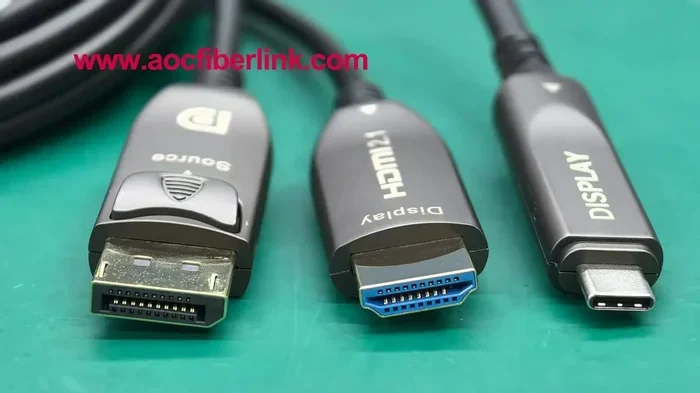
Not all HDMI connectors are created equal. Gold-plated connectors resist corrosion and provide a more reliable connection over time. They also fit snugly into ports, which reduces the chance of a loose connection.
Look for cables with thick, durable shielding. Good build quality means the cable will last longer and maintain a stable signal. A flimsy cable might work today but cause problems down the road.
Do Laptops Have VGA Ports?
If you are connecting a laptop to your 4K TV, you might run into an older laptop with a VGA port. VGA is an older analog connection that does not support 4K resolution. In that case, you will need an adapter or a newer laptop with a digital output. You can learn more about laptop ports and connectivity options by checking if your device has a VGA port or a modern HDMI output.
For the best 4K experience, always use a digital connection like HDMI or DisplayPort. Analog connections like VGA will limit your resolution and picture quality.
Common Mistakes People Make With 4K HDMI Cables
Avoiding common mistakes can save you money and frustration. Here are the pitfalls to watch out for.
Buying the Most Expensive Cable
Price does not always equal quality when it comes to HDMI cables. A $100 cable does not give you a better picture than a $10 certified high-speed cable. The difference in price usually comes from branding, fancy packaging, and marketing hype.
Stick to reputable brands that offer certified cables. You will get the same performance at a much lower price. Your wallet will thank you.
Ignoring Cable Certification
Always look for cables that carry an official HDMI certification. Certified cables have been tested to meet specific standards for speed, bandwidth, and durability. An uncertified cable might work, but there is no guarantee it will handle 4K content reliably.
Certification labels like “Ultra High Speed HDMI” or “Premium High Speed HDMI” tell you the cable has been tested and approved. Trust these labels over marketing claims on the box.
Setting Up Your 4K TV: Practical Tips
Once you have the right cable, setting up your 4K TV properly makes a big difference in your viewing experience.
Connecting Gaming Consoles and Streaming Devices
If you are connecting a gaming console like a PlayStation 5 or Xbox Series X, make sure you use an HDMI 2.1 cable to take advantage of 4K at 120Hz and HDR support. For streaming devices like a Roku or Fire Stick, a standard high-speed HDMI 2.0 cable is more than enough.
Here is a quick checklist for your setup:
- Plug the cable firmly into both the TV and the device.
- Select the correct HDMI input on your TV using the remote.
- Check your device settings to make sure 4K output is enabled.
- Test the connection by playing a 4K video or game.
Audio Return Channel (ARC) and eARC
If you are using your TV to send audio to a soundbar or home theater system, look for the ARC or eARC port on your TV. These ports allow audio to travel back through the HDMI cable, so you do not need a separate audio cable.
eARC supports higher-quality audio formats like Dolby Atmos. Make sure your HDMI cable supports eARC if you want the best audio experience with your 4K TV.
Security Camera and Trail Camera Setups
If you are connecting a security camera system or a trail camera to a 4K monitor or TV for live viewing, your HDMI cable choice matters just as much. For security cameras, understanding how many cameras your system can support helps you plan your cable runs and display setup. Similarly, if you are using a trail camera in the field, you may want to view footage directly on a 4K display. Some trail cameras offer direct HDMI output, while others rely on wireless transfer, so knowing whether your device needs wifi or a direct connection helps you choose the right viewing setup.
Final Verdict
So, do 4K TVs need special HDMI cables? The answer is simpler than you think. You do not need a cable marketed as “4K-specific.” What you need is a certified high-speed HDMI cable that matches the version of your TV and devices.
For most users, an HDMI 2.0 high-speed cable is the perfect balance of performance and affordability. If you are a serious gamer or want future-proofing, go for an HDMI 2.1 Ultra High Speed cable. And remember, the most expensive cable is not always the best one.
Take a moment to check your devices, pick the right cable, and enjoy your stunning 4K picture. You will be glad you did not fall for the marketing hype.
Frequently Asked Questions
Can I use any HDMI cable for 4K TV?
Not just any cable. You need a certified high-speed HDMI cable that supports at least HDMI 2.0 for 4K at 60Hz. Older cables may only support 4K at 30Hz or lower resolutions.
What is the difference between HDMI 2.0 and HDMI 2.1 cables?
HDMI 2.0 supports 4K at 60Hz, while HDMI 2.1 supports 4K at 120Hz and even 8K. HDMI 2.1 also offers higher bandwidth, VRR support, and eARC capabilities for better audio and gaming performance.
Do longer HDMI cables lose quality?
Yes, longer cables can lose signal strength, especially for 4K content. Keep your cable under 15 feet for the best results. If you need a longer run, use an active HDMI cable or a signal booster.
Are expensive HDMI cables worth it?
In most cases, no. A certified high-speed HDMI cable from a reputable brand performs just as well as an expensive one. The price difference usually comes from branding and packaging, not performance.
What does HDR have to do with HDMI cables?
HDR requires a cable with enough bandwidth to carry the extra color and brightness data. An HDMI 2.0 or higher certified cable handles HDR content without any issues. Older cables may not support HDR at all.
Can I connect my laptop to a 4K TV with an HDMI cable?
Yes, as long as your laptop has an HDMI output. Make sure your HDMI cable supports the resolution you want. If your laptop only has older ports like VGA, you will need an adapter or a newer laptop with digital output options.
=== CONCLUSION ===
Choosing the right HDMI cable for your 4K TV does not have to be stressful. Focus on the cable version, certification, and length rather than flashy marketing claims. A certified high-speed cable will deliver the stunning picture quality you paid for without emptying your wallet.
Now that you know the facts, you can shop with confidence. Pick the right cable, set up your 4K TV, and enjoy your favorite content in breathtaking detail. Happy viewing!