What Is a Packet in Computer Science
A packet is a small unit of data that travels across a computer network. When you send information online, your data gets broken into packets, sent through various routes, and reassembled at the destination. Understanding data packets helps you grasp how computer networking works behind the scenes.
Have you ever wondered what happens when you click a link or send an email? Your device doesn’t send the entire message as one big chunk. Instead, it breaks your data into tiny pieces called packets. Each packet travels through cables, routers, and servers before reaching its destination. Then, they get put back together like a digital puzzle.
This process might sound simple, but it’s the backbone of how the internet works. Whether you’re streaming a video, browsing a website, or playing an online game, data packets are doing the heavy lifting. In this article, we’ll explore what a packet in computer science really is, how it moves through networks, and why it matters for your daily tech use.
Let’s start with the basics and build from there.
## What Is a Packet in Computer Science?
A packet is a formatted unit of data carried by a packet-switched network. Think of it like a postal letter. You write a message, put it in an envelope, add an address, and drop it in the mail. The postal service handles the delivery. Similarly, a data packet contains your information wrapped in a structured format with delivery instructions.
In computer networking, packets are the smallest unit of communication. When you request a webpage, your browser doesn’t send one giant file. It splits the request and the response into many small packets. Each one travels independently and may even take a different path to reach the same destination.
### Why Are Packets Used?
You might ask why we don’t just send data as one continuous stream. The answer is efficiency. Breaking data into packets allows networks to use bandwidth more effectively. If one route is busy, packets can take alternate paths. This packet switching method keeps networks fast and resilient.
Also, smaller packets are easier to manage. If one packet gets corrupted during data transmission, only that one needs to be re-sent. The rest of your data arrives without delay. This approach makes internet communication much more reliable than sending one large block of data.
## How Packets Travel Across Networks
Understanding how data packets move through a network is fascinating. The journey isn’t a straight line. It involves multiple devices and decisions happening in milliseconds.
### The Journey of a Packet
When you send information, here’s what happens step by step:
- Your device breaks the data into packets. Each packet gets a header with source and destination addresses.
- Packets enter the network. They pass through your router and onto your internet service provider’s network.
- Routers read the headers. They decide the best path for each packet to reach its destination.
- Packets travel independently. Some may take fast routes, while others might hit a slower path.
- Packets arrive at the destination. The receiving device reassembles them in the correct order.
This entire process happens in fractions of a second. You never notice it happening, but it’s happening every time you go online.
### The Role of Protocols
Network protocols are the rules that govern how packets are formatted, sent, and received. The most important protocol suite is TCP/IP, which stands for Transmission Control Protocol and Internet Protocol.
TCP handles the breakdown and reassembly of data packets. It ensures every packet arrives and in the right order. IP handles the addressing and routing. Together, they make data transmission across the internet possible.
Other protocols like UDP (User Datagram Protocol) also play a role. UDP sends packets faster but without checking if they arrive. This is useful for live video calls and online gaming, where speed matters more than perfect delivery.
## The Anatomy of a Data Packet
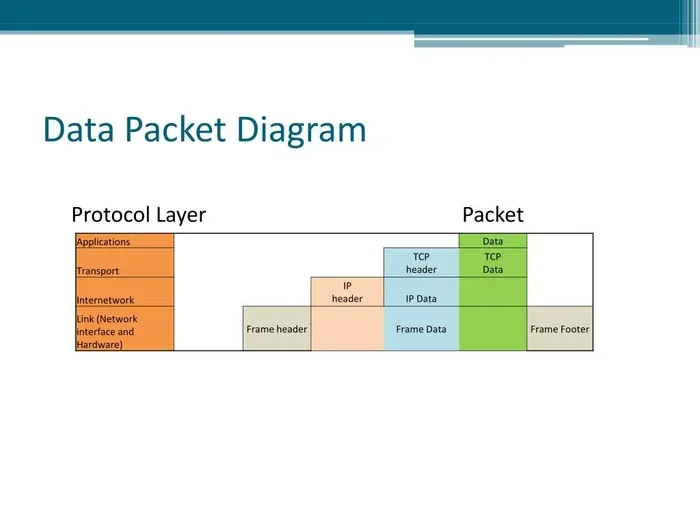
A network packet isn’t just raw data. It has a specific structure that makes routing and delivery possible. Understanding this structure helps you appreciate how computer networking works at a deeper level.
### Packet Header
The packet header is like the envelope on a letter. It contains essential information:
- Source IP address: Where the packet came from.
- Destination IP address: Where the packet is going.
- Packet number: This tells the receiver the order of packets.
- Protocol type: Whether it uses TCP, UDP, or another protocol.
- Error-checking data: Helps detect if the packet was corrupted.
The header is small but packed with critical details. It ensures your data packets reach the right place without getting lost.
### Packet Payload
The packet payload is the actual data being sent. It could be part of an email, a chunk of a webpage, or a piece of a file download. The payload size varies depending on the network and protocol being used.
Typically, a packet payload ranges from a few hundred bytes to around 1,500 bytes. The rest of the packet is taken up by the header and any error-checking information at the end called the trailer.
### Packet Trailer
The trailer comes at the very end of a packet. It contains error-detection information, often called a checksum. When the receiving device gets the packet, it checks the trailer to make sure nothing was damaged during data transmission. If there’s an error, the device asks for that specific packet to be sent again.
## Why Packets Matter for Computer Performance
You might wonder why understanding packets matters for your laptop or daily internet use. The answer is simple: packet performance directly affects your experience.
### How RAM Handles Packets
Your laptop RAM plays a crucial role in processing data packets. When packets arrive from the internet, they get stored temporarily in your RAM before being processed by the CPU. If your laptop RAM is slow or insufficient, packets can pile up, causing lag and slowdowns.
This is why having enough RAM matters for smooth internet performance. When you’re streaming videos or browsing heavy websites, your device is handling hundreds of data packets per second. The RAM in your laptop ensures these packets are processed quickly and efficiently.
### Packet Loss and Latency
Two common network issues are packet loss and latency. Packet loss happens when one or more packets fail to reach their destination. This can cause choppy video calls, slow downloads, or glitchy online games.
Latency is the delay between sending a packet and receiving a response. High latency makes everything feel slow. Even if your internet speed is fast, high latency can ruin your experience.
Both issues often stem from network congestion, poor connections, or hardware limitations. Understanding packets helps you identify where the problem lies.
### Bandwidth and Packet Flow
Bandwidth determines how many data packets your connection can handle at once. Think of it like a highway. More lanes mean more cars can travel simultaneously. Higher bandwidth means more packets can flow through your network without congestion.
When you upgrade your internet plan, you’re essentially adding more lanes to that highway. Your data packets can move faster and in greater numbers, improving your overall online experience.
## Common Packet Problems and How to Fix Them
Not every packet journey goes smoothly. Several issues can disrupt data transmission, but most have simple solutions.
### Packet Loss
Packet loss occurs when packets get dropped somewhere along the route. Common causes include:
- Network congestion from too many devices
- Weak Wi-Fi signals
- Faulty cables or hardware
- Overloaded routers
To fix packet loss, try restarting your router, moving closer to your Wi-Fi source, or using a wired connection. If the problem persists, contact your internet service provider.
### Packet Duplication
Sometimes, the same packet gets sent more than once. This wastes bandwidth and can slow down your connection. Packet duplication often happens due to network errors or misconfigured hardware. Updating your router firmware or replacing old networking equipment usually resolves this issue.
### Out-of-Order Packets
Because packets can take different routes, they sometimes arrive in the wrong order. TCP handles this by reordering packets at the destination. However, severe out-of-order delivery can still cause lag. Using a wired ethernet connection instead of Wi-Fi often reduces this problem.
## Using Packet Analysis Tools
Packet analyzers are tools that let you inspect individual data packets on your network. They’re incredibly useful for troubleshooting and security.
### What Can Packet Analyzers Do?
These tools capture and display packet information in real time. You can see:
- The source and destination of each packet
- The protocol being used
- The packet size and payload content
- Any errors or anomalies in the data
Network administrators use packet sniffing tools daily to diagnose problems and monitor network health. Even regular users can benefit from basic packet analysis when troubleshooting slow connections.
### Popular Packet Analysis Tools
Some widely used tools include Wireshark, tcpdump, and NetMonitor. Wireshark is free and beginner-friendly, making it a great starting point for anyone curious about computer networking.
## Quick Tips for Better Packet Performance
Want to keep your data packets flowing smoothly? Here are some quick tips:
- Use a wired connection when possible for more reliable data transmission.
- Restart your router regularly to clear congestion and reduce packet loss.
- Keep your laptop RAM adequate — at least 8GB for smooth multitasking. Check out how much 8GB RAM costs if you’re considering an upgrade.
- Update your network drivers to ensure optimal packet handling.
- Limit background apps that consume bandwidth and slow down packet flow.
## Final Thoughts
Data packets are the unsung heroes of the digital world. Every time you go online, thousands of packets work tirelessly behind the scenes to deliver your information. From breaking your data into small pieces to routing them across the globe, packet switching makes modern internet communication possible.
Understanding what a packet is in computer science gives you a deeper appreciation for how technology works. It also helps you troubleshoot common issues like packet loss, slow speeds, and connectivity problems. Next time you click a link or send a message, remember the incredible journey those tiny data packets are taking.
The more you know about computer networking, the better equipped you are to get the most out of your devices and your internet connection.
Key Takeaways
- Packets break data into smaller pieces: This makes data transmission faster and more reliable across networks.
- Every packet has a header and payload: The header contains routing info, while the payload holds the actual data.
- Packets can take different routes: This is called packet switching, and it keeps networks efficient.
- Packet loss can slow your connection: Understanding this helps you troubleshoot laptop and internet issues.
- RAM plays a key role in handling packets: Your laptop RAM processes incoming and outgoing data packets every second.
- Packet analysis is used for security: Tools called packet analyzers help detect network threats.
Frequently Asked Questions
What is a packet in simple terms?
A packet is a small chunk of data sent across a network. When you use the internet, your information gets broken into many packets, sent separately, and then put back together at the destination.
What is the difference between a packet and a data frame?
A packet operates at the network layer, while a frame operates at the data link layer. A frame wraps a packet with additional control information for local network delivery. Think of a frame as the outer packaging and a packet as the contents inside.
Can packets take different routes to the same destination?
Yes, they can. This is called packet switching. Each packet is evaluated independently by routers, which choose the best available path at that moment. This is why packets sometimes arrive out of order.
What causes packet loss?
Packet loss happens when packets get dropped due to network congestion, weak signals, faulty hardware, or software errors. It results in slower speeds, choppy calls, and incomplete downloads.
How does TCP handle out-of-order packets?
TCP assigns a sequence number to each packet. When the receiving device gets packets out of order, it uses these numbers to reassemble them correctly before passing the data to the application.
Is packet analysis legal?
Packet analysis is legal for your own network or with proper authorization. Using packet analyzers on networks you don’t own or have permission to monitor can violate privacy laws and organizational policies.