Are Usb Data Blockers Safe
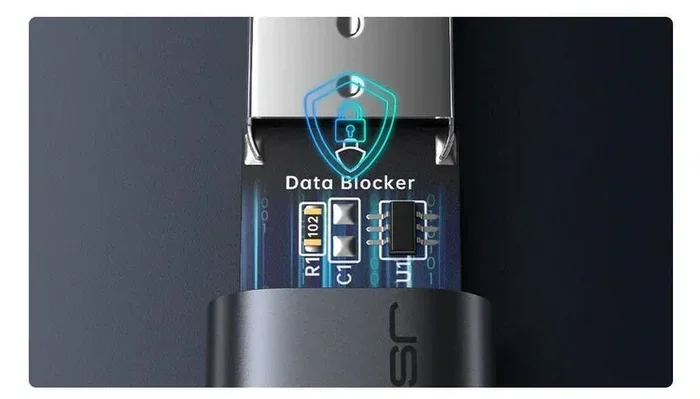
USB data blockers are small, affordable devices that let you charge your phone safely on public USB ports without risking data theft. They block all data pins inside the USB cable, allowing only power to pass through. Whether you are at an airport, hotel, or cafe, a USB data blocker adds a critical layer of USB security to your travel routine.
Have you ever been at an airport or a coffee shop with a dying phone and spotted a public USB charging station? It is tempting to plug in and let your battery climb back up. But have you ever stopped to think about what might be happening behind the scenes? That innocent-looking USB port could be quietly pulling data from your phone. This is where a USB data blocker comes in. In this guide, we will answer the big question: Are USB data blockers safe? We will break down how they work, why you need one, and how to pick the right one for your setup.
More and more people are traveling with multiple devices that need constant USB charging. From smartphones to portable chargers and even external drives like the SanDisk Extreme Portable 2TB external USB C NVMe SSD, our gadgets rely on USB connections every single day. With that reliance comes risk. Understanding USB security is no longer optional. It is essential for anyone who charges devices outside their home.
Key Takeaways
- USB data blockers prevent data theft: They physically block data pins so only power flows through your cable.
- They are safe for all devices: USB data blockers work with phones, tablets, laptops, and any device that charges via USB.
- Juice jacking is a real threat: Public USB ports can be used to steal your data or install malware without you knowing.
- Choosing the right blocker matters: Look for certified, durable models with wide compatibility for the best USB protection.
- They are affordable and portable: Most USB data blockers cost under $15 and fit easily in your pocket or bag.
📑 Table of Contents
- What Is a USB Data Blocker and Why Do You Need One?
- How Do USB Data Blockers Work?
- Are USB Data Blockers Safe for Your Devices?
- Common Risks When Charging on Public USB Ports
- How to Choose the Best USB Data Blocker
- Expert Tips for Staying Safe with USB Charging
- Final Verdict: Should You Use a USB Data Blocker?
What Is a USB Data Blocker and Why Do You Need One?
A USB data blocker is a small adapter that sits between your USB cable and the charging port. It is sometimes called a USB condom because it covers the exposed connector and filters what passes through. The device allows electrical power to flow to your device while completely blocking any data pins inside the USB cable.
You might wonder why you need this at all. The answer is simple. When you plug your phone into a public USB port, your device automatically tries to establish a connection. It asks the host device for permission to transfer data. A malicious port can exploit this handshake to access your files, install tracking software, or even clone your device information. A USB data blocker stops this process cold by sitting in the middle and filtering out anything except electricity.
Think of it like a toll booth on a highway. Cars (power) can pass through freely, but trucks carrying goods (data) are stopped at the gate. You get what you need without exposing yourself to unnecessary risk. This is especially important if you travel frequently, work remotely, or rely on public charging stations during long trips.
Using a USB data blocker is one of the simplest forms of USB protection you can adopt. It requires no software, no setup, and no technical knowledge. You just plug it in and charge. That ease of use is exactly why these small devices have become so popular among travelers and cybersecurity-conscious users alike.
How Do USB Data Blockers Work?
To understand how a USB data blocker keeps you safe, it helps to know a little about how USB connections work. A standard USB cable has several pins inside it. Some pins carry power, and others carry data. When you plug your device into a computer or a public charging station, both power and data pins make contact.
A USB data blocker physically blocks the data pins. It uses a built-in circuit that only connects the power pins, typically the VBUS and ground pins. The data pins, known as D+ and D-, are simply not connected. This means your device receives the electricity it needs but cannot send or receive any data.
Here is how the process works step by step:
- You plug the USB data blocker into the public charging port or wall adapter.
- You connect your USB cable to the blocker.
- The blocker allows power to flow through to your device.
- The data pins remain disconnected, preventing any data transfer.
- Your device charges safely with zero risk of data exposure.
Some people confuse a USB data blocker with a simple USB adapter. They are not the same thing. An adapter changes the shape of the connector, like going from USB-C to a smaller plug. A data blocker actually changes what passes through the cable. It is an active security tool, not just a physical shape-changer. For those who use external storage devices on the go, pairing a blocker with an M.2 NVMe SSD to USB 3.1 adapter is a smart way to keep your storage devices secure while still being able to transfer files safely on your own terms.
The technology behind these blockers is surprisingly simple, which is part of what makes them so reliable. There are no moving parts, no batteries, and no software to update. They work passively, meaning they require zero power of their own. You can leave one plugged in on your keychain or in your travel bag, and it will work every single time without any maintenance.
Are USB Data Blockers Safe for Your Devices?
The short answer is yes. USB data blockers are completely safe for your devices. They do not interfere with charging speed, battery health, or device performance. Because they only affect the data pins, your device receives clean, uninterrupted power just as it would from a wall outlet or your computer.
Some users worry that a USB data blocker might slow down their charging. This is a common misconception. Since the power pins are fully connected and the blocker adds virtually no resistance to the electrical flow, your charging speed remains the same. In fact, some users report that using a blocker actually improves charging consistency because it eliminates the brief negotiation phase that happens when a device first connects to a USB port.
Compatibility is another concern people have. The good news is that USB data blockers work with virtually all USB-enabled devices. Whether you are charging a smartphone, tablet, e-reader, camera, or even a portable hard drive like the M.2 NVMe SSD in a USB enclosure, a data blocker will not cause any issues. The device simply sits in the middle of the connection and filters out data while letting power pass through unchanged.
It is worth noting that not all blockers are created equal. Cheap, uncertified models may not properly block all data pins or could introduce electrical inconsistencies. To ensure maximum USB security, always buy from reputable brands and look for products that have been tested and certified by recognized standards organizations. A quality blocker will be clearly labeled and should come with a warranty or satisfaction guarantee.
Do USB Data Blockers Affect Power Delivery?
Modern devices often support USB power delivery, which allows faster and more efficient charging through USB connections. A good USB data blocker supports power delivery protocols fully. This means you can still use fast charging features like Qualcomm Quick Charge or USB Power Delivery without any interruption.
When shopping for a blocker, check the product specifications for power delivery support. Higher-quality models handle up to 100 watts of power, making them suitable for laptops and other power-hungry devices. If you carry a portable charger on your trips, a blocker ensures that even when you top off your devices at a public station, your encrypted data and personal files stay completely private.
Common Risks When Charging on Public USB Ports
Understanding the risks of public USB charging is the best reason to use a USB data blocker. These risks are real, and they are more common than most people realize.
Juice Jacking
Juice jacking is the term used to describe a cyberattack that happens through a public USB charging port. The attacker modifies the port to include hardware or software that can access your device the moment you plug in. This can happen in seconds, and you might not notice anything unusual until it is too late.
Through juice jacking, bad actors can:
- Steal personal files, photos, and contacts.
- Install malware or tracking software on your device.
- Access login credentials and financial information.
- Clone your device identity for fraudulent purposes.
The scary part is that juice jacking can happen silently. Your screen might not show any warning, and you might not see any unusual activity until days or weeks later. By the time you notice something is wrong, the damage could already be done. This is why USB port safety should be a top priority for every device user.
Malware Injection Through USB
Beyond juice jacking, public USB ports can be used to inject malware directly onto your device. Some malware is designed to install automatically the moment a USB connection is established, even without any user interaction. A USB data blocker prevents this entirely because it stops the data connection from forming in the first place.
If you frequently use external storage devices, you already know the importance of USB protection. But many people forget that the same risks apply to public charging ports. Whether you are connecting an NVMe SSD to USB adapter for file transfers or simply plugging in your phone at a hotel lobby, the threat is the same: an unsecured port can compromise your device.
Data Tracking and Information Harvesting
Even if an attacker is not trying to steal your data outright, public USB ports can be used for passive data harvesting. Some malicious ports quietly collect device information like your phone model, operating system, serial number, and connected networks. This data can be sold or used for targeted attacks later. A USB data blocker prevents this type of information leakage by keeping your device completely isolated from the host port.
How to Choose the Best USB Data Blocker
Not all USB data blockers are the same. When shopping for one, there are several factors to consider to make sure you get a product that actually delivers the USB security you need.
Look for Certification and Compliance
Choose a blocker that has been tested and certified by a recognized standards body. Look for labels like CE, FCC, or UL certification. These marks indicate that the product has been independently tested for safety and performance. Avoid unbranded or no-name products that do not provide any certification information. A certified blocker gives you peace of mind that the device will work as advertised and will not introduce electrical risks to your gear.
Check Compatibility with Your Devices
Make sure the blocker you choose is compatible with your devices. Most blockers support USB-A and USB-C connections, which covers the vast majority of modern gadgets. If you use older devices with micro-USB ports, look for a blocker that includes that connector type as well. Some premium models also support USB hub functionality, allowing you to connect multiple devices at once while maintaining security.
Consider Build Quality and Portability
A good USB data blocker should be compact, durable, and easy to carry. Many models are small enough to attach to your keychain or fit inside a wallet. Look for models made from sturdy materials like aluminum or reinforced plastic. Since you will likely be using your blocker in airports, hotels, and other travel environments, durability matters. A well-built blocker will last for years of regular use without breaking down.
Read Reviews and User Feedback
Before buying any USB protection device, take a few minutes to read user reviews. Look for feedback on charging speed, build quality, and long-term reliability. Pay attention to any reports of compatibility issues with specific devices. Real-world user experiences are one of the best ways to gauge whether a product is worth your money.
Price vs. Value
Most USB data blockers cost between $5 and $20. You do not need to spend a fortune to get good protection. However, the cheapest options may cut corners on build quality or security features. Aim for a mid-range product from a reputable brand that offers a balance of affordability, durability, and verified data blocking capability. Think of it as a small investment that protects all the valuable data on your devices.
Expert Tips for Staying Safe with USB Charging
A USB data blocker is one of the best tools you can use for USB security, but it is not the only one. Here are some expert tips to keep your devices safe whenever you are on the go:
- Always carry your own charger and wall adapter. The safest way to charge is using a known, trusted power source. A quality wall adapter eliminates the need for public ports altogether.
- Use a portable power bank for travel. A high-capacity portable charger means you never have to rely on public stations. Look for models that support fast charging and can recharge your devices multiple times.
- Keep your device software up to date. Regular updates patch security vulnerabilities that could be exploited through USB connections. Turn on automatic updates whenever possible.
- Disable file sharing on public networks. When you plug into any USB port, make sure your device is set to charging-only mode, not file transfer mode. Some devices let you configure this preference permanently.
- Use a USB data blocker on every trip. Make it a habit to keep one in your travel bag, laptop case, or desk drawer at home. Consistent use is the best way to build strong USB protection habits.
- Inspect USB ports before plugging in. If a port looks tampered with, damaged, or suspicious, do not use it. Trust your instincts and find an alternative charging source.
For those who work with external storage devices regularly, combining a USB data blocker with a reliable M.2 NVMe SSD enclosure adapter USB 3.1 ensures that both your charging habits and your data transfers remain secure. When you need to connect devices like the NVMe SSD vs standard SSD comparison shows, using the right accessories makes all the difference in maintaining both performance and security.
Final Verdict: Should You Use a USB Data Blocker?
The answer to the question Are USB data blockers safe? is a resounding yes. These small, affordable devices provide an essential layer of USB security that every device user should have. They are simple to use, compatible with virtually all devices, and require zero technical knowledge to operate.
The risks of using public USB ports without protection are real. Juice jacking, malware injection, and passive data harvesting are all genuine threats that can compromise your personal information and device security. A USB data blocker eliminates these risks with a simple plug-and-play solution.
Whether you are a frequent traveler, a remote worker, or simply someone who charges their phone in public spaces, a USB data blocker is one of the smartest investments you can make. It costs less than a meal at a restaurant, fits in your pocket, and could save you from a serious data breach or cybersecurity incident.
Take USB port safety seriously. Protect your devices, your data, and your peace of mind. Add a USB data blocker to your travel kit today and charge with confidence wherever you go.
Frequently Asked Questions
What exactly does a USB data blocker do?
A USB data blocker is a small adapter that sits between your USB cable and the charging port. It physically blocks the data pins inside the USB cable while allowing power to pass through freely. This means your device charges safely without any risk of data being accessed or transferred.
Can a USB data blocker damage my device?
No, a quality USB data blocker will not damage your device. It only affects the data pins and has no impact on the power delivery circuit. As long as you buy a certified product from a reputable brand, your device will charge normally and safely.
How do I know if I need a USB data blocker?
If you ever charge your device using a public USB port at an airport, hotel, cafe, or mall, you should use a USB data blocker. These are the exact scenarios where juice jacking and data theft can occur. Even if you only charge at home, having one in your travel bag is a smart precaution.
Do USB data blockers slow down charging speed?
No, a good USB data blocker does not slow down charging. Since it only blocks data pins and leaves the power pins fully connected, your charging speed remains unchanged. Premium models even support fast charging protocols like USB Power Delivery.
Are all USB data blockers the same?
Not all blockers are created equal. Some are poorly made and may not fully block data pins. Others support advanced features like USB power delivery and multiple connector types. Always choose a certified blocker from a reputable brand to ensure you get reliable USB protection.
Can I use a USB data blocker with an external hard drive?
Yes, you can use a USB data blocker with external storage devices. However, keep in mind that the blocker will prevent any data transfer through the cable. If you need to transfer files, you should remove the blocker during the transfer process. For secure on-the-go storage, consider pairing a blocker with a M.2 NVMe SSD in a USB enclosure for added protection.