Do Old Monitors Have Hdmi Ports
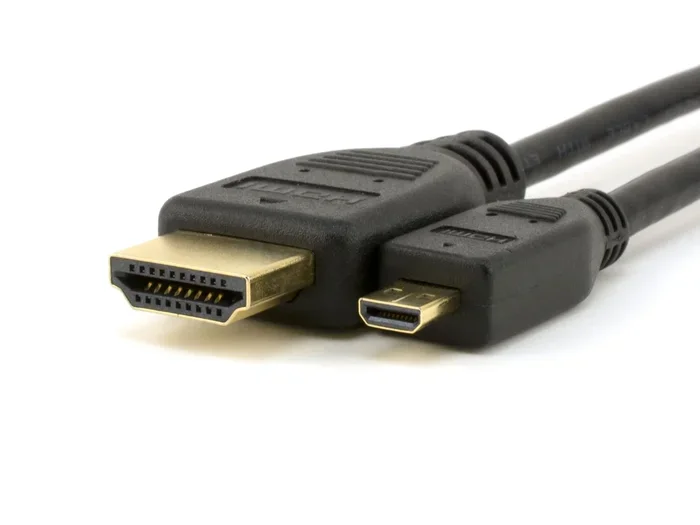
Old monitors typically do not come with HDMI ports, as HDMI became standard well after many legacy displays were manufactured. Most older monitors rely on VGA, DVI, or even proprietary connections instead. However, you can still connect an old monitor to modern devices using adapters and converters. Understanding what ports your old monitor has helps you choose the right cable and avoid frustration. This guide covers everything you need to know about old monitor ports and how to make them work with today’s technology.
Have you ever dug out an old monitor from a closet and wondered whether it would work with your new laptop or desktop? Maybe you found a dusty CRT or a flat panel from the early 2000s sitting in a garage. The first thing you probably noticed is that the port on the back looks nothing like the HDMI cable sitting in your drawer.
This is a very common situation. Do old monitors have HDMI ports? The short answer is usually no. But the full story is more interesting than you might think. Old monitors used different connection standards that served their purpose at the time. Understanding these ports helps you figure out how to use that old display with modern devices. In this guide, we will walk through every connection type you are likely to encounter and show you how to make old monitors work today.
Key Takeaways
- Most old monitors lack HDMI ports: They typically use VGA or DVI connections from an earlier era.
- Adapters solve the compatibility problem: You can use HDMI-to-VGA or HDMI-to-DVI adapters to connect old monitors to new devices.
- VGA is the most common old monitor port: It carries analog signals and was the standard for decades.
- DVI offered a digital upgrade: Some mid-2000s monitors included DVI before HDMI took over.
- Check your monitor’s back panel first: Knowing what ports are available saves time and money on the wrong adapter.
- Audio may need a separate connection: Old monitors often do not carry audio through video cables like HDMI does.
📑 Table of Contents
- Why Old Monitors Do Not Have HDMI Ports
- The Most Common Ports Found on Old Monitors
- How to Connect an Old Monitor to Modern Devices
- Can You Still Use Old Monitors Effectively Today?
- Do Old Monitors Have HDMI Ports: The Bottom Line
- Quick Tips for Connecting Old Monitors
- Common Mistakes People Make With Old Monitors
- Expert Insights on Old Monitor Connectivity
- Conclusion
Why Old Monitors Do Not Have HDMI Ports
HDMI technology did not become mainstream until the mid-2000s. Before that, monitor manufacturers relied on older connection standards. The transition from analog to digital video took many years. As a result, monitors manufactured before roughly 2005 almost never included HDMI ports.
Here is a quick look at why old monitors use different ports:
- Technology timeline: VGA dates back to 1987. DVI appeared in 1999. HDMI did not arrive until 2003 and took several more years to become the default.
- Manufacturing costs: Older monitors were built with the ports available at the time of production. Adding HDMI later was not cost-effective for manufacturers.
- Different purposes: Some old monitors were designed for specific tasks like office work or basic display output, where high-definition audio and video over one cable was not a priority.
If you are curious about how older laptop connections compare, you might want to check out whether laptops have VGA ports, since many older laptops shared the same connection standards as old monitors.
The Most Common Ports Found on Old Monitors
When you look at the back of an old monitor, you will likely see one or more of these ports. Each one served a specific purpose in its time.
VGA (Video Graphics Array)
VGA is the blue, D-shaped port that dominated the monitor world for over two decades. It carries an analog signal, which means it converts digital data from your computer into an analog signal for the display. VGA was the go-to standard for everything from office computers to home setups.
Key facts about VGA:
- Introduced in 1987 by IBM
- Carries only video, no audio
- Max practical resolution around 2048 x 1536
- Susceptible to signal degradation over long cable runs
- Still found on many projectors and legacy equipment today
If your old monitor only has a VGA port, you are not alone. This was the standard connection for a very long time. You will need a special adapter to connect it to a modern device that only outputs HDMI.
DVI (Digital Visual Interface)
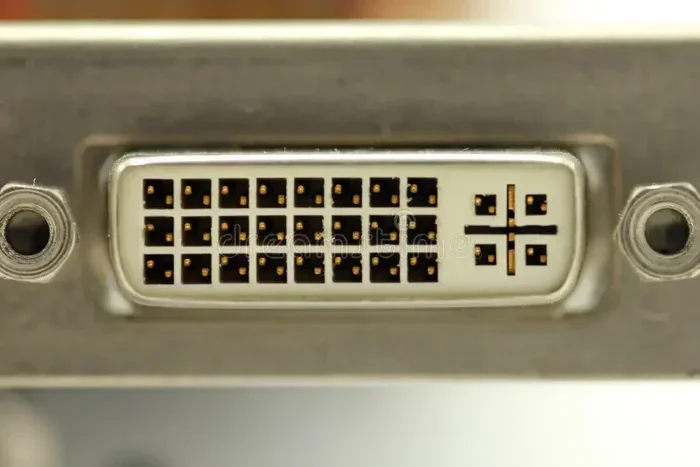
DVI came along in 1999 as a step up from VGA. It offered a digital signal, which meant sharper images and no analog-to-digital conversion loss. DVI ports come in a few varieties:
- DVI-D: Digital only
- DVI-A: Analog only (basically VGA)
- DVI-I: Integrated, supports both digital and analog
DVI was common on monitors from roughly 2001 to 2008. It provided better image quality than VGA and was a popular choice for gamers and designers during that era. However, DVI does not carry audio, which became a bigger deal as people started using monitors for entertainment.
Other Legacy Ports You Might Find
Some older monitors include less common ports that are worth mentioning:
- S-Video: An older analog connection found on some early flat panels
- Composite AV: The yellow RCA-style jack, mostly on very old CRT monitors
- Component video: Three separate RCA jacks for better analog quality
- DisplayPort (early versions): Appeared on some monitors around 2007 but was rare on truly “old” models
Each of these ports tells a story about when the monitor was made. The more ports you see, the more flexible the monitor was at the time of purchase.
How to Connect an Old Monitor to Modern Devices
Just because your old monitor does not have an HDMI port does not mean it is useless. Several adapters and converters can bridge the gap between old and new technology.
HDMI to VGA Adapter
This is the most popular solution for connecting a modern device to an old VGA monitor. The adapter converts the digital HDMI signal to an analog VGA signal. You plug the HDMI end into your laptop or desktop and the VGA end into your old monitor.
Things to keep in mind:
- Most adapters are plug-and-play and require no software
- You may need to install a driver for the best resolution
- Audio does not pass through VGA, so you will need separate speakers or headphones
- Image quality may be slightly lower than a native digital connection
HDMI to DVI Adapter
If your old monitor has a DVI port, an HDMI-to-DVI adapter works very well. Since DVI carries a digital signal, the image quality stays strong. These adapters are often cheaper than VGA adapters because the conversion is simpler.
One important note: DVI does not carry audio. If you are using your monitor for movies or gaming, you will need a separate audio solution like external speakers or headphones.
Active Converters for Better Quality
For the best results, consider an active converter box rather than a simple cable adapter. Active converters handle the signal conversion more effectively and often support higher resolutions. They are especially useful if you want to push an old monitor closer to its maximum capability.
If you are setting up multiple monitors or dealing with signal splitting, you might want to explore options like a best HDMI splitter for dual monitors, which can help you distribute your HDMI signal to multiple displays, including older ones with the right adapters.
Can You Still Use Old Monitors Effectively Today?
The short answer is yes. Old monitors can still serve useful purposes in 2024 and beyond. Whether you are a student on a budget, a retro gaming enthusiast, or someone who wants a second screen, an old monitor can absolutely still work.
Here are some practical uses for old monitors today:
- Second screen for productivity: An old 1080p monitor makes a great auxiliary display for writing, coding, or multitasking
- Retro gaming: Many old CRT monitors actually display older games better than modern flat panels
- Home office setup: A spare old monitor adds screen real estate without spending money
- Testing and development: Developers sometimes use old monitors to check how websites and apps look on different resolutions
- Media center display: With the right adapter, an old monitor can serve as a basic TV or media display
One thing to keep in mind is that old monitors may not support the high refresh rates that modern displays offer. If you are into fast-paced gaming, you might want to look at fastest gaming monitors for a modern experience that old hardware simply cannot match.
Limitations of Old Monitors
Using an old monitor comes with some trade-offs. Being aware of these helps you set realistic expectations:
- Lower resolution: Many old monitors max out at 1080p or even lower
- No built-in speakers: Most old monitors do not include audio output
- Bulkier design: CRTs in particular are heavy and take up a lot of desk space
- Higher power consumption: Older monitors often use more electricity than modern LED displays
- No smart features: Old monitors cannot stream content or run apps on their own
If you are wondering whether modern monitors include extra features like built-in audio, you might want to check out whether all monitors have speakers, since this is a common question when choosing between old and new displays.
Do Old Monitors Have HDMI Ports: The Bottom Line
So, do old monitors have HDMI ports? The answer remains no for the vast majority of older models. Monitors made before the mid-2000s almost exclusively use VGA, DVI, or even older analog connections. HDMI became the standard connection for monitors only after 2008 or so, and even then, it took several more years for it to become universal.
The good news is that you do not need to throw away an old monitor just because it lacks HDMI. Adapters and converters are widely available and affordable. A simple HDMI-to-VGA or HDMI-to-DVI adapter can bring an old monitor back to life in minutes.
Before buying any adapter, take a moment to check the ports on the back of your monitor. Identify whether it has VGA, DVI, or another connection type. Then purchase the matching adapter. This small step saves time, money, and a lot of frustration.
If you are in the market for a new monitor and want something with HDMI built in, modern options are plentiful and more affordable than ever. Whether you need a budget option or a high-performance display, today’s monitors make connecting simple and straightforward.
Quick Tips for Connecting Old Monitors
- Check the ports first: Look at the back of your monitor before buying any adapter or cable.
- Buy the right adapter type: HDMI-to-VGA for analog monitors, HDMI-to-DVI for digital monitors.
- Remember audio is separate: Old monitors do not carry sound through VGA or DVI cables.
- Update your graphics drivers: This ensures the best resolution and compatibility with adapters.
- Test before committing: Try the connection before mounting or permanently setting up the monitor.
- Consider the resolution limit: Old monitors have maximum resolutions. Do not expect 4K from a 15-year-old display.
Common Mistakes People Make With Old Monitors
Avoid these common pitfalls when trying to use an old monitor with modern devices:
- Buying the wrong adapter: VGA and DVI adapters look similar but serve different purposes. Double-check your monitor’s port type.
- Expecting audio through the video cable: VGA and DVI do not carry sound. You need a separate audio connection.
- Using long, cheap cables: Long VGA cables often cause signal loss and blurry images. Use a shorter, higher-quality cable.
- Ignoring driver updates: Outdated graphics drivers can prevent your monitor from displaying at its best resolution.
- Assuming all DVI is the same: DVI-D, DVI-A, and DVI-I are different. Make sure your adapter matches your monitor’s DVI type.
Expert Insights on Old Monitor Connectivity
Technology experts generally agree that old monitors still have value, especially as secondary displays or for specific use cases. The key is understanding the connection limitations and planning accordingly. A simple adapter can unlock surprising functionality from a display that might otherwise sit unused.
When evaluating whether to use an old monitor, consider the adapter cost versus buying a new budget monitor. In many cases, a five-dollar adapter is all you need to make an old monitor work perfectly for basic tasks. For more demanding uses like gaming or creative work, a modern monitor will provide a significantly better experience.
The world of monitor connectivity has evolved dramatically, but that does not mean older technology has lost all relevance. With the right knowledge and a small investment in adapters, you can keep an old monitor working well into the future.
Conclusion
So, do old monitors have HDMI ports? Most do not, but that does not mean they are obsolete. Old monitors use VGA, DVI, and other legacy connections that served their era well. With the right adapter, you can connect these displays to modern laptops, desktops, and even gaming consoles. Whether you are repurposing an old monitor as a second screen, setting up a retro gaming station, or simply trying to save money, understanding your monitor’s ports is the first step. Grab the right adapter, check your connections, and give that old monitor a new lease on life.
Frequently Asked Questions
Can I get sound through a VGA connection on an old monitor?
No, VGA only carries video signals and does not transmit audio. You will need to connect separate speakers or headphones to your computer or device for sound. Some HDMI-to-VGA adapters include a 3.5mm audio output jack to help with this limitation.
What is the difference between VGA and HDMI?
VGA is an older analog connection that only carries video. HDMI is a modern digital connection that carries both high-definition video and audio through a single cable. HDMI also supports higher resolutions and refresh rates than VGA ever could.
Do all DVI monitors support digital signals?
No, DVI comes in three types. DVI-D is digital only, DVI-A is analog only, and DVI-I supports both digital and analog signals. Check which type your monitor has before buying an adapter.
Can I use an HDMI-to-VGA adapter with a gaming console?
It depends on the console. Some older consoles with HDMI output can work with an HDMI-to-VGA adapter, but the results vary. Modern consoles like the PlayStation 5 and Xbox Series X do not support analog VGA output without additional active conversion equipment.
Are HDMI-to-VGA adapters expensive?
Not at all. Most HDMI-to-VGA adapters cost between five and fifteen dollars. Active converter boxes that provide better image quality typically run between twenty and fifty dollars, depending on the brand and features.
Will an old monitor work with a new computer?
Yes, in most cases. You just need the right adapter to bridge the connection type gap. If your new computer has HDMI and your old monitor has VGA, an HDMI-to-VGA adapter will do the job. For DVI monitors, an HDMI-to-DVI adapter works well for video, though you will still need separate audio.