Does a Micro Usb Work on Micro B

Micro USB and Micro B are closely related but not exactly the same thing. Micro-B is a specific type of Micro USB connector, so a Micro USB cable does indeed work on a Micro B port — because Micro B is part of the Micro USB family. Understanding this distinction helps you choose the right cable and avoid connection problems.
Key Takeaways
- Micro B is a subset of Micro USB: Micro-USB includes both Micro-A and Micro-B connectors, so they are compatible by design.
- Most devices use Micro B: Phones, tablets, and portable gadgets almost always use the Micro-B connector type.
- Physical differences matter: Micro-A and Micro-B look different, so using the wrong one can prevent a connection.
- Adapters can bridge the gap: If you have the wrong connector, a simple adapter can solve the problem.
- USB-C is replacing Micro USB: Newer devices are moving toward USB-C, but Micro USB remains widely used.
- Cable quality affects performance: A cheap or damaged Micro USB cable can cause slow charging or data transfer failures.
📑 Table of Contents
- Does a Micro USB Work on Micro B?
- Understanding Micro USB and Micro B Basics
- How Micro USB and Micro B Compare
- Why People Get Confused
- Common Use Cases for Micro USB and Micro B
- How to Choose the Right Cable
- The Shift from Micro USB to USB-C
- Quick Tips for Micro USB Users
- Common Mistakes to Avoid
- Expert Insights on Micro USB Connectivity
- Conclusion
Does a Micro USB Work on Micro B?
If you have ever stood in front of a shelf of cables, squinting at tiny connectors, you know how confusing this can get. The short answer is yes — a Micro USB does work on a Micro B port. That is because Micro B is actually a type of Micro USB connector. But the full picture has a few more layers, and understanding them saves you from buying the wrong cable or troubleshooting connection problems for no reason.
In this guide, we break down everything you need to know about Micro USB and Micro B. We cover the differences, compatibility, real-world use cases, and practical tips so you never have to guess again. Whether you are charging an old phone, connecting a peripheral, or just curious about cable types, this article has you covered.
Understanding Micro USB and Micro B Basics
What Is Micro USB?
Micro USB refers to a family of small connectors defined by the USB (Universal Serial Bus) standard. It was introduced in 2007 as a replacement for the larger Mini USB connectors. The goal was simple: make device connections smaller, faster, and more universal.
Micro USB comes in two main connector types:
- Micro-A: The flatter, more rectangular connector. It is typically found on the host side, like computers or hubs.
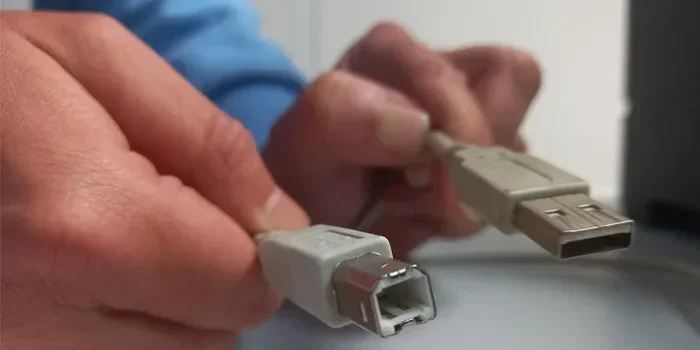
- Micro-B: The slightly trapezoidal connector with a small hook on top. This is the one you see on most phones, speakers, and portable devices.
Both are officially part of the Micro USB standard. So when someone says “Micro USB,” they are technically referring to either type — though in everyday language, most people mean Micro-B.
What Is Micro B?
Micro-B is the specific connector found on the device end of most Micro USB cables. If you have an Android phone from the 2010s or a portable Bluetooth speaker, it almost certainly uses a Micro-B port. The shape is distinctive — it has a slight angular edge and a small lip that helps guide the cable in the right way.
Think of it this way: Micro USB is like the word “fruit,” and Micro-B is like an “apple.” An apple is a fruit, but not all fruits are apples. Similarly, Micro-B is a Micro USB connector, but not every Micro USB connector is Micro-B.
How Micro USB and Micro B Compare
Physical Differences
While both connectors are small and compact, they have visible differences that matter when plugging them in.
- Shape: Micro-A is flat and rectangular. Micro-B is wider at the top and narrower at the bottom, with a slight angular slope on one side.
- Size: Both are roughly the same length (about 6.85mm wide by 1.8mm tall), but their profiles differ.
- Orientation: Micro-B has a top and bottom, so you cannot plug it in upside down. Micro-A also has a preferred orientation.
Compatibility Table
Here is a quick comparison to make things crystal clear:
| Feature | Micro-A | Micro-B |
|---|---|---|
| Part of Micro USB standard | Yes | Yes |
| Commonly found on | Computers, hubs, host devices | Phones, tablets, peripherals |
| Shape | Flat, rectangular | Trapezoidal with angled edge |
| Reversible | No | No |
| Works with Micro USB cable | Yes | Yes |
Speed and Power Delivery
Both Micro-A and Micro-B support the same USB 2.0 standard, which means data transfer speeds up to 480 Mbps and charging at up to 2.5 watts by default. Some Micro-B ports support USB On-TheGo (OTG), allowing devices to act as both host and peripheral. In terms of raw performance, there is no difference between Micro-A and Micro-B connections.
However, the overall charging speed depends more on the cable quality and the power source than the connector type. A good Micro USB cable with proper wiring delivers consistent power, while a cheap knockoff might slow things down or even damage your device over time.
Why People Get Confused
Mixed Terminology
The biggest source of confusion is language. Manufacturers, retailers, and even tech forums use “Micro USB” and “Micro B” somewhat interchangeably. A product listing might say “Micro USB port” when it really means a Micro-B port. This creates a mental loop where people wonder if they are different things.
In everyday conversation, calling a Micro-B connector a “Micro USB” is perfectly acceptable. The technical community uses the distinction mainly when discussing cable orientations or host-device relationships.
Similar-Looking Connectors
Adding to the confusion are connectors that look similar but are not the same:
- Mini USB: Larger and older. It has a similar trapezoidal shape but is noticeably bigger.
- Micro-B SuperSpeed (USB 3.0): This connector adds extra pins and a wider profile for faster data transfer. It is not the same as a standard Micro-B.
- USB-C: The modern replacement. It is oval-shaped and fully reversible.
Plugging a Mini USB cable into a Micro-B port will not work. Likewise, a standard Micro-B cable will not fit a Micro-B SuperSpeed port, even though they look similar. Always check your device specifications before buying a cable.
Common Use Cases for Micro USB and Micro B
Smartphones and Tablets
For years, Micro-B was the universal standard for Android devices. Almost every Android phone from 2010 to 2018 used a Micro-B port for charging and data transfer. Even today, many budget phones, e-readers, and budget tablets still rely on Micro-B connectivity.
If you own an older phone or a second-hand device, there is a very high chance it uses Micro-B. The connector is reliable, widely supported, and easy to replace.
Portable Electronics
Beyond phones, a surprising number of devices still use Micro-B ports:
- Portable Bluetooth speakers
- Power banks
- Fitness trackers and smartwatches
- Remote controllers for drones
- Some digital cameras
- Handheld gaming devices
Having a few Micro USB cables around the house remains practical. They charge more devices than you might think.
Peripherals and Accessories
Some computer peripherals also use Micro-B connections. Certain USB mice and keyboards, especially wireless dongles and charging cables, use Micro-B for power. If you have ever wondered why your wireless mouse needs a Micro USB cable for charging, now you know — it uses a Micro-B connector on the device side.
This is also why you might see articles about troubleshooting mouse connectivity on laptops. Sometimes the issue is not the mouse itself but the cable or port type being used. For more on this, you can check out guides on why the mouse on your laptop might not work or learn how to use a mouse on a laptop effectively.
How to Choose the Right Cable
Check Your Device Port
The first step is always identifying what port your device has. Look for the shape:
- If the port is flat and rectangular on one side, it is likely Micro-A.
- If the port has a slight angular slope and a small lip, it is Micro-B.
- If the port is oval and reversible, it is USB-C.
- If the port is noticeably larger and trapezoidal, it might be Mini USB.
Most consumer devices will have a Micro-B port. Once you confirm that, you can confidently buy any standard Micro USB cable — it will have a Micro-B end on one side.
Consider Cable Quality
Not all Micro USB cables are created equal. Here are a few tips for picking a good one:
- Look for braided or reinforced cables: These last longer and resist fraying at the connector end.
- Check for USB-IF certification: Certified cables meet safety and performance standards.
- Choose the right length: Shorter cables tend to charge faster due to lower resistance.
- Avoid ultra-cheap no-name cables: They often have thin wiring that leads to slow charging or even device damage.
Adapters and Converters
If you have the wrong connector on hand, adapters can help. You can find:
- Micro-A to Micro-B adapters: These let you connect a Micro-A host device to a Micro-B device directly.
- Micro USB to USB-C adapters: Useful for transitioning between older and newer devices.
- Micro USB to HDMI or VGA adapters: Great for screen mirroring older devices.
Always buy adapters from reputable brands. Poorly made adapters can damage ports or fail during use.
The Shift from Micro USB to USB-C
Why USB-C Is Taking Over
USB-C has largely replaced Micro USB in the consumer electronics space. The reversible design, faster data speeds, and higher power delivery make it a clear upgrade. Most modern phones, laptops, and tablets now ship with USB-C ports exclusively.
The European Union has also mandated USB-C as the standard charging port for many device categories starting in 2024. This push accelerates the transition and makes Micro USB increasingly a legacy technology.
Why Micro USB Still Matters
Despite the shift, Micro USB is far from dead:
- Millions of existing devices still use Micro-B ports and will for years to come.
- Budget electronics continue to rely on Micro USB to keep costs low.
- Spare parts and accessories are still widely available and affordable.
- Industrial and embedded devices often use Micro-B for its proven reliability.
So even if your new phone uses USB-C, you might still need a Micro USB cable for a speaker, a power bank, or a fitness tracker. Knowing that Micro USB works on Micro B ports ensures you are always prepared.
Quick Tips for Micro USB Users
Keep It Clean
Dust and lint love to accumulate inside Micro-B ports. Use a toothpick or compressed air to clean the port gently before inserting a cable. A dirty port can cause intermittent connection issues that seem like cable problems.
Do Not Force the Cable
If a Micro-B cable does not slide in easily, stop and check the orientation. Forcing it can bend or break the pins inside the port. This is a common mistake, especially for people switching from reversible USB-C connectors.
Store Cables Properly
Use cable organizers or retractable cables to prevent tangling and stress on the connector. A damaged connector is the number one reason Micro USB cables stop working.
Test with Multiple Cables
If your device is not charging or transferring data, try a different cable before assuming the port is broken. Often the problem is a worn-out cable, not the device. This simple step saves time and unnecessary troubleshooting.
Common Mistakes to Avoid
Assuming All Micro USB Cables Are the Same
A Micro USB cable with a Micro-A end and one with a Micro-B end are both “Micro USB” cables, but they connect to different devices. Always check which end goes where. Using a Micro-A end in a Micro-B port will not work, and vice versa.
Ignoring Cable Rating
Some cables only support charging, while others support both charging and data transfer. If you need to transfer files, make sure the cable supports data. Many cheap cables are charge-only, and the difference is not obvious until you try transferring a file.
Using Damaged Cables
A frayed cable might still work, but it poses a safety risk and can cause unstable connections. Replace damaged cables immediately. It is a small investment that protects both your device and your peace of mind.
Expert Insights on Micro USB Connectivity
Tech experts generally agree that Micro-B remains one of the most reliable connectors ever made. Its simple design, widespread adoption, and durability made it a gold standard for nearly a decade. While USB-C offers clear advantages, Micro-B cables continue to deliver dependable performance for everyday tasks.
One practical tip from professionals: invest in a few high-quality Micro USB cables for different uses — one for your nightstand, one for your bag, and one for your car. This small habit eliminates the frustration of searching for a working cable when you need it most.
Conclusion
So does a Micro USB work on Micro B? Absolutely yes. Micro-B is a specific type of Micro USB connector, so they are fully compatible by design. The confusion usually comes from mixed terminology and the existence of other similar-looking connector types like Mini USB and USB-C.
Understanding the difference helps you choose the right cable, avoid connection issues, and keep your devices powered and connected. Whether you are dealing with an older Android phone, a Bluetooth speaker, or a portable power bank, knowing your Micro-B port works with any standard Micro USB cable gives you confidence and convenience.
Micro USB technology may be aging, but it still plays a vital role in the electronics ecosystem. Keep a few quality cables handy, take care of your ports, and you will stay connected no matter what devices you own.
Frequently Asked Questions
Is Micro USB the same as Micro B?
Not exactly. Micro USB is the overall standard, while Micro B is one of two connector types within that standard. Micro B is what you find on most phones and portable devices. So every Micro B connector is Micro USB, but not every Micro USB connector is Micro B.
Can I plug a Micro A cable into a Micro B port?
No, Micro A and Micro B connectors have different shapes and will not physically fit each other. You would need a Micro A to Micro B adapter to connect a Micro A host device to a Micro B device. Always check the connector shape before plugging anything in.
Will a Micro USB cable charge any device with a Micro B port?
Yes, a standard Micro USB cable will charge any device with a Micro B port. However, charging speed depends on the cable quality and the power source. Some cheaper cables only support charging and may not support data transfer, so check the cable specifications if you need both features.
How can I tell if my device has a Micro B or Micro A port?
Look at the shape. Micro B ports are slightly wider at the top and narrower at the bottom with an angled edge. Micro A ports are flat and rectangular. If you are still unsure, check your device manual or look up the model number online. Most phones, tablets, and portable gadgets use Micro B.
Is it safe to use a cheap Micro USB cable?
It is not recommended. Cheap, uncertified cables may have poor internal wiring that leads to slow charging, data transfer failures, or even device damage over time. Stick to cables with USB-IF certification or from reputable brands. A quality cable protects your device and lasts much longer.
When will Micro USB be completely replaced?
USB-C is already the dominant standard for most new devices, especially after regulatory changes in the EU. However, Micro USB will likely remain in use for several more years on budget electronics, industrial devices, and older peripherals. It is a reliable technology that still has a long lifespan ahead.