Enterprise Nvme Ssd M 2

An enterprise NVMe SSD M.2 delivers blazing-fast speeds and rock-solid reliability for demanding data centers and workstations. These drives use the NVMe protocol over PCIe to outperform older SATA SSDs by a wide margin. Whether you need a high-performance SSD for servers or storage arrays, the M.2 form factor packs serious power into a compact design.
If you are running a business that depends on fast data access, you need to know about the enterprise NVMe SSD M.2. These drives are changing how companies store and retrieve information. They are faster, more reliable, and more efficient than older storage options.
But what exactly makes an enterprise NVMe SSD M.2 different from a regular solid state drive? And why should your business care? This guide breaks it all down in simple terms. You will learn about speeds, form factors, endurance, and the best options available today.
Whether you are building a server, upgrading a workstation, or planning a data center storage solution, this article has you covered. Let us dive in and explore everything you need to know about enterprise NVMe M.2 drives.
Key Takeaways
- Speed Advantage: Enterprise NVMe M.2 SSDs offer sequential read speeds that far exceed traditional SATA drives.
- Form Factor Matters: The M.2 2280 size fits most modern desktops, servers, and laptops with an M.2 slot.
- Endurance Is Key: Enterprise drives come with higher TBW ratings built for constant workloads.
- PCIe Gen4 and Gen5: Newer generations deliver even more bandwidth and lower latency.
- Capacity Options: You can find enterprise NVMe M.2 drives ranging from 512GB to 4TB and beyond.
- Compatibility Check: Always verify your motherboard or server supports NVMe M.2 before purchasing.
📑 Table of Contents
What Is an Enterprise NVMe SSD M.2?
An enterprise NVMe SSD M.2 is a high-performance solid state drive built for business and professional use. It uses the NVMe (Non-Volatile Memory Express) protocol, which communicates directly with the CPU through the PCIe bus. This is a big upgrade over the older AHCI protocol used by SATA SSDs.
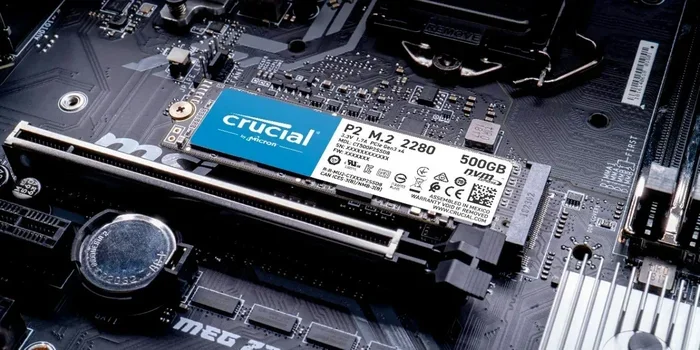
The M.2 part refers to the physical shape and size of the drive. Most enterprise NVMe M.2 SSDs use the 2280 form factor, which means they are 22 millimeters wide and 80 millimeters long. This compact size fits into a dedicated M.2 slot on modern motherboards and server boards.
Unlike consumer SSDs, enterprise drives are built to handle heavy, continuous workloads. They use premium NAND flash memory, often TLC (Triple-Level Cell) or even newer technologies. The result is a drive that stays fast and stable under pressure, making it ideal for data center storage and mission-critical applications.
When you compare an enterprise NVMe SSD M.2 to a standard SATA drive, the difference is night and day. You get much higher read and write speeds, dramatically lower latency, and better power efficiency. For businesses that need every millisecond, this matters a lot.
How NVMe Differs from SATA
The SATA interface was designed for spinning hard drives from the 1980s. It limits SSDs to about 550 MB per second. An NVMe drive, on the other hand, can reach speeds of 7,000 MB per second or more on PCIe Gen4. The NVMe protocol uses a streamlined command queue that reduces overhead and boosts performance.
This means your system boots faster, files transfer quicker, and applications load in a fraction of the time. For enterprises running databases, virtual machines, or AI workloads, this speed advantage translates directly into productivity gains.
Why Enterprises Choose M.2 NVMe Drives
Businesses choose enterprise NVMe M.2 SSDs for several compelling reasons. Let us look at the biggest benefits that drive this decision.
Blazing-Fast Speed and Low Latency
Speed is the number one reason companies make the switch. An enterprise NVMe SSD M.2 can deliver sequential read speeds of up to 7,400 MB per second on PCIe Gen4. Write speeds are equally impressive, often exceeding 6,000 MB per second. Compare this to a typical SATA SSD, and you see why enterprises are making the move.
Low latency is just as important. NVMe drives respond to data requests in microseconds instead of milliseconds. For databases and real-time analytics, this reduction in wait time can be a game changer.
Compact Form Factor with High Capacity
The M.2 form factor is tiny but mighty. A single M.2 2280 drive can store up to 4TB or more of data. This is perfect for space-constrained environments like blade servers or compact workstations. You get massive storage capacity without taking up much room.
For more details on high-capacity options, check out our 4TB NVMe M.2 SSD review to see what is possible with modern enterprise drives.
Reliability and Endurance
Enterprise drives are rated for much higher endurance than consumer SSDs. You will see TBW (Terabytes Written) ratings in the thousands, meaning the drive can handle constant writing for years without wearing out. This is critical for servers that run 24/7.
Enterprise NVMe M.2 SSDs also include advanced error correction and power-loss protection. These features keep your data safe even during unexpected outages. For businesses where downtime costs thousands of dollars per hour, this reliability is non-negotiable.
Energy Efficiency
NVMe M.2 drives consume less power per gigabyte than traditional hard drives or even SATA SSDs. This leads to lower electricity bills and less heat generation in your server rack. Over time, the energy savings can be significant, especially in large-scale deployments.
Key Specifications to Look For
Not all enterprise NVMe SSD M.2 drives are created equal. Here are the specs that matter most when you are shopping for one.
Interface and Generation
Look for PCIe Gen4 or PCIe Gen5 support. Gen4 offers up to 8 GT per second per lane, while Gen5 doubles that to 16 GT per second. More lanes mean more bandwidth. Most enterprise M.2 SSDs use four PCIe lanes (x4), which maximizes throughput.
If you want to understand the different PCIe generations better, our article on PCIe NVMe M.2 SSD drives covers this topic in depth.
NAND Flash Type
Enterprise drives typically use TLC or QLC NAND flash. TLC offers a great balance of speed, endurance, and cost. Some high-end models use SLC (Single-Level Cell) for maximum durability, though these are rarer and more expensive.
Capacity Options
Enterprise NVMe M.2 SSDs come in a wide range of capacities:
- 512GB: Great for boot drives and lightweight databases.
- 1TB: A solid sweet spot for most enterprise workloads.
- 2TB: Ideal for virtual machines and large-scale applications.
- 4TB: Best for storage-intensive tasks and high-capacity arrays.
For budget-friendly options in the 1TB range, you might want to explore our guide on 1TB NVMe M.2 SSD options to compare prices and features.
Endurance Rating (TBW)
The TBW rating tells you how much data you can write to the drive before it is expected to fail. Enterprise drives typically start at 1,000 TBW for 1TB models and go much higher for larger capacities. Always check this rating, especially if your workload involves heavy write operations.
Top Enterprise NVMe M.2 SSDs Worth Considering
The market for enterprise NVMe SSD M.2 drives has grown rapidly. Here are some top contenders that stand out in 2024 and beyond.
Crucial T705 PCIe Gen5 NVMe M.2
The Crucial T705 is one of the fastest consumer and prosumer NVMe drives available. It leverages PCIe Gen5 technology and delivers read speeds up to 12,400 MB per second. While not strictly labeled “enterprise,” its performance and reliability make it a strong choice for demanding professional environments.
For a detailed look at this drive, see our Crucial T705 PCIe Gen5 NVMe M.2 SSD review.
Samsung 970 EVO Plus NVMe M.2
The Samsung 970 EVO Plus remains a popular choice for enterprise and prosumer use. It offers excellent sequential speeds, strong endurance, and a reliable pedigree. It uses PCIe Gen3 but still delivers outstanding real-world performance for most workloads.
For more information on this drive, check out our Samsung 970 EVO Plus NVMe M.2 SSD review.
Micron 7450 NVMe M.2
The Micron 7450 is a true enterprise-grade NVMe M.2 SSD. It is designed for data center environments with high endurance and consistent performance under mixed workloads. This drive is built to run 24/7 without breaking a sweat.
WD Blue SN570 and SN770 Series
Western Digital’s Blue series offers affordable NVMe M.2 options with solid performance. The SN770 in particular is a step up and works well for small business servers and workstations that need reliable high-performance SSD storage without a premium price tag.
Kingston NV2 and KC3000
Kingston offers a range of NVMe M.2 drives for different needs. The KC3000 is positioned for enterprise use with PCIe Gen4 support and strong endurance. For a deeper look at Kingston’s offerings, see our Kingston NV2 1TB M.2 NVMe review.
How to Choose the Right Enterprise NVMe M.2 SSD
Choosing the right enterprise NVMe SSD M.2 depends on your specific needs. Here is a practical guide to help you decide.
Assess Your Workload
Ask yourself what the drive will be used for. Is it for a boot drive, a database server, a virtual machine host, or bulk storage? Different workloads place different demands on speed, endurance, and capacity.
For read-heavy workloads like content delivery or media serving, you can prioritize sequential read speed. For write-heavy tasks like logging or database transactions, look for high TBW ratings and consistent write performance.
Check Your System Compatibility
Not every computer or server supports NVMe M.2 drives. You need an M.2 slot that supports PCIe NVMe, not just SATA M.2. Check your motherboard or server manual before buying. Using a SATA M.2 slot with an NVMe drive will not work.
Also, make sure your system BIOS is up to date. Older BIOS versions sometimes do not recognize newer NVMe drives properly.
Consider Your Budget
Enterprise NVMe M.2 SSDs cost more than consumer models, but they deliver better endurance and reliability. Set a realistic budget based on your capacity needs and workload demands. Sometimes paying a bit more for a higher-end drive saves money in the long run by avoiding early replacements.
Think About Cooling
High-performance NVMe drives generate heat, especially under sustained workloads. Many enterprise M.2 SSDs come with heatsinks. If your motherboard has an M.2 heatsink, use it. For enclosed setups, you might also consider an NVMe M.2 enclosure that provides passive cooling for external use.
Installation and Compatibility Tips
Installing an enterprise NVMe SSD M.2 is straightforward, but a few tips can save you headaches.
First, locate the M.2 slot on your motherboard or server board. It is usually labeled with the M.2 key type, such as Key M or Key B. Most NVMe M.2 SSDs use Key M. Insert the drive at a 30-degree angle and press it down firmly. Secure it with the small screw that came with your motherboard.
After physical installation, you need to enable the NVMe drive in your BIOS. Restart your computer, enter the BIOS setup, and look for the NVMe or storage configuration section. Make sure the M.2 slot is enabled and set to NVMe mode, not SATA mode.
Once the drive is recognized by the operating system, you can format and partition it. For Windows, use the Disk Management tool. For Linux, use tools like fdisk or parted. Always initialize the drive with the GPT partition style for best results.
If you are unsure about driver support, some NVMe M.2 SSDs require specific drivers for optimal performance. Check the manufacturer’s website for the latest NVMe M.2 SSD WD Blue driver download or equivalent for your drive brand. Keeping drivers updated ensures stability and performance.
Common Mistakes to Avoid
- Using a SATA M.2 slot: This will not work with an NVMe drive and could cause confusion.
- Ignoring BIOS settings: An NVMe drive may not appear if the BIOS is set to legacy mode.
- Skipping the heatsink: Thermal throttling can slow down your drive under heavy loads.
- Not checking compatibility: Some older systems simply do not support NVMe M.2 drives.
Enterprise NVMe M.2 SSDs: The Future of Business Storage
The enterprise NVMe SSD M.2 market is evolving fast. PCIe Gen5 drives are becoming more affordable, and capacities are climbing rapidly. What was cutting-edge a year ago is now mainstream, and the pace of innovation shows no signs of slowing.
Businesses that invest in NVMe M.2 storage today are positioning themselves for the future. Faster boot times, quicker data access, and lower latency give companies a real competitive edge. Whether you are a small business or a large enterprise, the benefits of enterprise NVMe M.2 storage are clear.
Start by evaluating your current storage needs and future growth plans. Choose a drive that fits your budget and performance requirements. With the right enterprise NVMe SSD M.2, you will enjoy faster operations, better reliability, and a storage solution that keeps up with your business.
The transition from SATA to NVMe is no longer optional for companies that demand speed and reliability. The M.2 form factor makes it easy to upgrade without redesigning your entire system. Make the switch today and experience the difference that enterprise NVMe M.2 SSDs can make.
Frequently Asked Questions
What is an enterprise NVMe SSD M.2?
An enterprise NVMe SSD M.2 is a high-performance solid state drive designed for business use. It uses the NVMe protocol over PCIe to deliver much faster speeds than SATA SSDs. The M.2 form factor makes it compact and easy to install in modern motherboards and servers.
How fast is an enterprise NVMe M.2 SSD?
Enterprise NVMe M.2 SSDs can reach sequential read speeds of 7,000 MB per second or more on PCIe Gen4. Gen5 drives push that even higher, exceeding 12,000 MB per second. Write speeds are typically 30 to 50 percent lower than read speeds but still far faster than SATA drives.
What capacity options are available for enterprise NVMe M.2 SSDs?
You can find enterprise NVMe M.2 SSDs from 512GB all the way up to 4TB and beyond. The most popular capacities for business use are 1TB and 2TB, which offer a good balance of speed, endurance, and price.
Are enterprise NVMe M.2 SSDs worth the extra cost?
Yes, for businesses that need speed, reliability, and endurance, enterprise NVMe M.2 SSDs are absolutely worth it. They handle constant workloads better, last longer, and deliver significantly higher performance than consumer drives.
Can I use an NVMe M.2 SSD in any computer?
No, you need a motherboard or server with an M.2 slot that supports PCIe NVMe. Some M.2 slots only support SATA, which will not work with an NVMe drive. Always check your system specifications before purchasing.
Do enterprise NVMe M.2 SSDs need special cooling?
Many enterprise NVMe M.2 SSDs come with built-in heatsinks. For sustained high-performance workloads, adding a heatsink or using a motherboard with an M.2 thermal pad helps prevent thermal throttling and maintains peak speeds.
=== CONCLUSION ===
The enterprise NVMe SSD M.2 is a powerful storage solution that delivers speed, reliability, and efficiency for modern businesses. From blazing-fast read and write speeds to compact form factors and high endurance ratings, these drives check every box for enterprise storage needs.
Whether you are upgrading a single server or building an entire data center, choosing the right enterprise NVMe M.2 SSD can transform your operations. Consider your workload, check your system compatibility, and invest in a drive that grows with your business. The future of enterprise storage is here, and it fits in an M.2 slot.