Is Usb 3 2 Gen 1 Fast Enough
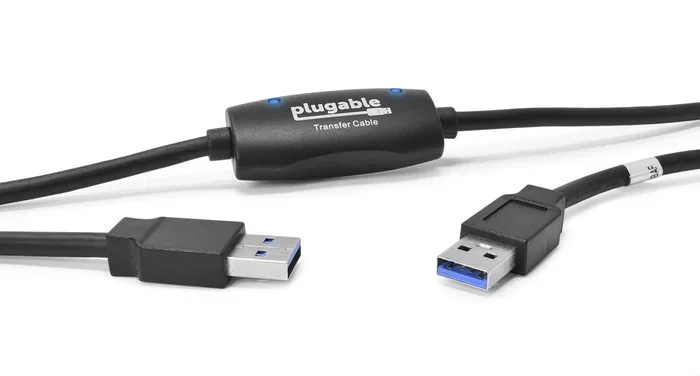
USB 3.2 Gen 1 offers up to 5 Gbps speeds, making it more than fast enough for everyday tasks like file transfers, backups, and external storage. While it does not match the blazing speeds of USB 3.2 Gen 2 or Thunderbolt 3, it still handles most common workloads with ease. Let us break down whether USB 3.2 Gen 1 is the right choice for your needs.
You have probably heard the term USB 3.2 Gen 1 thrown around when shopping for external drives, adapters, or enclosures. But what does it actually mean? And more importantly, is USB 3.2 Gen 1 fast enough for what you need? If you have been wondering whether this connection standard can keep up with your daily workflow, you are in the right place.
USB 3.2 Gen 1 has been around for a while, and it remains one of the most common ports on laptops, desktops, and external storage devices. It offers a maximum theoretical speed of 5 Gbps, which is the same as what was once called USB 3.0 and later USB 3.1 Gen 1. Despite the confusing naming changes from USB-IF, the technology itself is proven and reliable.
In this article, we will walk through everything you need to know about USB 3.2 Gen 1. We will cover real-world speeds, common use cases, where it falls short, and how it compares to newer USB standards. By the end, you will know exactly whether USB 3.2 Gen 1 is fast enough for your setup.
Key Takeaways
- USB 3.2 Gen 1 delivers 5 Gbps speeds: This is the same as USB 3.1 Gen 1 and USB 3.0, offering solid performance for most users.
- It is fast enough for everyday tasks: File transfers, photo backups, and external storage work great on USB 3.2 Gen 1.
- It may bottleneck high-speed NVMe SSDs: If you use a M.2 NVMe SSD USB setup, you will not get the full drive speed.
- USB 3.2 Gen 2 is faster but costs more: For heavy workloads, upgrading to Gen 2 gives you 10 Gbps.
- Your cables matter: Using the right USB cable can make a big difference in real-world speed.
- It is a great budget option: USB 3.2 Gen 1 offers excellent value for casual and moderate users.
📑 Table of Contents
What Is USB 3.2 Gen 1 and Why Does the Name Matter?
The naming history of USB standards can be confusing. USB 3.2 Gen 1 was previously known as USB 3.1 Gen 1 and before that, USB 3.0. Despite the name changes, the underlying technology has not changed. It still provides a maximum data transfer rate of 5 gigabits per second, or about 625 megabytes per second in theory.
Why does the name matter? Because when you are shopping for products like an M.2 NVMe SSD to USB 3.1 adapter or any USB storage device, the labeling can make it hard to compare options. Manufacturers sometimes use the old names, and sometimes they use the new ones. But under the hood, USB 3.2 Gen 1 is the same 5 Gbps connection.
The key takeaway here is simple. USB 3.2 Gen 1 is a solid, well-established standard. It is not the newest, but it is far from outdated. Most computers made in the last five years still include USB 3.2 Gen 1 ports, and they will continue to do so for many years to come.
Real-World Speeds of USB 3.2 Gen 1
Theoretical speeds and real-world speeds are two different things. So let us talk about what USB 3.2 Gen 1 actually delivers in everyday use.
What to Expect in Practice
In real-world testing, USB 3.2 Gen 1 typically delivers sustained transfer speeds between 300 and 450 megabytes per second. This depends on several factors:
- The type of storage device: A mechanical hard drive will max out the connection much faster than a solid-state drive.
- The quality of the USB cable: Cheap or damaged cables can significantly reduce speeds.
- The port type on your computer: USB 3.2 Gen 1 ports on motherboards and laptops can vary slightly in performance.
- The file size and type: Large files transfer faster than many small files due to overhead.
For most users, speeds in the 300 to 450 MB/s range are more than enough. You can transfer a 1 terabyte folder of photos in roughly 25 to 35 minutes. That is not lightning fast, but it is perfectly practical for everyday use.
Where USB 3.2 Gen 1 Shines
USB 3.2 Gen 1 works great for a wide range of tasks. Here are some examples where it performs well:
- Backing up documents and spreadsheets
- Transferring photos and videos from a camera
- Using an external drive for secondary storage
- Running applications directly from an external drive
- Connecting a M.2 NVMe SSD enclosure adapter USB 3.1 for portable storage
For these tasks, the 5 Gbps bandwidth is more than sufficient. You will not notice any lag or bottlenecks in your daily workflow.
When Is USB 3.2 Gen 1 Not Fast Enough?
While USB 3.2 Gen 1 handles most everyday tasks well, there are situations where it falls short. Understanding these limitations helps you decide if it is the right choice for your specific needs.
Working with Large Video Files
If you edit 4K video or work with large video projects, USB 3.2 Gen 1 can become a bottleneck. Modern NVMe SSDs can read and write at speeds of 3,000 to 7,000 MB/s or more. USB 3.2 Gen 1 caps out at around 625 MB/s, which means you are only using a fraction of the drive’s potential.
For video editors who need to scrub through footage in real time or transfer massive project files daily, this speed limitation can be frustrating. In these cases, a USB 3.2 Gen 2 connection or Thunderbolt 3 would be a much better fit.
High-Performance Gaming Setups
Gamers who want the fastest load times might find USB 3.2 Gen 1 limiting. While it is fast enough for most games, titles installed on a M.2 NVMe to USB C SSD enclosure will not load as quickly as they would on an internal NVMe drive or a faster USB connection.
That said, for casual gaming and storing game libraries, USB 3.2 Gen 1 is perfectly fine. The speed difference only becomes noticeable during initial installations or when moving very large game files.
Professional Audio and Photography Workflows
Professionals who work with large RAW photo libraries or high-resolution audio files may also feel the limitations. Transferring hundreds of gigabytes of RAW images or uncompressed audio projects takes longer on USB 3.2 Gen 1 compared to faster standards.
For hobbyists and semi-professionals, USB 3.2 Gen 1 is still workable. But for full-time professionals who move terabytes of data regularly, an upgrade to USB 3.2 Gen 2 or Thunderbolt makes sense.
USB 3.2 Gen 1 vs. Newer USB Standards
How does USB 3.2 Gen 1 stack up against the newer USB standards? Let us compare them side by side.
| Standard | Max Speed | Real-World Speed | Best For |
|---|---|---|---|
| USB 3.2 Gen 1 | 5 Gbps | 300-450 MB/s | Everyday file transfers, backups |
| USB 3.2 Gen 2 | 10 Gbps | 800-1000 MB/s | Large file transfers, video editing |
| USB 3.2 Gen 2×2 | 20 Gbps | 1500-2000 MB/s | Professional workloads |
| Thunderbolt 3 | 40 Gbps | 2500-3000 MB/s | High-performance, multi-device setups |
As you can see, USB 3.2 Gen 1 sits at the entry-level tier of modern USB speeds. It is not the slowest option, but it is not the fastest either. For most home and office users, it hits the sweet spot between performance and cost.
If you are using an external NVMe SSD, the connection speed matters a lot. A fast NVMe drive paired with a USB 3.2 Gen 1 connection will only perform as fast as the connection allows. This is why many users look for a M.2 NVMe SSD enclosure adapter USB 3.1 for basic needs, but upgrade to USB 3.2 Gen 2 for full performance.
How to Get the Best Performance from USB 3.2 Gen 1
If you decide that USB 3.2 Gen 1 is right for you, here are some tips to make sure you are getting the most out of it.
Use Quality Cables
This is the single biggest factor that affects real-world USB speeds. A cheap or damaged USB cable can cut your transfer rate in half. Always use cables that are rated for USB 3.2 Gen 1 or higher, and look for reputable brands.
Close Unnecessary Programs
When transferring large files, close any programs that are reading or writing to the same drive. This reduces competition for bandwidth and helps maintain consistent speeds.
Check Your Port
Not all USB ports are created equal. Make sure you are plugging into a USB 3.2 Gen 1 port (often marked with a blue insert or the SS logo) rather than a USB 2.0 port. Using a USB 2.0 port will give you speeds of only about 60 MB/s, which is dramatically slower.
Format Your Drive Properly
If you are using an external drive, make sure it is formatted with a file system that supports large files and fast transfers. NTFS for Windows or APFS for Mac are both good choices that work well with USB 3.2 Gen 1.
Keep Your Drivers Updated
Outdated USB drivers can cause speed issues and connectivity problems. Make sure your operating system and USB controller drivers are up to date for the best performance.
Is USB 3.2 Gen 1 Fast Enough for You?
The answer depends on what you plan to do. For the majority of users, USB 3.2 Gen 1 is more than fast enough. It handles file transfers, backups, external storage, and everyday computing tasks with ease. The 5 Gbps speed is still respectable and widely supported across devices.
However, if you work with large video files, need the fastest possible load times for games, or move terabytes of data regularly, you should consider a faster connection like USB 3.2 Gen 2 or Thunderbolt 3.
The good news is that USB 3.2 Gen 1 is affordable and universally compatible. You do not need expensive cables or special hardware to take advantage of it. If you are looking for a reliable and practical connection for your external storage, USB 3.2 Gen 1 is a solid choice.
For users who want a portable setup, a M.2 NVMe SSD USB solution with USB 3.2 Gen 1 connectivity offers a great balance of speed and convenience. You get the performance of an NVMe drive in a portable package, and the USB 3.2 Gen 1 connection ensures broad compatibility with your existing devices.
In summary, USB 3.2 Gen 1 is not the fastest option on the market, but it is far from slow. It is the workhorse of the USB world, reliable, compatible, and fast enough for most people. Unless you have very specific high-performance needs, USB 3.2 Gen 1 will serve you well.
Frequently Asked Questions
Is USB 3.2 Gen 1 the same as USB 3.0?
Yes, USB 3.2 Gen 1 is the same technology as USB 3.0 and USB 3.1 Gen 1. The naming changed when USB-IF rebranded the standards, but the speed and technology remain identical at 5 Gbps.
Can I use USB 3.2 Gen 1 for an external NVMe SSD?
You can, but you will not get the full speed of the NVMe drive. USB 3.2 Gen 1 caps out at about 625 MB/s, while most NVMe SSDs can go much faster. It works fine for general use but will bottleneck the drive during heavy transfers.
How fast is USB 3.2 Gen 1 in real life?
In real-world use, USB 3.2 Gen 1 delivers speeds of about 300 to 450 MB/s. This is fast enough for most file transfers, backups, and everyday storage tasks.
Should I upgrade from USB 3.2 Gen 1 to USB 3.2 Gen 2?
Only if you regularly work with very large files, edit 4K video, or need the fastest possible transfer speeds. For general users, USB 3.2 Gen 1 is more than sufficient.
Does the USB cable affect USB 3.2 Gen 1 speeds?
Yes, the cable matters a lot. A high-quality USB 3.2 Gen 1 cable ensures you get the full 5 Gbps speed. Cheap or damaged cables can significantly reduce your transfer rates.
Is USB 3.2 Gen 1 fast enough for gaming?
For most gaming, yes. USB 3.2 Gen 1 is fast enough to install and run games from an external drive. You will only notice slower load times compared to faster connections like USB 3.2 Gen 2 or Thunderbolt.
=== CONCLUSION ===
So, is USB 3.2 Gen 1 fast enough? For the vast majority of users, the answer is a clear yes. With 5 Gbps of bandwidth, it handles everyday file transfers, backups, and external storage with confidence. It is compatible with virtually every device you own, and it does not break the bank.
While it does not match the raw speed of USB 3.2 Gen 2 or Thunderbolt 3, it remains a practical and reliable choice for home users, students, and office workers. If your workload involves large video editing or professional data movement, consider stepping up to a faster standard.
USB 3.2 Gen 1 is not going anywhere anytime soon. It is a proven standard that continues to power millions of devices worldwide. If you are shopping for an external drive, an adapter, or an enclosure, USB 3.2 Gen 1 is a safe and smart choice that will serve you well for years to come.