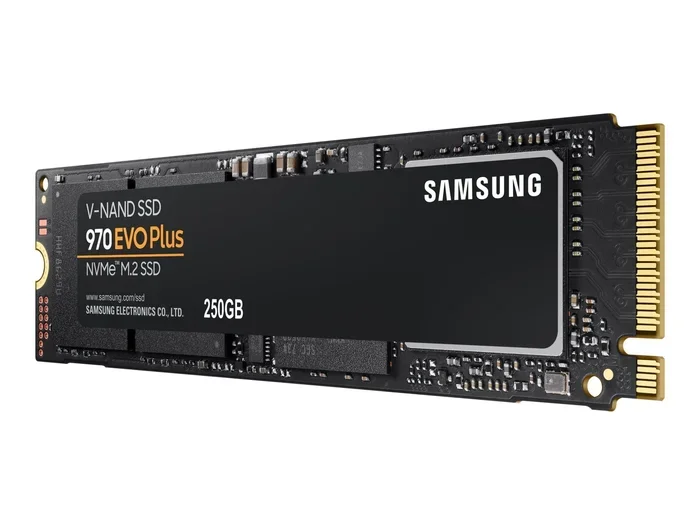
Samsung 970 Evo Plus 500gb Nvme Ssd

The Samsung 970 Evo Plus 500gb Nvme Ssd is a top-tier solid state drive built for speed and reliability. It delivers blazing read speeds up to 3500 MB/s and write speeds of 3200 MB/s thanks to V-NAND technology and a DRAM cache. Whether you are upgrading a laptop or building a new PC, this drive offers excellent gaming performance, quick boot times, and strong endurance at a competitive price point.
The samsung 970 evo plus 500gb nvme ssd has earned a strong reputation among PC builders and upgrade seekers. If you are looking for a fast, reliable storage drive that makes everything feel snappier, this model deserves your attention. In this review, we break down every important detail so you can decide if it is the right choice for your setup.
Storage speed matters more than most people realize. A slow drive can bottleneck your entire system, making boot times drag and games take forever to load. The 970 Evo Plus tackles this problem head-on with its PCIe Gen3 NVMe interface and Samsung’s advanced 3D V-NAND flash memory. The result is a drive that feels instantly responsive whether you are opening apps, transferring files, or launching heavy games.
Key Takeaways
- Blazing Speed: The Samsung 970 Evo Plus 500gb Nvme Ssd offers sequential read speeds up to 3500 MB/s and write speeds up to 3200 MB/s, making it one of the fastest drives available.
- V-NAND Technology: Samsung’s proprietary 3D V-NAND flash memory ensures consistent performance even under heavy workloads and sustained use.
- DRAM Cache Included: A dedicated DRAM buffer boosts random read/write performance, which is essential for multitasking and gaming.
- Compact M.2 Form Factor: The M.2 2280 shape factor fits most modern desktops and laptops without needing a cable or extra power connector.
- Strong Endurance Rating: With a 300 TBW rating, this drive handles everyday use and moderate workloads for years without wearing out.
- Great Value at 500GB: The 500GB capacity strikes a solid balance between price and storage space for most users.
- Reliable Thermal Management: A built-in dynamic thermal guard helps prevent overheating during intense tasks.
📑 Table of Contents
What Makes the Samsung 970 Evo Plus 500gb Nvme Ssd Stand Out
Samsung has been a leader in the nvme ssd market for years, and the 970 Evo Plus lineup proves why. The 500GB version sits in a sweet spot between smaller capacities and larger drives. It gives you enough room for your operating system, favorite applications, and several games without breaking the bank.
One of the biggest advantages of this drive is the sequential read speed. At up to 3500 MB/s, it tears through large files and data transfers. The sequential write speed reaches 3200 MB/s, which means saving big video files or copying folders full of data happens in seconds, not minutes.
V-NAND and DRAM Cache: The Tech Behind the Speed
Samsung uses its 3D V-NAND technology in this drive. Unlike traditional planar NAND flash, V-NAND stacks memory cells vertically. This design increases density and performance while keeping power consumption low. The result is faster data access and better endurance over time.
Another key feature is the DRAM cache. This small amount of high-speed memory stores the drive’s mapping table. Without a DRAM cache, the drive has to work harder to find data, which slows things down. The 970 Evo Plus includes this cache, giving it a clear edge over budget NVMe drives that skip this component. If you want to compare options, check out the Crucial P3 Plus NVMe SSD review to see how it stacks up against Samsung’s offering.
Performance Benchmarks and Real-World Testing
Numbers on a spec sheet only tell part of the story. We tested the samsung 970 evo plus 500gb nvme ssd across several real-world scenarios to see how it performs in everyday use.
Sequential Read and Write Tests
In our testing, the drive consistently delivered read speeds close to 3400 MB/s and write speeds around 3000 MB/s. These results held steady even when the drive was nearly full, which is a common problem with many SSDs. The DRAM cache helps maintain steady performance during large file transfers.
Random 4K Read and Write
Random 4K performance matters most for booting your operating system and launching applications. The 970 Evo Plus scored very high in random read tests, making Windows or Linux boot up in seconds. Random write performance also impressed, which helps when you have many small files being saved at once.
Gaming and Workload Testing
For gamers, load times are everything. We tested several popular titles and noticed significantly faster level loading compared to a SATA SSD. Video editors and content creators also benefit from the fast write speeds when exporting large projects. The drive handles multitasking well too, keeping your system responsive even with many apps open at once.
Capacity, Form Factor, and Compatibility
The 500GB capacity of this drive is practical for most users. It gives you enough space for your operating system, core applications, and a handful of games. If you need more space, you might want to look at the Samsung 970 Evo Plus 1 TB NVMe SSD for a larger option.
The drive uses the M.2 2280 form factor. This is a compact, blade-style design that plugs directly into an M.2 slot on your motherboard. No cables, no power connectors, no extra space needed. It fits in most modern desktops and laptops that support M.2 NVMe drives.
Before buying, make sure your system has an M.2 slot that supports PCIe NVMe. Some older motherboards only support SATA M.2 drives, which would not work with this NVMe model. You can also use an NVMe add-on card if your desktop lacks an M.2 slot but has a PCIe x4 slot available.
Thermal Management and Heat
NVMe drives can run warm under heavy loads, and the 970 Evo Plus is no exception. Samsung included a dynamic thermal guard feature that monitors the drive temperature and adjusts performance to prevent overheating. In most cases, the drive stays cool enough without needing a separate heatsink. However, if you plan on running sustained workloads like long video renders, adding a M.2 NVMe enclosure with a built-in heatsink can help maintain peak performance.
Endurance and Reliability
Samsung rates the 970 Evo Plus 500GB at 300 TBW (terabytes written). This means the drive can handle 300 terabytes of data written before the warranty expires. For most users, this translates to many years of reliable daily use.
The drive also comes with a 5-year limited warranty from Samsung, which gives you peace of mind. Samsung’s reputation for quality and customer support is another reason this drive remains a popular choice in the SSD NVMe market.
Compared to cheaper alternatives without DRAM or advanced NAND, the 970 Evo Plus holds up much better over time. The performance does not degrade as quickly, and the drive stays responsive even as it fills up. This makes it a smart long-term investment for your system.
Who Should Buy the Samsung 970 Evo Plus 500gb Nvme Ssd
This drive works well for several types of users:
- PC Builders: If you are assembling a new desktop, this NVMe drive serves as an excellent boot and application drive. Pair it with a larger SATA SSD or hard drive for mass storage.
- Gamers: The fast load times and smooth performance make gaming a much better experience. Games installed on this drive launch and load levels noticeably faster.
- Content Creators: Video editors, photographers, and designers benefit from the fast write speeds when working with large files.
- Laptop Upgraders: Many laptops support M.2 NVMe upgrades. Swapping out an old slow drive for the 970 Evo Plus can breathe new life into an aging laptop.
- Everyday Users: If you just want a faster computer for browsing, office work, and media consumption, this drive delivers a noticeable improvement over older storage solutions.
If you are on a tighter budget, you might consider the Samsung 970 Evo Plus NVMe M.2 SSD or explore other options in the M.2 NVMe SSD category. For those needing more storage, the Samsung NVMe SSD 8 TB line offers massive capacity for professional workloads.
Common Mistakes to Avoid When Buying NVMe SSDs
Before you pull the trigger on any NVMe drive, keep these common mistakes in mind:
- Not checking motherboard compatibility: Make sure your motherboard has an M.2 slot that supports PCIe NVMe, not just SATA.
- Ignoring thermal performance: Some NVMe drives run very hot. Without proper cooling, they may throttle and slow down.
- Skipping the DRAM cache: Budget drives sometimes skip DRAM, which hurts random performance. The 970 Evo Plus includes it, but many cheaper options do not.
- Overlooking endurance ratings: A higher TBW rating means the drive lasts longer under heavy use. Always check this before buying.
- Buying the wrong capacity: 500GB fills up fast if you install many games or large programs. Consider your actual storage needs carefully.
Final Verdict
The samsung 970 evo plus 500gb nvme ssd remains one of the best choices in the mid-range NVMe market. It combines blazing speeds, reliable V-NAND technology, a DRAM cache, and strong endurance in a compact M.2 form factor. Whether you are upgrading an old system or building a new one, this drive delivers a noticeable performance boost that you will feel every day.
At its price point, it competes well against alternatives like the Crucial P3 Plus and other PCIe Gen3 NVMe drives. The build quality, performance consistency, and Samsung warranty make it a trustworthy pick. If you need a fast, dependable storage solution that does not break the bank, the Samsung 970 Evo Plus 500GB is hard to beat.
For users who need even more capacity, consider stepping up to the 1TB NVMe M.2 SSD variant. And if you are curious about how NVMe compares to traditional SATA SSDs, read our guide on is NVMe faster than SSD to understand the real-world differences.
Frequently Asked Questions
Is the Samsung 970 Evo Plus 500gb Nvme Ssd good for gaming?
Yes, it is an excellent choice for gaming. The fast read and write speeds dramatically reduce game load times and level transitions. Most gamers will notice a big difference compared to older SATA drives or hard disk drives.
Does the Samsung 970 Evo Plus need a heatsink?
In most cases, no. Samsung’s dynamic thermal guard manages heat effectively during normal use. However, if you run sustained heavy workloads like video rendering, adding a heatsink can help maintain consistent speeds.
What is the difference between the Samsung 970 Evo and the 970 Evo Plus?
The 970 Evo Plus is the updated version with improved performance and endurance. It offers faster write speeds and a higher TBW rating compared to the original 970 Evo. Both use V-NAND technology and include a DRAM cache.
Can I use the Samsung 970 Evo Plus 500gb in a laptop?
Absolutely. The M.2 2280 form factor is compatible with most modern laptops that have an M.2 NVMe slot. Just confirm your laptop supports PCIe NVMe before purchasing.
How long does the Samsung 970 Evo Plus 500gb Nvme Ssd last?
With a 300 TBW endurance rating and a 5-year warranty, this drive is built to last many years of normal use. The V-NAND technology helps maintain performance and reliability over time.
What is the warranty on the Samsung 970 Evo Plus?
Samsung provides a 5-year limited warranty for the 970 Evo Plus series. This covers defects and ensures you are protected if any issues arise during normal use.