Should I Get Hdmi Cable with Ethernet
An HDMI cable with Ethernet combines audio, video, and internet data into one cable, simplifying your home setup. It is a great choice if you want fewer cables on your desk or entertainment center. This guide covers everything you need to know before buying one.
You are setting up your home entertainment system. You have your TV, your streaming box, your gaming console, and maybe a soundbar. Now you are looking at all those cables and thinking, “Do I really need another one?” That is where the idea of an HDMI cable with Ethernet comes in. It promises to do the job of two cables in one. But is it actually worth it? Let us break it all down.
The short answer is: it depends on your setup. If you want a clean, minimalist entertainment area and your devices support it, an HDMI cable with Ethernet can be a smart move. But if you already have a solid network setup with separate cables, you might not need it. This guide will walk you through everything so you can make a confident decision.
Key Takeaways
- Simplified Cabling: An HDMI cable with Ethernet lets you carry both video and internet signals through a single cable, reducing cable clutter.
- Not Always Necessary: If your devices already have separate Ethernet ports, a standard HDMI cable plus a regular Ethernet cable may be a better fit.
- HDMI 2.1 Support: Many modern HDMI cables with Ethernet support high bandwidth, making them ideal for 4K and even 8K streaming.
- Smart Home Friendly: These cables work well with smart TVs, streaming boxes, and home theater systems that rely on network connectivity.
- Cost Consideration: HDMI cables with Ethernet may cost a bit more, but the convenience can be worth it for clean setups.
- Check Your Devices: Make sure both your source and display devices support the HDMI Ethernet Channel before purchasing.
📑 Table of Contents
- What Is an HDMI Cable with Ethernet?
- Pros and Cons of HDMI Cables with Ethernet
- Who Should Get an HDMI Cable with Ethernet?
- How to Choose the Right HDMI Cable with Ethernet
- HDMI Ethernet Channel vs. Regular Ethernet Connection
- Setting Up Your HDMI Cable with Ethernet
- Common Mistakes People Make with HDMI Cables
- Final Verdict: Should You Get an HDMI Cable with Ethernet?
What Is an HDMI Cable with Ethernet?
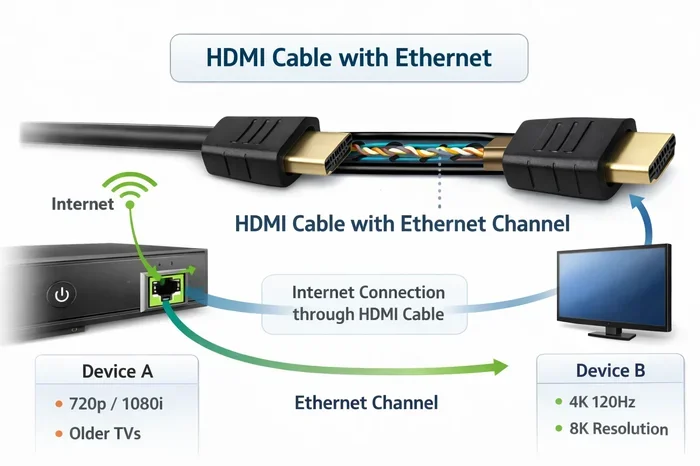
An HDMI cable with Ethernet is a special type of HDMI cable that includes an extra wire inside. This wire carries an internet signal alongside the audio and video data. It uses something called the HDMI Ethernet Channel, which was introduced in the HDMI 1.4 specification back in 2009. The idea was simple: why use two cables when one can do the job of both?
Here is how it works. When you connect two HDMI-CEC-enabled devices with this cable, the Ethernet channel allows them to share an internet connection. One device plugs into your router or modem, and the other device gets online through the HDMI cable itself. No extra Ethernet cable needed. It is a neat trick that not everyone knows about.
It is important to understand that the Ethernet channel does not replace a full-blown network connection for heavy tasks. It is designed for lighter data sharing, like allowing your smart TV to pull in online content without a separate Ethernet wire running to the back of your TV. Think of it as a convenience feature rather than a replacement for your home network.
Pros and Cons of HDMI Cables with Ethernet
The Advantages You Should Know About
There are several real benefits to using an HDMI cable with Ethernet in your setup. Let us look at the biggest ones.
- Less Cable Clutter: The most obvious benefit is fewer cables. Your entertainment center or desk stays cleaner and more organized. You do not need a dedicated Ethernet cable running from your router to your TV or streaming device.
- Easy Setup: If you are not tech-savvy, this can be a huge win. One cable handles both audio-video and internet. You plug it in, and everything works. No need to configure separate network connections.
- Better for Wall-Mounted TVs: When your TV is mounted on the wall, running extra cables can be a real hassle. An HDMI cable with Ethernet means you only need one cable run from your wall plate to your device. That makes installation much simpler.
- Future-Proofing: Many HDMI cables with Ethernet also support the latest HDMI standards, including HDMI 2.1. This means you get high-speed data transfer for 4K and 8K content along with the Ethernet feature.
- Cost Savings on Cables: Buying one cable that does two jobs can save you money compared to buying a premium HDMI cable and a high-quality Ethernet cable separately.
The Drawbacks to Keep in Mind
Now let us talk about the downsides. No product is perfect, and HDMI cables with Ethernet have some limitations.
- Not All Devices Support It: Both your source device and your display need to support the HDMI Ethernet Channel. If one of them does not, the Ethernet feature will not work. This is a common issue that catches people off guard.
- Slower Than Dedicated Ethernet: The Ethernet channel in HDMI cables is not as fast as a dedicated Ethernet connection. If you need rock-solid internet for competitive gaming or large downloads, a separate Ethernet cable is still the better choice.
- Can Be Harder to Find: Not every retailer stocks HDMI cables with Ethernet. You might need to shop online or look in specialty stores. They are not as common as standard HDMI cables.
- Sometimes Unnecessary: If your devices already have built-in Wi-Fi or Ethernet ports, the Ethernet channel in an HDMI cable becomes redundant. You are paying extra for a feature you might never use.
Who Should Get an HDMI Cable with Ethernet?
This is the big question, and the answer depends on your situation. Let us look at a few scenarios to help you decide.
You Should Get One If…
- You have a wall-mounted TV and want to minimize the number of cables running through the wall.
- Your entertainment center is in a tight space and cable management is a real challenge.
- You want a simple, plug-and-play setup without dealing with multiple network configurations.
- Your devices support the HDMI Ethernet Channel and you want to take advantage of that feature.
- You are building a new home theater or smart TV setup from scratch and want to keep things clean from day one.
You Might Not Need One If…
- Your devices already have reliable Wi-Fi or Ethernet connections built in.
- You need high-speed, low-latency internet for competitive gaming or video conferencing.
- You already have a well-organized cable setup with separate HDMI and Ethernet cables.
- Your TV and source devices are older models that do not support the HDMI Ethernet Channel.
If you are still on the fence, think about how often you would actually use the Ethernet feature. For many people, Wi-Fi is more than enough for streaming content. But if you value a clean, minimal setup, the HDMI cable with Ethernet is a great tool to have in your kit.
How to Choose the Right HDMI Cable with Ethernet
Not all HDMI cables are created equal. When shopping for one with Ethernet, there are a few key things to keep in mind.
Check the HDMI Version
Look for cables that support at least HDMI 2.0 or HDMI 2.1. HDMI 2.1 cables offer much higher bandwidth, which means they can handle 4K at 120Hz or even 8K resolution. If you have a modern TV or gaming console, an HDMI 2.1 cable with Ethernet is the way to go. It gives you the best of both worlds: ultra-fast video and the convenience of shared internet.
Consider Cable Length
Measure the distance between your devices before buying. HDMI cables can lose signal quality over long distances. For most home setups, a 6-foot or 10-foot cable works perfectly. If you need something longer, look for active HDMI cables or cables with signal boosters to maintain quality.
Look for Premium Certification
The HDMI Forum offers Premium High Speed certification for cables that meet strict quality standards. A certified cable ensures you get reliable performance. It also means the cable has been tested for the higher bandwidths needed for 4K and HDR content. Do not skimp on this if you want a setup that lasts.
Brands Worth Considering
Some brands have built a solid reputation for quality HDMI cables. Look for well-known manufacturers that offer warranties and clear specifications. Reading reviews from other users can also help you spot any potential issues before you buy. Just remember that the most expensive cable is not always the best one for your specific needs.
HDMI Ethernet Channel vs. Regular Ethernet Connection
It is easy to confuse the Ethernet channel in an HDMI cable with a regular Ethernet connection. They are not the same thing, and understanding the difference matters.
A regular Ethernet connection uses a dedicated cable from your router or modem to your device. It provides a direct, high-speed link to your network. This is ideal for tasks that need consistent, fast internet, like online gaming or large file downloads. If you are comparing options, check out our guide on whether you should upgrade your CPU or GPU if you are building a gaming setup where network speed matters.
The HDMI Ethernet Channel, on the other hand, shares the internet connection between two HDMI devices through the cable itself. It is slower and less reliable than a dedicated Ethernet link, but it is incredibly convenient for simple tasks like smart TV streaming. Think of it as a bonus feature, not a replacement for proper networking.
If you have a device like a Raspberry Pi that you use with an HDMI display, you might be interested in how it boots from an NVMe SSD. You can check out our article on NVMe SSD boot with the Raspberry Pi 5 for tips on setting up high-speed storage with HDMI output.
Setting Up Your HDMI Cable with Ethernet
Setting up an HDMI cable with Ethernet is pretty straightforward. Here is a quick step-by-step guide to get you started.
- Check Compatibility: Make sure both your source device (like a Blu-ray player or streaming box) and your display (like your TV) support the HDMI Ethernet Channel. You can usually find this in the device specifications.
- Connect the Cable: Plug one end of the HDMI cable with Ethernet into your source device and the other end into your TV or display.
- Enable Network Sharing: Go into the settings on one of your devices and look for an option to enable HDMI network sharing or CEC (Consumer Electronics Control). This allows the devices to communicate over the Ethernet channel.
- Test the Connection: Try loading an online video or app on your TV. If it plays without issues, your Ethernet channel is working correctly.
- Troubleshoot if Needed: If the connection does not work, try reseating the cable or checking your device settings. Sometimes a simple restart fixes the issue.
One thing to keep in mind: the HDMI Ethernet Channel only works when both devices are powered on and properly connected. If one device is off, the other will not be able to share its internet connection through the cable.
For those who are also managing other connectivity accessories in their setup, like external SSD enclosures for fast data transfer, consider checking out our article on the Acasis 80Gbps M.2 NVMe SSD enclosure compatible with Thunderbolt 5 for high-speed storage solutions that complement your HDMI setup.
Common Mistakes People Make with HDMI Cables
Even with a great cable, people sometimes make mistakes that cause problems. Here are a few to avoid.
- Buying the Wrong Version: Not all HDMI cables support the same features. Make sure you buy the right version for your devices. A cable that only supports HDMI 1.4 will not give you the same performance as an HDMI 2.1 cable.
- Ignoring Cable Quality: Cheap, uncertified cables can cause signal drops, flickering, or no signal at all. Invest in a quality cable from a reputable brand. Your setup is only as good as the cables connecting it.
- Assuming Ethernet Works Automatically: The Ethernet channel does not turn on by default. You need to enable it in your device settings. If you do not see any network sharing happening, check your settings first.
- Using Damaged Cables: A frayed or bent HDMI cable can cause all sorts of issues, from poor picture quality to no signal at all. Inspect your cables regularly and replace them if they look worn.
- Overlooking Audio Settings: Sometimes people focus so much on video that they forget to check their audio settings. Make sure your audio output is set correctly to get the best sound from your setup.
Proper cable care goes a long way. If you want to keep your setup running smoothly, make sure to clean your devices regularly. Check out our guide on how often you should clean your laptop for tips that also apply to your other tech gear.
Final Verdict: Should You Get an HDMI Cable with Ethernet?
So, should you get an HDMI cable with Ethernet? The answer comes down to your specific needs and setup. If you value a clean, clutter-free entertainment area and your devices support the HDMI Ethernet Channel, then yes, it is a great choice. It simplifies your cabling and adds a layer of convenience that you will appreciate every day.
On the other hand, if you already have a solid network setup with Wi-Fi or separate Ethernet cables, the Ethernet feature in an HDMI cable might not add much value for you. In that case, a standard high-quality HDMI cable will do the job just fine.
For most people building a new home theater or upgrading their current setup, an HDMI cable with Ethernet is a smart investment. It is affordable, easy to set up, and it keeps your space looking clean. Just make sure your devices are compatible, and you will be good to go.
Remember, the best cable is the one that fits your setup and meets your needs. Take a look at what you have, think about what you want, and make the choice that feels right for you. You will not regret it.
Frequently Asked Questions
Can I use an HDMI cable with Ethernet for gaming?
Yes, you can use an HDMI cable with Ethernet for gaming, but the Ethernet channel is not designed for high-speed gaming needs. If you play competitive online games, a dedicated Ethernet connection will give you lower latency and more stable performance. The HDMI Ethernet channel is better suited for streaming content on your TV or sharing a basic internet connection between devices.
Do all HDMI cables have Ethernet?
No, not all HDMI cables have Ethernet. The Ethernet feature is only available on cables that specifically support the HDMI Ethernet Channel, which was introduced with HDMI 1.4. When shopping, look for cables that mention Ethernet support in their specifications. Standard HDMI cables without this feature will not carry internet data.
Does an HDMI cable with Ethernet improve video quality?
No, the Ethernet channel does not affect video quality at all. It only carries internet data between compatible devices. Video quality depends on the HDMI version and bandwidth of the cable, such as whether it supports HDMI 2.0 or HDMI 2.1. The Ethernet feature is purely a convenience for network sharing.
Can I connect my laptop to my TV using an HDMI cable with Ethernet?
Yes, you can connect your laptop to your TV using an HDMI cable with Ethernet, as long as both devices support the HDMI Ethernet Channel. However, most laptops do not have HDMI Ethernet support built in. You will likely get better results using a standard HDMI cable for video and a separate Ethernet connection if you need internet access on your TV.
Is an HDMI cable with Ethernet the same as an HDMI ARC cable?
No, they are not the same thing. An HDMI ARC (Audio Return Channel) cable sends audio from your TV back to a soundbar or receiver. An HDMI cable with Ethernet carries internet data between devices. Some cables support both ARC and Ethernet, so check the specifications carefully when shopping. Both features serve different purposes in your setup.
How much does an HDMI cable with Ethernet cost compared to a regular HDMI cable?
An HDMI cable with Ethernet usually costs a little more than a standard HDMI cable of the same quality and length. The price difference is typically small, often just a few dollars. Given the convenience of combining video, audio, and internet into one cable, the extra cost is usually worth it for people who want a cleaner, simpler setup.