16 Gig Ram Stick Laptop
A 16 gig ram stick laptop offers the ideal balance of performance and value for most users in 2024. Whether you’re multitasking, gaming, or working with demanding software, 16GB of RAM ensures smooth operation without breaking the bank. This guide covers everything you need to know about choosing the right 16GB RAM laptop, including top brands, price ranges, and upgrade options.
Key Takeaways
- 16GB RAM is the sweet spot: It provides enough memory for multitasking, gaming, and productivity without overspending on unnecessary capacity.
- Dual-channel matters: A single 16GB stick limits performance compared to two 8GB sticks running in dual-channel mode.
- Most modern laptops support 16GB: From budget Acer Aspire models to premium HP and Lenovo laptops, options exist at every price point.
- Upgradability varies: Some laptops have soldered RAM that cannot be upgraded, while others offer accessible SODIMM slots for easy expansion.
- DDR4 vs DDR5: DDR5 offers faster speeds and better efficiency, but DDR4 remains more affordable and widely available.
- Gaming and content creation benefit most: 16GB RAM significantly improves performance in video editing, 3D rendering, and modern gaming titles.
- Budget-friendly options exist: You can find excellent 16GB RAM laptops under $500, especially during sales and on refurbished models.
📑 Table of Contents
- Why a 16 Gig Ram Stick Laptop Is the Perfect Choice in 2024
- Understanding RAM: What It Does and Why 16GB Matters
- Single 16GB Stick vs. Dual-Channel 2x8GB: What’s the Difference?
- Top Laptop Brands Offering 16GB RAM Models
- Buying Guide: How to Choose the Right 16GB RAM Laptop
- Upgrading Your Laptop’s RAM: Is It Possible?
- DDR4 vs DDR5: Which RAM Type Should You Choose?
- Best Use Cases for a 16GB RAM Laptop
- Frequently Asked Questions
- Final Thoughts
Why a 16 Gig Ram Stick Laptop Is the Perfect Choice in 2024
Let’s be honest. Choosing the right laptop can feel overwhelming. There are dozens of specs to consider, and RAM is one of the most important ones. If you’ve been shopping around, you’ve probably noticed that many laptops now come with 16GB of RAM. But what does that actually mean for you?
A 16 gig ram stick laptop simply means the computer has 16 gigabytes of random access memory. Think of RAM as your laptop’s short-term memory. It stores the data your computer needs right now or in the near future. The more RAM you have, the more tasks your laptop can handle simultaneously without slowing down.
So why is 16GB considered the sweet spot? Well, 8GB used to be enough for basic tasks. But modern operating systems, web browsers, and applications are hungrier than ever. A single Chrome tab can eat up hundreds of megabytes. Add a few more tabs, a streaming app, and maybe a document editor, and 8GB starts to choke. That’s where 16GB comes in. It gives you breathing room to do more without your laptop breaking a sweat.
Understanding RAM: What It Does and Why 16GB Matters
What Exactly Is RAM?
RAM stands for Random Access Memory. It’s a type of volatile memory, meaning it only holds data while your laptop is turned on. When you shut down, everything in RAM gets cleared. But while your laptop is running, RAM is where all the active data lives.
When you open a program, your laptop loads it from the storage drive into RAM because accessing data from RAM is dramatically faster from a hard drive or even an SSD. The more programs you run simultaneously, the more RAM you need. If you run out of RAM, your laptop starts using a portion of your storage drive as virtual memory, which is much slower and causes noticeable lag.
If you want a deeper dive into how memory works, check out our guide on what is the ram on a laptop for a comprehensive explanation.
Is 16GB Enough for Most Users?
The short answer is yes, for most people. Here’s a quick breakdown of how different users benefit from 16GB:
- Casual users: Web browsing, email, social media, and streaming. 16GB is more than enough and will keep things smooth for years.
- Office professionals: Running multiple Office applications, video calls, and browser tabs. 16GB handles this effortlessly.
- Students: Research papers, online classes, light photo editing, and multitasking. 16GB is perfect.
- Gamers: Most modern games recommend 16GB for optimal performance. It’s the standard for gaming laptops today.
- Content creators: Video editing, graphic design, and 3D modeling can benefit from 16GB, though 32GB may be better for heavy workloads.
Our detailed article on how much ram is good for a laptop breaks this down even further if you’re still unsure about your specific needs.
Single 16GB Stick vs. Dual-Channel 2x8GB: What’s the Difference?
The Performance Impact of Dual-Channel Memory
Here’s something many people overlook. A laptop with two 8GB RAM sticks will generally outperform a laptop with a single 16GB stick. This is because of dual-channel memory architecture.
In dual-channel mode, the memory controller can read and write to both RAM sticks simultaneously. This effectively doubles the memory bandwidth compared to a single stick. The result? Faster data transfer, better multitasking, and improved performance in memory-intensive applications.
For everyday tasks like browsing and document editing, you might not notice a huge difference. But in gaming, video editing, and other demanding workloads, dual-channel can provide a meaningful boost. Some benchmarks show performance improvements of 10-20% in certain scenarios.
When a Single 16GB Stick Makes Sense
That said, there are situations where a single 16GB stick is the smarter choice. If your laptop has only one RAM slot, a 16GB stick is your only option for reaching that capacity. Some ultra-thin laptops sacrifice upgradability for portability.
A single stick also leaves room for future upgrades. If your laptop has two slots and you install one 16GB stick now, you can add another 16GB later for a total of 32GB. This staggered approach can be more budget-friendly than buying two sticks upfront.
Top Laptop Brands Offering 16GB RAM Models
HP Laptops with 16GB RAM
HP has been a leader in the laptop market for decades, and their 16GB RAM models are some of the best available. From the budget-friendly HP Pavilion series to the premium HP Spectre line, there’s something for everyone.
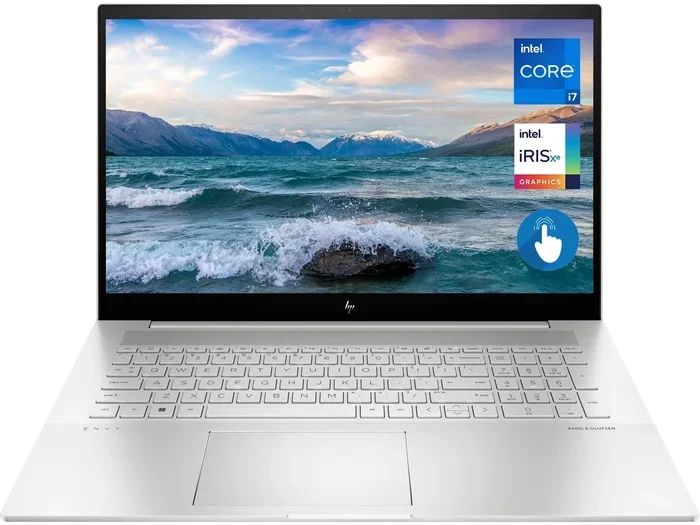
The HP Pavilion with 16GB RAM is a popular choice for students and professionals. It offers solid performance, a comfortable keyboard, and a sleek design at a reasonable price point. If you’re looking for something more powerful, the HP Envy series steps up with better displays and faster processors.
For a closer look at specific models, explore our detailed review of the HP 16 gig ram laptop lineup to find the perfect match for your budget and needs.
Lenovo Laptops with 16GB RAM
Lenovo consistently delivers excellent value, especially in their ThinkPad and IdeaPad series. The ThinkPad line is legendary among business users for its durability, fantastic keyboards, and reliable performance.
The Lenovo IdeaPad with 16GB RAM is a great option for everyday users who want a reliable machine without spending a fortune. It handles multitasking beautifully and often comes with fast SSD storage for quick boot times.
Our comprehensive guide on Lenovo laptops with 16GB ram covers the best models across different price ranges and use cases.
Acer Aspire 5: Budget-Friendly 16GB Options
If you’re on a tight budget, the Acer Aspire 5 deserves serious attention. It’s one of the most affordable laptops that comes with 16GB of RAM, and it doesn’t cut too many corners to get there.
The Aspire 5 typically features AMD Ryzen processors, which offer excellent performance per dollar. You’ll get a Full HD display, decent battery life, and enough power for everyday tasks and light gaming. It’s a fantastic choice for students or anyone who needs a capable laptop without breaking the bank.
Check out our review of the Acer Aspire 5 with 16GB RAM and Ryzen 5 for a complete breakdown of what this budget champion offers.
Buying Guide: How to Choose the Right 16GB RAM Laptop
Consider the Processor
RAM is important, but it doesn’t work alone. The processor and RAM work together to determine your laptop’s overall performance. A 16GB RAM laptop paired with an older or weak processor won’t reach its full potential.
For the best experience, look for laptops with at least an Intel Core i5 or AMD Ryzen 5 processor. These mid-range CPUs pair beautifully with 16GB of RAM and deliver excellent performance for most tasks. If you’re into gaming or content creation, consider stepping up to an Intel Core i7 or AMD Ryzen 7.
Budget-friendly options with Intel Core i3 or AMD Ryzen 3 can still work well with 16GB RAM, especially for basic tasks. But they might struggle with more demanding applications.
Storage Type and Capacity
Don’t forget about storage when choosing your laptop. A 16GB RAM laptop with a slow hard drive will still feel sluggish. Always prioritize SSD storage over traditional hard drives.
A 512GB SSD is a great starting point for most users. It provides enough space for your operating system, applications, and a reasonable amount of files. If you work with large files like videos or games, consider a 1TB drive or look for laptops that support storage upgrades.
For those interested in maximizing storage, our article on 16GB RAM 1TB SSD laptops highlights some excellent options that combine ample memory with generous storage.
Display Quality
The display is another factor that can make or break your laptop experience. Look for at least a Full HD (1920×1080) resolution. Anything lower will look noticeably pixelated, especially on screens 14 inches and larger.
If you work with photos or videos, consider a laptop with an IPS panel for better color accuracy and wider viewing angles. Some 16GB RAM laptops also offer touchscreen functionality, which can be handy for certain workflows.
Battery Life
Portability matters. A powerful laptop is great, but not if it dies after two hours. Most modern 16GB RAM laptops offer between 6 and 10 hours of battery life under normal use.
Keep in mind that battery life claims from manufacturers are often based on ideal conditions. Real-world usage, especially with multiple applications open, will typically yield shorter battery life. Reading user reviews can give you a more accurate picture of what to expect.
Upgrading Your Laptop’s RAM: Is It Possible?
Can You Add More RAM to a Laptop?
One of the most common questions we hear is whether you can upgrade a laptop’s RAM after purchase. The answer is: it depends.
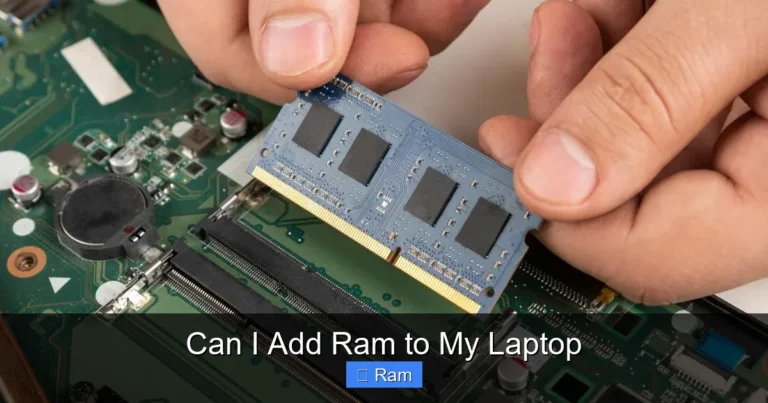
Many laptops, especially thicker models and business-oriented machines, have accessible RAM slots. You can open the bottom panel and swap out or add RAM sticks. However, many ultra-thin laptops have RAM soldered directly to the motherboard. These cannot be upgraded, so you need to choose the right amount of RAM at the time of purchase.
Before buying a laptop with plans to upgrade later, check the manufacturer’s specifications or user manual to confirm whether the RAM is upgradeable. Look for terms like “SODIMM slots” or “user-upgradeable memory.”
Not sure if your current laptop can be upgraded? Our guide on can I add more ram to my laptop walks you through the process step by step.
How to Install RAM in a Laptop
If your laptop supports RAM upgrades, the process is usually straightforward. You’ll need a small Phillips screwdriver, an anti-static wrist strap (or at least touch a grounded metal object before handling components), and the correct type of SODIMM RAM.
Here’s a general overview of the process:
- Power off the laptop and unplug it from the charger.
- Remove the bottom panel screws and carefully open the case.
- Locate the RAM slots on the motherboard.
- If replacing existing RAM, gently push the retention clips outward to release the stick.
- Insert the new RAM stick at a 45-degree angle, then press down until the clips snap into place.
- Replace the bottom panel and power on the laptop.
For a detailed walkthrough with photos, visit our tutorial on how to install ram into a laptop. It covers everything you need to know for a safe and successful upgrade.
DDR4 vs DDR5: Which RAM Type Should You Choose?
Understanding RAM Generations
RAM technology has evolved significantly over the years. DDR4 has been the standard for laptops since around 2015, and it’s still widely used today. DDR5 is the newer generation, offering faster speeds, greater bandwidth, and improved power efficiency.
DDR4 typically runs at speeds between 2133 MHz and 3200 MHz. DDR5 starts at 4800 MHz and can go much higher. This increased bandwidth translates to better performance in tasks that move large amounts of data through memory.
Should You Pay Extra for DDR5?
For most users, DDR4 with 16GB of RAM is perfectly sufficient in 2024. The real-world performance difference between DDR4 and DDR5 is noticeable but not dramatic for everyday tasks. You’ll see the biggest benefits in memory-intensive applications like video editing, scientific computing, and high-end gaming.
DDR5 laptops tend to be more expensive, and DDR5 RAM itself costs more than DDR4. If you’re on a budget, DDR4 offers better value. If you want the latest technology and plan to keep your laptop for several years, DDR5 is worth considering for its future-proofing benefits.
The key takeaway is this: don’t stress too much about DDR4 vs DDR5. Both work great with 16GB of RAM. Focus more on the overall laptop quality, processor, display, and storage when making your decision.
Best Use Cases for a 16GB RAM Laptop
Gaming
Modern games are more demanding than ever. Titles like Cyberpunk 2077, Call of Duty, and Elden Ring recommend 16GB of RAM for smooth gameplay. With 16GB, you can run your game, have Discord open in the background, browse the web for guides, and stream music without any hiccups.
A 16 gig ram stick laptop designed for gaming will typically pair that memory with a dedicated graphics card and a fast processor. This combination delivers the best gaming experience at this price point.
Content Creation
Video editors, graphic designers, and 3D artists will appreciate 16GB of RAM. Programs like Adobe Premiere Pro, Photoshop, and Blender can consume large amounts of memory, especially when working with high-resolution files.
While 32GB is ideal for professional content creators, 16GB handles most tasks well. You might need to close other applications when rendering large projects, but for editing 1080p and even 4K video, 16GB gets the job done.
Software Development
Developers who run virtual machines, Docker containers, or multiple IDEs simultaneously will benefit from 16GB of RAM. Modern development environments can be surprisingly memory-hungry, and having enough RAM prevents frustrating slowdowns.
Web developers running local servers, databases, and multiple browser tabs for testing will find 16GB to be a comfortable amount. It’s enough to keep everything running smoothly without constantly managing which applications are open.
Everyday Productivity
For most people, a 16GB RAM laptop is the perfect productivity machine. You can have dozens of browser tabs open, run Microsoft Office applications, participate in video conferences, and listen to music simultaneously. Everything just works.
This level of performance also means your laptop will stay relevant longer. As software continues to evolve and demand more resources, having 16GB of RAM gives you a buffer that 8GB simply can’t provide.
Frequently Asked Questions
How much does a 16GB RAM laptop cost?
Prices vary widely depending on the brand, processor, and other specifications. Budget models like the Acer Aspire 5 can be found for under $400, while premium laptops from HP or Lenovo with 16GB RAM typically range from $600 to $1,200. Gaming laptops with 16GB RAM and dedicated graphics cards usually start around $800 and can go well above $1,500.
Is 16GB RAM overkill for basic use?
For very basic tasks like web browsing and email, 16GB might seem like more than you need. However, modern web browsers and operating systems are increasingly memory-hungry. 16GB ensures your laptop stays fast and responsive for years to come, making it a smart investment even for casual users.
Can I upgrade from 8GB to 16GB RAM myself?
In most cases, yes. Many laptops have user-accessible RAM slots that allow you to add or replace memory sticks. However, some ultra-thin laptops have soldered RAM that cannot be upgraded. Check your laptop’s specifications before assuming it’s upgradeable.
What’s the difference between DDR4 and DDR5 RAM?
DDR5 is the newer generation of RAM, offering faster speeds, higher bandwidth, and better power efficiency compared to DDR4. For most users, DDR4 is still perfectly adequate, but DDR5 provides better future-proofing and slightly improved performance in demanding applications.
Should I choose a laptop with one 16GB stick or two 8GB sticks?
Two 8GB sticks running in dual-channel mode generally offer better performance than a single 16GB stick. However, a single 16GB stick leaves room for future upgrades. If your laptop has two slots and you plan to upgrade to 32GB later, starting with one 16GB stick is a cost-effective strategy.
Is 16GB RAM enough for gaming in 2024?
Yes, 16GB is the recommended amount for most modern games. It provides enough memory for smooth gameplay while running background applications like Discord or a web browser. Some extremely demanding future titles may benefit from 32GB, but 16GB handles current games beautifully.
Final Thoughts
Choosing a 16 gig ram stick laptop is one of the smartest decisions you can make in 2024. It hits the perfect balance between performance, price, and future-proofing. Whether you’re a student, a professional, a gamer, or a casual user, 16GB of RAM ensures your laptop handles everything you throw at it without breaking a sweat.
Remember to consider the full package when shopping. RAM is just one piece of the puzzle. Look at the processor, storage type and capacity, display quality, and battery life to find the best overall machine for your needs.
Brands like HP, Lenovo, and Acer all offer excellent 16GB RAM laptops at various price points. Take your time, read reviews, and choose a laptop that fits both your budget and your workflow. With 16GB of RAM under the hood, you’ll be set up for success for years to come.
Frequently Asked Questions
Is a 16 gig ram stick laptop good for gaming?
Yes, a 16GB RAM laptop is excellent for gaming in 2024. Most modern games recommend 16GB of memory for optimal performance. Combined with a dedicated graphics card and a fast processor, 16GB RAM ensures smooth gameplay while running background apps like Discord or streaming software.
Can I upgrade my laptop from 8GB to 16GB RAM?
In most cases, you can upgrade your laptop’s RAM from 8GB to 16GB. Many laptops have accessible SODIMM slots that allow you to add or replace memory sticks. However, some ultra-thin models have soldered RAM that cannot be upgraded, so always check your laptop’s specifications first.
What is the best budget laptop with 16GB RAM?
The Acer Aspire 5 is widely considered one of the best budget laptops with 16GB RAM. It offers solid performance with AMD Ryzen processors, a Full HD display, and reliable build quality at a very affordable price point. You can often find it for under $400 during sales.
Is DDR5 RAM worth it over DDR4 in a laptop?
DDR5 offers faster speeds and better efficiency than DDR4, but the real-world performance difference is modest for everyday tasks. DDR4 remains more affordable and widely available. Choose DDR5 if you want the latest technology and future-proofing, but DDR4 is still an excellent choice for most users.
How long will a 16GB RAM laptop stay relevant?
A 16GB RAM laptop should remain relevant and perform well for at least 4 to 6 years for most users. As software continues to demand more resources, having 16GB provides a comfortable buffer that 8GB simply cannot offer. It’s a solid long-term investment.
Should I buy one 16GB stick or two 8GB sticks of RAM?
Two 8GB sticks running in dual-channel mode deliver better performance than a single 16GB stick. However, a single 16GB stick leaves an open slot for future upgrades. If you plan to expand to 32GB later, starting with one 16GB stick is a smart and cost-effective approach.