512 Gb Pcie Nvme M 2 Ssd
A 512 GB PCIe NVMe M.2 SSD is one of the best storage upgrades you can make for your computer. It combines the NVMe protocol with the compact M.2 form factor to deliver blazing-fast read and write speeds that leave traditional hard drives and even SATA SSDs in the dust. Whether you are a gamer, content creator, or everyday user, this drive delivers exceptional performance in a tiny package.
Key Takeaways
- Blazing Fast Speeds: A 512 GB PCIe NVMe M.2 SSD offers read speeds up to 7,000 MB/s, making it far faster than traditional SATA drives.
- Compact Form Factor: The M.2 2280 size fits perfectly in laptops and desktops without taking up much space.
- Wide Compatibility: Most modern motherboards support PCIe Gen 3 and Gen 4 NVMe drives, making upgrades easy.
- Great Storage Capacity: 512 GB strikes the perfect balance between speed and storage space for most users.
- Power Efficient: NVMe drives consume less power than traditional drives, helping laptops last longer on battery.
- Easy Installation: Installing an M.2 SSD takes just a few minutes and usually requires no cables.
- Ideal for Boot Drives: This drive type is perfect as a boot drive for faster system startup and application loading.
📑 Table of Contents
- What Is a 512 GB PCIe NVMe M.2 SSD?
- Why Choose a 512 GB NVMe M.2 SSD?
- How to Choose the Right 512 GB PCIe NVMe M.2 SSD
- Installation: How to Set Up Your 512 GB NVMe M.2 SSD
- Top Performance Benefits You Will Notice
- Common Mistakes to Avoid
- Quick Tips for Getting the Most Out of Your 512 GB NVMe SSD
- Expert Insights on 512 GB NVMe M.2 SSDs
- Conclusion
What Is a 512 GB PCIe NVMe M.2 SSD?
A 512 GB PCIe NVMe M.2 SSD is a solid state drive that uses the NVMe protocol over a PCIe connection in the tiny M.2 form factor. Let us break that down so it is easy to understand.
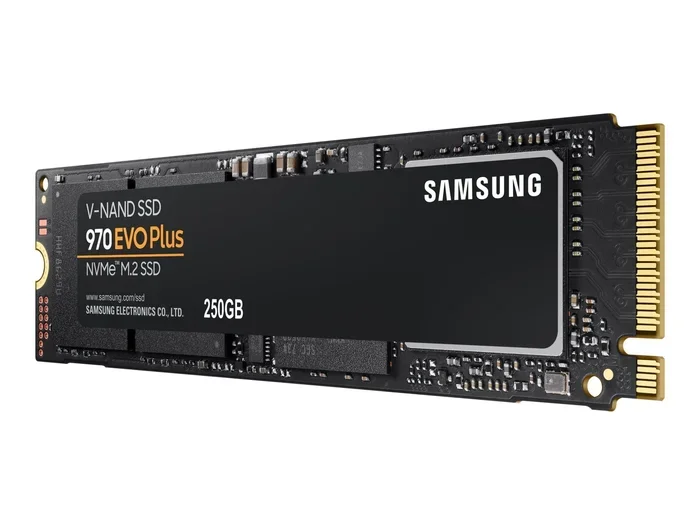
The M.2 part refers to the physical size and shape of the drive. It is a small, stick-like component that plugs directly into your motherboard. The most common size is the M.2 2280 format, which measures 22mm by 80mm. It is small enough to fit in slim laptops yet powerful enough for demanding workloads.
The PCIe part means the drive connects through your computer’s PCIe slots. This gives it much more bandwidth than a SATA connection ever could. The NVMe protocol is the language the drive uses to communicate with your system. It was designed specifically for flash storage, making it faster and more efficient than older protocols.
Together, these technologies create a storage device that is incredibly quick, compact, and versatile. A 512 GB NVMe M.2 SSD gives you plenty of space for your operating system, favorite applications, games, and files while keeping things snappy.
You can learn more about the basics of this technology in our detailed guide on 512Gb NVMe M.2 SSD and also check out our breakdown of the 512Gb M.2 NVMe SSD for additional insights.
Why Choose a 512 GB NVMe M.2 SSD?
There are many reasons to consider upgrading to a 512 GB PCIe NVMe M.2 SSD. Here is why this drive stands out from the crowd.
Lightning-Fast Read and Write Speeds
This is the biggest selling point. A 512 GB NVMe SSD can deliver sequential read speeds of up to 7,000 MB/s on PCIe Gen 4 drives. Compare that to a SATA SSD, which maxes out around 550 MB/s. The difference is night and day.
In real-world use, this means:
- Your operating system boots in seconds, not minutes.
- Large files copy and transfer almost instantly.
- Games load significantly faster, reducing wait times.
- Applications like video editing software open and render much quicker.
Perfect Storage Capacity
512 GB hits a sweet spot for most users. It gives you enough room for your operating system, commonly used programs, and a solid library of games or media files. If you need more space, you can always add a secondary drive later.
For many people, a 512 GB storage capacity is all they need for a primary boot drive. It keeps things organized and fast without overcomplicating your setup.
Compact and Space-Saving Design
The M.2 form factor is incredibly small. It does not need cables or mounting brackets like a traditional 2.5-inch drive. You simply slot it into the motherboard and you are done. This makes it perfect for:
- Slim laptops where every millimeter counts.
- Small form factor desktops with limited space.
- Clean, cable-free builds that look great.
Power Efficiency
NVMe drives are designed to use less power than their SATA counterparts. This is especially great for laptop users. You get better battery life while still enjoying exceptional performance. The drive uses less energy during idle and under load, helping your laptop last longer on a single charge.
How to Choose the Right 512 GB PCIe NVMe M.2 SSD
Not all M.2 NVMe SSDs are created equal. Here are the key factors to keep in mind when shopping for one.
PCIe Generation: Gen 3 vs Gen 4
This is the most important choice you will make. The PCIe generation determines how fast the drive can go.
- PCIe Gen 3: Offers speeds up to about 3,500 MB/s. It is still fast and works with older motherboards. This is a great budget-friendly option.
- PCIe Gen 4: Delivers speeds up to about 7,000 MB/s. This is the faster choice for modern systems that support it.
Both are excellent. If your motherboard supports Gen 4, go for it. If not, a Gen 3 drive still gives you a huge upgrade over SATA. You can explore more about the differences in our article on Samsung 970 Evo Plus NVMe M.2 SSD, which covers both generations.
DRAM Cache
Some NVMe SSDs include a DRAM cache chip. This helps the drive manage data more efficiently, especially during sustained workloads. Drives with DRAM cache tend to perform better under heavy use. If you do a lot of video editing or work with large files, look for a DRAM-cached model.
NAND Flash Type
The type of NAND flash memory inside the drive affects performance and durability. Common types include:
- TLC (Triple-Level Cell): A great balance of speed, endurance, and cost. Most 512 GB NVMe drives use TLC.
- QLC (Quad-Level Cell): Cheaper but slightly slower. Fine for general use but not ideal for heavy workloads.
- MLC (Multi-Level Cell): Fast and durable but more expensive. Less common in consumer drives today.
Form Factor and Size
Make sure you pick the right size. The M.2 2280 is the most common and fits most systems. Always check your motherboard or laptop specs before buying. Some systems also support shorter M.2 2230 drives, commonly found in ultra-thin laptops.
Brand Reputation and Warranty
Stick with trusted brands. Look for drives from manufacturers known for quality and reliable performance. A solid warranty gives you peace of mind. Most reputable brands offer 5-year warranties on their 512 GB PCIe NVMe M.2 SSDs.
Installation: How to Set Up Your 512 GB NVMe M.2 SSD
One of the best things about an M.2 NVMe SSD is how easy it is to install. Here is a simple guide to get you started.
What You Need
- A screwdriver (usually Phillips head).
- Your new 512 GB NVMe M.2 SSD.
- Your motherboard or laptop manual (to locate the M.2 slot).
Steps for Desktop Installation
- Power off your computer and unplug it.
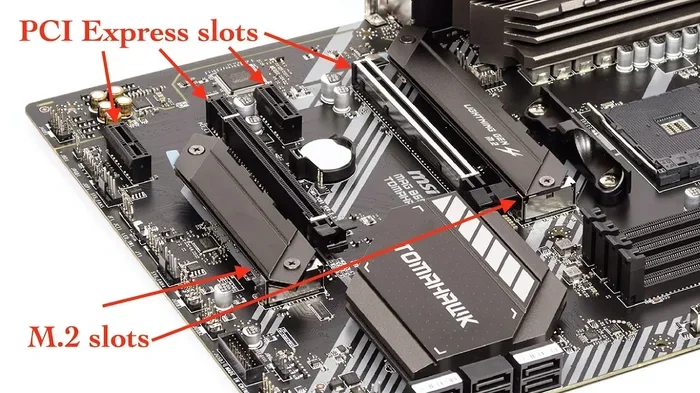
- Open the case and locate the M.2 slot on your motherboard. It is usually near the CPU socket.
- Remove the mounting screw that holds the M.2 slot bracket in place.
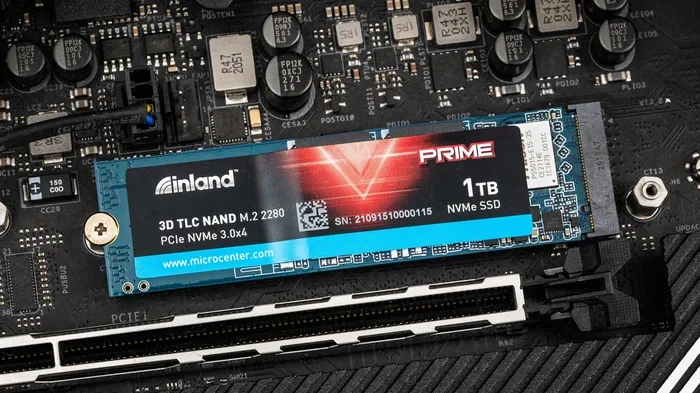
- Insert the SSD at a slight angle into the slot. Push it down gently until it sits flat.
- Secure the SSD with the mounting screw.
- Close your case, plug everything back in, and power on.
Steps for Laptop Installation
- Shut down your laptop and remove the charger.
- Find the M.2 slot. On many laptops, you need to remove the bottom panel.
- Insert the SSD at an angle and press it down flat.
- Secure it with the small screw provided.
- Replace the bottom panel and power on.
After installation, you may need to go into your BIOS or use disk management software to initialize and format the new drive. Most modern systems detect it automatically, though. This process is a great storage upgrade that anyone can do at home.
Top Performance Benefits You Will Notice
Once you install a 512 GB PCIe NVMe M.2 SSD, the difference is immediate. Here is what you can expect.
Faster System Boot Times
Your computer will wake up and be ready to use in under 15 seconds on most systems. The NVMe protocol handles the boot process so efficiently that everything feels instant. This alone is reason enough to upgrade.
Smoother Multitasking
Running multiple applications at once becomes much smoother. The high bandwidth of a PCIe NVMe drive means data flows quickly between your storage and applications. You will notice less lag and faster response times when switching between programs.
Improved Gaming Experience
Many modern games benefit from NVMe storage. Open-world games with large environments load faster and stream assets more efficiently. Some next-generation games even require NVMe drives for their fastest features. A 512 GB gaming SSD is a great way to boost your gaming setup.
Better Content Creation Workflows
If you edit video, photos, or music, a 512 GB NVMe M.2 SSD will cut down rendering and export times significantly. Working with large 4K video files becomes much less frustrating when your drive can keep up with your creativity.
Common Mistakes to Avoid
Even though installing an M.2 NVMe SSD is straightforward, there are a few pitfalls to watch out for.
Buying the Wrong Size
Not all M.2 slots are the same. Some systems only support M.2 2230 drives while others need M.2 2280. Always double-check your device specifications before purchasing a 512 GB M.2 NVMe SSD.
Ignoring Thermal Management
Fast drives generate heat. Thermal throttling can slow down your SSD if it gets too hot. Many motherboards come with M.2 heatsinks. If yours does not, consider buying an aftermarket M.2 heatsink or a drive with built-in thermal protection. Keeping your drive cool ensures consistent performance.
Using an Older Motherboard Without PCIe Support
An NVMe drive needs a PCIe slot to work. Some older motherboards have M.2 slots that only support SATA. Make sure your M.2 slot supports NVMe PCIe before buying a non-SATA drive. Check your motherboard manual to confirm.
Not Checking Compatibility with Your System
Always verify that your system supports the PCIe generation of the drive you are buying. A Gen 4 drive will work in a Gen 3 slot but at reduced speeds. It still works, but you will not get the full performance benefit.
Quick Tips for Getting the Most Out of Your 512 GB NVMe SSD
- Use it as your boot drive: Install your operating system on the 512 GB PCIe NVMe M.2 SSD for the fastest possible system performance.
- Enable NVMe in BIOS: Some systems need you to manually enable NVMe mode. Check your BIOS settings if the drive is not detected.
- Keep your firmware updated: Manufacturers release firmware updates that improve performance and fix bugs. Check the manufacturer’s website periodically.
- Use a heatsink: Especially in desktop builds, a heatsink prevents thermal throttling and keeps speeds consistent.
- Partition wisely: You can split your 512 GB storage into separate partitions for your OS and personal files. This helps with organization.
- Clone your old drive: Use cloning software to move everything from your old drive to the new NVMe SSD without reinstalling everything from scratch.
Expert Insights on 512 GB NVMe M.2 SSDs
Industry experts agree that NVMe technology has changed the storage landscape. According to storage specialists, the shift from SATA to NVMe is one of the most impactful upgrades a user can make. A 512 GB PCIe NVMe M.2 SSD offers the best balance of speed, capacity, and value for most users.
Experts also recommend considering your long-term needs. If you plan to store massive media libraries or work with very large datasets, you might want to pair your 512 GB NVMe drive with a larger HDD or additional SSD for bulk storage. This way, you get the speed you need where it matters most, plus plenty of room for everything else.
Another expert tip: always prioritize sequential read and write speeds when comparing NVMe SSDs. These numbers tell you how fast the drive performs during large file transfers and sustained workloads. Random read speeds matter too, but sequential speeds are a good indicator of overall drive quality.
Conclusion
A 512 GB PCIe NVMe M.2 SSD is a fantastic storage upgrade for anyone looking to boost their computer’s speed and responsiveness. With blazing-fast read and write speeds, a compact M.2 form factor, and easy installation, it is one of the best value upgrades available today.
Whether you are a gamer wanting faster load times, a content creator needing smooth rendering, or an everyday user who wants their computer to feel snappy again, this drive delivers. The 512 GB capacity gives you plenty of space, and NVMe technology ensures you are getting the most out of your hardware.
Do not wait to upgrade. Pick up a 512 GB PCIe NVMe M.2 SSD today and experience the difference for yourself. Your computer will thank you.
Frequently Asked Questions
Is a 512 GB NVMe M.2 SSD enough for gaming?
Yes, 512 GB is a solid amount for gaming. It gives you plenty of space for your operating system and several modern games. If you have a large game library, consider pairing it with a secondary storage drive for extra capacity.
Can I install a PCIe Gen 4 NVMe SSD in a Gen 3 slot?
Yes, it will work. However, the drive will operate at Gen 3 speeds instead of Gen 4 speeds. You will still get a significant boost over a SATA SSD, but you will not reach the full potential of a Gen 4 drive.
Do I need a heatsink for a 512 GB NVMe M.2 SSD?
It depends on your system. Many motherboards come with built-in M.2 heatsinks. If yours does not, and you plan to do heavy workloads like video editing or sustained file transfers, adding a heatsink helps prevent thermal throttling and maintains consistent performance.
How does a 512 GB NVMe M.2 SSD compare to a SATA SSD?
A 512 GB NVMe M.2 SSD is significantly faster than a SATA SSD. NVMe drives can reach speeds up to 7,000 MB/s on PCIe Gen 4, while SATA SSDs top out around 550 MB/s. NVMe drives are also smaller, use less power, and connect directly to the motherboard without cables.
Will a 512 GB NVMe SSD fit in my laptop?
Most modern laptops support the M.2 2280 form factor, which is the standard size for 512 GB NVMe SSDs. However, some ultra-thin laptops use the smaller M.2 2230 format. Check your laptop specifications before purchasing to ensure compatibility.
What is the lifespan of a 512 GB NVMe M.2 SSD?
Most quality 512 GB PCIe NVMe M.2 SSDs last around 5 to 10 years under normal use. They typically have a TBW (Terabytes Written) rating that indicates how much data you can write before the drive may start to degrade. Reputable brands usually offer 5-year warranties for peace of mind.