Is 4gb of Ram Good for a Laptop

Is 4GB of RAM good for a laptop? The short answer is: it depends on what you plan to do. For basic tasks like web browsing, email, and word processing, 4GB of RAM can still get the job done. However, for modern multitasking, creative work, or gaming, 4GB falls short and will likely leave you frustrated with slow performance. This guide breaks down exactly what 4GB of RAM can handle, when it’s enough, and when you should consider upgrading.
Key Takeaways
- 4GB is the bare minimum: 4GB of RAM is the absolute minimum for running a modern operating system like Windows 10 or Windows 11, leaving very little room for applications.
- Basic tasks only: With 4GB of RAM, you can comfortably handle light tasks like web browsing, email, document editing, and streaming video.
- Multitasking suffers: Opening multiple browser tabs alongside other applications will cause noticeable slowdowns and lag with only 4GB of RAM.
- Not suitable for gaming or creative work: Modern games, video editing, photo editing, and programming tools require significantly more RAM than 4GB.
- Chromebooks are an exception: Chromebooks with 4GB of RAM perform well because ChromeOS is lightweight and cloud-based by design.
- Upgrading is often possible: Many laptops allow you to upgrade RAM, and moving from 4GB to 8GB can dramatically improve performance for a relatively low cost.
- Future-proofing matters: Software and websites continue to demand more resources over time, making 4GB increasingly insufficient for long-term use.
📑 Table of Contents
- Is 4GB of RAM Good for a Laptop? The Honest Answer
- What Exactly Does RAM Do in a Laptop?
- What Can You Actually Do with 4GB of RAM?
- 4GB of RAM on Different Operating Systems
- Who Is 4GB of RAM Actually Good For?
- When You Should Definitely Upgrade from 4GB
- How to Upgrade Your Laptop’s RAM
- 4GB vs. 8GB vs. 16GB: A Practical Comparison
- Tips to Make 4GB of RAM Feel Faster
- The Bottom Line: Is 4GB of RAM Good for a Laptop?
Is 4GB of RAM Good for a Laptop? The Honest Answer
If you’re wondering whether 4GB of RAM is good for a laptop, you’re not alone. This is one of the most common questions people ask when buying a budget laptop or trying to revive an older machine. The answer isn’t a simple yes or no. It really depends on what you need your laptop to do.
RAM, or Random Access Memory, is your laptop’s short-term memory. It stores the data your computer is actively using so it can be accessed quickly. The more RAM you have, the more tasks your laptop can handle at the same time without slowing down. Think of it like a desk: a bigger desk lets you spread out more papers and work on multiple things at once, while a tiny desk forces you to constantly shuffle things around.
In 2024, 4GB of RAM sits at the very bottom of the spectrum. It can work for extremely basic computing needs, but it struggles with almost anything beyond that. Let’s dive deep into what 4GB of RAM can and cannot do, so you can make the right decision for your needs and budget.
What Exactly Does RAM Do in a Laptop?
The Role of RAM in Everyday Computing
Before we judge whether 4GB of RAM is good for a laptop, it helps to understand what RAM actually does. Every time you open a program, load a webpage, or play a file, your laptop pulls that data from the storage drive and loads it into RAM. RAM is much faster than even the best SSD, which is why your computer uses it as a temporary workspace.

Visual guide about Is 4gb of Ram Good for a Laptop
Image source: image.slideserve.com
When you have enough RAM, everything feels snappy and responsive. When you don’t have enough, your laptop starts using a portion of your hard drive as “virtual memory.” This process, called paging or swapping, is dramatically slower than real RAM and causes the frustrating freezes and delays most people associate with a “slow computer.”
If you want a deeper understanding of this topic, check out our guide on what RAM is good for in a laptop. It covers the fundamentals in detail.
How Much RAM Do Modern Operating Systems Need?
One of the biggest factors in determining whether 4GB of RAM is good for a laptop is the operating system itself. Windows 10 typically uses around 2GB to 3GB of RAM just idling on the desktop with no applications open. Windows 11 is similar, sometimes using slightly more. That means with 4GB of total RAM, you might only have 1GB to 2GB left for your actual programs.
macOS is somewhat more efficient but still recommends at least 8GB for a smooth experience. Linux distributions vary widely, with lightweight versions like Lubuntu or Xubuntu able to run comfortably on 4GB. ChromeOS, found on Chromebooks, is designed to run well on 4GB because it relies heavily on cloud-based applications.
What Can You Actually Do with 4GB of RAM?
Tasks That Work Fine with 4GB
Let’s be fair: 4GB of RAM isn’t completely useless. There are several everyday tasks that run perfectly well with this amount of memory. If your computing needs are genuinely simple, 4GB might be enough for you.
Here’s what you can comfortably do with 4GB of RAM:
- Web browsing with a few tabs: Opening 3 to 5 browser tabs at a time is manageable. Just don’t go overboard, especially with media-heavy websites.
- Email and messaging: Checking email, using web-based email clients, and running messaging apps like WhatsApp Web or Slack (with limited channels) works fine.
- Word processing and spreadsheets: Google Docs, Microsoft Word, and basic Excel spreadsheets run without issues on 4GB of RAM.
- Streaming video: Watching YouTube, Netflix, or other streaming services in standard or high definition is generally smooth.
- Light photo viewing: Looking at photos and doing very basic edits in simple programs is possible.
- Playing music: Running Spotify, Apple Music, or other music streaming apps in the background while doing other light tasks.
Tasks That Struggle with 4GB
Now for the reality check. Modern computing has moved well beyond what 4GB of RAM can comfortably handle. Here are the tasks where you’ll run into serious problems:
- Heavy multitasking: Trying to run a web browser with 10+ tabs alongside a word processor and a music player will cause major slowdowns.
- Modern gaming: Even modest games from the last few years typically require at least 8GB of RAM as a minimum.
- Photo and video editing: Programs like Adobe Photoshop, Premiere Pro, or even free alternatives like GIMP and DaVinci Resolve need much more memory.
- Programming and development: Running an IDE, a local server, a browser, and a database simultaneously requires at least 8GB to 16GB of RAM.
- Virtual machines: Running a virtual machine typically requires dedicating 4GB or more to the VM alone.
- Large spreadsheets or databases: Working with complex Excel files or database applications can quickly exhaust 4GB of RAM.
4GB of RAM on Different Operating Systems
Windows 10 and Windows 11
Windows is the most common operating system for laptops, and it’s also the most demanding when it comes to RAM. With 4GB of RAM on Windows 10 or 11, you’ll notice that the system itself consumes a large portion of your available memory. After booting up, you might only have 1GB to 1.5GB of free RAM remaining.

Visual guide about Is 4gb of Ram Good for a Laptop
Image source: wallpapercat.com
This leaves very little breathing room for applications. Opening Google Chrome with a handful of tabs can easily consume another 1GB to 2GB. At that point, your laptop is already running out of memory and will start using the page file on your storage drive, which causes everything to slow to a crawl.
Windows 11 has slightly higher system requirements than Windows 10, making 4GB an even tighter squeeze. While it technically runs, the experience is far from smooth.
ChromeOS (Chromebooks)
Chromebooks are the one category where 4GB of RAM genuinely works well. ChromeOS is designed from the ground up to be lightweight and cloud-centric. Most applications on a Chromebook are essentially web apps running through the Chrome browser, and the operating system is optimized to manage memory efficiently.
If you primarily use your laptop for browsing the web, checking email, using Google Docs, and streaming media, a Chromebook with 4GB of RAM can deliver a surprisingly good experience. This is why many budget Chromebooks ship with 4GB and receive positive reviews from users with basic computing needs.
Linux
Linux is another option where 4GB of RAM can work well, but it depends heavily on which distribution and desktop environment you choose. Lightweight Linux distributions like Lubuntu, Xubuntu, Linux Mint XFCE, or Puppy Linux are designed to run on limited hardware and can make 4GB feel quite usable.
However, running a full-featured desktop environment like GNOME or KDE with a heavier distribution like standard Ubuntu or Fedora will feel sluggish with 4GB, similar to the experience on Windows.
Who Is 4GB of RAM Actually Good For?
Students with Basic Needs
If you’re a student who primarily needs a laptop for taking notes, writing papers, doing research online, and checking email, 4GB of RAM can work. Especially if you’re using a Chromebook or a lightweight Linux setup. Just be aware that if your coursework involves specialized software for programming, design, or data analysis, you’ll need more RAM.
Casual Home Users
For someone who wants a laptop to browse the web, watch videos, manage personal finances in a spreadsheet, and stay connected on social media, 4GB of RAM is adequate. These are all relatively light tasks that don’t demand a lot of memory, as long as you’re not trying to do all of them simultaneously.
Secondary or Backup Laptops
A laptop with 4GB of RAM can serve well as a secondary device. Maybe you have a powerful desktop for heavy work and just need something portable for travel or quick tasks on the go. In this role, 4GB of RAM is perfectly acceptable.
Kids and Beginners
For young children learning to use computers or older adults who are new to technology, a laptop with 4GB of RAM can be a good starting point. The tasks they’re likely to perform are simple enough that the limited memory won’t be a major issue.
When You Should Definitely Upgrade from 4GB
You’re Constantly Running Out of Memory
The most obvious sign that 4GB of RAM isn’t enough is if you’re constantly seeing your laptop slow down, freeze, or display “low memory” warnings. If you frequently have to close applications to open new ones, or if your laptop becomes unusable when you have too many browser tabs open, it’s time to upgrade.

Visual guide about Is 4gb of Ram Good for a Laptop
Image source: show-channel.com
You can check your RAM usage by opening Task Manager on Windows (Ctrl + Shift + Esc) and looking at the Memory section. If your memory usage is consistently above 80% to 90% during normal use, you need more RAM.
You Need to Run Demanding Software
Any kind of creative work, software development, data analysis, or gaming requires more than 4GB of RAM. Most professional software lists 8GB as the minimum requirement, with 16GB or more recommended for optimal performance.
If you’re a content creator, programmer, designer, or gamer, 4GB of RAM will be a severe bottleneck. You’ll experience long load times, frequent crashes, and an overall frustrating experience.
You Want Your Laptop to Last
Software and websites keep getting more resource-intensive over time. What runs smoothly today might struggle a year from now as updates add features and complexity. If you plan to keep your laptop for several years, investing in more RAM now will extend its useful life significantly.
For a detailed breakdown of how much RAM different users should aim for, take a look at our article on how much RAM is good for a laptop.
How to Upgrade Your Laptop’s RAM
Check If Your Laptop Supports Upgrades
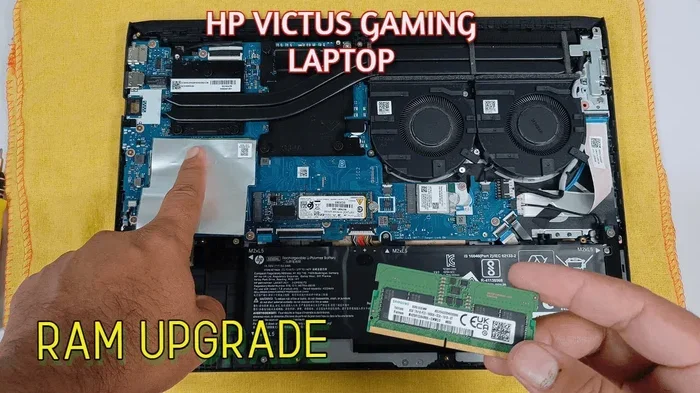
Not all laptops allow you to upgrade RAM. Many modern ultrabooks and thin-and-light laptops have RAM soldered directly to the motherboard, meaning it cannot be replaced or upgraded. Before purchasing new RAM, you need to verify that your laptop has accessible RAM slots.

Visual guide about Is 4gb of Ram Good for a Laptop
Image source: i.ytimg.com
You can check your laptop’s specifications on the manufacturer’s website, consult the user manual, or use system information tools to see your current RAM configuration. If you’re unsure how to check, our guide on how to check RAM of a laptop walks you through the process step by step.
Choosing the Right RAM
If your laptop does support upgrades, you’ll need to buy the correct type of RAM. Laptops use SO-DIMM modules, which are smaller than the DIMM modules used in desktop computers. You also need to match the generation (DDR3, DDR4, or DDR5) and speed supported by your laptop.
For most users currently running 4GB, upgrading to 8GB is the sweet spot. It’s affordable and provides a noticeable improvement in performance. If your laptop has two RAM slots, you might be able to add another 4GB stick to reach 8GB total, or replace the existing module with an 8GB or 16GB stick.
Installation Process
Installing RAM in a laptop is usually straightforward. You’ll need a small Phillips screwdriver to remove the bottom panel of your laptop. Once inside, you can release the clips on either side of the RAM slot, remove the old module if necessary, and insert the new one at an angle before pressing it down until the clips snap into place.
Always make sure your laptop is powered off and unplugged before working on it. It’s also a good idea to ground yourself by touching a metal object to prevent static discharge from damaging components.
4GB vs. 8GB vs. 16GB: A Practical Comparison
4GB: The Bare Minimum
As we’ve discussed, 4GB of RAM is the absolute minimum for modern computing. It handles basic tasks but struggles with anything more demanding. If you’re on a very tight budget and your needs are simple, it can work, but you should plan to upgrade when possible.

Visual guide about Is 4gb of Ram Good for a Laptop
Image source: verywellfit.com
8GB: The Sweet Spot for Most Users
8GB of RAM is the recommended amount for the average user in 2024. It provides enough memory for comfortable web browsing with multiple tabs, office productivity, light photo editing, and even some casual gaming. The price difference between 4GB and 8GB laptops is often small, making 8GB the better value.
If you’re curious whether 8GB is sufficient for your specific needs, our article on is 8GB RAM enough for a laptop provides a thorough analysis.
16GB: For Power Users and Future-Proofing
16GB of RAM is ideal for users who multitask heavily, work with creative software, develop software, or play modern games. It also provides excellent future-proofing, ensuring your laptop remains capable for years to come. While it’s more expensive, the investment pays off in longevity and performance.
Tips to Make 4GB of RAM Feel Faster
Reduce Startup Programs
One of the easiest ways to free up RAM on a 4GB laptop is to disable unnecessary startup programs. Many applications configure themselves to launch automatically when you boot up your computer, consuming memory before you even start working. On Windows, you can manage startup programs through the Task Manager’s Startup tab.

Visual guide about Is 4gb of Ram Good for a Laptop
Image source: pngimg.com
Use a Lightweight Browser
Google Chrome is notorious for its high memory usage. If you’re stuck with 4GB of RAM, consider switching to a more memory-efficient browser like Mozilla Firefox, Microsoft Edge, or Brave. These browsers tend to use less RAM while providing a similar browsing experience.
Limit Browser Extensions
Every browser extension you install consumes additional RAM. If you’re running a 4GB laptop, keep your extensions to a minimum. Disable or remove any extensions you don’t actively use, as they can collectively consume a significant amount of memory.
Keep Your System Clean
Regularly uninstall programs you no longer use, clear temporary files, and keep your operating system updated. A clean system runs more efficiently and uses less RAM. Tools like the built-in Disk Cleanup utility on Windows can help free up resources.
Consider a Lightweight Operating System
If your laptop struggles with Windows on 4GB of RAM, consider installing a lightweight Linux distribution. Distributions like Lubuntu, Linux Mint XFCE, or Zorin OS Lite are designed to run well on limited hardware and can breathe new life into an older laptop.
The Bottom Line: Is 4GB of RAM Good for a Laptop?
So, is 4GB of RAM good for a laptop? For most people in 2024, the answer is no. While it can handle the most basic computing tasks, it falls short of what’s needed for a smooth, modern computing experience. The operating system alone consumes most of the available memory, leaving very little room for applications.

Visual guide about Is 4gb of Ram Good for a Laptop
Image source: thoracickey.com
That said, there are specific situations where 4GB of RAM is perfectly acceptable. If you’re buying a Chromebook for basic web-based tasks, setting up a simple computer for a child or elderly family member, or using a laptop as a secondary device for light work, 4GB can serve you well.
If you’re purchasing a Windows laptop or plan to do anything beyond the most basic tasks, aim for at least 8GB of RAM. The small additional cost is well worth the significant improvement in performance and usability. And if your budget allows, 16GB is even better for long-term satisfaction.
The key is to honestly assess your needs. If you know you’ll only be browsing the web, writing documents, and watching videos, 4GB might be fine. But if there’s any chance you’ll need to multitask, run demanding software, or keep your laptop for several years, investing in more RAM is the smart choice.
Frequently Asked Questions
Can I run Windows 11 on a laptop with 4GB of RAM?
Yes, Windows 11 technically runs on 4GB of RAM since it’s listed as the minimum requirement. However, the experience will be sluggish because the operating system itself uses most of the available memory. You’ll have very little RAM left for applications, leading to frequent slowdowns and reliance on slower virtual memory.
Is 4GB of RAM enough for students?
4GB of RAM can work for students who only need to write papers, browse the web, and check email. However, if your studies involve programming, graphic design, video editing, or running specialized software, you’ll need at least 8GB of RAM for a smooth experience. Many modern educational tools and platforms are also quite resource-heavy.
Can I play games on a laptop with 4GB of RAM?
Modern gaming is not realistic with 4GB of RAM. Most games released in the last five years require at least 8GB of RAM as a minimum. You might be able to play very old or extremely lightweight indie games, but expect poor performance, long load times, and frequent crashes with anything more demanding.
Is 4GB of RAM good for a Chromebook?
Yes, 4GB of RAM is generally good for a Chromebook. ChromeOS is designed to be lightweight and relies heavily on cloud-based applications, so it manages memory much more efficiently than Windows. A Chromebook with 4GB of RAM can handle browsing, streaming, and basic productivity tasks without major issues.
How much does it cost to upgrade from 4GB to 8GB of RAM?
Upgrading from 4GB to 8GB of RAM typically costs between $20 and $50 for a compatible SO-DIMM module, depending on the type and speed. If your laptop has an open slot, you can simply add a 4GB stick. If not, you’ll need to replace the existing module with an 8GB one. It’s one of the most cost-effective upgrades you can make.
Will adding more RAM make my laptop faster?
Adding more RAM will make your laptop faster if you’re currently running out of memory. When your laptop has insufficient RAM, it uses your storage drive as virtual memory, which is much slower. Upgrading to 8GB or more eliminates this bottleneck and allows your laptop to handle more tasks simultaneously without slowing down.