M 2 Nvme Ssd Drives

M 2 NVMe SSD drives are the fastest and most popular way to upgrade your computer storage. These small drives plug directly into your motherboard and deliver incredible speeds compared to old hard drives. Whether you are a gamer, a creator, or just someone who wants a faster PC, understanding M 2 NVMe SSD technology helps you make the right choice.
M 2 NVMe SSD drives have completely changed how we store and access data on computers. These small, powerful drives are now the go-to choice for anyone looking to speed up their system. Whether you are building a new PC or upgrading an old one, understanding what M 2 NVMe SSD drives bring to the table is essential.
The name M 2 refers to the physical shape and size of the drive. NVMe stands for Non-Volatile Memory Express, which is the protocol that makes these drives so fast. Together, they create a storage solution that is compact, reliable, and incredibly quick. In this guide, we will walk you through everything you need to know about M 2 NVMe SSD drives.
From speed comparisons to installation tips, this article covers it all. You will learn how these drives work, why they are better than traditional hard drives, and how to choose the right one for your needs. Let us dive in.
Key Takeaways
- M 2 NVMe SSD drives are tiny, fast storage devices that connect directly to your motherboard using the PCIe interface.
- NVMe protocol is much faster than SATA, offering read speeds up to 7,000 MB/s or more on newer drives.
- The 2280 form factor is the most common size, fitting most modern laptops and desktops.
- PCIe Gen4 and Gen5 drives offer the best performance for gaming, video editing, and heavy workloads.
- M 2 NVMe SSD drives are easy to install and require no cables, making them a clean upgrade option.
- Not all M 2 slots support NVMe, so always check your motherboard compatibility before buying.
📑 Table of Contents
What Is an M 2 NVMe SSD Drive?
An M 2 NVMe SSD drive is a type of solid state drive that uses the M 2 form factor and the NVMe protocol to deliver storage. Unlike old spinning hard drives, these drives have no moving parts. They use flash memory to store data, which makes them faster, quieter, and more durable.
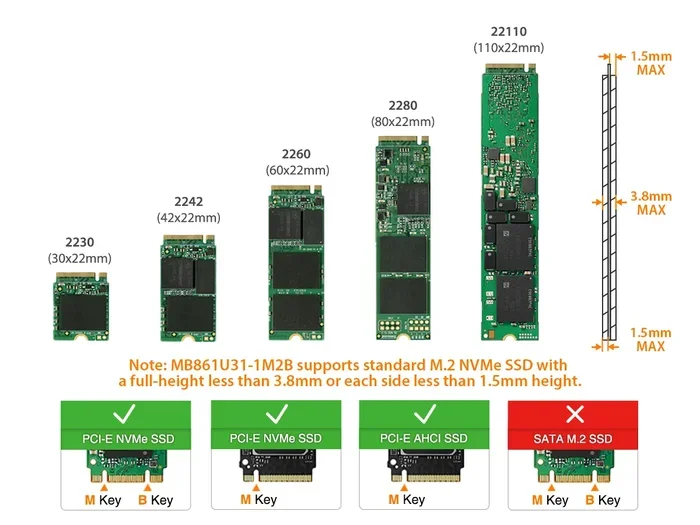
The M 2 form factor looks like a small stick of gum. It plugs directly into a slot on your motherboard. There are no cables needed. This makes installation simple and keeps your build clean. The 2280 size is the most common, meaning it is 22mm wide and 80mm long.
NVMe is the key difference here. Traditional SATA SSDs use an older protocol that limits their speed. NVMe was designed specifically for flash storage and uses the PCIe bus to communicate with your system. This means M 2 NVMe SSD drives can transfer data at speeds that SATA drives simply cannot match.
M 2 NVMe SSD vs SATA SSD
It is important to understand the difference between NVMe and SATA drives. Both can come in M 2 form factors, but they perform very differently. SATA SSDs max out at around 550 MB/s read speeds. NVMe drives can reach 3,500 MB/s to 7,000 MB/s or even higher on the newest models.
Here is a quick comparison:
- SATA M 2 SSD: Read speeds around 500-550 MB/s. Good for basic upgrades.
- PCIe Gen3 NVMe M 2 SSD: Read speeds around 3,500 MB/s. A solid mid-range option.
- PCIe Gen4 NVMe M 2 SSD: Read speeds around 5,000-7,000 MB/s. Great for gaming and creative work.
- PCIe Gen5 NVMe M 2 SSD: Read speeds over 10,000 MB/s. The cutting edge of storage performance.
If you want the best performance, a PCIe NVMe M 2 SSD drive is the way to go. The speed difference is noticeable the moment you boot up your system or open large files.
Why Choose an M 2 NVMe SSD Drive?
There are many reasons to choose an M 2 NVMe SSD drive over other storage options. Let us look at the biggest benefits.
Speed
Speed is the number one reason people switch to NVMe drives. Boot times drop from minutes to seconds. Games load faster. Video editing software responds instantly. If you have ever waited for your computer to start up or for a large file to copy, you know how valuable speed is.
Real-world performance gains are huge. A 1TB NVMe M 2 SSD can copy a 50GB file in under 10 seconds. The same task on a SATA drive takes over a minute.
Size and Design
The compact size of M 2 drives is a major advantage. They take up almost no space inside your computer case. This is especially important for laptops where every millimeter counts. The small footprint also allows for cleaner builds with better airflow.
No Cables Needed
Traditional SSDs and hard drives require SATA cables and power cables. M 2 NVMe SSD drives connect directly to the motherboard slot. No cables means less clutter and fewer things to worry about. Your build looks cleaner and stays cooler.
Energy Efficiency
NVMe drives use less power than traditional hard drives. This is great for laptops because it can slightly improve battery life. For desktops, it means less heat output, which helps keep your system running cool.
Types of M 2 NVMe SSD Drives
Not all M 2 NVMe SSD drives are the same. Different types serve different needs and budgets. Let us break them down.
By PCIe Generation
The PCIe generation determines the maximum speed of the drive. Here is what you need to know:
- PCIe Gen3: Still very fast and affordable. Great for everyday use and gaming. Speeds up to 3,500 MB/s.
- PCIe Gen4: The current sweet spot for most users. Offers excellent speed at reasonable prices. Speeds up to 7,000 MB/s.
- PCIe Gen5: The newest standard. Blazing fast but still expensive. Best for professionals and enthusiasts. Speeds over 10,000 MB/s.
For most people, a PCIe Gen4 drive like the Crucial T705 PCIe Gen5 NVMe M 2 SSD or a similar Gen4 model offers the best balance of speed and price.
By Capacity
M 2 NVMe SSD drives come in several sizes:
- 250GB: Budget option for operating system and essential apps.
- 500GB: Good for most users. Handles games and files comfortably.
- 1TB: The most popular size. Plenty of space for games and media.
- 2TB: Great for heavy users and content creators.
- 4TB: Maximum storage for professionals who need it all.
A 2TB NVMe M 2 SSD is a popular choice for gamers who want to install multiple large games without worrying about running out of space.
By NAND Type
The type of NAND flash memory used in the drive affects performance and durability:
- TLC (Triple-Level Cell): Stores three bits per cell. Offers a good balance of speed, endurance, and price.
- QLC (Quad-Level Cell): Stores four bits per cell. Cheaper but slower and less durable over time.
- MLC (Multi-Level Cell): Stores two bits per cell. Faster and more durable but more expensive.
For most users, TLC is the best choice. It offers reliable performance and a good lifespan. Many popular drives use TLC NAND, including solid state drive PCIe 3.0 TLC NVMe M 2 SSD options that are widely available and affordable.
How to Choose the Right M 2 NVMe SSD Drive
Choosing the right M 2 NVMe SSD drive can feel overwhelming with so many options. Here is a simple guide to help you decide.
Check Your Motherboard Compatibility
Not all M 2 slots support NVMe. Some only support SATA M 2 drives. Check your motherboard manual to see which slots support NVMe and what PCIe generation they use. This will determine the maximum speed you can get.
Also, check the physical size. Most motherboards support the 2280 size, but some may only fit shorter drives. Make sure the drive you buy matches your slot.
Consider Your Needs
Think about what you will use the drive for:
- Basic use: Web browsing, office work, and media playback. A 500GB Gen3 drive is plenty.
- Gaming: Modern games are huge. A 1TB or 2TB Gen4 drive gives you fast load times and enough space.
- Content creation: Video editing and large file work benefit from the fastest NVMe speeds. A Gen4 or Gen5 drive is ideal.
- Professional workloads: Databases and server applications need the best performance and endurance. Look for high-endurance models.
Budget Considerations
M 2 NVMe SSD drives have become very affordable. A good 1TB Gen4 drive costs around $60 to $100. Prices continue to drop as technology improves. You do not need to spend a fortune to get a huge speed boost over a traditional hard drive.
Brand Reputation
Stick with well-known brands. Companies like Samsung, Crucial, Kingston, WD, and Intel have proven track records. They offer good warranties and reliable performance. Reading reviews before buying is always a smart move.
Installation and Setup
Installing an M 2 NVMe SSD drive is one of the easiest PC upgrades you can do. No cables, no tools (usually), and no complicated software. Here is how it works.
Physical Installation
First, locate the M 2 slot on your motherboard. It looks like a small slot with a screw hole nearby. Gently insert the drive at a 30-degree angle and press it down flat. Secure it with the small screw. That is it.
For laptops, the process is similar but the M 2 slot may be under a removable panel. Check your laptop manual for specific instructions.
Software Setup
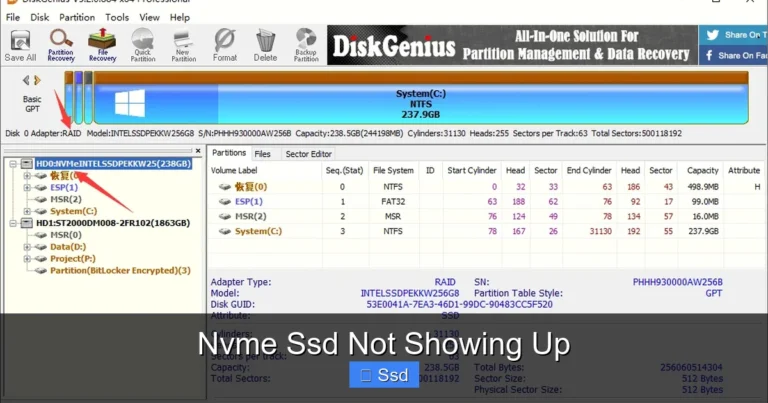
Most modern operating systems recognize M 2 NVMe SSD drives automatically. If you are installing Windows fresh, the drive will show up during setup. If you are adding a second drive, you may need to initialize it through Disk Management in Windows.
To get the best performance, make sure you have the latest NVMe drivers installed. You can usually find these on your motherboard manufacturer’s website or from the SSD brand’s support page.
Using an M 2 NVMe SSD Enclosure
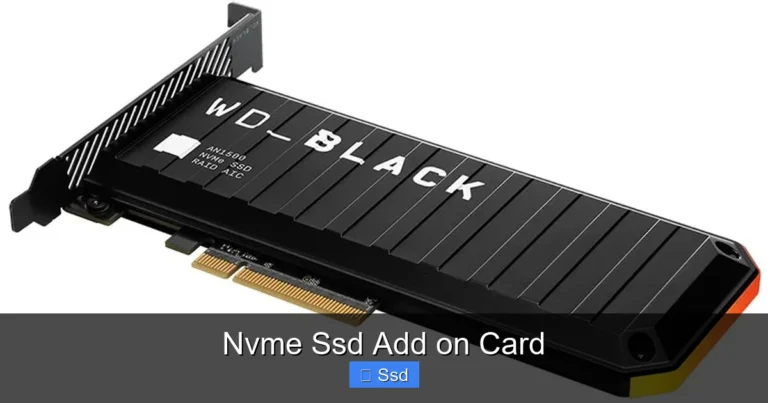
Can you use an M 2 NVMe SSD outside of your computer? Yes! An NVMe M 2 SSD enclosure lets you turn your internal drive into a portable external drive. This is great for backing up data or transferring large files between computers. Just plug it into a USB port and go.
Common Mistakes to Avoid
Even though M 2 NVMe SSD drives are simple to use, there are a few common mistakes to watch out for.
- Buying the wrong type: Make sure you buy NVMe, not just any M 2 drive. Some M 2 drives are SATA-based and will be much slower.
- Ignoring cooling: High-performance NVMe drives can get hot. Some come with heatsinks, but others do not. Adding a small heatsink can prevent thermal throttling.
- Not checking slot compatibility: Always verify that your motherboard supports the NVMe protocol and the PCIe generation of the drive you are buying.
- Overfilling the drive: SSDs perform best when they have some free space. Try to keep at least 10-15% of the drive free for optimal performance.
- Skipping firmware updates: Manufacturers release firmware updates that can improve performance and fix bugs. Check for updates periodically.
Expert Tips for Getting the Most from Your M 2 NVMe SSD Drive
Want to squeeze every bit of performance from your M 2 NVMe SSD drive? Here are some expert tips.
- Enable TRIM: TRIM helps your SSD maintain peak performance over time. Make sure it is enabled in your operating system.
- Keep firmware updated: Check the manufacturer’s website for the latest firmware. Updates often include performance improvements.
- Use the drive as your boot drive: Install your operating system and most-used programs on the NVMe drive. This gives you the fastest experience for daily tasks.
- Consider a dual-drive setup: Use a smaller NVMe SSD for your system and programs, and a larger SATA SSD or hard drive for mass storage. This balances speed and capacity.
- Monitor drive health: Use free tools like CrystalDiskInfo to check the health and temperature of your NVMe drive regularly.
The world of storage is moving fast, and M 2 NVMe SSD drives are leading the way. With speeds that dwarf traditional hard drives and a compact design that fits anywhere, these drives are the clear choice for modern computing. Whether you are a casual user or a power user, there is an M 2 NVMe SSD drive that fits your needs and budget.
If you are still using an old hard drive, upgrading to an M 2 NVMe SSD drive is one of the best investments you can make. The difference in speed is night and day. Your system will feel faster, more responsive, and more enjoyable to use every single day.
Take the time to choose the right drive for your setup. Check compatibility, consider your storage needs, and pick a reputable brand. Once you experience the speed of NVMe, you will never want to go back to slower storage again.
Frequently Asked Questions
What does M 2 NVMe mean?
M 2 refers to the physical size and shape of the SSD. NVMe stands for Non-Volatile Memory Express, which is the fast communication protocol these drives use. Together, they mean you are getting a small, ultra-fast solid state drive that plugs directly into your motherboard.
Are M 2 NVMe SSD drives faster than SATA SSDs?
Yes, significantly faster. While a SATA SSD tops out around 550 MB/s, a PCIe Gen3 NVMe drive can reach 3,500 MB/s, and Gen4 drives can hit 7,000 MB/s or more. The speed difference is very noticeable in everyday use.
Can I use an M 2 NVMe SSD as my main drive?
Absolutely. In fact, that is the best way to use one. Install your operating system and frequently used programs on the NVMe drive for the fastest boot times and application loading speeds.
Do M 2 NVMe SSD drives need a heatsink?
Not always, but they can help. High-performance NVMe drives generate heat during heavy use. A heatsink keeps temperatures in check and prevents the drive from slowing down due to thermal throttling. Many modern motherboards already have M 2 heatsinks built in.
How long do M 2 NVMe SSD drives last?
Most quality M 2 NVMe SSD drives last 5 to 10 years under normal use. The lifespan depends on how much you write to the drive. For typical home and office use, endurance is rarely a concern. Most drives come with warranties of 3 to 5 years.
What is the difference between M 2 NVMe and M 2 SATA?
The form factor looks the same, but they use different protocols. M 2 NVMe uses the PCIe bus and is much faster. M 2 SATA uses the older SATA protocol and is limited to lower speeds. Always check which type your motherboard supports before buying.
=== CONCLUSION ===
M 2 NVMe SSD drives are the best storage upgrade you can make for your computer today. They are fast, compact, and easy to install. Whether you are a gamer looking for quicker load times, a creator who needs speed for large files, or simply someone who wants a more responsive PC, these drives deliver real results.
The technology continues to improve with each new PCIe generation, offering even faster speeds at better prices. Now is a great time to make the switch. Choose the right size, the right PCIe generation, and a trusted brand, and you will enjoy the benefits of NVMe storage for years to come.