512gb M 2 Nvme Pcie 3.0 Ssd
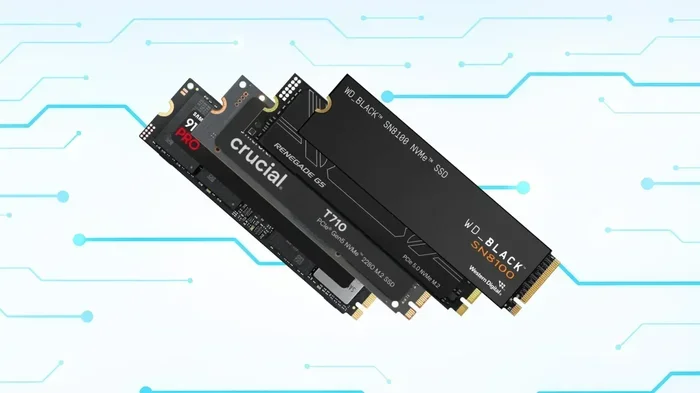
A 512gb M 2 NVMe PCIe 3.0 SSD delivers fast storage with read speeds up to 3,500 MB/s. This compact drive fits laptops and desktops easily. It offers the perfect balance of speed, capacity, and affordability for most users.
A 512gb M 2 NVMe PCIe 3.0 SSD is one of the best storage upgrades you can make for your computer. Whether you are building a new PC or upgrading an older machine, this type of drive brings a massive speed boost. It combines the compact M.2 design with the NVMe protocol and PCIe 3.0 bandwidth to deliver real-world performance that SATA drives simply cannot match.
So why are so many people choosing this storage option? The answer is simple. Speed, size, and value all come together in one small package. A 512GB NVMe M.2 SSD gives you enough space for your operating system, favorite applications, and a solid collection of games. At the same time, it stays affordable enough that most budgets can handle it.
In this guide, we will break down everything you need to know. You will learn what makes this drive special, how it compares to other options, and whether it is the right choice for your setup. Let us dive in.
## What Is a 512GB M.2 NVMe PCIe 3.0 SSD?
Let us start with the basics. An M.2 SSD is a small, rectangular-shaped storage drive. It plugs directly into your motherboard through a dedicated M.2 slot. There is no cables needed. No extra power connectors. It just slides in and locks into place.
The NVMe part stands for Non-Volatile Memory Express. This is a communication protocol designed specifically for flash storage. It allows the drive to talk to your system much faster than older protocols like AHCI, which were built for spinning hard drives.
PCIe 3.0 refers to the third generation of the Peripheral Component Interconnect Express interface. It provides the data pathway between the SSD and your CPU. PCIe 3.0 offers up to 8 GT/s per lane, and most NVMe M.2 drives use four lanes. This gives a theoretical maximum bandwidth of about 3.9 GB/s.
A 512GB M 2 NVMe PCIe 3.0 SSD uses this connection to deliver sequential read speeds typically between 3,000 and 3,500 MB/s. Write speeds usually range from 2,000 to 3,000 MB/s. Compare that to a typical SATA SSD, which tops out around 550 MB/s. The difference is night and day.
### Why M.2 Form Factor Matters
The M.2 form factor is tiny. Most drives measure about 22mm wide and 80mm long. That is smaller than a stick of gum. This compact size makes it perfect for laptops where every millimeter counts. It also works well in small desktop cases where space is tight.
Because the drive mounts directly onto the motherboard, there are no moving parts. No spinning disks. No read/write heads. This means solid state drive technology in the M.2 format is both faster and more durable than traditional hard drives.
## Benefits of a 512GB NVMe SSD
There are many reasons to choose a 512GB NVMe M.2 SSD for your system. Let us look at the biggest advantages.
### Blazing Fast Boot and Load Times
One of the most noticeable improvements is boot time. A 512GB M 2 NVMe PCIe 3.0 SSD can boot Windows in under 15 seconds on most systems. Applications launch almost instantly. Games load much faster. You will feel the difference the moment you start using your PC.
### Enough Space for Most Users
512GB is a sweet spot for many people. It gives you room for:
- Your operating system (Windows or Linux)
- Everyday productivity software
- A collection of 10 to 20 games
- Photos, videos, and documents
- A few large creative projects
If you need more space, you can always pair a 512GB NVMe M.2 SSD with a larger hard drive or SATA SSD for mass storage. This is a popular setup that gives you both speed and capacity.
### Energy Efficiency
NVMe SSDs are designed to be energy efficient. They use less power than traditional hard drives. This is especially important for laptops because it can help extend battery life. A solid state drive in M.2 format also generates less heat than older storage options.
### No Noise
Because there are no moving parts, these drives are completely silent. You will never hear a spinning disk or clicking sounds. This makes for a much more pleasant computing experience, especially in quiet environments.
## PCIe 3.0 vs Other Interfaces
Understanding the interface helps you see why a 512gb M 2 NVMe PCIe 3.0 ssd is a great choice. Let us compare it to other common options.
### NVMe vs SATA SSDs
SATA SSDs use the older AHCI protocol. They connect through the same interface as traditional hard drives. This limits their maximum speed to about 550 MB/s. A PCIe 3.0 NVMe drive is roughly six times faster in sequential reads.
For everyday tasks like web browsing and document editing, the difference might not be obvious. But for large file transfers, video editing, and gaming, the speed gap is huge.
### PCIe 3.0 vs PCIe 4.0 and 5.0
PCIe 4.0 offers double the bandwidth of PCIe 3.0. PCIe 5.0 doubles it again. So why choose PCIe 3.0?
- Price: PCIe 3.0 drives are more affordable.
- Compatibility: Most motherboards support PCIe 3.0 M.2 slots.
- Real-World Gains: For most users, PCIe 3.0 speed is more than enough.
A 512GB M 2 NVMe PCIe 3.0 SSD delivers excellent performance for the price. Unless you are doing heavy professional workloads like 8K video editing, PCIe 3.0 will serve you very well.
### Is PCIe 3.0 Still Relevant?
Absolutely. PCIe 3.0 has been around for years, and it remains a reliable and fast interface. Many popular drives like the 512GB NVMe M.2 SSD use this interface and deliver outstanding results. Newer PCIe generations offer faster speeds, but they also cost more. For most users, PCIe 3.0 hits the perfect balance.
## Top Picks for a 512GB NVMe M.2 SSD
When shopping for a 512GB M 2 NVMe PCIe 3.0 SSD, you have several great options. Here are some popular choices to consider.
### Crucial P310
The Crucial P310 is a well-known budget-friendly option. While the 1TB version uses PCIe Gen4, the 512GB models are also available in Gen3. It offers solid sequential speeds and reliable TLC NAND. This drive is a great entry point for anyone looking to upgrade.
### Samsung 970 EVO Plus
The Samsung 970 EVO Plus is a premium choice. It delivers excellent read and write speeds. Samsung’s reputation for quality makes this a trustworthy option. It is slightly pricier but offers top-tier performance.
### Kingston NV2
Kingston offers affordable NVMe solutions. The Kingston NV2 is a popular pick for budget builds. It uses PCIe 3.0 and provides decent speeds at a low price point. A 512GB M 2 NVMe PCIe 3.0 SSD from Kingston can be a great value for students and casual users.
### WD Blue SN570
The WD Blue SN570 is another reliable option. It uses PCIe 3.0 and delivers consistent performance. WD is a trusted brand in the storage world. This drive works well for gaming and everyday use.
## How to Install a 512GB M.2 NVMe SSD
Installing a 512GB NVMe M.2 SSD is simpler than most people think. You do not need to be a tech expert. Here is a quick overview of the process.
### Step-by-Step Installation
- Power off your PC and unplug it from the wall.
- Open your case by removing the side panel.
- Locate the M.2 slot on your motherboard. It looks like a small slot with a retention screw.
- Insert the SSD at a 30-degree angle into the slot. Gently press it down until it sits flat.
- Secure the drive with the small screw that holds the M.2 drive in place.
- Close your case and plug your PC back in.
- Boot into BIOS to make sure the drive is detected.
- Initialize and format the drive through Windows Disk Management.
That is it. In about 10 to 15 minutes, you can have a brand new SSD running in your system. For a more detailed walkthrough, check out our guide on SSD NVMe PCIe M.2 installation tips.
### What If My PC Does Not Have an M.2 Slot?
Some older PCs do not have an M.2 slot on the motherboard. In that case, you can use an M.2 to PCIe adapter card. These cards plug into a standard PCIe x4 slot and give you an M.2 connection. They are inexpensive and widely available.
Another option is an external enclosure. You can place your 512GB M 2 NVMe PCIe 3.0 SSD in an enclosure and connect it via USB. This works great for portable storage or temporary upgrades.
## Common Mistakes to Avoid
Before you buy and install a 512GB M 2 NVMe PCIe 3.0 SSD, keep these common mistakes in mind.
### Buying the Wrong Form Factor
M.2 SSDs come in different lengths. The most common is 2280 (22mm wide, 80mm long). Some motherboards support 2260 or 22110 drives. Always check your motherboard manual to make sure the drive length is compatible.
### Ignoring PCIe Generation
Not all M.2 slots support PCIe. Some only support SATA. If you buy a PCIe NVMe drive but your slot only supports SATA, the drive will not work at full speed or may not work at all. Check your motherboard specifications carefully.
### Skipping the BIOS Update
Older motherboards sometimes need a BIOS update to properly support NVMe drives. Before installing, visit your motherboard manufacturer’s website and check for updates. This simple step can save you from headaches later.
### Forgetting to Enable the NVMe Drive in BIOS
Some BIOS settings disable NVMe drives by default. After installation, enter your BIOS and make sure the M.2 slot is enabled. Look for settings related to “NVMe” or “PCIe” in the storage configuration section.
## Expert Tips for Getting the Most Out of Your SSD
Getting the most performance from your 512GB NVMe M.2 SSD is easy with a few simple tips.
### Keep Your Firmware Updated
SSD manufacturers regularly release firmware updates that improve performance and fix bugs. Check the manufacturer’s website every few months for updates.
### Enable TRIM
TRIM helps your SSD maintain peak performance over time. It tells the drive which data blocks are no longer in use. Windows 10 and 11 enable TRIM by default for NVMe drives, but it is worth checking to make sure.
### Do Not Fill the Drive Completely
SSDs perform best when they have some free space. Try to keep at least 10 to 15 percent of your 512GB M 2 NVMe PCIe 3.0 SSD free. This allows the drive’s controller to manage data efficiently and maintain fast speeds.
### Use the Right Cloning Software
If you are migrating from an old drive to your new SSD, use reliable cloning software. Tools like Macrium Reflect or Samsung Data Migration make the process easy and error-free. A clean clone ensures your new drive boots perfectly.
## Is a 512GB NVMe SSD Right for You?
A 512GB M 2 NVMe PCIe 3.0 SSD is an excellent choice for most users. It offers fast speeds, compact size, and good value. Whether you are a student, a gamer, a creative professional, or just someone who wants a faster PC, this drive delivers.
If you need more storage, consider pairing it with a larger HDD or SATA SSD. If you need even more speed, you can look at PCIe 4.0 or 5.0 options. But for the best combination of price, performance, and practicality, the 512GB NVMe M.2 SSD is hard to beat.
The M.2 PCIe NVMe SSD category continues to grow, and prices keep dropping. Now is a great time to make the switch if you are still using an older hard drive or a slower SATA SSD.
Key Takeaways
- Blazing Speed: PCIe 3.0 NVMe drives offer much faster speeds than traditional SATA SSDs.
- Compact Form Factor: The M.2 shape factor fits into small laptops and desktops without taking up space.
- Great Value: A 512GB capacity gives you enough room for your OS, apps, and games without breaking the bank.
- Easy Installation: Most modern PCs support M.2 slots, making upgrades simple and tool-friendly.
- Solid Reliability: TLC NAND technology in PCIe 3.0 drives provides dependable daily performance.
- Wide Compatibility: These drives work with most motherboards that have an M.2 PCIe 3.0 slot.
Frequently Asked Questions
What speeds can I expect from a 512GB M 2 NVMe PCIe 3.0 SSD?
Most drives in this category deliver sequential read speeds between 3,000 and 3,500 MB/s. Write speeds typically range from 2,000 to 3,000 MB/s. Real-world speeds vary depending on the drive controller and NAND type.
Is a 512GB NVMe SSD enough for gaming?
Yes, a 512GB M 2 NVMe PCIe 3.0 SSD can hold a solid game library. Many modern games range from 30 to 80GB each. You can comfortably fit 10 to 20 games, plus your operating system and apps.
Do I need a special motherboard for an M.2 NVMe SSD?
Your motherboard needs an M.2 slot that supports PCIe NVMe. Most modern motherboards from the last five years include at least one M.2 slot. Always check the motherboard specs to confirm NVMe support.
Can I use a 512GB NVMe SSD as my boot drive?
Absolutely. A 512GB NVMe M.2 SSD makes an excellent boot drive. It will load your operating system and applications much faster than a traditional hard drive or SATA SSD.
How does PCIe 3.0 compare to PCIe 4.0 for NVMe SSDs?
PCIe 4.0 offers roughly double the bandwidth of PCIe 3.0. However, for most everyday tasks and gaming, PCIe 3.0 provides more than enough speed. PCIe 4.0 drives shine in heavy professional workloads like video editing and large data transfers.
What is the lifespan of a 512GB NVMe SSD?
Modern NVMe SSDs use TLC or QLC NAND and are built to last several years under normal use. Most drives come with warranties of three to five years. Keeping the drive from filling completely and enabling TRIM helps extend its lifespan.
=== CONCLUSION ===
A 512gb M 2 NVMe PCIe 3.0 SSD is one of the smartest upgrades you can make for your computer. It brings lightning-fast speeds, a compact design, and reliable performance to any system. Whether you are upgrading an old laptop or building a new desktop, this storage solution delivers real value.
The combination of NVMe protocol and PCIe 3.0 bandwidth means your system responds faster. Games load quicker. Files transfer in seconds. And the 512GB capacity gives you plenty of room for what matters most.
If you are ready to upgrade, take a look at the options available and pick the drive that fits your needs and budget. Your PC will thank you.