Is Dvi Better Quality Than Hdmi
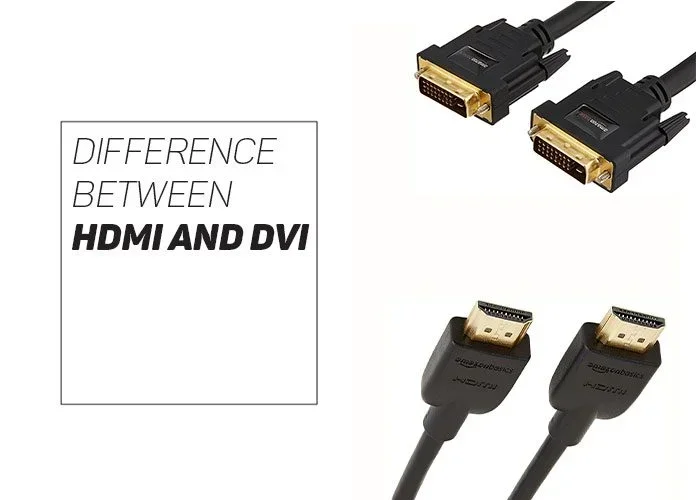
DVI and HDMI both carry digital video signals, but HDMI offers a clear advantage with built-in audio support and newer features. While DVI can deliver excellent video quality at lower resolutions, HDMI supports higher resolutions like 4K and carries both audio and video through a single cable. Understanding the differences helps you choose the right connection for your setup.
When you are setting up a monitor, a TV, or a projector, one of the first decisions you face is choosing the right cable. Two names come up almost every time: DVI and HDMI. Both are widely used display connections, but they are not created equal. If you have ever stood in front of a shelf of cables and wondered which one gives you the best picture, you are not alone. This guide breaks down everything you need to know about DVI vs HDMI quality so you can make a confident choice.
The short answer is that HDMI generally offers better overall quality because it handles both audio and video and supports newer resolutions and features. However, DVI still has its place, especially with older hardware. Let us dive deep into how these two connections compare across every important category.
Key Takeaways
- HDMI is the more versatile choice: It carries both audio and video signals through one cable, making it ideal for most modern setups.
- DVI still holds value for older systems: Many monitors and graphics cards still include DVI ports, and it delivers solid video quality at 1080p and below.
- Signal quality depends on the cable version: Both DVI and HDMI come in different versions that affect resolution, refresh rate, and bandwidth.
- HDMI supports more advanced features: HDMI includes ARC, CEC, and Ethernet capabilities that DVI simply cannot match.
- For gaming and 4K displays, HDMI is the clear winner: HDMI 2.0 and later support 4K at 60Hz, while DVI is limited to 1080p at 60Hz.
- Adapters are readily available: You can convert between DVI and HDMI easily if your devices have different ports.
- Choose based on your devices: Check what ports your monitor, TV, and graphics card support before buying a cable.
📑 Table of Contents
Understanding DVI Technology
DVI stands for Digital Visual Interface. It was introduced in 1999 by the Digital Display Working Group as a way to replace older analog connections like VGA. DVI was a big step forward because it carried a fully digital signal, which means less quality loss from source to screen.
Types of DVI Connectors
Not all DVI cables are the same. There are three main types you should know about:
- DVI-D (Digital): This carries only a digital signal. It is the most common type for modern digital displays.
- DVI-A (Analog): This carries only an analog signal and is basically a VGA connector in a different shape. You will rarely see this in modern setups.
- DVI-I (Integrated): This can carry both digital and analog signals, making it the most versatile DVI option.
DVI Single Link vs Dual Link
A single link DVI cable can support up to 1920 x 1200 resolution at 60Hz. A dual link DVI cable doubles the bandwidth and can handle up to 2560 x 1600 at 60Hz. This matters if you are using a high-resolution monitor or a dual-link display. If you are unsure which type you have, look at the connector. Dual link DVI has extra pins in the middle of the connector.
Understanding HDMI Technology
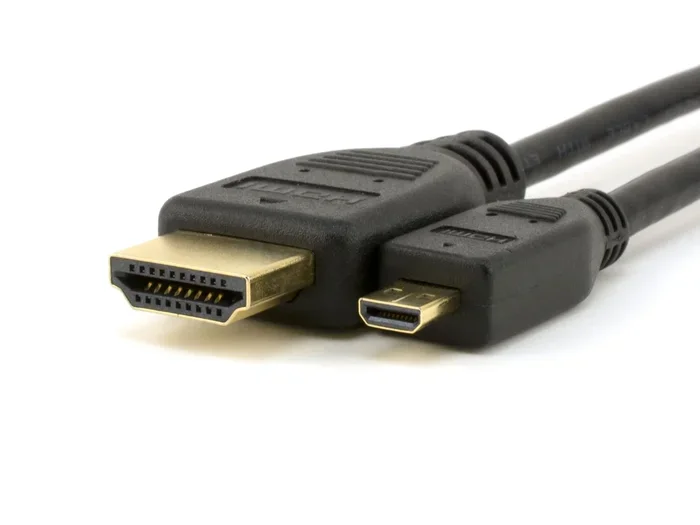
HDMI stands for High Definition Multimedia Interface. It was introduced in 2003 and quickly became the standard for connecting TVs, monitors, and streaming devices. Unlike DVI, HDMI was designed from the start to carry both audio and video signals through a single cable.
HDMI Versions and What They Mean
HDMI has gone through several versions over the years, and each one brought improvements:
- HDMI 1.0 to 1.4: These early versions supported up to 1080p resolution. HDMI 1.4 added 4K support at 30Hz and introduced the ARC (Audio Return Channel) feature.
- HDMI 2.0: This version brought 4K support at 60Hz and wider color gamuts. It is the sweet spot for most current gaming and home theater setups.
- HDMI 2.1: The latest standard supports 4K at 120Hz and even 8K at 60Hz. It is designed for next-gen gaming consoles and high-end displays.
HDMI Features You Get With DVI
One of the biggest advantages of HDMI is the extra features built in. HDMI supports CEC (Consumer Electronics Control), which lets you control multiple devices with one remote. It also includes ARC, which sends audio from your TV back to your soundbar or receiver through the same HDMI cable. DVI simply does not have these capabilities. If you want a clean setup with fewer cables, HDMI wins hands down.
DVI vs HDMI: Quality Comparison
Now let us get to the heart of the matter. How do these two connections stack up when it comes to actual quality? The answer depends on what you care about most.
Video Quality
At 1080p resolution, both DVI and HDMI deliver excellent video quality. The digital signal in both formats is essentially the same at this resolution, so you will not notice a difference. However, when you push beyond 1080p, HDMI pulls ahead. DVI maxes out at 2560 x 1600 with dual link, while HDMI 2.0 and later can handle 4K and beyond.
If you are using a gaming display or a 4K monitor, HDMI is the only realistic choice between the two. DVI simply does not have the bandwidth for modern high-resolution content.
Audio Quality
This is where the comparison becomes very one-sided. DVI carries no audio signal at all. You need a separate audio cable, like a 3.5mm jack or an optical cable, to get sound. HDMI, on the other hand, carries uncompressed audio and supports surround sound formats like Dolby TrueHD and DTS-HD Master Audio.
For anyone building a home theater or connecting a PC to a TV, this difference alone makes HDMI the better choice. You get high-quality audio and video through one simple cable connection.
Bandwidth Comparison
Bandwidth determines how much data a cable can carry per second, which directly affects resolution and refresh rate. Here is a quick comparison:
| Feature | DVI Dual Link | HDMI 2.0 | HDMI 2.1 |
|---|---|---|---|
| Max Resolution | 2560 x 1600 @ 60Hz | 4K @ 60Hz | 4K @ 120Hz / 8K @ 60Hz |
| Bandwidth | 9.9 Gbps | 18 Gbps | 48 Gbps |
| Audio Support | None | Yes (up to 32 channels) | Yes (up to 32 channels) |
| HDR Support | No | Yes (HDR10) | Yes (HDR10, Dolby Vision) |
| ARC/eARC Support | No | Yes | Yes (eARC) |
As you can see, HDMI 2.1 offers a massive advantage in bandwidth, which translates to smoother motion, higher resolutions, and better color depth. Even HDMI 2.0 outperforms DVI in every meaningful way.
When DVI Still Makes Sense
Despite HDMI being the clear winner in most categories, there are situations where DVI still has a role to play.
Older Monitors and Graphics Cards
Many older monitors and budget graphics cards still come with DVI ports. If you are working with legacy hardware, DVI is a perfectly fine connection for 1080p gaming and everyday use. You do not need to replace a perfectly good monitor just because it has a DVI port instead of HDMI.
Pure Video Workloads
If you only care about video quality and you already have a separate audio solution, DVI can work well. Some professional video editors prefer DVI because it provides a clean digital signal without the overhead of audio processing. In these cases, DVI delivers reliable and consistent video output.
Using DVI to HDMI Adapters
One practical option is to use a DVI to HDMI adapter. This lets you connect a DVI output to an HDMI monitor or TV. The video quality remains the same, and you can handle audio separately. Adapters are inexpensive and widely available, making this a great bridge solution if your devices have different ports.
Common Mistakes People Make With Display Cables
There are a few mistakes that many people make when choosing between DVI and HDMI. Avoiding these can save you frustration and money.
Assuming All Cables Are the Same
Not all DVI or HDMI cables are created equal. A cheap HDMI cable might not support the bandwidth needed for 4K at 60Hz. Always check the version rating on the cable and make sure it matches your display capabilities. A cable that does not meet the spec will limit your quality no matter how good your monitor is.
Ignoring Speaker Impedance When Using HDMI Audio
When you use HDMI to connect your display to a sound system, the audio output depends on your speaker setup. If you are wondering whether higher or lower ohms are better for speakers, the general rule is that lower impedance speakers draw more power, but matching your speakers to your amplifier is what really matters. You can learn more about speaker impedance and what works best for your setup to get the most out of your HDMI audio connection.
Overlooking the Need for Separate Audio
If you are using DVI, remember that you need a separate audio cable. Many people plug in DVI, turn on their display, and wonder why there is no sound. This is because DVI simply does not carry audio. Plan your audio setup accordingly, whether that means using a 3.5mm cable, an optical cable, or a separate speaker connection.
Choosing the Wrong HDMI Version
Buying an HDMI 1.4 cable when your TV supports HDMI 2.1 means you will not get the full benefit of your display. Always match your cable to the highest version supported by your devices. This is especially important for gaming, where higher refresh rates and resolutions make a big difference.
Quick Tips for the Best Display Quality
- Check your ports before buying: Look at the back of your monitor, TV, and graphics card to see what connections are available.
- Use the latest HDMI version you can afford: HDMI 2.0 is the minimum for 4K content, but HDMI 2.1 is the future-proof choice.
- Buy certified cables: Look for HDMI Premium Certified cables to ensure they meet the bandwidth requirements.
- Keep cables short when possible: Longer cables can lead to signal degradation, especially at higher resolutions.
- Match your speaker setup: If you are using HDMI audio, make sure your speakers are compatible. Most home theater setups use 4 or 8 ohm speakers, and understanding the difference helps you get the best audio quality. You can read more about which speaker impedance is better for your system to optimize your setup.
- Consider bi-wiring for better audio: If you are serious about sound quality, bi-wiring your speakers can reduce signal interference and improve clarity. To learn more about this technique, check out our guide on what bi-wiring speakers means and how it can improve your audio.
Which Connection Should You Choose?
The answer depends on your specific situation, but here is a simple breakdown to help you decide.
Choose HDMI if: You want audio and video through one cable, you are using a 4K display, you are gaming at high refresh rates, or you are setting up a home theater system. HDMI is the best all-around choice for most people in 2024 and beyond.
Choose DVI if: You are using older hardware that only has DVI ports, you only need video and have a separate audio setup, or you are on a tight budget and your display supports DVI at the resolution you need.
For most users, HDMI is the better quality choice. It offers superior resolution support, built-in audio, and advanced features that DVI simply cannot match. DVI remains a solid option for legacy setups, but it is slowly becoming outdated as the industry moves toward newer standards.
Conclusion
The debate between DVI and HDMI comes down to versatility and features. HDMI wins in nearly every category, from resolution support to audio transmission to smart features like ARC and CEC. DVI still delivers good video quality for 1080p and even some 1440p setups, but it lacks the bandwidth and features needed for modern high-resolution displays.
If you are building a new setup or upgrading your cables, HDMI is the clear choice. It future-proofs your setup, simplifies your cable management, and delivers the best overall quality. If you are stuck with DVI hardware, do not worry, it still works well for everyday use. Just know that HDMI is where the display world is heading, and investing in it now will serve you well for years to come.
Take a look at your current setup, check what ports your devices have, and make the choice that fits your needs best. Whether you go with DVI or HDMI, the most important thing is that you enjoy a clear, sharp picture and great sound from your display.
Frequently Asked Questions
Can DVI support 4K resolution?
No, DVI cannot support 4K resolution. The maximum resolution for a dual link DVI cable is 2560 x 1600 at 60Hz. If you need 4K, you must use HDMI 2.0 or later, DisplayPort, or another modern connection that has the necessary bandwidth.
Is DVI or HDMI better for gaming?
HDMI is better for gaming, especially if you are playing at 4K resolution or high refresh rates like 120Hz or 144Hz. HDMI 2.1 supports the latest gaming features, while DVI is limited to older resolutions and refresh rates. For competitive gaming at 1080p, DVI can still work, but HDMI offers a much better experience overall.
Does DVI carry audio?
No, DVI does not carry any audio signal. It is a video-only connection. If you use DVI, you will need a separate audio cable to get sound from your source to your speakers or headphones. This is one of the biggest advantages HDMI has over DVI.
Can I use a DVI to HDMI adapter without losing quality?
Yes, using a DVI to HDMI adapter does not reduce video quality because both use the same digital signal format for video. The only limitation is that you will still not get audio through the DVI connection, so you will need to handle sound separately.
How do I know if my HDMI cable is version 2.0 or 2.1?
Check the packaging or the cable itself for the HDMI version number. Many high-quality cables are labeled with their version. If you are unsure, look for cables that are certified as “Ultra High Speed HDMI” for HDMI 2.1 or “Premium High Speed HDMI” for HDMI 2.0. Buying from reputable brands also helps ensure you get the right version.
Will DVI become completely obsolete?
DVI is already becoming obsolete in most new devices. Modern monitors, TVs, and graphics cards are increasingly dropping DVI ports in favor of HDMI and DisplayPort. While DVI will likely still be found on some legacy hardware for years to come, it is not being developed further, and HDMI is the clear standard moving forward.