Crucial Vs Samsung Ram The Definitive Memory Battle

Crucial and Samsung are two of the biggest names in PC memory, but they serve different needs. This guide covers speed, compatibility, pricing, and real-world performance so you can pick the right RAM for your system. Whether you are upgrading a laptop or building a desktop, you will find clear answers here.
When you are building or upgrading a PC, memory is one of the most important parts you will choose. The debate between Crucial vs Samsung RAM comes up constantly in forums, YouTube videos, and tech reviews. Both brands are trusted by millions of users, but they are not the same. Each has strengths that appeal to different types of buyers.
In this guide, we will break everything down in plain language. You will learn how each brand performs, where they differ, and which one is the better fit for your needs. We will cover speed, capacity, price, compatibility, and real-world usage. By the end, you will know exactly which memory modules to pick.
Key Takeaways
- Crucial RAM offers great value and wide compatibility, making it a top choice for budget-conscious builders.
- Samsung RAM delivers premium performance and reliability, especially in high-speed DDR5 kits.
- Both brands use quality chips, but Samsung tends to lead in raw speed and latency benchmarks.
- Crucial is owned by Micron, which gives it strong manufacturing backing and consistent quality control.
- Price differences are real, and Samsung typically costs more for equivalent capacity and speed.
- Compatibility matters most, and both brands work well with modern Intel and AMD platforms.
- Your choice should depend on your budget, use case, and whether you need cutting-edge speed or solid reliability.
📑 Table of Contents
- Who Makes Crucial and Samsung RAM?
- Crucial vs Samsung RAM: Head-to-Head Comparison
- Performance: How Do They Compare in Real Use?
- Compatibility and Ease of Use
- Price and Value: Which Brand Gives More Bang for Your Buck?
- Does RAM Need Cooling?
- Which Brand Should You Choose?
- Final Thoughts on Crucial vs Samsung RAM
Who Makes Crucial and Samsung RAM?
Understanding who makes these memory brands helps you trust the products more. Both companies have deep roots in the semiconductor industry, but their business models differ.
Crucial: A Micron Brand
Crucial is a brand owned by Micron Technology, one of the largest memory manufacturers in the world. This means Crucial has direct access to cutting-edge chip production. When you buy a Crucial DDR4 or Crucial DDR5 kit, you are getting memory built by a company that actually makes the chips. This vertical integration gives Crucial a big advantage in quality control and pricing.
Because Crucial sells directly to consumers through its website and major retailers, there is no middleman adding extra cost. This is why Crucial RAM price points are often lower than competitors offering similar specs.
Samsung: A Tech Giant
Samsung is a household name in electronics, and its memory division is no exception. Samsung manufactures its own DRAM chips and sells them under the Samsung brand and to other companies as well. Samsung memory is used in smartphones, servers, and PCs worldwide. When you buy a Samsung DDR5 kit, you are getting memory from one of the most advanced chipmakers on the planet.
Samsung focuses heavily on premium performance. Their high-end kits often feature tighter timings and higher speeds, which makes them popular among enthusiasts and gamers who want the absolute best.
Crucial vs Samsung RAM: Head-to-Head Comparison
Let us get into the numbers. The table below compares key specs across popular kits from both brands.
- Speed: Samsung leads in high-end DDR5 kits, often reaching 6000 MT/s and beyond. Crucial offers strong DDR4 options and competitive DDR5 kits, typically peaking around 5600 MT/s for mainstream builds.
- Capacity: Both brands offer kits from 8GB to 64GB and beyond. Samsung has a slight edge in ultra-high-capacity DDR5 modules.
- Latency: Samsung generally offers lower CAS latency on its premium kits, which translates to faster response times.
- Price: Crucial is almost always cheaper for the same capacity and speed tier. This is the biggest advantage for budget builders.
- RGB Lighting: Samsung offers RGB options in its DDR5 lineup. Crucial has RGB kits too, but the selection is more limited.
- Compatibility: Both brands work with modern Intel and AMD platforms. Crucial’s Crucial System Scanner tool makes finding compatible memory very easy.
Performance: How Do They Compare in Real Use?
Benchmarks tell only part of the story. Real-world performance is what matters when you are gaming, editing video, or running heavy applications.
Gaming Performance
In most games, the difference between Crucial and Samsung RAM is small. Both brands deliver smooth frame rates when paired with a decent CPU and GPU. However, Samsung’s faster DDR5 kits can show a slight edge in CPU-bound titles where memory bandwidth matters most. If you are a competitive gamer chasing every frame, Samsung’s high-speed kits are worth considering.
Content Creation and Workloads
For video editing, 3D rendering, and multitasking, capacity often matters more than brand. A 32GB kit from either brand will handle heavy workloads with ease. That said, Samsung’s lower latency can help in applications that benefit from faster data access, such as large spreadsheet work or database queries.
If you want to know whether overclocking RAM can boost your frame rates, check out our guide on does overclocking RAM increase FPS. It covers how memory speed affects gaming performance in detail.
Everyday Use
For browsing, office work, and light multitasking, both brands perform identically. You will not notice any difference in daily tasks. In these cases, price becomes the deciding factor, and Crucial wins here hands down.
Compatibility and Ease of Use
One of the biggest headaches when upgrading memory is finding the right kit for your system. Both brands make this easier, but in different ways.
Crucial’s Compatibility Tools
Crucial offers a free online tool called the Crucial System Scanner. You simply download it, run a scan on your PC, and it tells you exactly which Crucial RAM kits are compatible with your motherboard and CPU. This tool is incredibly reliable and saves a lot of guesswork. If you are not sure about your current DDR type, their website also has a helpful guide on how to find your RAM DDR type.
Samsung’s Compatibility Approach
Samsung provides detailed spec sheets for each kit but does not offer a built-in scanner tool like Crucial. You will need to check your motherboard’s QVL (Qualified Vendor List) manually. Most modern motherboards list Samsung as a tested and approved brand, so compatibility is rarely an issue.
Laptop vs Desktop RAM
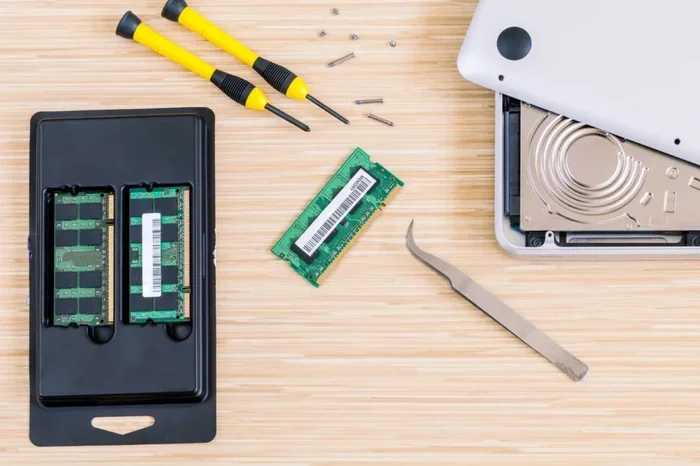
If you are upgrading a laptop, keep in mind that laptop memory uses a different form factor than desktop RAM. Laptop RAM is typically SODIMM, while desktop uses DIMM. Both Crucial and Samsung offer laptop memory options. To learn more about the differences, visit our laptop RAM vs desktop RAM comparison.
Price and Value: Which Brand Gives More Bang for Your Buck?
Price is where the two brands diverge the most. Crucial has built its reputation on offering solid memory at fair prices. A 16GB (2x8GB) DDR4-3200 kit from Crucial typically costs around $50 to $65, depending on sales and region.
A comparable Samsung DDR4 kit usually runs $5 to $15 more. The gap is even wider in DDR5, where Samsung’s premium positioning pushes prices higher. A 32GB DDR5-5600 Samsung kit can cost $30 to $50 more than an equivalent Crucial kit.
So is the premium worth it? For most users, the answer is no. Crucial offers excellent value and performance for everyday use. However, if you are an enthusiast who wants the fastest speeds and lowest latencies, Samsung’s premium kits justify the extra cost.
If you are on a tight budget and wondering whether 8GB is enough, check out our 8GB RAM vs 16GB RAM laptop guide to see what capacity makes sense for your needs.
Does RAM Need Cooling?
Heat is a factor in memory performance and longevity. Most standard RAM sticks come with basic aluminum heat spreaders that handle normal workloads just fine. However, if you are pushing your system hard with heavy overclocking or running sustained memory-intensive tasks, cooling becomes more important.
Both Crucial and Samsung include heat spreaders on their kits. Samsung’s premium DDR5 kits sometimes come with more advanced cooling solutions, including RGB fans on high-end kits. For most users, the standard heat spreaders included with either brand are more than sufficient. If you want to dive deeper into RAM cooling, read our article on does RAM need cooling.
Which Brand Should You Choose?
The right choice depends on your specific situation. Here is a quick breakdown to help you decide.
Choose Crucial if:
- You are on a budget and want the best value for your money.
- You need a simple, reliable upgrade without overthinking it.
- You want easy compatibility checking with the System Scanner tool.
- You are building a solid everyday PC or a mid-range gaming rig.
Choose Samsung if:
- You want the absolute fastest DDR5 speeds available.
- You need ultra-low latency for competitive gaming or professional workloads.
- You prefer RGB lighting and premium aesthetics.
- You are building a high-end system and price is not the primary concern.
Final Thoughts on Crucial vs Samsung RAM
The Crucial vs Samsung RAM debate does not have a single winner. Both brands deliver excellent quality and performance. Crucial wins on value and ease of use, while Samsung wins on raw speed and premium features.
If you are upgrading an existing system or building a practical daily-use PC, Crucial RAM is hard to beat. It is reliable, affordable, and backed by Micron’s manufacturing expertise. If you are chasing top-tier performance and have the budget to match, Samsung RAM delivers a premium experience that enthusiasts will appreciate.
Whichever brand you choose, make sure your motherboard supports the DDR type and speed you select. Always check the QVL before purchasing. And remember, the best RAM is the one that fits your system, your budget, and your needs.
Memory is the backbone of your PC. It feeds data to your processor and keeps everything running smoothly. Investing in quality system memory from either Crucial or Samsung is a decision you will not regret.
Frequently Asked Questions
Is Crucial RAM better than Samsung RAM?
It depends on your needs. Crucial offers better value and easier compatibility checking, while Samsung leads in raw speed and premium features. For most users, Crucial is the smarter choice. For enthusiasts, Samsung is worth the extra cost.
Can I mix Crucial and Samsung RAM in the same system?
Yes, you can mix brands, but it is not always ideal. Different kits may have different speeds, latencies, and timings, which can cause instability. If you mix them, try matching the speed and using the slowest kit’s settings for stability.
Does Samsung RAM last longer than Crucial RAM?
Both brands use quality components and offer similar lifespans. Samsung’s premium chips may have a slight edge in endurance under heavy workloads, but for typical use, both will last many years without issues.
Which brand is better for gaming?
Samsung’s faster DDR5 kits give a slight edge in CPU-bound games, but the difference is small. Most gamers will not notice a big difference between the two brands. Focus more on capacity and speed tier than brand name.
Is Crucial RAM compatible with all motherboards?
Crucial RAM is compatible with most modern motherboards. Use their System Scanner tool to find the exact kit that works with your specific system. Always double-check your motherboard’s QVL for the best results.
How much RAM do I really need?
For most users, 16GB is the sweet spot for everyday use and gaming. Content creators and professionals should consider 32GB or more. Check our guide on is 16GB RAM enough for architecture to see what works for your specific workload.