Laptops with a Lot of Ram

Laptops with a lot of RAM deliver blazing-fast performance for gaming, editing, and heavy multitasking. Whether you need 16 GB, 32 GB, or even 64 GB, having enough memory makes everything smoother. This guide covers why big RAM matters, how much you really need, and the best laptops to buy today.
If your laptop freezes every time you open a few browser tabs, it might be time to look at machines with more memory. Laptops with a lot of RAM change the game. They let you run heavy apps, switch between tasks, and enjoy games without a single stutter.
But what does “a lot of RAM” really mean? And how do you know if you need it? Let us walk through everything you need to know about choosing the right amount of memory for your laptop.
RAM, or random access memory, is the short-term memory your laptop uses to handle tasks. When you open apps, edit files, or browse the web, your laptop stores that information in RAM so it can access it quickly. The more RAM you have, the more your laptop can juggle at the same time.
Think of RAM like a desk. A small desk holds a few papers. A big desk holds a stack of projects, your laptop, and a coffee mug — all at once. Laptops with a lot of RAM give you a bigger desk, which means fewer slowdowns and smoother performance.
Key Takeaways
- More RAM means smoother multitasking: Laptops with a lot of RAM handle many apps at once without slowing down.
- 16 GB is the sweet spot for most users: It covers gaming, work, and everyday use with room to spare.
- 32 GB and 64 GB are for power users: Video editors, 3D modelers, and serious gamers benefit from these higher amounts.
- You can upgrade RAM on many laptops: Adding memory later is often easy and affordable.
- Check your current RAM first: Knowing what you have helps you decide if an upgrade makes sense.
- RAM is not the only factor: Processor speed and storage type also play big roles in overall performance.
📑 Table of Contents
Why RAM Matters So Much
RAM directly affects how fast and smooth your laptop feels. When you run out of memory, your laptop starts using your hard drive as a backup. That is much slower and causes lag. Here is why having enough memory is so important:
- Faster multitasking: You can keep many apps open without crashes or freezes.
- Better gaming: Modern games need a lot of memory to run well.
- Smoother video editing: Big video files require lots of memory to preview and render.
- Quicker load times: Apps and files open faster when there is enough RAM.
- Future-proofing: Software keeps getting heavier. More RAM means your laptop stays useful longer.
To understand what RAM actually does, check out our guide on what RAM does on a laptop. It breaks down the basics in simple terms.
How Much RAM Do You Really Need?
Not everyone needs the same amount of memory. Your needs depend on what you do with your laptop. Here is a simple breakdown:
4 GB to 8 GB: Basic Use
For web browsing, email, and light document work, 4 GB to 8 GB is enough. However, 4 GB feels very limited today. If you can, aim for at least 8 GB. Our article on whether 4 GB of RAM is good for a laptop goes deeper into this.
16 GB: The Sweet Spot
16 GB is the most popular choice right now. It handles gaming, photo editing, and multitasking with ease. Most laptops with a lot of RAM in this range offer a great balance of price and performance.
32 GB and Above: Power User Territory
If you edit 4K video, run virtual machines, or do 3D rendering, 32 GB or more is ideal. These laptops are fast but come at a higher price. You can explore laptops with 32 GB RAM for some great options.
| RAM Amount | Best For | Price Range |
|---|---|---|
| 4 GB – 8 GB | Basic tasks, web browsing | $300 – $600 |
| 16 GB | Gaming, editing, multitasking | $600 – $1,200 |
| 32 GB | Video editing, 3D work, heavy multitasking | $1,200 – $2,000 |
| 64 GB+ | Professional workloads, AI, server tasks | $2,000+ |
Still unsure about the right amount? Read our detailed piece on how much RAM you need on a laptop to find your perfect match.
Best Laptops with a Lot of RAM in 2024
The market is full of laptops with big memory. Here are some standout options that deserve your attention:
Laptops with 32 GB RAM
These machines are built for professionals and serious enthusiasts. They handle heavy workloads without breaking a sweat. Laptops with 32 GB RAM are perfect for video editors, programmers, and power users who demand the best.
Laptops with 16 GB RAM
For most people, 16 GB hits the sweet spot. You get smooth performance for gaming, work, and creative tasks without paying a premium price. Many laptops with a lot of RAM in this category offer excellent value.
Laptops with 64 GB RAM
These are beast machines. They are designed for professionals who run massive datasets, complex simulations, or multiple virtual machines at once. If you need extreme memory, a 64 GB laptop is worth every penny.
Can You Upgrade RAM on a Laptop?
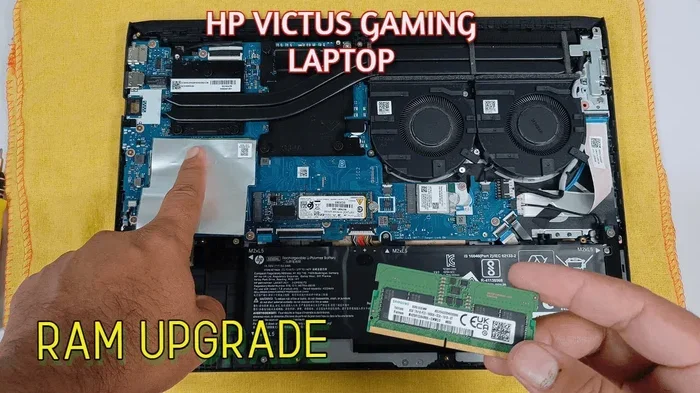
One of the best things about laptops is that many of them let you add more memory later. Upgrading RAM is one of the easiest and most affordable ways to breathe new life into an older machine.
Before you buy a new laptop, check if your current one supports upgrades. Some laptops have soldered RAM that cannot be changed. But many models still have open slots where you can add more memory.
Our guide on how to upgrade RAM on a laptop walks you through the process step by step. It is simpler than most people think.
Here are a few quick tips if you plan to upgrade:
- Check your laptop’s manual to see what type of RAM it supports.
- Buy RAM that matches your existing memory speed and type.
- Watch a tutorial specific to your laptop model before opening the back panel.
- Ground yourself to avoid static damage to components.
Common Mistakes People Make with Laptop RAM
Avoid these common pitfalls when shopping for or upgrading your laptop memory:
Buying More RAM Than You Need
Just because 64 GB sounds impressive does not mean you need it. For everyday use, 16 GB is more than enough. Extra RAM you never use is wasted money.
Ignoring Compatibility
Not all RAM works with all laptops. Check your laptop’s specifications before buying any memory. Wrong RAM will not fit or will not work properly.
Thinking RAM Fixes Everything
RAM helps with multitasking and speed, but it is not a magic fix. A slow processor or an old hard drive can still cause problems even with lots of memory.
Forgetting to Check Current RAM
Before upgrading, find out how much RAM you already have. You might be surprised. Our guide on how to check the RAM of a laptop makes this easy.
Expert Tips for Getting the Most Out of Your RAM
Want to squeeze every bit of performance from your laptop? Here are some pro tips:
Close apps you are not using. Every open app uses up memory. Even background apps can eat up RAM without you noticing. Get in the habit of closing what you do not need.
Use lightweight apps when possible. Some apps are heavier than others. Switching to lighter alternatives can free up significant memory.
Keep your laptop updated. Software updates often include performance improvements that help your memory run more efficiently.
Consider an SSD. If your laptop still uses a hard drive, upgrading to a solid-state drive (SSD) makes a huge difference. It works hand in hand with RAM to speed things up.
For more insights on what makes a laptop fast, read about what is good RAM on a laptop to understand the full picture.
Final Thoughts
Choosing the right amount of RAM is one of the most important decisions you will make when buying a laptop. Laptops with a lot of RAM give you the freedom to work, play, and create without limits. Whether you pick 16 GB for everyday use or go all the way to 64 GB for professional workloads, the right memory makes everything better.
Think about what you do on your laptop. Match that to the right amount of RAM. And remember, you can always upgrade later if you need more. The key is to start with a solid foundation.
Now that you know what to look for, you are ready to make a smart choice. Happy computing!
Frequently Asked Questions
What counts as a lot of RAM for a laptop?
These days, 16 GB or more is considered a lot of RAM for most users. Power users and professionals who run heavy software may want 32 GB or even 64 GB. The answer depends on what you plan to do with your laptop.
Is 32 GB of RAM overkill for a laptop?
Not necessarily. If you edit video, do 3D rendering, or run multiple virtual machines, 32 GB is very useful. For casual users, it might be more than you need, but it future-proofs your laptop for years to come.
Can I add more RAM to my laptop later?
Many laptops allow RAM upgrades, but not all of them do. Check your laptop’s specifications first. Some models have soldered RAM that cannot be changed, while others have open slots for easy upgrades.
Does more RAM make a laptop faster?
More RAM helps with multitasking and running heavy apps smoothly. It does not speed up your processor, but it prevents slowdowns when you have many apps open at once.
How do I check how much RAM my laptop has?
You can check your RAM in your laptop’s settings. On Windows, go to Settings and look for “About.” On a Mac, click the Apple menu and select “About This Mac.” You can also read our guide on how to check RAM of laptop for detailed steps.
What is the difference between 16 GB and 32 GB RAM in a laptop?
16 GB handles most everyday tasks, gaming, and light editing with ease. 32 GB is designed for heavier workloads like 4K video editing, 3D modeling, and running multiple demanding programs at the same time.