Where To Buy Laptop Ram Uk Boost Your Pc Performance
Looking to upgrade your laptop? This guide covers everything you need to know about where to buy laptop RAM in the UK. You will find the best online retailers, local stores, and insider tips to pick the right memory for your machine. Boost your PC performance without breaking the bank with our simple, step-by-step advice.
If your laptop feels slow, the answer might be simpler than you think. A RAM upgrade can breathe new life into an aging machine. But before you rush out and grab some memory, you need to know where to buy laptop RAM in the UK. This guide walks you through every option, from big online retailers to local shops, so you can make a smart choice.
Upgrading your laptop memory is one of the most affordable ways to improve performance. Whether you use your laptop for work, gaming, or streaming, more RAM means smoother multitasking. The good news is that buying RAM in the UK has never been easier. There are plenty of trusted sellers offering competitive prices and fast shipping. Let us dive in and explore your options.
Key Takeaways
- Know your needs: Check your current RAM and find out how much memory your laptop actually supports.
- Best online stores: Amazon UK, Crucial, and eBuyer offer great prices and fast delivery across the UK.
- Local options exist: PC World, Currys, and independent shops let you see products in person before buying.
- Compatibility matters: Always verify your laptop model supports the RAM type, speed, and capacity you want.
- Timing is key: Watch for sales events like Black Friday to grab the best deals on RAM upgrades.
- Installation is easy: Most laptop RAM upgrades take just a few minutes with basic tools.
📑 Table of Contents
- Why Upgrading Laptop RAM Matters
- Best Online Stores To Buy Laptop RAM In The UK
- Local Stores To Buy Laptop RAM In The UK
- How To Choose The Right Laptop RAM
- Popular RAM Brands Available In The UK
- How To Install New RAM In Your Laptop
- When To Upgrade Vs When To Replace
- Tips For Getting The Best Deals On Laptop RAM
- Common Mistakes To Avoid When Buying Laptop RAM
- Final Thoughts On Where To Buy Laptop RAM In The UK
Why Upgrading Laptop RAM Matters
Random Access Memory, or RAM, is the short-term memory your laptop uses to handle tasks. When you open multiple browser tabs, run software, or play games, your RAM takes the strain. If your laptop has too little memory, everything slows down. You might notice lag, freezing, or long load times. Boosting your PC performance with a RAM upgrade solves these problems quickly.
Here are some clear signs your laptop needs more memory:
- Your laptop takes forever to open apps.
- You experience frequent freezing or crashes.
- Your browser slows down with multiple tabs.
- Video editing or gaming becomes choppy.
- Your system uses swap memory often, which slows things down.
Most modern laptops come with 4GB to 8GB of RAM. For everyday tasks, 8GB works fine. But if you are a power user, 16GB or even 32GB makes a huge difference. Before you buy, it helps to understand what your laptop needs. You can check which RAM is compatible with your laptop to avoid buying the wrong type.
Best Online Stores To Buy Laptop RAM In The UK
Shopping online gives you the widest selection and often the best prices. Here are the top places to buy laptop RAM in the UK from the comfort of your home.
Amazon UK
Amazon UK is one of the most popular places to buy laptop RAM. They carry brands like Kingston, Corsair, Crucial, and G.Skill. You can filter by laptop model, RAM type, speed, and capacity. Fast delivery is a huge plus, and many items qualify for next-day shipping. Always check seller ratings and reviews before purchasing.
Crucial UK Store
Crucial is a trusted brand in the memory world. Their own UK store makes it easy to find the right RAM for your laptop. They have a built-in scanner tool on their website. You just enter your laptop model, and it tells you exactly which memory modules work. This removes all the guesswork. Where to buy laptop RAM in the UK starts with names like Crucial because they specialise in memory upgrades.
eBuyer
eBuyer is a well-known UK electronics retailer with a strong online presence. They often have competitive prices on RAM kits. Their website is easy to navigate, and they offer flexible delivery options. If you want a reliable UK-based seller with good customer service, eBuyer is worth checking out.
Scan Computers
Scan Computers has been a UK favourite for PC components for years. They carry a wide range of laptop memory from various brands. Their website includes detailed product descriptions and compatibility guides. If you want expert advice alongside your purchase, Scan is a solid choice.
Overclockers UK
Overclockers UK caters to PC enthusiasts, but they also carry RAM suitable for everyday laptops. They often run promotions and bundle deals. If you want high-performance memory for gaming or creative work, Overclockers is a great place to look.
Local Stores To Buy Laptop RAM In The UK
Not everyone likes shopping online. Some people prefer to see and touch the product before buying. The good news is that several UK stores stock laptop RAM on their shelves.
Currys PC World
Currys PC World has stores all across the UK. Their electronics sections often carry popular RAM brands. You can speak to staff who may help you find the right module. Prices might be slightly higher than online, but the ability to get it on the same day is a big advantage.
Amazon Fresh and Local Pick-Up Points
Amazon offers click-and-collect at many UK locations. You order online and pick up your RAM from a local locker or counter. This gives you the best of both worlds: online prices with offline convenience.
Independent Computer Shops
Do not overlook small, independent computer shops in your area. Many of these stores specialise in upgrades and repairs. They can often order specific RAM modules for you within a day or two. Plus, you get personalised service that big retailers cannot match.
How To Choose The Right Laptop RAM
Buying RAM is not just about picking the cheapest option. You need to make sure the memory works with your laptop. Here is what to consider before you buy.
Check Your Laptop Model
Every laptop model supports specific types of RAM. Some older laptops use DDR3 memory, while newer ones use DDR4 or DDR5. You need to match the RAM type to your laptop. Knowing what RAM is compatible with your laptop saves you time and money.
Understand RAM Capacity
RAM capacity is measured in gigabytes (GB). Most users will be fine with 8GB. If you run heavy software or play modern games, 16GB is ideal. For professional work like video editing or 3D rendering, 32GB or more may be needed. Always check your laptop’s maximum supported capacity before buying.
Pay Attention to Speed
RAM speed is measured in megahertz (MHz). Higher numbers mean faster data transfer. However, the speed benefit depends on your laptop’s processor and motherboard. If your laptop supports faster RAM, it is worth the investment. But do not pay a premium for speed your system cannot use.
Single Channel vs Dual Channel
Many laptops work best with matched pairs of RAM modules. This is called dual-channel mode. It improves memory bandwidth and overall performance. If your laptop has two RAM slots, consider buying a matching pair instead of a single stick. If you are unsure, finding your laptop’s RAM slots is a quick and easy process.
Popular RAM Brands Available In The UK
When you know what to look for, choosing a brand becomes easier. Here are some of the most reliable RAM brands you will find when buying laptop RAM in the UK:
- Crucial: Known for reliability and easy compatibility tools.
- Kingston: Offers a wide range of affordable and premium options.
- Corsair: Popular among gamers and performance users.
- G.Skill: High-performance kits, especially for enthusiasts.
- Samsung: Makes excellent raw memory modules used by many brands.
- HyperX: A solid choice for gaming laptops on a budget.
Each brand has its strengths. Crucial and Kingston are great for everyday users. Corsair and G.Skill shine for gaming and heavy workloads. Pick the brand that fits your needs and budget.
How To Install New RAM In Your Laptop
Once your new RAM arrives, installation is straightforward. Most laptops make it easy to access the memory slots. Here is a quick overview of the process.
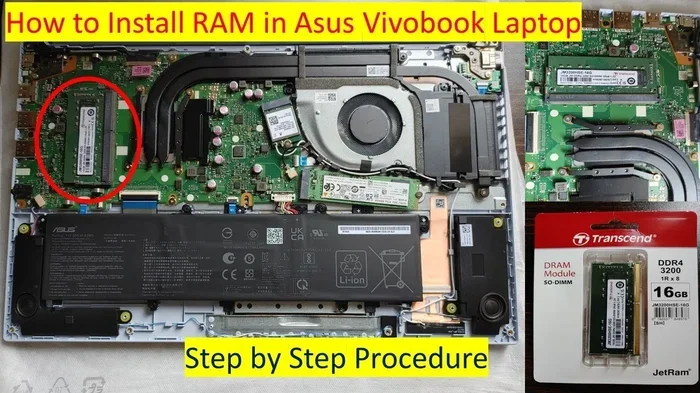
First, turn off your laptop and unplug it. Remove the battery if possible. Find the RAM access panel on the bottom of the laptop. Use a small screwdriver to unscrew it. Carefully remove the old RAM modules by pushing the side clips outward. The module will pop up at an angle. Then, align your new module with the slot at a 45-degree angle and press it down firmly until it clicks.
If you want a detailed walkthrough, you can read our guide on how to install a RAM in a laptop. It covers every step with clear instructions and tips.
After installation, power on your laptop. It should recognise the new memory automatically. If it does not, try reseating the module. Sometimes the module needs a gentle push to make proper contact.
When To Upgrade Vs When To Replace
Not every slow laptop needs a RAM upgrade. Sometimes the problem lies elsewhere. Here are some quick guidelines to help you decide.
- Upgrade RAM if: Your laptop is relatively new, has enough storage, but feels sluggish when multitasking.
- Replace your laptop if: The processor is outdated, the screen is damaged, or the battery no longer holds a charge.
- Consider both if: Your laptop is a few years old and could benefit from RAM and a solid-state drive (SSD) upgrade.
Many people find that combining a RAM upgrade with an SSD swap transforms an old laptop into a fast machine. If you are unsure, check what your laptop currently has. Finding out how much RAM your laptop has is the first step toward making the right decision.
Tips For Getting The Best Deals On Laptop RAM
Saving money on your RAM purchase is always smart. Here are some tips to help you get the best value:
- Compare prices across multiple sites. Use price comparison tools like Google Shopping or PriceRunner.
- Look for bundle deals. Some retailers offer RAM and laptop bundles at a discount.
- Check for student or corporate discounts. Some stores offer special pricing for students and businesses.
- Wait for sales events. Black Friday, Cyber Monday, and Amazon Prime Day often feature great RAM deals.
- Consider refurbished options. Some sellers offer tested and certified refurbished memory at lower prices.
- Read reviews carefully. Check what other buyers say about compatibility and performance.
By following these tips, you can find quality RAM at a price that fits your budget. The key is to be patient and do a little research before you buy.
Common Mistakes To Avoid When Buying Laptop RAM
Even experienced buyers sometimes make mistakes. Here are the most common ones to watch out for:
- Buying the wrong RAM type: DDR3 and DDR4 are not interchangeable. Always double-check your laptop’s specifications.
- Ignoring maximum capacity: Some laptops only support up to 16GB. Buying 32GB will not work.
- Skipping compatibility checks: Always verify that the RAM is listed as compatible with your specific laptop model.
- Choosing speed over compatibility: The fastest RAM does no good if your laptop does not support it.
- Forgetting about the operating system: A 32-bit operating system can only use around 3.5GB of RAM, no matter what you install.
Avoiding these mistakes ensures a smooth upgrade experience. Take a few minutes to verify your laptop’s specs before placing any order.
Final Thoughts On Where To Buy Laptop RAM In The UK
Upgrading your laptop RAM is one of the simplest and most cost-effective ways to boost your PC performance. Whether you shop online or visit a local store, the UK has plenty of excellent options. From Amazon UK and Crucial to Currys and independent shops, you have no shortage of choices.
Remember to check compatibility first. Know your laptop model, RAM type, and maximum supported capacity. Choose a reputable brand and a trusted seller. And do not forget to compare prices to get the best deal. With the right RAM upgrade, your laptop will feel faster and more responsive than ever before.
So do not let a slow laptop hold you back. Take action today. Find the perfect memory module, install it, and enjoy the difference. A small investment in RAM can make a world of difference to your daily computing experience.
Frequently Asked Questions
How much does laptop RAM cost in the UK?
Laptop RAM prices vary based on capacity and brand. A single 8GB DDR4 module typically costs between 25 and 50 pounds. 16GB kits usually range from 50 to 90 pounds. Prices can drop significantly during sales events like Black Friday. Always compare prices across multiple retailers to find the best deal.
Can I upgrade the RAM in any laptop?
Not all laptops allow RAM upgrades. Some ultrabooks and thin designs have soldered memory that cannot be replaced. However, most standard laptops come with accessible RAM slots. Check your laptop’s specifications or manual to confirm whether your model supports upgrades.
How do I know if my laptop needs more RAM?
If your laptop struggles with multitasking, freezes often, or takes a long time to open apps, it likely needs more memory. You can check your current RAM usage through Task Manager on Windows. If usage regularly exceeds 80 percent, an upgrade will help.
Is it better to buy RAM from a UK-based retailer?
Buying from a UK-based retailer ensures faster delivery and easier returns. UK retailers also stock RAM that meets local standards and specifications. Popular UK options include Amazon UK, Crucial, eBuyer, and Currys PC World.
How long does it take to install new laptop RAM?
Installing laptop RAM takes about 5 to 15 minutes for most models. You need a small screwdriver and a clean, flat workspace. If you are unsure about the process, many YouTube tutorials walk you through it step by step.
Will adding more RAM make my laptop faster?
Adding RAM improves performance when your current memory is insufficient. It helps with multitasking, faster app switching, and smoother overall operation. However, if your laptop has a slow processor or outdated storage, RAM alone may not solve all performance issues.