Is Apple Going to Usb C

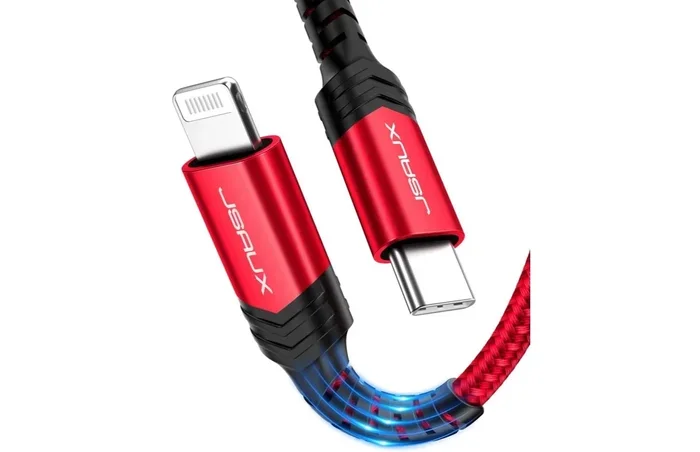
Yes, Apple is fully transitioning to USB-C across its product lineup. The company has already replaced Lightning with USB-C on the iPhone 15, iPad Air, and iPad Pro models. This shift brings faster charging, universal compatibility, and a cleaner, reversible connector that works with one cable for nearly all your devices.
Let’s talk about something that has dominated tech conversations for years. Is Apple going to USB-C? The short answer is yes, and the transition is already well underway. Apple has made a big move away from its proprietary Lightning connector and embraced the universal USB-C standard. This shift affects iPhones, iPads, and even accessories. If you have been wondering what this means for you as a user, you are in the right place.
The USB-C transition is not just a cable change. It represents a bigger shift toward universal compatibility, faster data speeds, and simpler charging. Apple has been using USB-C on its MacBooks since 2015, but bringing it to the iPhone and iPad marks a turning point. In this article, we will cover everything you need to know about Apple’s move to USB-C. We will look at why it happened, what it means for your devices, and what you can expect going forward.
Key Takeaways
- Apple has adopted USB-C: The iPhone 15, iPad Air, and iPad Pro now use USB-C instead of Lightning.
- Faster charging and data transfer: USB-C supports USB 3 speeds and USB-C power delivery for quicker syncing and charging.
- Universal compatibility: One USB-C cable can charge your phone, tablet, and laptop, reducing cable clutter.
- Regulation drove the change: The EU’s common charger law played a major role in Apple’s decision.
- USB-C accessories are growing: From USB-C headphones to hubs and adapters, the ecosystem is expanding fast.
- MacBooks already use USB-C: Apple has been on USB-C since 2015, so the transition was inevitable.
📑 Table of Contents
The USB-C Transition: What Apple Has Already Done
Apple did not wake up one day and decide to switch cables overnight. The company has been building toward USB-C for several years. Let us walk through the key milestones that led to this moment.
MacBooks Pioneered the Change
Apple introduced USB-C on the first MacBook in 2015. That was a bold move at the time. The laptop had only one port, and many people were skeptical. But USB-C proved its worth. It handled charging, data transfer, and video output through a single small connector. Over the years, Apple expanded USB-C across its entire MacBook lineup. Today, every MacBook model uses USB-C or Thunderbolt ports.
iPads Followed Suit
After the MacBook success, Apple moved to USB-C on the iPad Pro in 2018. The iPad Air got USB-C in 2020. The standard iPad held on to Lightning for a while, but even that changed. Now, most iPad models ship with USB-C. This made the iPad a more versatile productivity tool. You can connect it to external displays, storage drives, and even M.2 NVMe SSD enclosures using a simple adapter.
The iPhone 15 Marked the Big Switch
The biggest moment came in September 2023 when Apple launched the iPhone 15. For the first time, the iPhone used USB-C instead of Lightning. This was not entirely Apple’s choice. The European Union passed a law requiring a common charger for mobile devices. Apple had no option but to comply. Still, the results speak for themselves. USB-C on the iPhone means faster charging, better data transfer, and a universal cable you can share with almost any device.
Why Apple Is Moving to USB-C
There are several reasons behind Apple’s USB-C shift. Some were driven by external pressure, while others make perfect business and design sense. Let us break them down.
Regulatory Pressure from the EU
The European Union passed a directive in 2022 that required all smartphones, tablets, and laptops sold in the EU to use USB-C as the standard charging port. This law was designed to reduce electronic waste and make life easier for consumers. Apple could not ignore this regulation. The company already used USB-C on its MacBooks and iPads, so extending it to the iPhone was the logical next step.
Faster Data Transfer Speeds
Lightning was great in its time, but it had limits. The Lightning connector maxed out at USB 2 speeds, which means around 480 Mbps. USB-C, on the other hand, supports USB 3.0, USB 3.1, and even USB 4. These standards offer speeds up to 40 Gbps or more. For professionals who transfer large files from their iPhones or iPads, this is a game changer. You can move a full photo library in seconds instead of minutes.
Universal Compatibility
One of the biggest frustrations with Lightning was the cable pile-up. You needed a Lightning cable for your iPhone, a USB-C cable for your MacBook, and sometimes a third cable for your iPad. With USB-C, one cable can do it all. You can charge your iPhone from your MacBook, share a charger with friends, and use the same cable for data transfer across devices. This universal compatibility is a huge win for everyday users.
Thinner, Reversible Design
USB-C is a small, reversible connector. It does not matter which way you plug it in. This might sound like a small detail, but it makes a big difference in daily use. Lightning was also reversible, but USB-C is more durable and supports higher power delivery. The compact design also helps Apple make thinner, lighter devices.
What USB-C Means for Apple Users
Now that Apple has made the switch, what does it actually mean for you? Let us look at the practical benefits and changes you will notice.
Faster Charging on iPhone and iPad
USB-C supports USB-C Power Delivery, which allows for much faster charging. The iPhone 15 and iPhone 16 can charge significantly faster with a USB-C charger compared to the old Lightning setup. You can go from zero to 50 percent in about 30 minutes with the right charger. iPads benefit even more. The iPad Pro with USB-C can charge at 20W or higher, which means less time tethered to a wall.
Connecting to External Displays
If you use your iPad or iPhone as a secondary screen, USB-C makes this much easier. The USB-C port supports video output through protocols like HDMI and DisplayPort with the right adapter. You can connect your iPad to a monitor, projector, or TV for presentations, streaming, or extended workspace. This was always possible with Lightning to some degree, but USB-C makes it more reliable and versatile.
Expanding Storage Options
Need to move files between your iPhone and a computer? USB-C makes it simple. You can connect an external drive directly to your iPhone or iPad. Apple’s Files app supports external storage natively on USB-C iPads. This means you can offload photos, videos, and documents without needing a computer in the middle. For creative professionals working with large video files, this is incredibly useful.
Using a USB Adapter for NVMe SSDs
One of the coolest things about USB-C is the ability to connect high-speed external storage. With an NVMe SSD to USB adapter, you can plug a super-fast solid-state drive directly into your iPad Pro or MacBook. This is perfect for video editors, photographers, and anyone who works with large files on the go. The speeds you get with USB-C are dramatically better than what Lightning could ever offer.
Accessories and Ecosystem Changes
The switch to USB-C also means a shift in the accessories market. You will find USB-C cables, chargers, hubs, and docks everywhere now. Many third-party accessory makers have already made the transition. From USB-C headphones to multiport hubs, the ecosystem is growing rapidly. This gives users more choices and often better prices as competition increases.
USB-C vs Lightning: A Quick Comparison
It helps to compare the two connectors side by side. Here is a simple breakdown of how USB-C stacks up against the old Lightning standard.
- Speed: USB-C supports USB 3 and Thunderbolt speeds up to 40 Gbps. Lightning is limited to USB 2 at 480 Mbps.
- Power Delivery: USB-C can deliver up to 240W with USB PD. Lightning maxes out around 12W to 20W on iPhones.
- Reversibility: Both are reversible, so this is a tie.
- Durability: USB-C is built to withstand more insertion cycles than Lightning.
- Compatibility: USB-C works with nearly all modern devices. Lightning works only with Apple products.
- Size: USB-C is slightly larger than Lightning but still compact enough for mobile devices.
As you can see, USB-C wins in almost every category. The only advantage Lightning had was being exclusive to Apple. But exclusivity does not matter much when the whole industry has moved to USB-C.
The Future of USB-C in Apple’s Product Line
Apple’s move to USB-C is not a one-time event. It is part of a bigger strategy. Let us look at what the future might hold for USB-C in Apple’s lineup.
More Devices Will Adopt USB-C
Apple has already transitioned its iPhone, iPad, and MacBook lines to USB-C. The Apple Watch still uses a proprietary magnetic charger, but there are rumors that even the Apple Watch could move to USB-C in the future. AirPods and other accessories may follow. The writing is on the wall. USB-C is Apple’s future.
Thunderbolt 4 and Beyond
Apple’s MacBooks already support Thunderbolt 4 through USB-C. This means ultra-fast data transfer, dual 4K display support, and up to 100W of power delivery. As USB standards continue to evolve, Apple will likely adopt the latest versions quickly. Thunderbolt 5 is already on the horizon, and it promises even faster speeds and more power.
A Cleaner, Simpler Charging Experience
Imagine a world where you carry one cable and one charger for all your Apple devices. That future is already here to some extent. With USB-C, you can use the same charger for your iPhone, iPad, and MacBook. This simplifies travel, reduces clutter, and makes life easier. Apple has always focused on simplicity, and USB-C aligns perfectly with that philosophy.
Environmental Impact
Apple has publicly stated its commitment to reducing its environmental footprint. Moving to a single universal connector reduces e-waste. Fewer cables end up in landfills when everyone uses the same standard. While the EU law was the main driver, Apple’s environmental goals also align with the USB-C transition. This is a win-win for both the company and the planet.
Common Mistakes and Tips for Apple USB-C Users
Buying Cheap Cables
Not all USB-C cables are created equal. Cheap cables may not support the full speed or power delivery that your device can handle. Always buy cables from reputable brands or directly from Apple. A bad cable can cause slow charging, data transfer issues, or even damage your device.
Ignoring USB-C Power Delivery
USB-C Power Delivery is a smart charging standard that negotiates the right amount of power with your device. If you buy a USB-C charger, make sure it supports USB PD. A basic charger without PD will charge your iPhone or iPad much slower. Look for chargers rated at 20W or higher for best results.
Forcing the Connector
USB-C is reversible, so there is no wrong way to plug it in. But if you feel resistance, do not force it. Make sure the cable and port are clean and free of debris. A little dust in the port can cause connection issues. A quick blow or a soft brush can fix this easily.
Not Using a Hub or Dock
One USB-C port on your MacBook or iPad can do a lot, but a USB-C hub unlocks its full potential. A good hub gives you extra ports for USB-A devices, HDMI output, SD card readers, and more. This is especially useful if you use your iPad as a laptop replacement with a keyboard.
Key Takeaways
- Apple has fully adopted USB-C: The iPhone 15, iPad Air, and iPad Pro now use USB-C instead of Lightning.
- Faster charging and data transfer: USB-C supports much higher speeds and power delivery than Lightning ever could.
- One cable for all devices: USB-C works across iPhones, iPads, MacBooks, and many other devices, reducing cable clutter.
- EU regulation played a role: The common charger law pushed Apple to make the switch, but the benefits are real for all users.
- The USB-C ecosystem is growing: From USB-C headphones to hubs, adapters, and external drives, accessories are expanding fast.
- Thunderbolt support adds power: Apple’s USB-C ports support Thunderbolt 4, giving professionals the speed they need.
- The future is universal: Expect more Apple devices to adopt USB-C, and maybe even the Apple Watch and AirPods eventually.
Frequently Asked Questions
When did Apple switch to USB-C?
Apple started using USB-C on MacBooks in 2015. The iPad Pro switched to USB-C in 2018, and the iPhone 15 was the first iPhone to use USB-C in 2023. The transition has been gradual but is now complete across most Apple product lines.
Can I use my old Lightning cables with new Apple devices?
No, the iPhone 15 and newer models, as well as recent iPads, do not support Lightning cables. You will need a USB-C cable for charging and data transfer. You can still use older Lightning accessories with a USB-C to Lightning adapter if needed.
Is USB-C faster than Lightning?
Yes, USB-C is significantly faster. While Lightning is limited to USB 2 speeds of 480 Mbps, USB-C can support speeds up to 40 Gbps with USB 3 or Thunderbolt connections. This makes a huge difference for file transfers and charging.
Do I need a special USB-C charger for my iPhone?
Not necessarily. Any USB-C charger will charge your iPhone, but for the fastest speeds, look for a charger that supports USB Power Delivery at 20W or higher. Apple’s own 20W USB-C charger works great, but many third-party options are available too.
Can I connect my iPhone to a TV with USB-C?
Yes, you can. You will need a USB-C to HDMI adapter or a USB-C Digital AV Multiport Adapter. This lets you mirror your iPhone screen to a TV or monitor. The experience is smooth and works well for presentations and streaming.
Will all future Apple devices use USB-C?
It is very likely. Apple has already moved its entire mobile and laptop lineup to USB-C. The only holdouts are the Apple Watch and AirPods, which use proprietary chargers. But even these could switch to USB-C in the coming years as the industry standard becomes more universal.
Final Thoughts
The answer to is Apple going to USB-C is a definitive yes, and the transition is already complete for most devices. Apple has embraced the USB-C standard fully, and the benefits are clear. Faster charging, universal compatibility, and a cleaner ecosystem make this a win for everyone. Whether you are a casual user or a creative professional, USB-C makes your Apple devices more versatile and easier to use.
The shift away from Lightning was inevitable, and Apple made the right call. While some people mourned the loss of the Lightning cable, USB-C offers so much more in return. You get faster data transfer, better power delivery, and the ability to use one cable for nearly all your devices. The future of Apple accessories is USB-C, and it is already here. Embrace the change, grab a good USB-C cable and charger, and enjoy the simpler, faster experience that comes with it.
So the next time someone asks you, is Apple going to USB-C, you can confidently say yes. The transition is done, and it is only going to get better from here.