Do I Need a Special Hdmi Cable for Arc
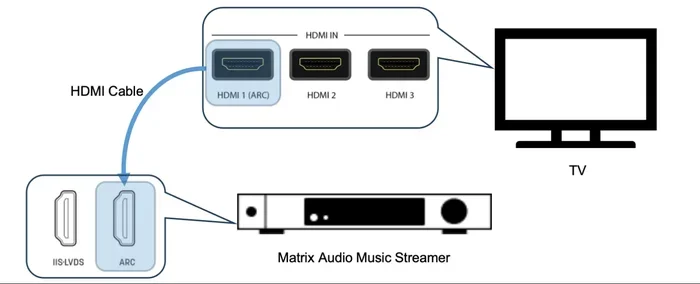
You do not always need a special HDMI cable for ARC, but using the right one ensures reliable audio and video performance. HDMI ARC works with standard High Speed HDMI cables, but eARC demands a Premium High Speed or Ultra High Speed cable. This guide breaks down exactly which HDMI cable you need, common mistakes to avoid, and how to get the best sound from your TV and soundbar setup.
If you have set up a soundbar or home theater system recently, you may have seen the term HDMI ARC pop up. It sounds technical, and it can feel like you need to buy expensive gear just to get sound working properly. But here is the good news. In most cases, you do not need a special HDMI cable for ARC. The cable you already own might be perfectly fine.
That said, not every HDMI cable is created equal. The right cable makes a big difference in audio quality, reliability, and whether your setup works at all. This guide walks you through everything you need to know about HDMI ARC cables. You will learn what ARC actually is, which cables work best, and how to avoid common setup mistakes.
Let us clear up the confusion once and for all. By the end of this article, you will know exactly which HDMI cable to buy and why.
Key Takeaways
- Standard HDMI cables can support ARC: Most High Speed HDMI cables handle ARC without any issues.
- eARC needs a better cable: If your TV supports eARC, you need a Premium High Speed HDMI cable for full bandwidth.
- Check the cable label: Look for the HDMI certification logo on the packaging to confirm ARC compatibility.
- Cable length matters: Longer cables can cause signal loss, so keep runs under 15 feet when possible.
- Not all ports are equal: Only the HDMI port labeled ARC supports audio return channel functionality.
- Old cables may work: A standard HDMI 1.4 cable can handle basic ARC, but newer versions offer better performance.
📑 Table of Contents
- What Is HDMI ARC and Why Does It Matter?
- Do You Really Need a Special HDMI Cable for ARC?
- HDMI Cable Types Explained
- How to Choose the Right HDMI Cable for Your ARC Setup
- Common HDMI ARC Problems and How to Fix Them
- HDMI ARC vs eARC: What Is the Difference?
- Expert Tips for Getting the Best HDMI ARC Performance
- Final Thoughts
What Is HDMI ARC and Why Does It Matter?
HDMI ARC stands for Audio Return Channel. It is a feature built into HDMI that lets your TV send audio back to your soundbar, receiver, or speaker system through the same HDMI cable. Before ARC existed, you needed a separate cable or even an optical audio cable just to get sound from your TV to your speakers.
This is a big deal for home entertainment setups. It cuts down on cable clutter and simplifies your connection. Instead of plugging in three or four cables, you can use just one HDMI cable to handle both video and audio.
How HDMI ARC Works in Practice
Here is a simple example. You watch a movie on your smart TV. The TV sends the video to your display and the audio to your soundbar through the same HDMI cable. The soundbar receives the audio signal and plays it. This happens automatically when ARC is enabled in your TV settings.
But here is the catch. Not all HDMI cables support ARC equally. The cable needs enough bandwidth to carry the audio signal back to your speaker system. This is where the question of whether you need a special cable comes in.
Most modern TVs and soundbars use HDMI ARC as a standard feature. But the cable you plug in determines whether the connection works smoothly or causes frustration. If you are having audio issues with your current setup, the cable might be the problem.
Do You Really Need a Special HDMI Cable for ARC?
The short answer is no. You do not need a special HDMI cable for basic ARC. A standard High Speed HDMI cable can handle ARC just fine. Most cables sold today meet the requirements for HDMI 1.4, which introduced ARC as a feature.
However, there is a but. If you want to use eARC (Enhanced Audio Return Channel), the rules change. eARC supports advanced audio formats like Dolby Atmos and DTS:X. These formats need more bandwidth than standard ARC. For eARC, you need a Premium High Speed HDMI cable or an Ultra High Speed HDMI cable.
When a Standard Cable Is Enough
If your setup is straightforward, a standard High Speed HDMI cable works great. Here are situations where you do not need anything special:
- You have a basic soundbar connected to your TV
- You only use stereo audio or simple surround sound
- Your TV and soundbar both support HDMI ARC (not eARC)
- You are not using advanced audio formats like Dolby Atmos
In these cases, any certified High Speed HDMI cable will get the job done. You do not need to spend extra money on premium cables. Just make sure the cable is not damaged and the connectors are in good shape.
When You Need a Better Cable
You need a Premium High Speed or Ultra High Speed HDMI cable when eARC is involved. eARC was introduced with HDMI 2.1 and supports high-resolution audio formats. If you have a modern TV and a premium sound system, eARC gives you the best audio experience.
Also, if you are running a long cable run, a better cable helps. Signal degradation can happen over long distances. A higher quality cable with good shielding reduces this problem. If your cable run exceeds 15 feet, consider upgrading to a Premium High Speed cable.
HDMI Cable Types Explained
The HDMI cable world can feel overwhelming. There are so many labels and versions. Let us break it down into simple terms so you know exactly what to look for.
Standard HDMI Cable
This is the basic cable. It supports standard definition and some high definition content. It does not support ARC well and is not recommended for modern setups. You will rarely find these in stores anymore, but they still exist in old drawers and junk drawers everywhere.
High Speed HDMI Cable
This is the cable you want for basic ARC. High Speed HDMI cables support resolutions up to 4K at 30Hz. They also support HDMI ARC. Most cables sold today fall into this category. Look for the High Speed HDMI logo on the packaging to confirm.
Premium High Speed HDMI Cable
This cable supports 4K at 60Hz and HDR content. It also handles eARC with ease. If you have a modern home theater setup, this is the sweet spot. It gives you room to grow without spending money on the top-tier option you may not need yet.
Ultra High Speed HDMI Cable
This is the top-of-the-line cable. It supports 8K, 4K at 120Hz, and all HDMI 2.1 features. It handles eARC and advanced audio formats without any issues. You only need this if you have the latest TVs and audio equipment that fully use HDMI 2.1.
How to Choose the Right HDMI Cable for Your ARC Setup
Choosing the right cable comes down to your specific setup. You do not need to overspend, but you also do not want to buy a cable that bottlenecks your audio quality.
Check Your TV and Soundbar Specs
Before buying any cable, check what your TV and soundbar support. Look in the user manual or check the manufacturer website. If both devices support eARC, you need a Premium High Speed or Ultra High Speed cable. If they only support standard ARC, a High Speed cable is all you need.
Also check which HDMI port on your TV supports ARC. Not every port on your TV has ARC capability. The port is usually labeled ARC or eARC. Plug your cable into that specific port for the audio return channel to work.
Consider Your Cable Length
Cable length affects signal quality. Shorter cables are generally more reliable. If you can keep your HDMI cable under 10 feet, you should not have any signal issues. If you need a longer run, go for a higher quality cable with good shielding.
If you are running a long cable through a wall or across a room, consider an active HDMI cable. These cables have built-in signal boosters that keep the audio and video signal strong over longer distances.
Look for Certification Logos
HDMI cables come with certification logos that tell you what they support. Look for these on the packaging:
- High Speed HDMI – supports ARC and 4K at 30Hz
- Premium High Speed HDMI – supports eARC and 4K at 60Hz
- Ultra High Speed HDMI – supports HDMI 2.1 features and 8K
Avoid cables that do not have any certification. These may not work reliably with ARC. Stick with reputable brands and buy from trusted sellers.
Common HDMI ARC Problems and How to Fix Them
Even with the right cable, HDMI ARC setups can run into issues. Here are the most common problems and how to solve them.
No Audio Through HDMI ARC
If you have video but no sound, the first thing to check is your TV audio settings. Make sure HDMI ARC or eARC is turned on in the audio output settings. Also check that your soundbar or receiver is set to the correct input.
Sometimes the fix is as simple as unplugging the HDMI cable and plugging it back in. This resets the handshake between devices. If that does not work, try turning both devices off and back on.
Audio Cuts Out Intermittently
Intermittent audio dropouts usually point to a cable problem. A loose connection or a damaged cable can cause this. Try a different HDMI cable to rule out cable issues. Also make sure the cable is firmly seated in both ports.
Another common cause is CEC (Consumer Electronics Control) conflicts. CEC is a feature that lets HDMI devices control each other. Sometimes CEC settings clash and cause audio issues. Try turning CEC off on one of your devices to see if that fixes the problem.
ARC Not Showing Up in TV Settings
If your TV does not recognize the ARC connection, check a few things. First, make sure the cable is plugged into the correct HDMI port. The port must be labeled ARC. Second, update your TV firmware. Sometimes a software update adds or fixes ARC support.
If none of these steps work, your TV may not support ARC on that particular port. Check your TV manual to confirm which ports support ARC.
HDMI ARC vs eARC: What Is the Difference?
HDMI ARC and eARC are related but different. Understanding the difference helps you choose the right cable.
HDMI ARC was introduced with HDMI 1.4. It supports basic audio formats like Dolby Digital and DTS. It works well for most soundbars and basic home theater setups. A standard High Speed HDMI cable handles ARC just fine.
eARC was introduced with HDMI 2.1. It supports advanced audio formats like Dolby Atmos, DTS:X, and object-based audio. eARC also has a higher bandwidth capacity, which means it can handle uncompressed audio. For eARC, you need a Premium High Speed or Ultra High Speed HDMI cable.
If you are buying new equipment today, look for eARC support. It is the future of home audio and gives you much better sound quality. But if you have a simple setup, standard ARC is still perfectly fine.
Expert Tips for Getting the Best HDMI ARC Performance
Here are some practical tips from audio and video enthusiasts to get the most out of your HDMI ARC setup.
First, always use the HDMI port labeled ARC or eARC on your TV. Using a non-ARC port will not work, no matter what cable you use. Second, keep your HDMI cables as short as possible. Longer cables increase the chance of signal loss. Third, buy certified cables from reputable brands. Cheap uncertified cables are the number one cause of ARC problems.
Also, make sure your TV firmware is up to date. Manufacturers often release updates that improve HDMI ARC compatibility. Finally, if you are having persistent issues, try a different HDMI port on your TV. Sometimes a specific port has a hardware issue that causes ARC to fail.
One more thing. If you have an older soundbar or receiver, check whether it supports ARC at all. Not all audio equipment has HDMI ARC built in. Some older devices only have optical audio inputs. In that case, you would need an HDMI to optical converter, which is a different setup entirely.
When you are shopping for cables, you might also want to check whether you need a special cable for other audio setups. For example, if you are connecting speakers to a turntable, you need a different type of connection than HDMI. Understanding your full audio setup helps you make better cable choices.
Similarly, if you are building a home theater and wondering whether your current setup needs an amplifier, it helps to understand how all your audio components connect. The right cables and the right equipment work together to give you the best experience.
Final Thoughts
So do you need a special HDMI cable for ARC? The answer depends on your setup. For basic ARC, a standard High Speed HDMI cable works perfectly. You do not need to spend extra money. For eARC and advanced audio formats, you need a Premium High Speed or Ultra High Speed HDMI cable.
The most important thing is to check your devices, buy a certified cable, and use the right HDMI port. With the right cable and a few simple steps, your HDMI ARC setup will work flawlessly. You will enjoy great sound from your TV, soundbar, or home theater system without any headaches.
Take a few minutes to check your current setup. If your cable is old or damaged, replacing it might solve your audio problems. And if you are buying a new cable, now you know exactly which one to choose. A good HDMI cable is a small investment that makes a big difference in your home entertainment experience.
Frequently Asked Questions
Can I use any HDMI cable for ARC?
Most High Speed HDMI cables support basic ARC just fine. You do not need a special or expensive cable for standard ARC functionality. Just make sure the cable is certified and in good condition.
What happens if I use a non-ARC HDMI cable?
If the cable is a High Speed HDMI cable, it will likely work with ARC. But if the cable is an older Standard HDMI cable, it may not support ARC at all. Always check the cable specifications before purchasing.
Do I need a special HDMI cable for eARC?
Yes, eARC requires a Premium High Speed HDMI cable or an Ultra High Speed HDMI cable. Standard High Speed cables do not have enough bandwidth for the advanced audio formats that eARC supports.
Can I use an HDMI splitter with ARC?
Most HDMI splitters do not pass through the ARC signal. If you need to split your HDMI signal and keep ARC, look for a splitter specifically designed to support ARC functionality.
Why is my HDMI ARC not working even with the right cable?
There could be several reasons. Check that the cable is plugged into the ARC-labeled port on your TV. Also verify that ARC is enabled in your TV settings. Firmware updates on your TV or soundbar can also fix ARC issues.
Is HDMI ARC better than optical audio?
HDMI ARC is generally better because it carries both audio and video on one cable. It also supports more audio formats than optical. However, optical cables are immune to electromagnetic interference, which can be an advantage in some setups.