What Is the Difference Between Micro Sd Micro M2
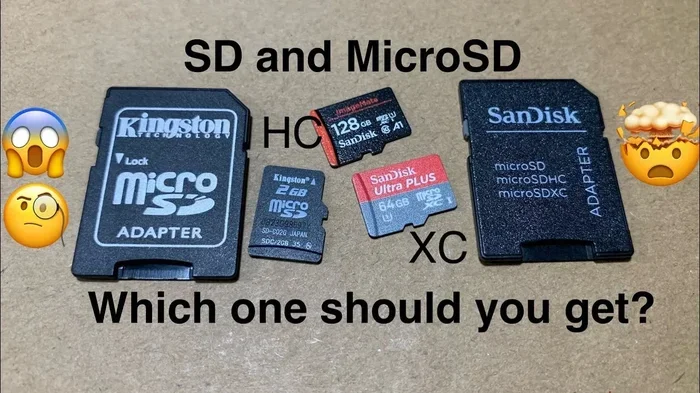
Micro SD cards and Micro M.2 SSDs are both storage solutions for small devices, but they work very differently. A Micro SD is a removable flash memory card, while a Micro M.2 is a tiny built-in solid-state drive. Understanding the differences helps you choose the right storage for your phone, tablet, or laptop.
Key Takeaways
- Different Form Factors: Micro SD cards are removable and plug into a slot, while Micro M.2 SSDs are soldered or inserted into a motherboard socket.
- Speed Gap Is Significant: Micro M.2 SSDs use NVMe or SATA protocols and are much faster than Micro SD cards in both read and write speeds.
- Use Cases Differ: Micro SD cards suit expandable storage in phones and cameras, while Micro M.2 SSDs serve as primary drives in ultra-compact laptops and tablets.
- Price Per GB Varies: Micro SD cards are cheaper for small capacities, but Micro M.2 drives offer better value at higher storage sizes.
- Compatibility Matters: Not all devices support both formats, so always check your device specifications before purchasing.
- Durability and Lifespan Differ: Micro M.2 SSDs are more durable and reliable for long-term use compared to removable SD cards.
📑 Table of Contents
What Is a Micro SD Card?
A Micro SD card is a tiny removable flash memory card used to store data in compact devices. You have probably seen one in smartphones, action cameras, or portable gaming consoles. These cards come in different sizes and speed classes to match various needs.
The Micro SD format has been around for many years. It evolved from the full-size SD card, which was originally designed for cameras and laptops. Over time, manufacturers shrunk the format to fit smaller devices. Today, Micro SD cards are available in capacities ranging from a few gigabytes up to 1 terabyte.
These cards use NAND flash memory to store data permanently. They do not need power to retain your files, which makes them convenient for portable use. You can plug them into a card reader, transfer files, and remove them whenever you want.
How Micro SD Cards Work
A Micro SD card connects to your device through a dedicated card slot. The device reads and writes data using a simple interface protocol. Most modern phones and tablets support UHS (Ultra High Speed) ratings, which define the maximum transfer speed.
The speed class rating tells you how fast the card can write data. For example, a Class 10 card writes at a minimum of 10 megabytes per second. UHS-I cards can reach speeds around 104 MB/s, while UHS-II and UHS-III go even faster. However, the actual speed also depends on your device’s card reader.
Common Uses for Micro SD Cards
- Expanding phone storage: Many Android phones still include a Micro SD slot for extra space.
- Recording video: Action cameras like GoPro rely on fast Micro SD cards for 4K recording.
- Portable gaming: Devices like the Nintendo Switch use Micro SD cards to store games.
- Dashcams and security cameras: These devices need reliable, high-endurance cards for continuous recording.
- Data transfer: Photographers and videographers use Micro SD cards to move files between devices.
What Is a Micro M.2 SSD?
A Micro M.2 SSD is a tiny solid-state drive built into compact devices. Unlike a Micro SD card, it is not meant to be removed easily. It connects directly to the motherboard through an M.2 slot. This makes it a permanent storage solution for laptops, tablets, and mini PCs.
The M.2 form factor is very small, usually about the size of a gum stick. It was designed to replace older storage interfaces like mSATA. The Micro M.2 variant is even smaller, built specifically for ultra-thin and lightweight devices where space is extremely limited.
Micro M.2 SSDs use either the SATA or NVMe protocol to communicate with the device. NVMe drives are significantly faster because they use the PCIe interface. This means you can expect much higher read and write speeds compared to traditional storage or even standard SSDs.
How Micro M.2 SSDs Work
A Micro M.2 SSD slots directly into an M.2 connector on the motherboard. It communicates through either the SATA bus or the PCIe bus. The NVMe protocol, which runs over PCIe, allows for incredibly fast data transfer rates.
These drives use NAND flash memory just like Micro SD cards, but they are built with more advanced controllers and firmware. This is why they can handle much higher speeds and offer better reliability over time. A typical Micro M.2 NVMe SSD can read data at speeds over 2000 MB/s, which is far beyond what any Micro SD card can achieve.
Common Uses for Micro M.2 SSDs
- Ultrabooks and thin laptops: Many modern laptops use Micro M.2 SSDs as their main storage drive.
- Mini PCs and NUCs: Compact desktop PCs rely on M.2 drives for space-efficient storage.
- Tablets and 2-in-1 devices: Premium tablets sometimes use built-in M.2 storage for better performance.
- Embedded systems: Industrial devices and smart equipment use Micro M.2 SSDs for reliable storage.
- Gaming devices: High-performance portable gaming systems benefit from the fast read speeds of NVMe drives.
Micro SD vs Micro M.2: Key Differences
The main differences between a Micro SD card and a Micro M.2 SSD come down to design, speed, and purpose. Let us break each one down so you can see exactly how they compare.
Physical Design and Form Factor
A Micro SD card is a small, flat removable card. You push it into a slot and it stays in place until you eject it. A Micro M.2 SSD is a small rectangular stick that plugs into a slot on the motherboard. It is secured with a tiny screw.
Micro SD cards are designed to be swapped in and out frequently. Micro M.2 drives are designed to stay installed permanently. This difference affects how you upgrade or replace storage in your device.
Speed and Performance
This is where the biggest difference lies. A Micro SD card typically maxes out at read speeds around 100 to 300 MB/s, depending on the speed class. A Micro M.2 NVMe SSD can reach read speeds of 2000 MB/s or more.
For everyday tasks like browsing or watching videos, a Micro SD card works fine. But if you need fast boot times, quick file transfers, or smooth app performance, a Micro M.2 SSD is the clear winner.
Removability and Upgradability
One of the biggest advantages of a Micro SD card is that you can remove it and swap it easily. You can carry your files on a separate card. Micro M.2 SSDs are not designed for frequent removal. Upgrading usually requires opening the device and replacing the drive.
However, if you want permanent, fast storage built into your device, Micro M.2 is the better choice. It also tends to be more reliable since it is not exposed to physical wear from repeated insertions and removals.
Price and Value
Micro SD cards are generally cheaper per gigabyte for smaller capacities. A 256GB Micro SD card costs much less than a 256GB Micro M.2 SSD. But as storage needs grow, the price gap narrows. At 1TB and above, Micro M.2 drives often offer better value for the performance you get.
If you just need extra storage for photos and media, a Micro SD card makes sense. If you need a fast primary drive for an operating system or heavy applications, investing in a Micro M.2 SSD pays off.
| Feature | Micro SD Card | Micro M.2 SSD |
|---|---|---|
| Type | Removable flash card | Built-in solid-state drive |
| Interface | SD protocol | SATA or NVMe (PCIe) |
| Read Speed | Up to 300 MB/s | Up to 2000+ MB/s |
| Write Speed | Up to 200 MB/s | Up to 1500+ MB/s |
| Max Capacity | Up to 1TB | Up to 2TB |
| Removability | Yes, easily removable | No, usually soldered or screwed in |
| Primary Use | Expandable storage | Primary storage drive |
| Typical Price (256GB) | $20 – $40 | $30 – $60 |
| Durability | Good, but exposed to wear | Excellent, built into device |
Speed Comparison: Why It Matters
Speed is one of the most important factors when choosing between Micro SD and Micro M.2 storage. Your storage speed directly affects how fast your device boots, how quickly apps open, and how smoothly you can transfer large files.
A standard Micro SD card might offer read speeds of 80 to 100 MB/s. This is fine for storing photos, documents, and music. But if you try to run apps or play games directly from the card, you will notice lag and slow load times.
In contrast, a Micro M.2 NVMe SSD delivers speeds that are 10 to 20 times faster. Booting an operating system takes seconds instead of minutes. Apps launch instantly. Large video files transfer in a fraction of the time.
If you are comparing storage options for a laptop or a tablet, the speed difference alone might justify choosing a Micro M.2 drive. For a phone or camera where expandable storage is the goal, a fast Micro SD card remains practical.
Which One Should You Choose?
Choosing between a Micro SD card and a Micro M.2 SSD depends on your device and your needs. Here are some simple guidelines to help you decide.
Choose a Micro SD card if: You need extra storage for media files, you want to swap cards between devices, or your device has a card slot but no built-in upgrade path. Micro SD cards are also great for budget-friendly storage expansion.
Choose a Micro M.2 SSD if: You need a fast primary drive for a laptop or mini PC, you want better overall system performance, or you are building a compact device where speed matters most.
For many users, both options serve different purposes. You might use a Micro M.2 SSD as your main drive and a Micro SD card for extra media storage. This combination gives you the best of both worlds.
When considering upgrades, it is also worth looking at related components. For example, checking what the RAM on a laptop does can help you understand how storage and memory work together. Similarly, if you are exploring storage options, learning about the difference between SSD and NVMe can give you a clearer picture of what drives are available.
Another helpful step is understanding maximum storage options. For instance, learning about what the biggest NVMe SSD is can help you plan for future storage needs and ensure you invest in the right capacity from the start.
Common Mistakes People Make
Many people assume all small storage devices are the same. This leads to poor purchasing decisions and frustration. Here are some common mistakes to avoid.
- Buying the cheapest card without checking speed: A cheap Micro SD card may have slow write speeds that bottleneck your device. Always check the speed class and UHS rating.
- Assuming Micro M.2 is just a smaller SD card: They are completely different technologies. Micro M.2 drives use NVMe or SATA protocols, while SD cards use a different interface entirely.
- Ignoring device compatibility: Not every device supports every storage type. Check your device manual before buying a Micro M.2 SSD or a high-speed Micro SD card.
- Overlooking endurance ratings: For cameras and dashcams, endurance matters more than raw speed. Look for high-endurance rated cards for continuous recording.
- Confusing storage with memory: Storage holds your files permanently. RAM (memory) handles temporary tasks. Both are important, but they serve different purposes.
Expert Tips for Getting the Most Out of Your Storage
Whether you use Micro SD cards or Micro M.2 SSDs, a few best practices can extend the life and performance of your storage.
First, always format your storage in the device you plan to use it with. This ensures the file system is optimized for that device. Second, avoid filling your storage to maximum capacity. Keeping at least 10 to 15 percent free helps maintain performance, especially on SSDs.
Third, back up your data regularly. No storage medium is completely failure-proof. A cloud backup or an external drive gives you peace of mind. Fourth, buy from reputable brands. Well-known manufacturers offer better reliability and longer warranties.
Finally, if you are upgrading a laptop, consider the overall balance of components. A fast Micro M.2 SSD paired with enough RAM will make your device feel much quicker. For tips on choosing compatible RAM, check out this guide on how to know what RAM is compatible with your laptop.
The Future of Small Storage Devices
The world of portable storage is evolving fast. Micro SD cards continue to improve, with newer standards offering faster speeds and larger capacities. The SD Association regularly updates the SD specification to keep up with demands for higher performance.
At the same time, Micro M.2 SSDs are becoming more common in consumer devices. As NVMe technology advances, these tiny drives are getting faster and more affordable. We are likely to see more phones, tablets, and laptops adopt built-in M.2 storage in the coming years.
One exciting trend is the push toward embedded storage in smartphones. Many modern phones no longer include a Micro SD slot, relying instead on built-in flash storage. This trend mirrors what happened in laptops, where M.2 SSDs replaced traditional hard drives. As devices get thinner and lighter, built-in storage solutions like Micro M.2 will continue to replace removable options.
However, Micro SD cards still hold an important place in the market. They offer flexibility and convenience that built-in storage cannot match. For users who need to expand storage or swap media between devices, the Micro SD card remains the go-to solution.
Final Thoughts
The difference between Micro SD and Micro M.2 comes down to design, speed, and purpose. Micro SD cards are removable, affordable, and perfect for expandable storage. Micro M.2 SSDs are fast, permanent, and ideal as primary drives in compact devices.
Both technologies serve important roles in the tech world. Your choice depends on what device you are using and what you need the storage for. If you want quick and easy expansion, go with Micro SD. If you want speed and performance, choose Micro M.2.
Understanding these differences empowers you to make smarter buying decisions. You will get the right storage for your needs without overspending or underperforming. Keep these key points in mind, and you will always have the perfect storage solution at hand.
Frequently Asked Questions
Can I use a Micro SD card as a primary drive in a laptop?
Technically yes, but it is not recommended. Micro SD cards are much slower than M.2 SSDs and will significantly slow down your laptop. They also wear out faster when used as a primary drive with constant read and write operations.
Is a Micro M.2 SSD the same as an NVMe SSD?
Not exactly. A Micro M.2 SSD can use either the SATA or NVMe protocol. NVMe is a faster protocol that runs over the PCIe bus. So while all NVMe M.2 drives are M.2 SSDs, not all M.2 SSDs are NVMe drives.
Why are Micro M.2 SSDs more expensive than Micro SD cards?
Micro M.2 SSDs use more advanced technology, including faster controllers and PCIe interfaces. They also offer much higher read and write speeds, which justifies the higher cost. The manufacturing process is more complex as well.
Can I upgrade the storage in my phone with a Micro M.2 SSD?
Most phones do not have an M.2 slot. They use built-in flash memory soldered to the motherboard. However, some tablets and 2-in-1 devices do support M.2 storage upgrades. Always check your device specifications first.
What is the lifespan of a Micro M.2 SSD compared to a Micro SD card?
Micro M.2 SSDs generally last longer because they are built with more durable components and advanced wear-leveling technology. Micro SD cards are more prone to physical damage since they are removable and exposed to repeated insertions.
Do Micro M.2 SSDs need cooling?
Most Micro M.2 SSDs do not need active cooling in normal use. However, high-performance NVMe drives can get warm during heavy workloads. Some laptops and devices include heatsinks around the M.2 slot to manage temperatures effectively.