Is Micro Hdmi the Same as Mini Displayport
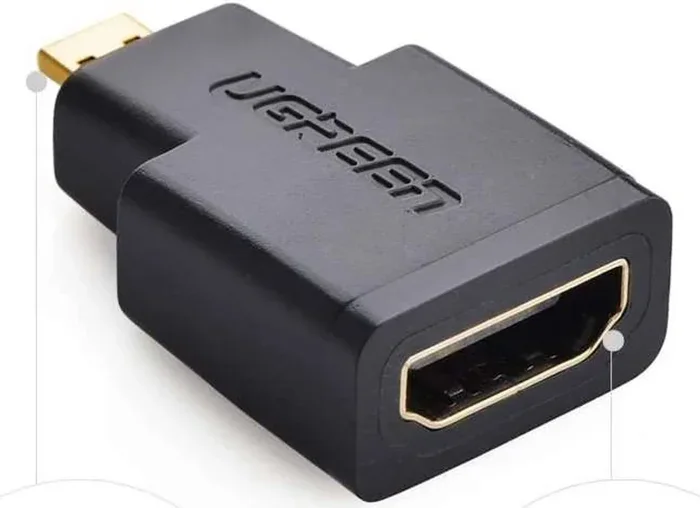
Micro HDMI and Mini DisplayPort are not the same. They are two completely different connectors used for carrying video and audio from a device to a display. While they look similar in size, they differ in design, signal type, bandwidth, and device compatibility. Knowing the difference helps you choose the right cable and adapter for your setup.
Have you ever looked at the tiny port on your laptop or tablet and wondered, is Micro HDMI the same as Mini DisplayPort? It is a really common question. These two connectors look almost identical at a glance. They are both small, slim, and designed for portable devices. But here is the truth: they are completely different.
Understanding the difference matters more than you might think. Using the wrong cable means no signal, no display, and a lot of frustration. Whether you are connecting a phone to a TV, hooking up a monitor to an ultrabook, or setting up a docking station, knowing which connector you need saves time and money.
This guide breaks down everything you need to know. We will cover what each connector is, how they differ, which devices use them, and how to pick the right one. By the end, you will never confuse the two again.
Key Takeaways
- Different Connectors: Micro HDMI and Mini DisplayPort are physically and electrically distinct ports.
- Not Interchangeable: You cannot plug one into the other without an adapter or converter.
- Different Use Cases: Micro HDMI is common in phones and cameras, while Mini DisplayPort is found on ultrabooks and tablets.
- Signal Differences: Mini DisplayPort supports higher bandwidth, making it better for high-resolution displays.
- Adapters Exist: You can use adapters to convert between the two when needed.
- Check Your Device: Always verify which port your device has before buying a cable.
📑 Table of Contents
What Is Micro HDMI?
Micro HDMI is a smaller version of the standard HDMI connector. It carries both audio and video signals through a single cable. The official name is Type D HDMI. It was designed for very compact devices where space is limited.
The connector has 19 pins arranged in a trapezoidal shape. It is about half the size of a standard HDMI port. This makes it perfect for devices where every millimeter counts.
Where You Will Find Micro HDMI
Micro HDMI is most commonly found on portable electronics. Here are some typical devices:
- Smartphones, especially older Android models
- Compact digital cameras
- Action cameras like GoPro
- Some tablets and e-readers
- Portable media players
If you have a device with a Micro HDMI port, you can connect it directly to an HDTV or monitor. You get both high-definition video and sound through one cable difference setup. No extra audio cable is needed.
The maximum resolution supported depends on the HDMI version. HDMI 1.4 supports up to 4K at 30Hz. HDMI 2.0 can handle 4K at 60Hz. However, most devices with Micro HDMI ports use HDMI 1.4, which limits you to 1080p or 4K at lower refresh rates.
What Is Mini DisplayPort?
Mini DisplayPort is a compact version of the full-size DisplayPort connector. It was developed by Apple and introduced in 2008. The Mini DisplayPort carries both video signal and audio signal digitally. It is known for its high bandwidth and reliable performance.
The connector has 20 pins and uses a different shape than HDMI. It is slightly more rectangular with rounded edges. Despite being small, it delivers excellent performance for its size.
Where You Will Find Mini DisplayPort
Mini DisplayPort became very popular in the laptop world. Here are the devices that commonly use it:
- Apple MacBook laptops (2008 to 2016)
- Ultrabooks and thin laptops
- Some Windows tablets
- Professional audio and video equipment
- Certain desktop graphics cards
Apple was the biggest champion of Mini DisplayPort. Many of their MacBook models from that era featured the port as the primary laptop display output. It offered a great alternative to VGA and DVI connectors that were common at the time.
Mini DisplayPort supports high resolutions and refresh rates. DisplayPort 1.2, which most Mini DisplayPort devices use, can handle 4K at 60Hz. This makes it a strong choice for professionals who need crisp, smooth visuals.
Key Differences Between Micro HDMI and Mini DisplayPort
Now that you know what each connector is, let us look at the real differences. These are the details that matter when you are choosing a cable or adapter.
Physical Design and Shape
The most obvious difference is the shape. Micro HDMI has a trapezoidal form, just like a regular HDMI port. It is slightly smaller but the profile is the same.
Mini DisplayPort is more rectangular with a slightly rounded appearance. The latch mechanism is also different. Mini DisplayPort has a small clip that locks the cable in place. Micro HDMI does not have this feature.
You cannot plug a Micro HDMI cable into a Mini DisplayPort port. The shapes simply do not match. This is the first thing to check when troubleshooting a display port vs HDMI situation.
Signal Type and Bandwidth
This is where the technical differences really matter.
- Micro HDMI uses the HDMI protocol. It supports resolutions up to 4K depending on the version.
- Mini DisplayPort uses the DisplayPort protocol. It generally offers higher bandwidth.
Mini DisplayPort typically supports higher refresh rate values at 4K resolution. For gaming or video editing, this can make a noticeable difference. HDMI is still perfectly fine for most everyday tasks like watching movies or presenting slides.
Audio and Video Capabilities
Both connectors carry audio and video. However, there are subtle differences in how they handle these signals.
- Micro HDMI transmits uncompressed audio and video
- Mini DisplayPort also carries uncompressed digital audio and video
- DisplayPort supports multi-stream transport, meaning you can daisy-chain multiple monitors
- HDMI supports Consumer Electronics Control (CEC), which lets you control connected devices with one remote
For most users, both connectors will deliver a great experience. But if you need to connect multiple monitors in a chain, Mini DisplayPort has the edge.
Compatibility and Device Support
Compatibility is a big factor. Micro HDMI is found mostly on mobile devices and cameras. Mini DisplayPort is more common on laptops and professional gear.
If you are buying a portable device, check which port it has. This determines which cables and adapters you need to keep in your bag. Mixing up the two can lead to an frustrating experience, especially when you are on the go.
Which One Should You Use?
The answer depends entirely on your device and what you are trying to do. Here is a simple way to think about it.
If your device has a Micro HDMI port, use a Micro HDMI cable. It is the simplest and most direct solution. You do not need any special adapters if your TV or monitor has a standard HDMI input.
If your device has a Mini DisplayPort, use a Mini DisplayPort cable. This gives you the best performance and the most reliable connection. It is especially useful for high-resolution monitors and professional displays.
When in doubt, check your device manual or look up the model online. The port type is always listed in the specifications. Never assume. Buying the wrong cable is an easy and costly mistake.
Common Devices That Use Each Connector
Here is a side-by-side look at typical devices for each connector type.
- Micro HDMI Devices: Samsung Galaxy phones (older models), Canon cameras, GoPro Hero cameras, Nintendo Switch (with adapter), Kindle Fire tablets
- Mini DisplayPort Devices: Apple MacBook Air and Pro (2008-2016), Dell XPS ultrabooks, Microsoft Surface tablets, Lenovo ThinkPad models, external GPU enclosures
Notice how the two connector types serve different ecosystems. Micro HDMI is more common in the Android and camera world. Mini DisplayPort is closely tied to Apple and premium Windows laptops.
Some newer devices have moved away from both connectors entirely. USB-C with DisplayPort Alt Mode has become the new standard. This is worth keeping in mind if you are shopping for a new ultrabook connection option.
Adapters and Converters: Bridging the Gap
What if you have a device with one port type but need to connect to a display with the other? Adapters and converters come to the rescue.
You can find adapters that convert Micro HDMI to standard HDMI, Mini DisplayPort to HDMI, and even Micro HDMI to Mini DisplayPort. These small adapters are affordable and very useful.
Here are some tips for using adapters:
- Always buy adapters from reputable brands
- Check that the adapter supports your desired resolution
- Active adapters may be needed for certain signal conversions
- Keep your adapters in a small pouch to avoid losing them
A good adapter converter can save you in a pinch. Whether you are giving a presentation at work or connecting your camera to a TV at home, having the right adapter in your kit makes all the difference.
One thing to watch out for is signal quality. Cheap adapters can degrade the digital display connection. Stick with well-reviewed products to avoid flickering or no signal issues.
Common Mistakes People Make
Avoid these common pitfalls when dealing with these two connectors:
- Assuming they are interchangeable. They are not. The physical shape and signal protocol are different.
- Buying the wrong cable. Always double-check your device port before purchasing a cable.
- Ignoring the adapter quality. A poor-quality adapter can cause signal loss or damage your port.
- Not checking resolution support. Some adapters only support certain resolutions and refresh rates.
- Forgetting about audio. Some adapters carry only video. Make sure yours supports audio if you need it.
Taking a few extra seconds to verify your setup can save you a lot of headaches. The cable difference between Micro HDMI and Mini DisplayPort is real, and it matters.
Expert Insights
From a technical standpoint, both connectors serve their purpose well. Mini DisplayPort generally offers better bandwidth and is preferred by professionals. Micro HDMI is more versatile for consumer devices because HDMI is so widely supported.
If you are building a small form factor setup, consider which connector best fits your workflow. For video editors and designers, Mini DisplayPort is often the better choice. For casual users connecting a phone to a TV, Micro HDMI is perfectly adequate.
The port types comparison ultimately comes down to your specific needs. Neither connector is inherently better. They are simply tools designed for different jobs.
Frequently Asked Questions
Can I use a Micro HDMI to Mini DisplayPort adapter?
Yes, adapters exist that convert between the two. However, make sure the adapter supports the resolution and features you need. Not all adapters handle audio and video equally.
Is Mini DisplayPort better than Micro HDMI for gaming?
Generally, yes. Mini DisplayPort offers higher bandwidth, which supports smoother gameplay at higher resolutions. Micro HDMI is fine for casual gaming but may struggle with demanding titles at 4K.
Can I connect my phone to a monitor with Micro HDMI?
Yes, if your phone has a Micro HDMI port. Simply use a Micro HDMI cable and connect it to any standard HDMI monitor or TV. You will get both video and audio through the single cable.
Are Micro HDMI and Mini DisplayPort cables interchangeable?
No, they are not interchangeable without an adapter. The physical connectors are different sizes and shapes, and they use different signal protocols.
Which is more common today, Micro HDMI or Mini DisplayPort?
Both are becoming less common as USB-C becomes the standard. However, Mini DisplayPort is still found on many professional laptops, while Micro HDMI remains popular in cameras and older phones.
Do I need a special cable for audio with these connectors?
No. Both Micro HDMI and Mini DisplayPort carry audio and video signals through a single cable. You do not need a separate audio cable for basic setups.
Conclusion
So, is Micro HDMI the same as Mini DisplayPort? The answer is a clear no. They are two different connectors with different shapes, different signals, and different best use cases. Micro HDMI is ideal for mobile devices and cameras. Mini DisplayPort excels in professional and high-performance laptop setups.
Understanding the difference empowers you to make better buying decisions. You will pick the right cable, the right adapter, and the right setup for your needs. The next time you see one of these tiny ports on your device, you will know exactly what it is and what it can do.
Keep this guide handy. Share it with friends who always mix up the two. And remember, the right connection makes all the difference in your digital experience.