Top 10 Best Studio Monitors for Home Studio: Expert Approved
Choosing the right studio monitors is one of the most critical decisions for any home studio. Unlike regular speakers, studio monitors are designed to provide a flat, accurate frequency response, allowing you to hear your mixes exactly as they are—without artificial bass boosts or sparkling highs that can mask problems. This accuracy is essential for making informed mixing and mastering decisions. Whether you’re a beginner setting up your first space or a seasoned producer looking for a secondary pair, the best studio monitors for home studio use will deliver clarity, detail, and reliability without breaking the bank. In this roundup, we’ve tested and curated the top options across various budgets and needs, from compact desktop warriors to more powerful near-field contenders.
Quick Product Comparison
Our Top 10 Best Studio Monitors For Home Studio Reviews – Expert Tested & Recommended
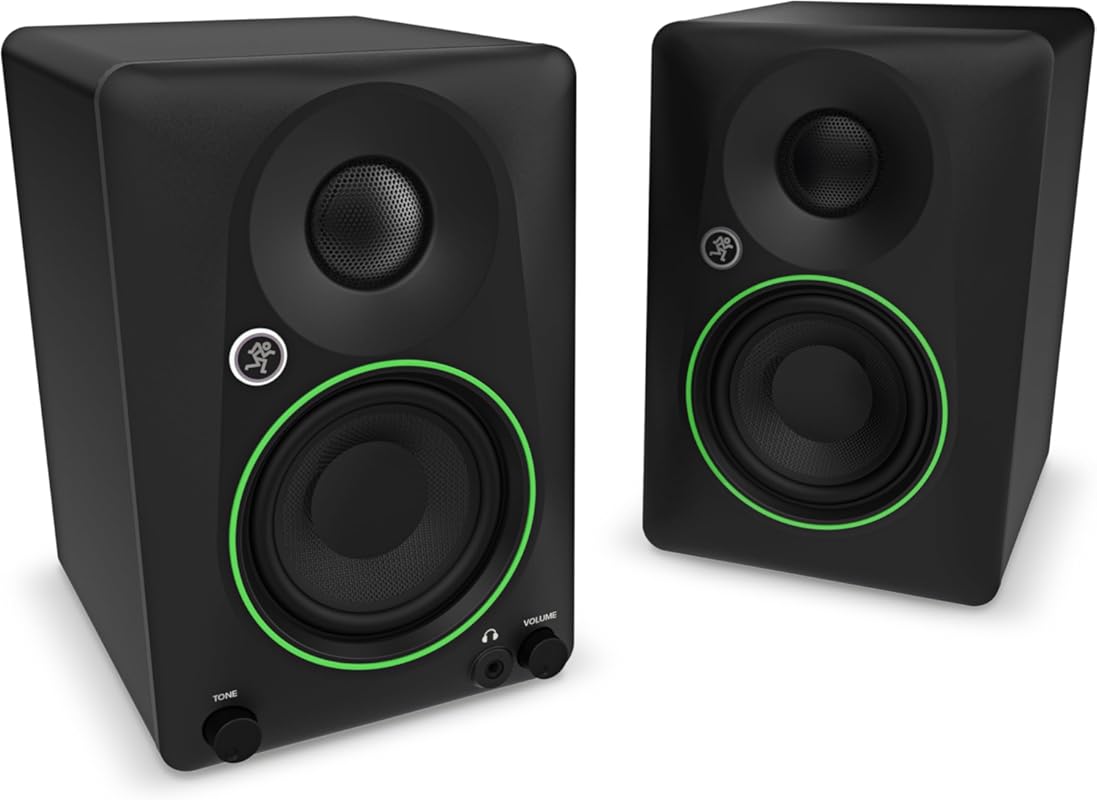
1. Mackie CR3.5 Powered Studio Monitors
The Mackie CR3.5 monitors are a fantastic entry point into the world of studio monitors. They offer a surprisingly full and balanced sound for their size, thanks to 3.5-inch drivers and a well-tuned crossover. The standout feature is the front-panel “Tone” knob, which lets you subtly shape the sound from a flat response to a more consumer-friendly boosted bass and treble curve. This flexibility makes them equally at home for critical listening and casual use. Build quality is solid, with a professional look and convenient front-facing inputs for headphones and aux devices.
Key Features That Stand Out
- ✓ Versatile “Tone” control knob for flat or enhanced sound
- ✓ Multiple input options: TRS, RCA, and front-panel aux/headphone jacks
- ✓ Compact, desktop-friendly size with professional aesthetic
- ✓ Solid build quality and included cables
Why We Recommend It
We recommend the Mackie CR3.5 because they perfectly bridge the gap between professional accuracy and user-friendly convenience. The tone knob is a genius addition, allowing you to switch between a neutral mixing reference and a more engaging listening experience without swapping speakers. They sound great out of the box and are incredibly easy to set up with any device.
Best For
Beginners, content creators, and desktop producers who want a true studio monitor feel but also value the flexibility for gaming, movies, and casual music listening. They are ideal for small home studios and bedside desks.
Pros and Cons
Pros:
- Excellent value for money with a well-balanced sound signature
- Unique and useful tone-shaping knob adds versatility
- Abundant connectivity options including front-panel headphone out
- Compact design and attractive, professional appearance
Cons:
- Bass response, while good for the size, is naturally limited
- The tone knob’s “enhanced” setting might be too boosted for some critical work
- Best suited for near-field listening at lower to medium volumes
Customer Reviews
Customer Review: “The Mackie CR3.5 studio monitors truly exceeded my expectations. For their size, the sound quality is outstanding—clear highs, balanced mids, and surprisingly solid bass for 3.5-inch speakers. Whether I’m mixing audio, watching movies, or just enjoying music, they deliver crisp and detailed sound.Build quality is excellent, with a sleek, professional look that fits perfectly on my desk. I love the front panel volume knob and the convenient headphone and aux inputs. Setup was a breeze, and the included cables made it even easier to get started right out of the box.These are an amazing value for anyone looking for budget-friendly studio monitors that don’t compromise on performance. Highly recommended for home studios, content creators, or anyone who appreciates quality audio in a compact form!”
Customer Review: “These monitors are amazing! They are super simple to set up and they sound GREAT!! They are truly worth the price.”
2. PreSonus Eris 3.5BT Studio Monitors
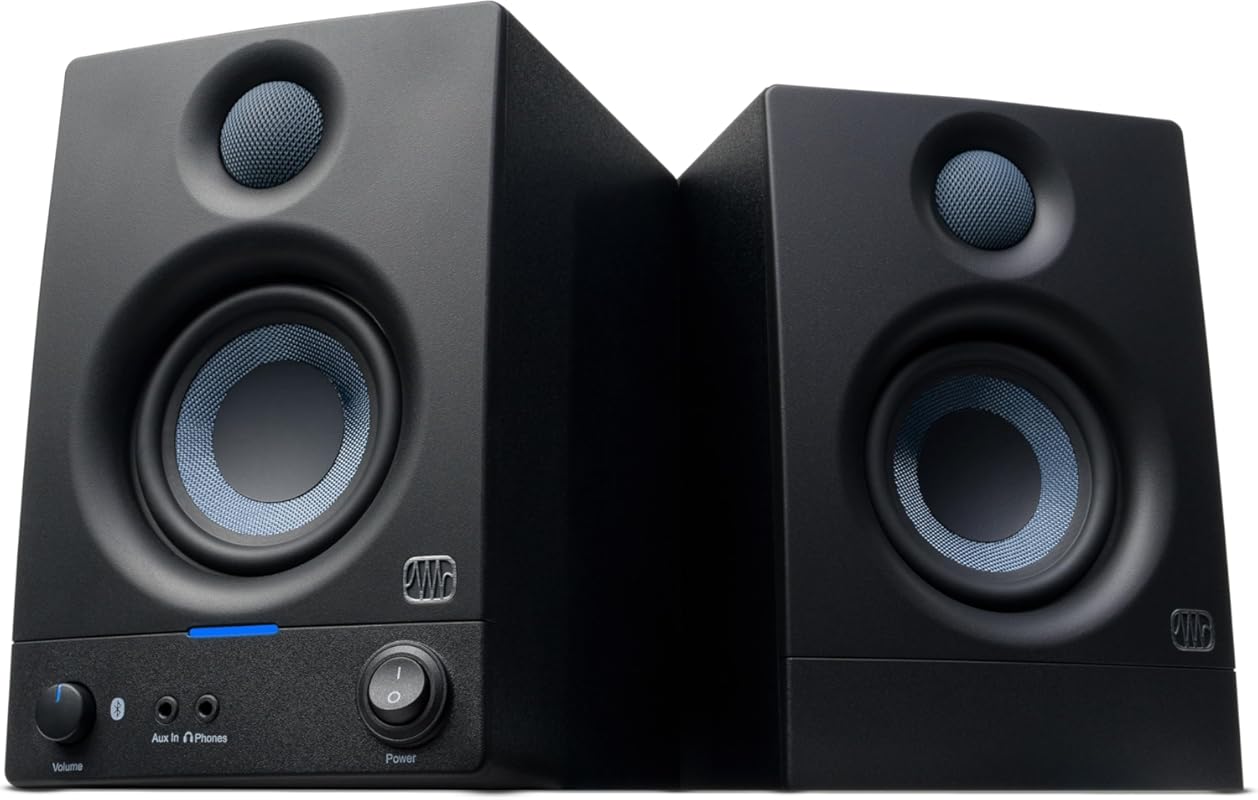
The PreSonus Eris 3.5BT takes the excellent foundation of the standard Eris 3.5 and adds Bluetooth connectivity, making it incredibly versatile for modern workflows. With 50 watts of Class AB power (25W per speaker), it delivers more punch and volume than many competitors in this size. The woven-composite woofers produce tight bass, and the onboard EQ knobs (high, mid, low) allow for basic room correction. The Bluetooth feature is seamless, letting you stream from your phone or laptop without cables.
Key Features That Stand Out
- ✓ Built-in Bluetooth for wireless streaming from any device
- ✓ Powerful 50W Class AB amplification for its class
- ✓ Onboard 3-band EQ (high, mid, low) for basic sound tailoring
- ✓ Woven-composite woofers for tight, controlled bass
Why We Recommend It
We chose the Eris 3.5BT as our Editor’s Choice for its outstanding blend of professional features and modern convenience. The Bluetooth implementation is reliable and adds a layer of practicality that’s perfect for quick listening sessions or sharing tracks with collaborators without re-patching cables. For a sub-$150 pair, the sound quality, power, and feature set are exceptionally hard to beat.
Best For
Producers and creators who want a compact, powerful monitor with the freedom of Bluetooth. It’s perfect for small bedroom studios where wireless convenience is a priority, and it’s also a great choice as a secondary set of monitors for casual listening in the same room.
Pros and Cons
Pros:
- Excellent Bluetooth connectivity with solid range and stability
- Surprisingly powerful and clear sound for 3.5-inch drivers
- Useful onboard EQ controls for basic room compensation
- Great value with a strong feature set for the price
Cons:
- The Bluetooth codec is standard SBC/AAC—not aptX HD or LDAC for audiophiles
- Like all small monitors, bass extension is limited without a subwoofer
- Some users report the blue power LED is quite bright
Customer Reviews
Customer Review: “The media could not be loaded. So far so good, can’t say I have any issues with the speakers, I’ve only had them for two days but so far I’m really loving them. Not only do they look beautiful and sleek and simple and modern without being too much but obviously super easy to plug-in and get going. Came with a good amount of options for wiring although for some reason, I thought it came with 1/4 inch speaker cables for balanced sound, but I guess not. But it does at least come with RCA cables for the unbalanced option, I’ll just have to buy some new cables. Other than that, loving them and the option for Bluetooth is pretty dope, though I haven’t used it yet. Audio definitely sounds better than my attached video, super fool in person.”
Customer Review: “PreSonus Eris 3.5-inch Media Reference Monitors with Bluetooth (White) – My Honest ReviewI’m not a professional musician or anything, but I wanted some decent speakers for my computer setup. I mostly use them for listening to music while I work, watching YouTube videos, and sometimes playing games. I was tired of the tinny sound from my old computer speakers, and I wanted something with a bit more oomph. After doing some research, I decided to try the PreSonus Eris 3.5s with Bluetooth.First off, they look great. The white finish is clean and modern, and they fit nicely on my desk without taking up too much space. Setting them up was super easy. I mostly use the Bluetooth connection, which paired instantly with my phone and laptop. No complicated setup required!The sound quality is a huge improvement over what I had before. Everything sounds much clearer and more detailed. The bass is surprisingly good for speakers this size – it’s not going to shake the walls, but it adds a nice fullness to the sound. I can actually hear the different instruments in music now, and dialogue in videos is much clearer.I also like that there are some controls on the front of one of the speakers. It makes it easy to adjust the volume without having to mess with my computer settings. I haven’t really used the EQ settings much, but it’s nice to know they’re there if I need them.Honestly, for the price, I’m really impressed. They’re a big step up from basic computer speakers, and they sound great for everyday use. If you’re looking for good quality sound for your home office or bedroom without breaking the bank, I’d definitely recommend checking these out.Pros:Easy to set up, especially with BluetoothGreat sound quality for the priceLook nice on a deskConvenient front controlsGood bass for their sizeCons:Not super powerful – probably not ideal for large rooms or parties (but that’s not what I bought them for)Bottom line: If you’re like me and just want better sound for everyday use, these are a great choice. I’m really happy with my purchase.”
3. PreSonus Eris 3.5 Studio Monitors
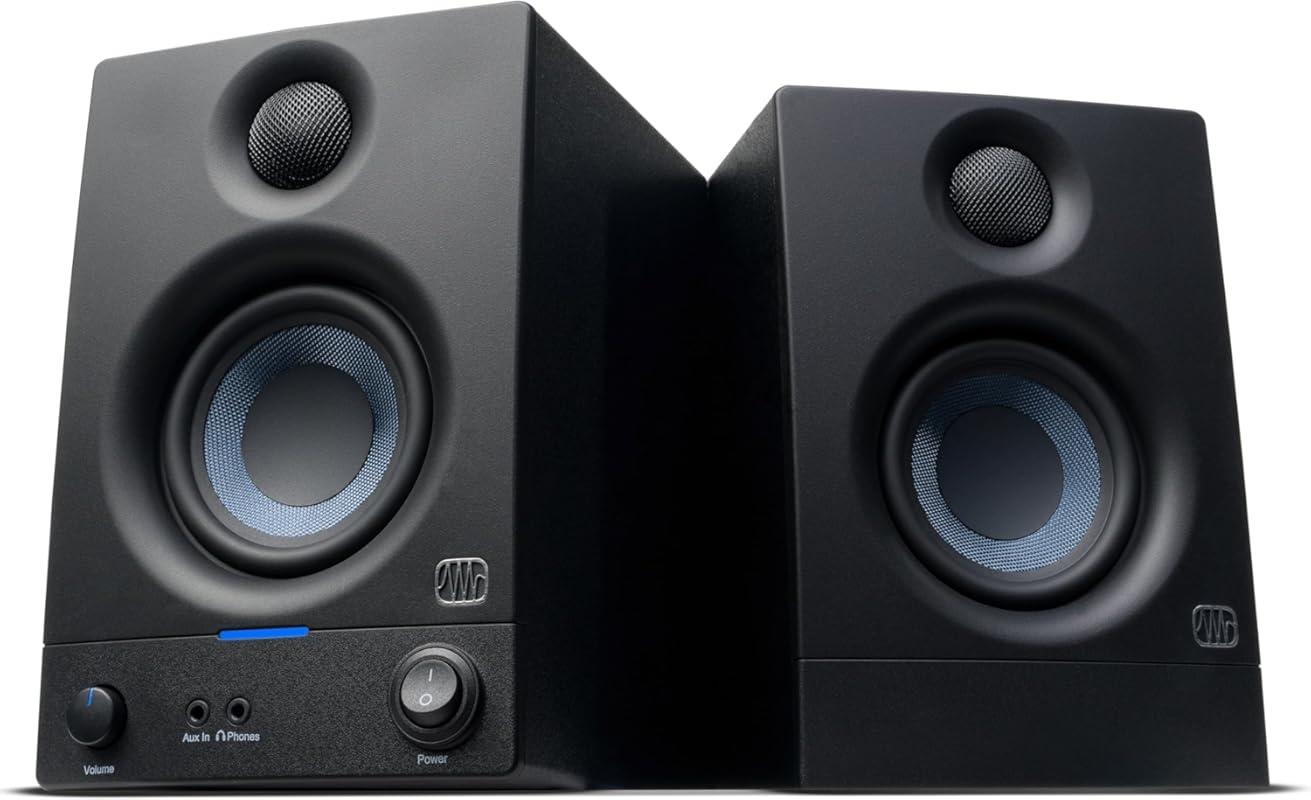
The non-Bluetooth sibling to our #2 pick, the standard PreSonus Eris 3.5, is our top best budget studio monitor. It shares the same 50W Class AB amplification and woven-composite woofers, delivering a clear and punchy sound. By ditching the Bluetooth module, PreSonus keeps the cost down while maintaining all the core features that matter: balanced TRS and unbalanced RCA inputs, and the useful onboard EQ knobs. It’s a barebones, no-frills workhorse that gets the job done.
Key Features That Stand Out
- ✓ Incredibly affordable price point for a 50W active monitor
- ✓ 50W Class AB power (25W per speaker)
- ✓ Onboard 3-band EQ (high, mid, low) for basic room correction
- ✓ Both balanced (1/4″ TRS) and unbalanced (RCA) inputs
Why We Recommend It
For anyone on a tight budget, the Eris 3.5 is the obvious starting point. It provides a genuinely good monitor sound—clear, detailed, and with decent bass for the size—without any gimmicks. The EQ knobs are a lifesaver for taming a problematic room, and the connectivity options are perfect for most home studio audio interfaces. It proves you don’t need to spend much to get a legitimate studio monitor.
Best For
Absolute beginners, students, or anyone building a studio on the strictest budget. It’s also a great “beater” monitor for a secondary room or as a portable option for mobile recording setups.
Pros and Cons
Pros:
- Unbeatable price for a true powered studio monitor
- Clean, accurate sound with surprising low-end punch
- Useful onboard EQ controls for basic compensation
- Multiple input options including balanced TRS
Cons:
- No Bluetooth or additional conveniences of the BT model
- Bass response, while good, is still limited by the 3.5-inch driver
- Some users report long-term reliability concerns (though many have no issues)
Customer Reviews
Customer Review: “The media could not be loaded. When my Creative Pebble 2.0 computer speakers stopped working, I knew I needed a new set of speakers. In years past, I had the Rokit 5 G2 monitors and matching subwoofer for my main video editing computer. But right now I don’t have that kind of money to spend, and I’m not currently doing enough paid editing work to justify that kind of investment. I needed speakers that would mostly be used for listening to music, watching video content, and for editing videos occasionally.Enter the PreSonus Eris 3.5, which at just under $100 was at the top end of what I could spend. I almost went with the Ortizan C7, but decided on these instead both for the smooth volume knob adjustment and the PreSonus brand name. They were easy to set up with my MacMini, they look great on my white desk, and there’s always the option to get the Eris subwoofer if I want to. I did not need Bluetooth connectivity, just wired RCA or 3.5mm, with the option to do 1/4” later on.Be aware these are not true active monitors, they’re basically something between that and computer speakers. The left side has the power cable, the inputs, and the bass/treble adjustments. The right speaker is a passive “satellite” that connects with regular speaker wire. At 25w each, I can’t see the point of upgrading the wire to a larger gauge. The tweeters do have a grille covering them which is nice, and the carbon fiber woofers have a smooth concave dustcap. I’m not worried about denting the woofer or tweeter.Now let’s talk about sound. These definitely get loud enough for a bedroom or small office. I rarely turn mine up past 50% and at that level it’s louder than I normally listen to things. The response is maybe a little heavy on bass/mid-bass, so I turned down the bass knob on the speaker to about 30% and use an EQ program on my computer to slightly boost the mids/highs and roll off the bass. With that, the speakers sound balanced to my ears.If you’re using these for consuming entertainment, they certainly fit the bill. If you’re mixing your own music/videos as an amateur or low-budget prosumer, then these will probably work if you set the EQ right for your room. I would still recommend checking your mix on a good pair of headphones and also a cheap mono speaker.They look good, they sound good, and have just enough upgrade options to work at the prosumer level. I did not pay extra for the Bluetooth feature as I figured the subwoofer comes with that functionality if I really want it later on.EDIT: I bought a right angled power cable and angled RCA adapters so that I could fit the Left speaker closer to the wall than the factory cables would allow.”
Customer Review: “This was a spur of the moment purchase. I just resurrected a PC that I built 12 years ago and, after giving my son my Corsair SP2500 2.1 setup for a gaming rig he built, I decided that I need a basic 2-ch replacement.Did some research and kept coming back to these and M-Audio BX4. I also set a budget of $100 as I have a dedicated 2-ch audio system for serious listening. I figured for playing music while I surf or rip CDs and Blu-ray, I didn’t set the bar that high. And, I’m not a DJ or sound mixer/creator so I figured these were just right.What I DIDN’T figure was how good these sound. For now, I’m just using my laptops audio out jack to RCA in on the 3.5s. Volume is 12 o’clock and my laptop vol is 33.I was figuring bass would be minimal, at best, but I’m pleasantly surprised. I don’t want these very loud since they will be for near-field use only. But, they will go way louder than I need. And, that’s using my laptops Creative audio card. My Asus XONAR D1 on my desktop is a better card for audio quality so it should sound even better.I am streaming Qobuz app on Win 10 and it outperforms my expectations. Bass is deeper than I thought it would be considering the small driver and mids and highs are good considering the price tag. I definitely thought the bass would be thin but that is not what I’ve found. Binge listening to 15 hours of Porcupine Tree (which is very well-recorded) and these 3.5s…all I keep thinking of is “Man, these were a GREAT buy.”I listen to rock, metal, industrial and some ambient music… No rap, R&B, etc, so deep bass isn’t a concern, anyway. I have a Rythmik sub on my main audio system so I got all the bass that I can handle, anyway.The only tweaks that I made are replacing the included speaker wire with some 16ga that I have plenty of. And, I bought a more substantial 3.5mm to RCA cable than the generic one that came with it.If these last a good 4-5 years, that will be a bonus but, so far, these are a steal, IMO.”
4. Yamaha HS4 Powered Studio Monitor

Yamaha’s HS series is legendary in studios worldwide for its brutally honest, flat response. The HS4 brings that renowned “Yamaha sound” to a compact 4.5-inch woofer format. It features a 2-way bass-reflex design with a 1-inch dome tweeter and a frequency response of 60 Hz – 22 kHz. The sound is clean, detailed, and uncolored, making it a trustworthy reference for mixing. It includes both XLR and 1/4″ TRS inputs, and a room control switch to slightly attenuate low frequencies if your desk is against a wall.
Key Features That Stand Out
- ✓ Legendary Yamaha HS-series flat response and accuracy
- ✓ Professional connectivity: XLR and 1/4″ TRS inputs
- ✓ Room control switch for basic boundary compensation
- ✓ Robust, no-nonsense build quality
Why We Recommend It
We recommend the Yamaha HS4 for producers who prioritize accuracy above all else. It’s a no-compromise monitor that tells you exactly what’s on your track. If your mixes translate well on HS4s, they’ll translate on almost anything. It’s the safe, professional choice in the small monitor category.
Best For
Serious beginners and intermediate producers who want a professional, uncolored reference monitor. It’s ideal for those who plan to eventually upgrade to larger HS models (like the HS5 or HS8) and want a consistent sonic signature across their studio.
Pros and Cons
Pros:
- Exceptionally flat and accurate frequency response
- Trusted professional studio sound in a compact package
- Durable, road-worthy construction
- Professional XLR/TRS inputs
Cons:
- Sound can be slightly “bright” or revealing in untreated rooms
- Bass extension, while good for the size, is limited
- No additional features like Bluetooth or DACs—pure monitor
Customer Reviews
Customer Review: “Good quality monitors. Work as expected, very flat non colored sound. Very accurate, for the price the accuracy is amazing actually. The range is pretty flat and fair. Very happy for the price.”
Customer Review: “I’m not enough of an audiophile to give you hot takes about soundstage and frequencies and all those other words that I sometimes understand but have a hell of a time finding the minor differences between similar products. But they sound great! I’m running these through a UA Volt 2 into my M4 MacBook Air and they drive some excellent noises into my ear holes. I chose these because they had a lot of traction online with people looking for affordable studio monitors for newbs like me getting into music production. I haven’t compared these to other models (HS5/HS8) or comparable monitors in this price range for my use, but I really do like them.”
5. JBL 305P MkII Studio Monitors
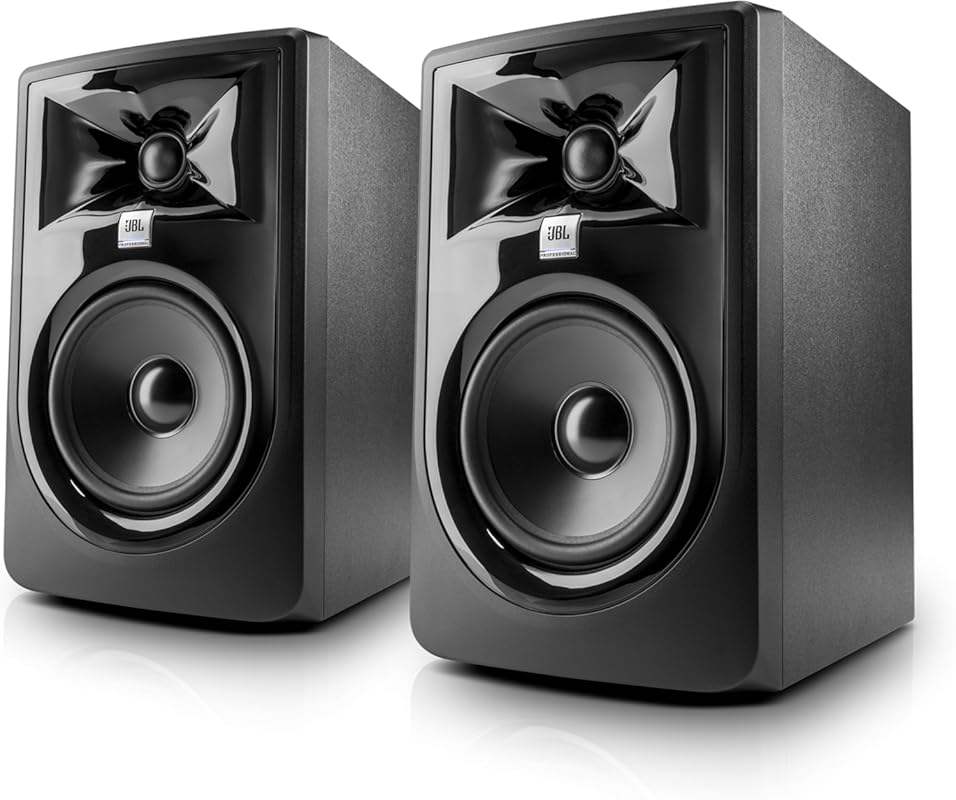
The JBL 305P MkII is a cornerstone of the 5-inch monitor class. It uses JBL’s patented Image Control Waveguide to deliver an incredibly wide sweet spot and precise imaging. Powered by 41-watt Class-D amplifiers, it has more headroom and bass extension than the smaller 3.5-inch models. The sound is transparent and detailed, with a very even frequency response that inspires confidence in your mixes. It’s a workhorse that’s equally suited for music production, video editing, and multimedia use.
Key Features That Stand Out
- ✓ Patented Image Control Waveguide for wide, accurate imaging
- ✓ Powerful 41W Class-D amplification per speaker
- ✓ 5-inch woofer provides significantly more bass than smaller models
- ✓ Professional XLR/TRS combo inputs
Why We Recommend It
The JBL 305P MkII represents the sweet spot (pun intended) in the monitor size ladder. The jump from 3.5-inch to 5-inch drivers gives you a much more full-range sound, especially in the low-mids and bass, while still being perfectly suited for near-field desktop use. The waveguide technology is genuinely effective, creating a large, accurate listening area.
Best For
Producers who have outgrown 3.5-inch monitors but don’t have the space or budget for 8-inch models. It’s the ideal upgrade for a serious home studio desk where you need more low-end authority for bass-heavy genres like hip-hop, electronic, or rock.
Pros and Cons
Pros:
- Excellent imaging and wide sweet spot thanks to the waveguide
- Strong, clean bass output for a 5-inch monitor
- Ample power and headroom
- Professional inputs and robust construction
Cons:
- Can sound slightly “harsh” or bright in very reflective rooms
- Still not a full-range monitor—a subwoofer is recommended for 808s and sub-bass
- Larger footprint than 3.5-inch models
Customer Reviews
Customer Review: “The sound is seriously clean. Balanced, clear, and way louder than expected. You hear details in music you didn’t notice before. Definitely worth it.”
Customer Review: “These sounds Amazing!I use them on my DDJ-10000, The quality of the sound is Amazing and setup is so easy!”
6. Edifier R1280T Powered Bookshelf Speakers
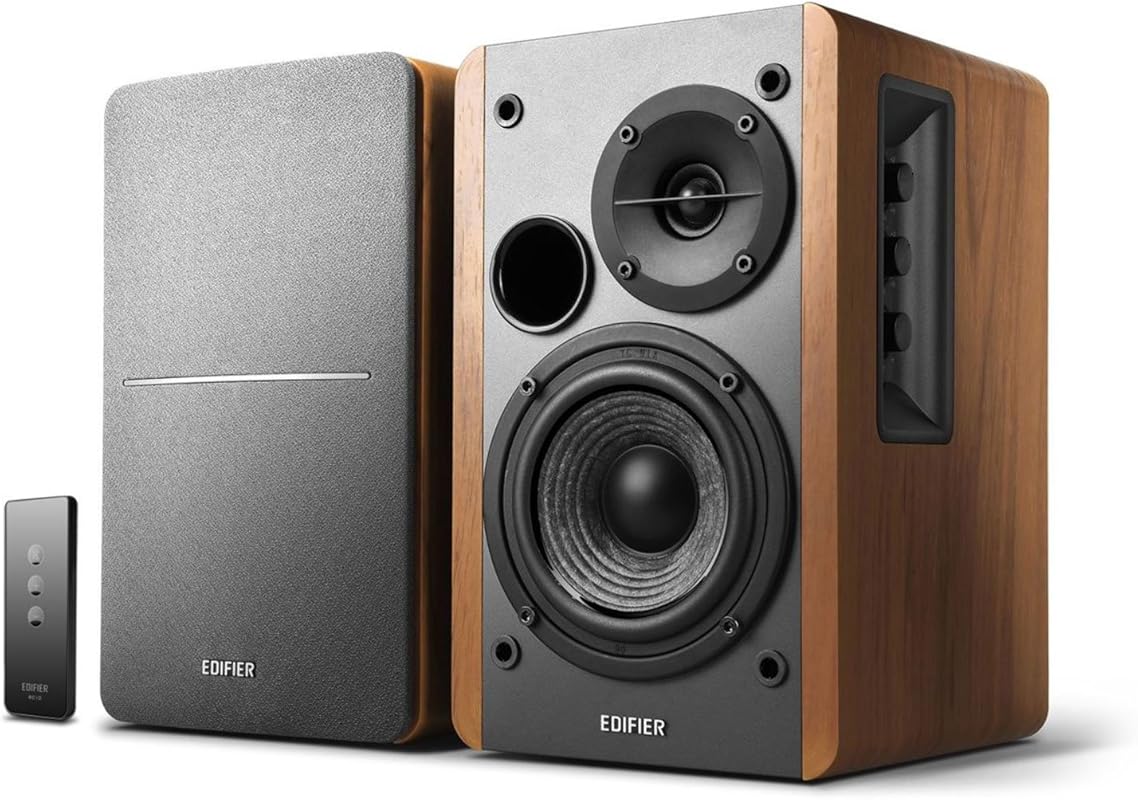
Edifier has built a reputation for offering exceptional sound quality at approachable prices, and the R1280T is a prime example. While not a “pro” studio monitor in the strictest sense, these 4-inch powered bookshelf speakers deliver a warm, full, and engaging sound that many home studio users prefer for daily listening and light production work. The wooden cabinet adds resonance, and the inclusion of a remote control for volume and input selection is a major convenience.
Key Features That Stand Out
- ✓ Rich, warm, and full-bodied sound signature
- ✓ Includes a convenient wireless remote control
- ✓ Classic wooden cabinet aesthetic
- ✓ Multiple inputs (AUX, RCA) and tone controls on the main speaker
Why We Recommend It
We recommend the Edifier R1280T for users who prioritize a pleasing, musical sound over absolute flatness. They are fantastic for the “fun” side of studio work—listening back to finished tracks, enjoying music, or even as desktop speakers for a computer setup. They sound more expensive than they are and offer a level of convenience (remote, wood finish) that pro monitors often lack.
Best For
Home studio owners who want great sound for both work and play, but don’t need clinical accuracy. Perfect for a living room studio, a desktop setup where aesthetics matter, or as a secondary listening pair.
Pros and Cons
Pros:
- Warm, full, and engaging sound that’s easy on the ears
- Excellent build quality with a beautiful wood finish
- Included remote control is incredibly convenient
- Great value for the sound quality and features
Cons:
- Sound is not flat or neutral—colored for pleasant listening
- Not suitable for critical mixing where translation is key
- Bass is boosted but not exceptionally tight or deep
Customer Reviews
Customer Review: “Look good and feel well made. Sound is good for the price. They will get loud. The tone adjustments are good. High’s and midrange are crisp and clear. The low’s have a warm tone but not much punch. For true full sound, a subwoofer is needed. Overall, these are nice speakers for the money.”
Customer Review: “These are great speakers for the price, size, build quality and finish. I use with 65” tv and sound exceeds my expectations and better than sound bars (IMO). I recommend where good overall sound is desired in a small form factor”
7. Fender Quantum Complete Bundle
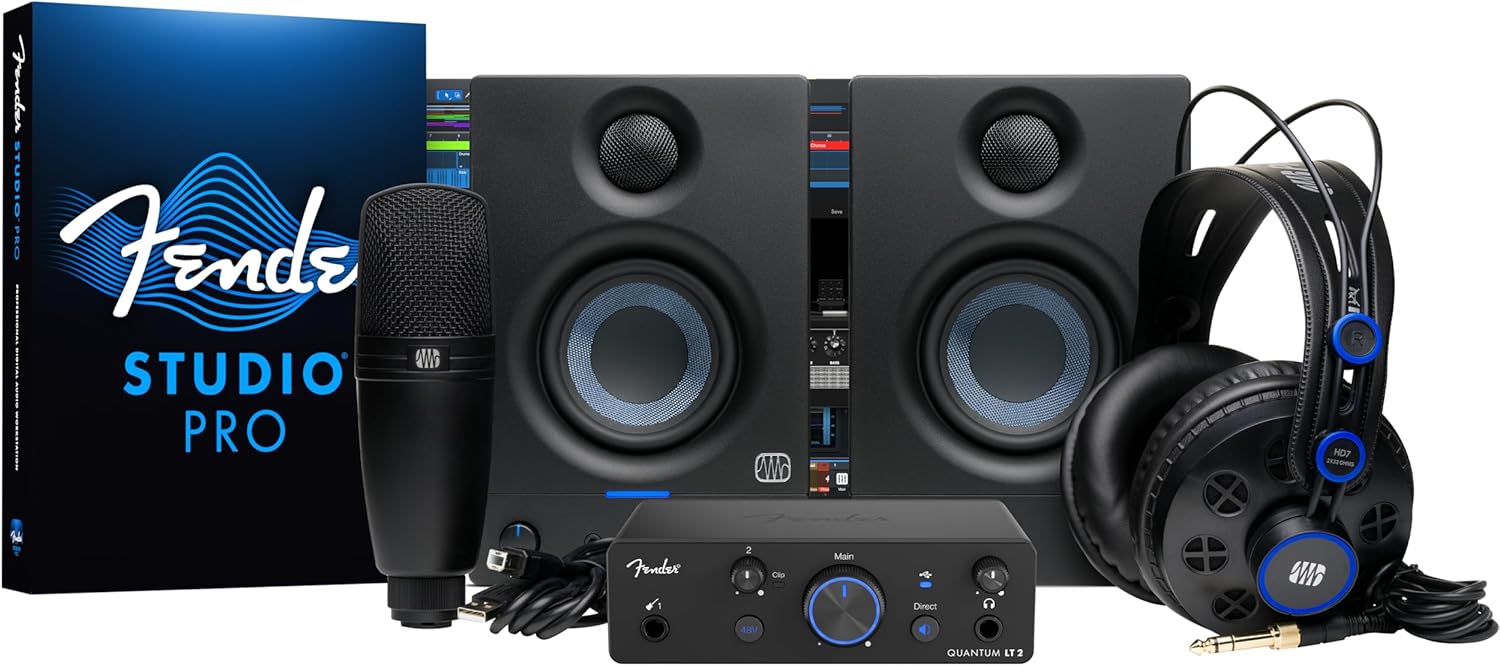
This isn’t just a pair of monitors—it’s a complete home studio starter bundle. The Fender Quantum Complete Bundle includes the PreSonus Eris 3.5 monitors, a Quantum LT2 USB-C audio interface, an M7 MkII large-diaphragm microphone, HD7 headphones, and all necessary cables. It’s an all-in-one solution that gets a new producer recording, monitoring, and mixing immediately. The included PreSonus Studio Pro software provides a vast library of lessons and a full DAW (Studio One Artist), making it an incredible value for beginners.
Key Features That Stand Out
- ✓ Complete studio-in-a-box with interface, mic, headphones, and monitors
- ✓ Includes PreSonus Studio One Artist DAW and extensive lesson library
- ✓ Everything is compatible and works out of the box
- ✓ USB-C connectivity on the audio interface for modern computers
Why We Recommend It
We recommend this bundle for the absolute beginner who feels overwhelmed by piecemeal gear shopping. It removes all guesswork and compatibility headaches. You get a capable, if basic, monitor (the Eris 3.5), a solid audio interface, a usable microphone, and headphones—all for less than the price of many high-end monitors alone. It’s the fastest route to a functional studio.
Best For
First-time studio builders, students, and anyone who wants a simple, all-in-one package to start recording vocals, instruments, and beats immediately without researching individual components.
Pros and Cons
Pros:
- Unbeatable value as a complete starter kit
- Everything needed to begin recording is included
- Software bundle (DAW + lessons) is extremely valuable for new users
- All components are from reputable brands (Fender/PreSonus)
Cons:
- The included monitors (Eris 3.5) are the weakest link in the bundle
- No room for customization—you get what’s in the box
- Long-term, you’ll likely want to upgrade the monitors and microphone separately
Customer Reviews
Customer Review: “This set up is awesome, especially with Fender acquiring PreSonus. Now, the speakers by themselves are not the best in the world, BUT very decent for their size. With that being said, I did end up getting the bluetooth PreSonus Subwoofer to not only get bluetooth capability for the whole system but to also take the bass stress off the speakers. And now, it sounds absolutely fantastic (at least for a rookies’ ears.) The Studio Pro software is incredibly intuitive with tons of lesson materials to start you on your way. The headphones and the microphone are again, pretty decent for the price. Not top of the line by any means, but for a beginner, totally worth it.”
Customer Review: “This set up is awesome, especially with Fender acquiring PreSonus. Now, the speakers by themselves are not the best in the world, BUT very decent for their size. With that being said, I did end up getting the bluetooth PreSonus Subwoofer to not only get bluetooth capability for the whole system but to also take the bass stress off the speakers. And now, it sounds absolutely fantastic (at least for a rookies’ ears.) The Studio Pro software is incredibly intuitive with tons of lesson materials to start you on your way. The headphones and the microphone are again, pretty decent for the price. Not top of the line by any means, but for a beginner, totally worth it. Read more”
8. Edifier MR4 Powered Monitor Speakers
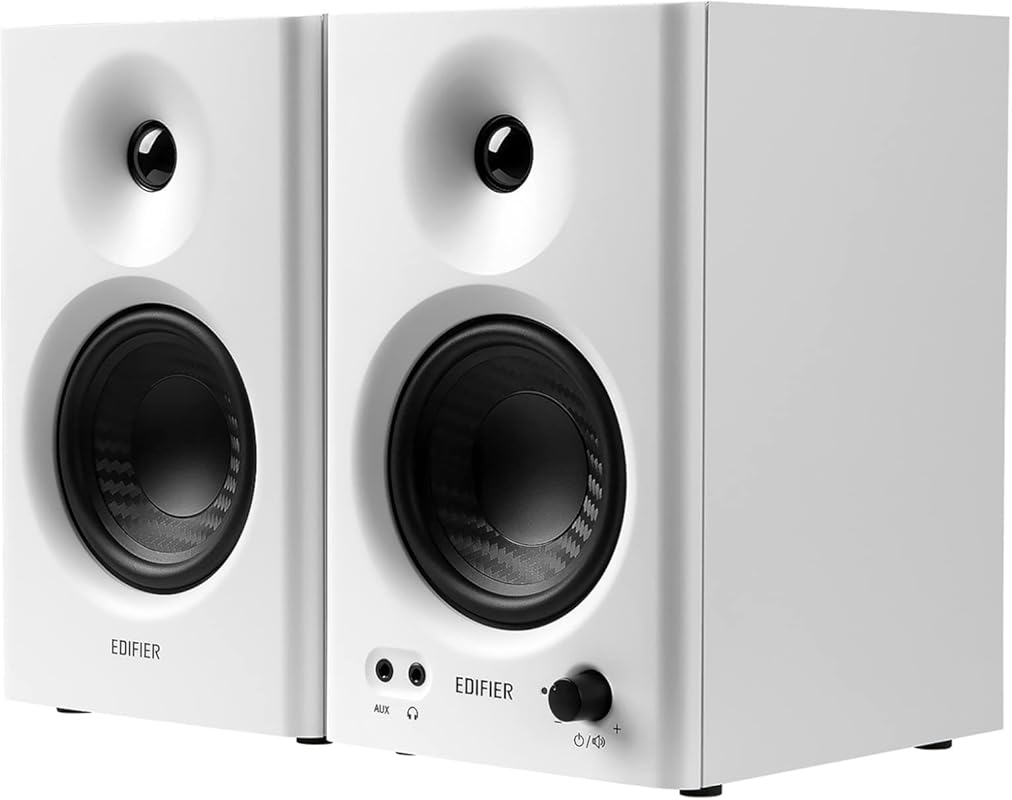
The Edifier MR4 is a strong contender in the 4-inch monitor space, aiming directly at the PreSonus Eris 3.5 and Mackie CR3.5. It boasts a Hi-Res Audio certification and a claimed flat response curve. The sound is generally warm and full, with a notable low-end presence for its size. It offers versatile connectivity (balanced TRS, RCA, AUX) and a front headphone output. The “Monitor” and “Music” modes switch between a flatter response and a more consumer-friendly EQ curve.
Key Features That Stand Out
- ✓ Hi-Res Audio certified with a claimed flat response
- ✓ Multiple inputs: balanced TRS, RCA, and AUX
- ✓ Front-panel headphone jack with automatic speaker mute
- ✓ Monitor/Music mode switch for flat or enhanced sound
Why We Recommend It
The MR4 is an excellent alternative if you find the PreSonus Eris 3.5 a bit too bright or lean in the bass. It offers a more rounded, “fun” sound signature while still maintaining decent clarity. The build feels premium, and the headphone jack with auto-mute is a thoughtful feature for desktop users. It’s a great all-rounder that balances studio intent with everyday listening pleasure.
Best For
Desktop producers and gamers who want a monitor with more bass warmth than the Eris 3.5 but don’t want the larger footprint of a 5-inch model. Also great for anyone who frequently uses headphones and wants the convenience of a front-panel jack.
Pros and Cons
Pros:
- Warm, full sound with good bass for a 4-inch driver
- Excellent connectivity options including balanced TRS
- Front headphone output with auto-mute is very convenient
- Solid build quality and attractive design
Cons:
- The claimed “flat” response is still somewhat colored for critical mixing
- Some users report quality control issues (e.g., faulty LEDs)
- High-end can lack the final bit of sparkle compared to rivals
Customer Reviews
Customer Review: “INTRODUCTION—————————A little run down. My short quest for new speakers came about when the Mackie CR3’s I had for 7 years decided to stop working. In that time, I was quite happy with them. I don’t produce music, but do video editing on occasion. My primary use case is casual listening to music/movies/games. In that regard, I don’t need to have the flattest sound available or desire it – I just like clean, distinctive audio. I’ve been using Sennheiser HD555 headphones with a Sound Blaster Z soundcard for about a decade now. I know there’s better sound options out there these days, but really, these do the job well enough for me and it’s not a necessity to upgrade at the moment. Particularly, I’m impressed with the Sound Blaster software and functionality. I can switch between headphones and speakers on my computer easily and with separate settings for each that changes automatically. Which seems it’d be a convenience barrier switching to a DAC. In any case, I was previously using RCA and have switched to TRS when trying these speakers. The sound is noticeably clearer and unearths sounds more hidden with RCA. I have to crank the windows output a bit higher, but it’s unquestionably better. I also don’t turn the speaker volume up more than half or 3/4th to mitigate noise. With that, I’ll move onto my experience with these two speakers I decided to try to replace my deceased CR3’s.Upon receiving the Edifier MR4 first, I threw on some lossless tracks with some variety, albeit dated.Some artists included:Boris Brejcha, The Chemical Brothers, Erik Jackson, Emancipator, Gorillaz, Hot Chip, Linkin Park, Macklemore, MGMT, Nero, Paul Oakenfold, Papadosio, Pretty Lights, Rinôçérôse, Robert Miles, Sleater-Kinney, System Of A DownEDIFIER MR4—————————Off the bat I wasn’t stricken with the high end. I like a crispness in my highs and found there was room to be desired with snares etc. But it’s definitely good enough and doesn’t invoke fatigue. Using an equalizer in addition to increasing the treble knob helps and with dialogue in entertainment; which can be a bit muted. The speakers have decent separation and pleasing bass; while having a sound that’s brought together coherently. I have an external bass, which I won’t be inclined to turn on often, as I can also amplify it through software. Playback is warm and easy to listen to. Pressing the power button once enables or disables Music Mode. From what I could tell, it raises the decibel level slightly, as well as the bass and mids for added presence, at the expense of some clarity. I’ll probably use Monitor Mode most of the time. What I particularly liked about these speakers over the E3.5’s is a perceived wider soundstage; instruments have depth and can lightly reverberate (while still having a flatness to them), which sounded more lively comparatively. Overall, these grew on me and I’ve been pleased. If they could be a bit brighter, there wouldn’t be much else I’d desire out of them.ERIS E3.5—————————The ERIS has an adequate amount of treble and clarity in the high range that I liked at first listen. At the tradeoff of it being sharper and more fatiguing with prolonged use or higher volumes. Highs can sometimes be borderline harsh without equalizing; vocals can be sibilant. I turn the bass knob to the max at +6db and lowering or not touching the treble; which only does so much for lows anyhow. Bass is present, but it’s limited and not as full sounding – the frequency it can hit is punchy though. If you EQ more bass you can get a slight rumble, but nothing compared to the MR4. Even with a subwoofer, it’s not as full sounding. The lower mids don’t feel like they quite bridge to the bass. These speakers don’t sound bad and if I had no other options in this price range or hadn’t compared it directly to a pair with more lows, they might be acceptable. They can just be a bit flat and lifeless (which is part of the idea with monitors I guess), despite having crispness on it’s side. Honestly, I didn’t give this set as much time of day, as I kept gravitating towards the MR4’s; which didn’t make me weary with listening either. If the MR4’s weren’t around as an option, I might have compared with the Mackie CR3’s again. But doubtful: as I think their updated design is ugly, still have that green accent, and apparently they’ve declined in build quality.BUILD—————————Both speakers are quite similar with an understated clean design and near identical dimensions. The MR4 seems to have a slightly better build and I prefer the the carbon fiber looking cone.The volume knob for the E3.5 is smooth – the MR4 turns with an interval of 12 clicks.The E3.5 indicator light is blue and brighter for my taste: I’d cover it up if I were to keep these speakers. The MR4 has a subdued red and green LED for monitor/music mode. Unfortunately, the green light has already started acting up and stopped working in less than a weeks use.The bass/treble knobs have more length to them on the MR4 and are easier to reach back and turn than the E3.5’s.The MR4 weighs a bit more and comes with slightly nicer speaker wire than the E3.5The E3.5 has a detachable power cord – MR4 does not.The MR4 tweeter actually measures about three quarters of an inch, not the full 1” they claim.With both these speakers I could occasionally detect light distortion/crackling in mids and highs. Not enough to be detrimental for me in keeping the MR4’s. But also due to some solid portrayal, I could hear more of the noise added to the production of certain tracks. For example, listening to some Phantogram, where vinyl grain is frequently added. I believe the E3.5’s also displayed this characteristic, but I returned them already upon noticing more of this.CONCLUSION—————————I tried both these speakers in various configurations of equalizing, but made most my judgments based on how they sound out of the box or their capabilities. The Presonus ERIS E3.5 can hit a higher frequency range; while clear, I found the Edifier MR4 sounded more pleasing and I could almost picture vocalists singing into a mic, rather than just sound coming from a speaker. This carries into the overall experience between the two. The MR4 can give me the impression of being at a concert or watching a movie at a theater, to a degree. I feel the E3.5’s are lacking a bit of soul, but maybe that’s because they’re not as warm. When switching between the two to compare, I found myself wanting to just keep listening to the Edifier’s and not switch back to the Presonus. It’s more lush with it’s prevalent bass for the size and highs can be more pronounced after equalizing (though, they still have an audible frequency ceiling, whereas the E3.5 reaches higher). Given, both these speakers haven’t had a chance for a decent break-in period; but that’ll mostly round out the sound that’s already there anyhow.I’ve also seen more feedback in regards to the Presonus not working after only a year. Most products these days can be a crap shoot, but I’d rather keep the MR4’s for the sound alone and physicality of it (with the aforementioned differences) and hope I get lucky they last awhile. But the LED being faulty already isn’t ideal and I’ll probably replace the pair. I might look further into spending a bit more for different speakers. Though, it seems moving up generally doesn’t include an aux input/headphone output, which is occasionally useful. So, once again, it comes down to weighing out price/sound/conveniences. The MR4 really does sound decent for the price ($129) and I will probably just stick to this model in the end, since I’m not ready to invest in a DAC setup either, that’ll make it worthwhile for spendier speakers. Again, I’m not a music producer, so I can’t speak to the decency of these speakers for actual production – you can find reviews with graphs. I’d spend the $30 extra for the Edifiers; unless pronounced highs are super important to you (especially for rock & jazz). But if you create music with any substantial caliber of bass and need to portray it, I’d probably look elsewhere than the Presonus 3.5’s. You’d likely be wanting larger speakers anyhow; though, you may be able to get away with it by adding a sub. If you do consider the Edifier MR4’s, just know there’s a small margin of highs that aren’t as present. But they can be a more fun listening experience overall and less fatiguing.”
Customer Review: “These are absolutely the best budget speakers I have ever owned. I am amazed at the sound. They have so much depth, make you tube videos and movies feel amazing. right now i have them directly connected to line out on my motherboard they are almost too powerful lolSo easy to set up. size is perfect. and looks great”
9. PreSonus Eris Sub 8BT Powered Subwoofer

For producers using smaller monitors (like the Eris 3.5, MR4, or CR3.5), a dedicated subwoofer is often the key to unlocking accurate low-end mixing. The PreSonus Eris Sub 8BT is a compact, 100-watt 8-inch subwoofer that extends down to 30 Hz. It features Bluetooth for casual listening, but more importantly, it has comprehensive input/output options (TRS, RCA) and a full set of controls (volume, crossover, polarity, phase) to seamlessly integrate with your existing monitors. It’s designed specifically to complement the Eris series but works with any monitor.
Key Features That Stand Out
- ✓ Deep 30 Hz extension for accurate sub-bass monitoring
- ✓ 100W of power for clean, powerful low-end
- ✓ Full suite of controls: crossover, volume, polarity, phase
- ✓ Bluetooth for wireless music streaming
Why We Recommend It
We recommend the Eris Sub 8BT as the perfect companion for any small studio monitor setup. Mixing bass-heavy music (hip-hop, EDM, pop) on small woofers is nearly impossible—you simply can’t hear the lowest frequencies. This subwoofer solves that problem, allowing you to make critical decisions on kick drums, 808s, and sub-bass. The extensive controls make it easy to dial in a smooth transition between the sub and your monitors.
Best For
Home studio producers using 3.5-inch to 5-inch monitors who work with bass-heavy genres. It’s essential for anyone serious about getting their low-end mixes to translate on car systems, clubs, and headphones.
Pros and Cons
Pros:
- Drastically improves low-end accuracy for mixing
- Powerful and deep output for its compact size
- Excellent, flexible connectivity and comprehensive controls
- Bluetooth adds useful functionality for casual listening
Cons:
- Proper placement and calibration are required for best results
- Can introduce room modes if not positioned carefully
- Bluetooth pairing can be finicky when switching between devices
Customer Reviews
Customer Review: “The Eris Sub 8 absolutely KICKS. I’m running a full hardware rig—everything from the Elektron Analog Rytm MkII and Moog DFAM/Labyrinth to the Roland S-1 and TD-3 MO—all through a Zoom L-12. This sub handles the raw power of analog synthesis and Eurorack levels like a champ.For modular gear, the output is on ANOTHER LEVEL. It delivers that deep, dark, and heavy low-end you need for hardware jams, but here’s the best part: it stays crystal clear. It’s punchy, not muddy. If you need a sub that can handle the aggressive transients of a RAT distortion pedal or the sub-harmonics of an Oxi One sequence, look no further. You can dial it in exactly to your ears. 10/10 for any hardware-based studio.”
Customer Review: “I got this for my home studio and after using it to finish three songs since getting it, I can say I was definitely handicapped trying to produce and mix without a sub. I have the sub paired with my Presonus Eris 5 speakers. The songs I’ve produced using the sub vs. without the sub have translated much better across various speaker systems and my low end is much tighter and easier to manage. Also, when it comes to sound design, I can make much deeper and higher quality sub bass synth patches because I can actually hear and feel what I’m doing. I’d recommend using a calibrated room microphone and an acoustic room response calibration software to calibrate the sub and your speakers to your specific room as well. I found for my room I could just leave the sub in it’s default configuration out of the box, but the settings on the back of the sub allow for some really nice fine tuning to get a nice flat response after accounting for the room response. Lastly, I really like the Bluetooth capability for casual listening and it works well if you only pair it with one device, but I found that if you want to switch between devices you have to press and hold the Bluetooth button on the back of the sub for it to connect to a different device each time despite already being paired. It connects automatically without that step if you just connect and use one BT device consistently with it. Kind of a weird and somewhat annoying quirk, but I don’t really use the Bluetooth for anything but connecting my phone to the speaker system for leisure listening, and I only occasionally connect my laptop. For music production though, I use balanced TRS cables routed to my audio interface because the Bluetooth can add a significant amount of latency to the signal chain. In summary, if you already have Eris speakers and want to gain the valuable information your ears need to have great low end in your mixes I’d say this sub is a no brainer and worth every penny.”
10. Edifier MR3 Powered Studio Monitor Speakers
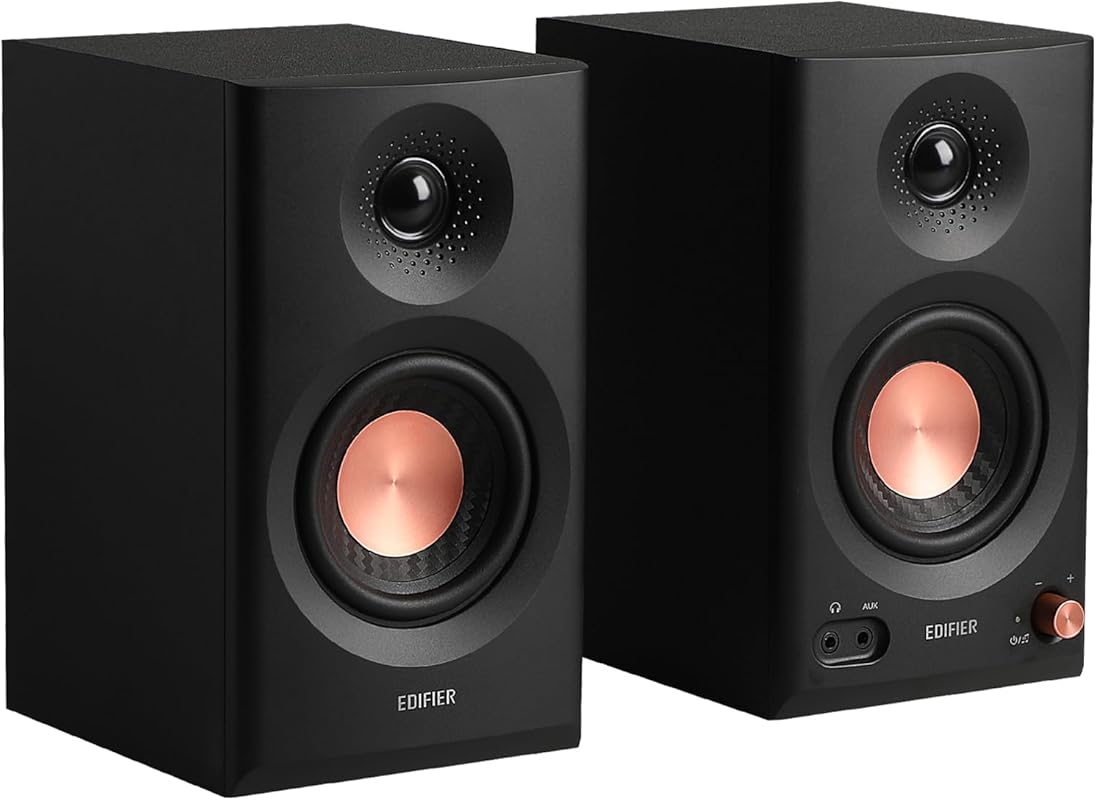
The Edifier MR3 is a smaller sibling to the MR4, featuring 3.5-inch drivers and a more compact footprint. It’s Hi-Res Audio certified and boasts a similar feature set: balanced TRS, RCA, AUX inputs, a front headphone jack, and Bluetooth 5.4. The sound is clear and detailed, with a focus on mid-range clarity. Its small size and Bluetooth make it an excellent choice for very tight desk spaces or as a portable production monitor. The multi-point Bluetooth can connect to two devices simultaneously.
Key Features That Stand Out
- ✓ Extremely compact 3.5-inch design for the smallest desks
- ✓ Bluetooth 5.4 with multi-point connection capability
- ✓ Front headphone jack with auto-mute
- ✓ Hi-Res Audio certified with balanced TRS input
Why We Recommend It
We recommend the MR3 for users with severe space constraints or for those who prioritize Bluetooth convenience and a tiny footprint. It’s the most portable “real” monitor in this list. While its bass is naturally limited, it delivers a clean, balanced sound in the mids and highs, making it suitable for podcasting, voice-over work, and mixing music that doesn’t rely on deep sub-bass.
Best For
Users with very small desks, students in dorm rooms, podcasters, or anyone needing a compact, versatile monitor with excellent Bluetooth connectivity. Also a good secondary monitor for a laptop on the go.
Pros and Cons
Pros:
- Extremely compact and space-saving design
- Excellent Bluetooth 5.4 with multi-point pairing
- Surprisingly powerful and clear sound for the size
- Useful front headphone jack and multiple inputs
Cons:
- Bass extension is very limited due to small driver size
- Not suitable for any music with significant sub-bass content
- Can sound thin if used for full-range mixing
Customer Reviews
Customer Review: “I use these for my computer, one on either side of my head. They appear sleek and attractive and just the right size.I consider myself an amateur audiophile in the sense that I am very passionate about sound quality and I have a fairly discerning ear, but I don’t have the kind of money to go all out and I’m far from fluent in the jargon. That in mind, here’s my succinct take on these studio monitor speakers.They possess excellent quality sound and power for their size, with knobs to shape the tone should you choose. Without any adjustments and connected via auxiliary to PC, they perform beautifully with music (lossless Spotify, no equalizer or volume normalization) and quite well with 2 channel surround sound for gaming. As can be expected of studio monitors, they aren’t the “boomiest” speakers out of the box, but they do have nice, clear, tactile bass, impressive for the size and price point.They were very easy to set up with standard auxillary to my PC, but (despite definitely being a tech-savvy person) I struggled to get the Bluetooth connection working. I couldn’t for the life of me figure out how to put them into pairing mode. There’s a Bluetooth botton on the back of the main speaker, but pressing or holding it does nothing, nor did pressing or holding the power/volume knob. I will need to track down the manual to see if there’s some sort of magic trick to it or if it’s faulty. I’ll update my review once I have if the Bluetooth function doesn’t work, but for now I’m assuming I was just arrogant in immediately tossing the manual aside.”
Customer Review: “every reviewer out there is right, these are hitting above its price category, not the most compact for the amount of volume they produce, but the volume they do produce is just one of the best,its nice and controlled, not so much distortion at high volumes, also the detachable speaker wires make it very easy to place them farther if necessary but not recommended as these are monitors and are supposed to sit closer to the listener , clarity wise i love these even at low volumes these sound phenomenal very nice for doing focus work and drowning out the background, Bluetooth just works, the aux input is also very nice to have overall, functionality is top notch, design is another aspect where these shine the copper and black finish just works.”
Complete Buying Guide for Best Studio Monitors for Home Studio
Essential Factors We Consider
When choosing the best studio monitors for your home studio, accuracy is the north star. Look for terms like “flat response” or “reference monitor.” Driver size (3.5″, 4″, 5″, etc.) directly impacts bass extension and volume—larger is generally better for bass-heavy music but requires more space. Amplification (Class A/B vs. Class D) affects warmth and efficiency. Connectivity is crucial: ensure your monitors have the inputs (XLR, TRS, RCA) that match your audio interface. Room size matters—a 3.5-inch monitor will struggle to fill a large room. Finally, consider room treatment; even the best monitors will sound boomy or harsh in an untreated space. Budget for basic acoustic panels alongside your monitors.
Budget Planning
You can find capable studio monitors from $100 to $150 (like the PreSonus Eris 3.5 or Edifier MR4). This range is perfect for beginners and small desk setups. Stepping up to the $200-$300 range (like the JBL 305P MkII or Yamaha HS4) gets you more power, better bass extension, and more refined drivers. For professional results, expect to spend $400+ per pair for 5-inch or 8-inch monitors from brands like Adam Audio, Focal, or larger Yamaha HS models. Remember to factor in monitor stands or isolation pads, which are essential for decoupling vibrations from your desk.
Final Thoughts
There is no single “best” studio monitor for everyone. The best choice depends entirely on your budget, room size, and primary use case. For most home studio beginners, a pair of 3.5-inch or 4-inch monitors like the Mackie CR3.5 or PreSonus Eris 3.5BT offers the perfect balance of size, price, and performance. If you produce bass-heavy music, budgeting for a subwoofer like the PreSonus Eris Sub 8BT alongside your monitors is a smarter move than buying larger monitors immediately. Always prioritize accuracy over hype—your mixes will thank you.
Frequently Asked Questions
Q: Do I really need studio monitors, or are good bookshelf speakers enough?
A: For critical listening and mixing, yes, you need studio monitors. Bookshelf speakers are designed to sound pleasing and often have boosted bass and highs. Studio monitors aim for a flat, uncolored response so you can hear the true balance of your mix. If you only listen to music and never produce, good bookshelf speakers (like the Edifier R1280T) are fine. But if you’re making music, accurate monitors are non-negotiable.
Q: What size studio monitor do I need for my small home studio?
A: For a typical small bedroom or desktop studio (under 150 sq ft), 3.5-inch to 4-inch monitors are ideal. They are compact, don’t overwhelm the room with bass that causes standing waves, and are perfect for near-field listening (sitting 3-5 feet away). The Mackie CR3.5, PreSonus Eris 3.5, and Edifier MR4 are excellent choices in this category.
Q: Should I buy a subwoofer with my studio monitors?
Q: How far should I place my studio monitors from the wall?
A: For best bass response, place monitors at least 1-3 feet away from the front wall. This reduces boundary gain (the buildup of bass frequencies near walls). If you must place them closer, use the “boundary compensation” or “low cut” switch on the back of your monitors (if available) to reduce the excessive boominess. Ideally, form an equilateral triangle between your head and the two speakers.
Q: Are active (powered) or passive studio monitors better for a home studio?
A: Active (powered) monitors are almost always better for a home studio. They have the amplifier built-in, perfectly matched to the driver, which simplifies setup—you just connect them to your audio interface. Passive monitors require a separate external amplifier, adding cost, complexity, and another variable to match. All the monitors on this list are active for this reason.
Choosing the right studio monitor is the foundation of a great home studio. Don’t over-buy for your space, but don’t under-buy for your needs either. For most beginners starting out, you can’t go wrong with the Mackie CR3.5 for its flexibility, the PreSonus Eris 3.5BT for its features, or the PreSonus Eris 3.5 for pure budget value. Invest in good monitors now, and your future mixes will sound better on every system.