What Does Ram Do in Laptop

RAM is your laptop’s short-term memory that temporarily stores data your computer is actively using, allowing faster access than your hard drive. The more RAM you have, the more applications you can run simultaneously without slowing down your system. Understanding what RAM does in a laptop helps you make smarter buying decisions and know when it’s time for an upgrade.
- RAM is temporary memory: Unlike your hard drive, RAM only holds data while your laptop is powered on, providing lightning-fast access to active programs and files.
- More RAM means better multitasking: Higher RAM capacity lets you run multiple applications simultaneously without experiencing lag or slowdowns.
- RAM affects everyday tasks: From web browsing to video editing, virtually every action on your laptop relies on RAM to function smoothly.
- Minimum requirements keep growing: Modern operating systems and applications demand more RAM than ever before, making 8GB the new baseline for most users.
- Upgrading RAM is cost-effective: Adding more RAM is one of the cheapest and easiest ways to breathe new life into a slow laptop.
- RAM speed matters too: Beyond capacity, RAM frequency and type (DDR4 vs DDR5) also influence how quickly your laptop processes information.
- Not all laptops allow upgrades: Some modern ultrabooks have RAM soldered to the motherboard, so checking upgradeability before buying is essential.
📑 Table of Contents
- What Does RAM Do in a Laptop? The Complete Guide
- Understanding RAM: Your Laptop’s Short-Term Memory
- How RAM Actually Works Inside Your Laptop
- Why RAM Matters for Everyday Laptop Use
- How Much RAM Do You Actually Need?
- Types of RAM: Understanding the Specs
- How to Check Your Laptop’s RAM
- Upgrading Your Laptop’s RAM
- Common Myths About RAM
- Signs You Need More RAM
- Conclusion: RAM Is the Unsung Hero of Laptop Performance
What Does RAM Do in a Laptop? The Complete Guide
Have you ever wondered why your laptop slows to a crawl when you open too many browser tabs? Or why brand-new laptops with powerful processors sometimes feel sluggish right out of the box? The answer almost always comes down to one tiny component: RAM.
RAM, which stands for Random Access Memory, is one of the most critical parts of your laptop’s hardware. It works behind the scenes every single second you use your computer, acting as the bridge between your long-term storage and your processor. Without enough RAM, even the fastest processor in the world can’t perform at its best.
In this comprehensive guide, we’ll break down exactly what RAM does in a laptop, why it matters, how much you need, and what you can do if your current setup isn’t cutting it. Whether you’re buying a new laptop or trying to speed up an old one, understanding RAM will make you a smarter tech user.
Understanding RAM: Your Laptop’s Short-Term Memory
What Is RAM Exactly?
Think of RAM as your laptop’s working space. When you open a program, load a website, or edit a photo, your laptop pulls that data from your hard drive or SSD and places it into RAM. Why? Because RAM is dramatically faster than even the quickest storage drive.

Visual guide about What Does Ram Do in Laptop
Image source: publicdomainpictures.net
RAM is a type of volatile memory, meaning it only holds data while your laptop has power. The moment you shut down or restart, everything in RAM gets wiped clean. That’s different from your SSD or hard drive, which stores files permanently. If you want to dive deeper into the technical definition, check out our guide on what is the RAM in a laptop.
How RAM Differs from Storage
Many people confuse RAM with storage, but they serve completely different purposes. Your hard drive or SSD is like a filing cabinet — it holds all your documents, photos, and programs for the long term. RAM is like your desk — it holds only the files you’re actively working on right now.
The bigger your desk (more RAM), the more files you can spread out and work on simultaneously. The smaller your desk (less RAM), the more time you spend shuffling papers back and forth, which slows everything down. This analogy perfectly explains why what RAM does in a laptop is so fundamentally important to your daily computing experience.
How RAM Actually Works Inside Your Laptop
The Data Flow Process
Here’s what happens step by step when you open a program on your laptop:

Visual guide about What Does Ram Do in Laptop
Image source: groupgames101.com
- Step 1: You double-click an application icon.
- Step 2: Your laptop locates the program data on your hard drive or SSD.
- Step 3: That data gets loaded into RAM because RAM can be accessed much faster than storage.
- Step 4: Your processor (CPU) reads the data from RAM and executes the program.
- Step 5: Any changes you make get temporarily stored in RAM before being saved back to your permanent storage.
This entire process happens in milliseconds. But when your RAM is full, things get interesting — and not in a good way.
What Happens When You Run Out of RAM?
When your laptop runs out of available RAM, it uses a technique called virtual memory or paging. Your operating system starts moving some data from RAM back to your hard drive or SSD to free up space. This backup storage area is called a page file or swap file.
The problem? Even the fastest SSD is significantly slower than RAM. So when your laptop starts using virtual memory, you’ll notice:
- Programs take longer to open
- Your laptop feels sluggish and unresponsive
- You hear your hard drive working constantly (if you have an HDD)
- Applications may freeze or crash
- Overall system performance drops dramatically
This is exactly why understanding what RAM does in a laptop and having enough of it is so crucial for a smooth computing experience.
Why RAM Matters for Everyday Laptop Use
Web Browsing and Multitasking
Modern web browsers are surprisingly RAM-hungry. A single Chrome tab can use anywhere from 50MB to over 500MB of RAM, depending on the website. Complex sites like YouTube, social media platforms, and web-based tools can consume even more.

Visual guide about What Does Ram Do in Laptop
Image source: er.ceres.rub.de
If you’re the type of person who keeps 20+ tabs open while streaming music and running a few other applications, RAM becomes your best friend. With insufficient RAM, your browser will start reloading tabs, pages will load slowly, and your entire system may feel like it’s wading through mud.
Gaming Performance
Gamers know RAM is essential. Modern games load massive texture files, 3D models, and audio assets into RAM for quick access. When your laptop doesn’t have enough RAM, you’ll experience stuttering, long load times, and frame rate drops.
For a deeper look at gaming requirements, explore our guides on gaming laptops with 16GB RAM and gaming laptops with 32GB RAM to find the right setup for your needs.
Content Creation and Professional Work
If you work with photo editing, video production, 3D rendering, or software development, RAM is absolutely critical. Applications like Adobe Premiere Pro, Photoshop, and Visual Studio can consume enormous amounts of memory, especially when working with large files.
A video editor working with 4K footage might need 32GB or more of RAM just to work comfortably. A software developer running virtual machines, Docker containers, and an IDE simultaneously could easily use 16-32GB throughout a normal workday.
How Much RAM Do You Actually Need?
RAM Recommendations by Use Case
The amount of RAM you need depends entirely on how you use your laptop. Here’s a practical breakdown:
- 4GB RAM: Bare minimum for basic tasks like email and light web browsing. Not recommended for modern use as Windows 11 alone can consume nearly 4GB at idle.
- 8GB RAM: The sweet spot for most everyday users. Handles web browsing, office work, streaming, and light multitasking comfortably. Check out our article on how much RAM is good for a laptop for more details.
- 16GB RAM: Ideal for power users, gamers, and content creators. Plenty of headroom for heavy multitasking, modern games, and moderate creative work.
- 32GB RAM and above: Best for professionals working with large files, running virtual machines, or doing heavy video editing and 3D rendering.
Future-Proofing Your Purchase
Software requirements tend to increase over time. What runs smoothly on 8GB today might struggle in two years as applications and operating systems demand more resources. If you plan to keep your laptop for several years, investing in 16GB of RAM is a smart future-proofing move.
For more specific guidance tailored to your situation, our guide on how much RAM do I need for a laptop can help you make the right decision.
Types of RAM: Understanding the Specs
DDR4 vs DDR5: What’s the Difference?
RAM has evolved through several generations. The two most common types in laptops today are DDR4 and DDR5.

Visual guide about What Does Ram Do in Laptop
Image source: khoinguonsangtao.vn
DDR4 has been the standard for years and is still perfectly capable. It offers good speeds, wide compatibility, and affordable pricing. Most laptops from the past few years use DDR4.
DDR5 is the latest generation and offers significant improvements:
- Higher bandwidth: DDR5 can transfer data at nearly double the rate of DDR4
- Better power efficiency: DDR5 runs at lower voltage, which helps laptop battery life
- Higher capacities: DDR5 modules can hold more memory per stick
- Improved performance: Especially noticeable in memory-intensive tasks
However, DDR5 laptops tend to be more expensive, and the real-world performance difference for everyday tasks is often minimal. For most users, DDR4 remains an excellent choice.
RAM Speed and Latency
Beyond capacity, RAM is measured by two other important specs: speed (frequency) and latency (timings).
RAM speed is measured in MHz (megahertz) and indicates how many cycles per second the memory can perform. Common speeds include 2400MHz, 2666MHz, 3200MHz, and 4800MHz for DDR5. Higher speeds mean faster data transfer.
Latency, expressed as a series of numbers like CL16 or CL22, measures the delay between a request and the RAM’s response. Lower latency is better.
For most laptop users, the capacity of RAM matters far more than speed or latency. A 16GB DDR4 kit at 2666MHz will serve you better than an 8GB DDR5 kit at 5600MHz in almost every real-world scenario.
How to Check Your Laptop’s RAM
Checking RAM on Windows
Finding out how much RAM your laptop currently has is easy. On Windows:

Visual guide about What Does Ram Do in Laptop
Image source: m.media-amazon.com
- Press Ctrl + Shift + Esc to open Task Manager
- Click the Performance tab
- Select Memory from the left sidebar
- You’ll see your total RAM, speed, form factor, and how many slots are being used
You can also right-click This PC on your desktop, select Properties, and view your installed RAM under the Device Specifications section. For more detailed instructions, see our guide on how to check RAM in laptop.
Checking RAM on macOS
Mac users can check their RAM by:
- Clicking the Apple menu in the top-left corner
- Selecting About This Mac
- Viewing the Memory section for total RAM and speed
Keep in mind that most modern MacBooks have RAM soldered to the motherboard, meaning upgrades aren’t possible. This makes choosing the right amount of RAM at purchase especially important for Apple users.
Upgrading Your Laptop’s RAM
Can You Upgrade Your Laptop’s RAM?
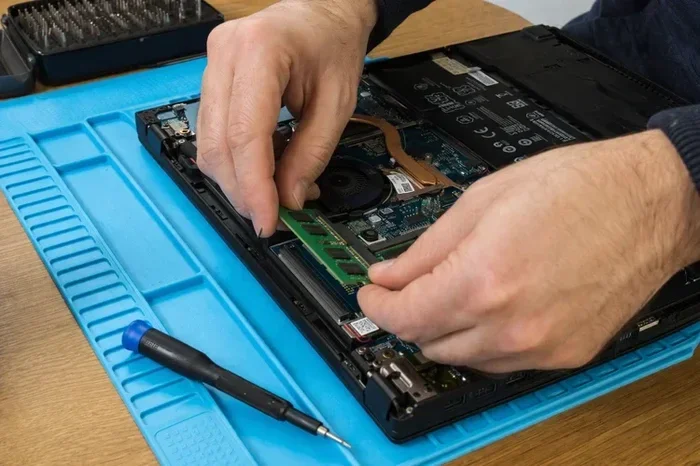
Not all laptops allow RAM upgrades. Many modern ultrabooks and thin-and-light laptops have RAM soldered directly to the motherboard to save space and reduce thickness. This means the RAM cannot be removed or replaced.

Visual guide about What Does Ram Do in Laptop
Image source: images.pexels.com
Before attempting an upgrade, check your laptop’s specifications or user manual. Gaming laptops, business laptops, and budget models are more likely to have user-upgradeable RAM with accessible SO-DIMM slots.
If you’re unsure whether your laptop supports upgrades, our article on can I add more RAM to my laptop walks you through the process of finding out.
How to Upgrade RAM Step by Step
If your laptop does support RAM upgrades, the process is straightforward:
- Step 1: Purchase compatible RAM. Check your laptop’s maximum supported capacity and RAM type (DDR4 or DDR5).
- Step 2: Power off your laptop completely and unplug it from the charger.
- Step 3: Remove the bottom panel. This usually requires a small Phillips-head screwdriver.
- Step 4: Ground yourself by touching a metal surface to prevent static discharge.
- Step 5: Locate the RAM slots. Remove existing modules by pushing the retention clips outward.
- Step 6: Insert the new RAM module at a 45-degree angle, then press down until the clips snap into place.
- Step 7: Replace the bottom panel, power on your laptop, and verify the new RAM is recognized.
For a more detailed walkthrough, check out our comprehensive guide on how to upgrade RAM in a laptop.
Tips for Buying RAM
When shopping for laptop RAM, keep these tips in mind:
- Match the type: DDR4 and DDR5 are not interchangeable. Make sure you buy the correct type for your laptop.
- Check maximum capacity: Every laptop has a maximum RAM limit. Exceeding it won’t damage anything, but the extra RAM won’t be used.
- Buy in pairs when possible: Running two identical RAM sticks enables dual-channel mode, which can improve performance by up to 15%.
- Stick with reputable brands: Corsair, Kingston, Crucial, G.Skill, and Samsung are all reliable choices.
- Consider your laptop’s generation: Older laptops may have limited compatibility with newer, faster RAM modules.
Common Myths About RAM
Myth 1: More RAM Always Means Faster Performance
This is only partially true. More RAM helps when you don’t have enough, but adding RAM beyond what you actually use provides zero performance benefit. If your laptop only uses 6GB of RAM during normal use, upgrading from 8GB to 32GB won’t make it faster. The extra RAM simply sits idle.

Visual guide about What Does Ram Do in Laptop
Image source: clipart-library.com
The key is finding the right amount for your specific workload. That’s why understanding what RAM does in a laptop and how much you personally need is so important.
Myth 2: Closing Programs Frees Up RAM Automatically
While closing programs does free up some RAM, modern operating systems are designed to use available RAM efficiently. Windows and macOS will cache frequently used data in unused RAM to speed things up. Seeing high RAM usage in Task Manager isn’t necessarily a problem — it means your system is using its resources effectively.
The real issue is when RAM usage is consistently near 100% and your laptop starts using virtual memory. That’s when you’ll notice actual performance problems.
Myth 3: RAM Cleaning Apps Improve Performance
Those “RAM booster” or “memory cleaner” apps you see in app stores? They’re largely unnecessary and sometimes counterproductive. Modern operating systems manage RAM far better than any third-party app can. These tools often force-clear cached data, which can actually make your laptop slower because it has to reload that data from storage.
Signs You Need More RAM
How do you know if your laptop needs a RAM upgrade? Watch for these telltale signs:

Visual guide about What Does Ram Do in Laptop
Image source: thumb.ac-illust.com
- Constant slowdowns: Your laptop feels sluggish even during basic tasks like opening files or switching between programs.
- High memory usage: Task Manager or Activity Monitor consistently shows RAM usage above 85-90%.
- Frequent freezing: Applications freeze or become unresponsive, especially when multitasking.
- Browser tab reloading: Your browser constantly reloads tabs because it ran out of memory.
- Difficulty running new software: Newer applications struggle to run or crash frequently.
- Excessive hard drive activity: You hear your hard drive constantly working (the “thrashing” sound), which indicates heavy virtual memory usage.
If you’re experiencing several of these symptoms, a RAM upgrade could be exactly what your laptop needs. It’s one of the most cost-effective improvements you can make.
Conclusion: RAM Is the Unsung Hero of Laptop Performance
Understanding what RAM does in a laptop is one of the most valuable pieces of tech knowledge you can have. RAM is the bridge between your storage and your processor, holding all the active data your laptop needs to function smoothly. Without enough of it, even the most expensive laptop will struggle.
The good news is that RAM is one of the easiest and most affordable components to upgrade. Whether you’re a casual user who needs 8GB for browsing and streaming, a gamer who wants 16GB for smooth gameplay, or a professional who needs 32GB for demanding creative work, there’s a RAM configuration that’s perfect for you.
Take a moment to check your current RAM usage. If your laptop is struggling, consider an upgrade — it might be the single best investment you can make in your computing experience. And if you’re shopping for a new laptop, don’t skimp on RAM. Your future self will thank you.
Frequently Asked Questions
What does RAM do in a laptop in simple terms?
RAM acts as your laptop’s short-term memory, temporarily storing data from programs and files you’re currently using. It allows your processor to access that information much faster than pulling it from your hard drive or SSD, which makes everything from opening apps to browsing the web feel snappier and more responsive.
How much RAM do I need for a basic laptop?
For basic tasks like web browsing, email, and document editing, 8GB of RAM is the recommended minimum in 2024. While 4GB can technically run modern operating systems, you’ll likely experience slowdowns and frustration. If you plan to keep your laptop for several years, 16GB is a smarter investment for future-proofing.
Can I add more RAM to my existing laptop?
It depends on your laptop model. Many gaming laptops, business laptops, and budget models have user-accessible RAM slots that allow upgrades. However, most modern ultrabooks and MacBooks have RAM soldered to the motherboard, making upgrades impossible. Check your laptop’s specifications or user manual to confirm whether your model supports RAM upgrades.
Does more RAM make my laptop faster?
More RAM only makes your laptop faster if you’re currently running out of memory. If your laptop has enough RAM for your typical workload, adding more won’t improve speed. The real benefit of additional RAM comes from being able to run more applications simultaneously without slowdowns, not from making individual programs run faster.
What’s the difference between DDR4 and DDR5 RAM?
DDR5 is the newer generation of RAM that offers higher data transfer speeds, better power efficiency, and greater maximum capacities compared to DDR4. However, DDR4 remains perfectly capable for most users and is more affordable. The real-world performance difference between DDR4 and DDR5 is minimal for everyday tasks like browsing, office work, and media consumption.
How do I check how much RAM my laptop has?
On Windows, press Ctrl + Shift + Esc to open Task Manager, then click the Performance tab and select Memory. On Mac, click the Apple menu, select About This Mac, and view the Memory section. Both methods will show you your total installed RAM, speed, and how much is currently being used.